How to Collect Process Reward Data for Training Better Coding Agents
Collect per-step reward labels for PRM training in Potato, with first-error and per-step modes and a script to shape the export for training.
What are process reward models?
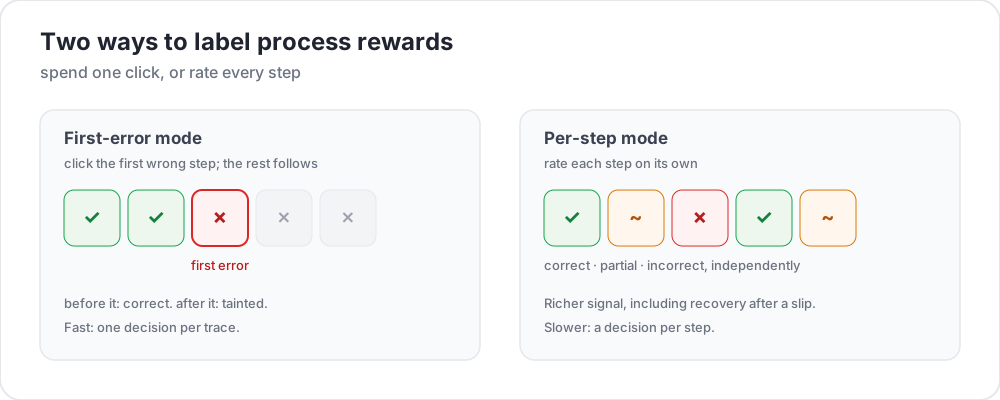 Two ways to label process rewards
Outcome reward models look only at the end of a coding agent's trajectory: did the code compile, did the tests pass, was the issue resolved? Process reward models score each intermediate step instead. With a signal at every step, training can pinpoint where an agent went wrong.
Recent work has pushed on this. AgentPRM redefines process rewards for agent tasks, scoring each action by the progress it makes toward the goal rather than by correctness, and reports over 8x better compute efficiency than the baselines it compares against. ToolRM found that reward models trained on natural-language outputs judge tool calls badly, and built tool-specific reward models plus FC-RewardBench to evaluate them. For contrast, DeepSWE trains a coding agent on a sparse outcome reward alone, whether the tests pass, and reaches 42.2% Pass@1 and 59% with test-time scaling on SWE-bench Verified. That is the outcome-only setup process supervision is trying to improve on.
What all of these need is step-level human annotation, and that is usually the bottleneck. For the schema reference, see the process reward documentation.
Two annotation modes
First-error mode
The annotator reads the trajectory top to bottom and clicks the first step where the agent goes wrong. Every earlier step is recorded correct, and that step and everything after it incorrect. It is fast because there is one decision per trace, and it suits the common case where an agent that goes off track does not recover.
annotation_schemes:
  - annotation_type: process_reward
    name: step_rewards
    description: "Click the first step where the agent makes a mistake. Steps after it are flagged automatically."
    mode: first_error
    steps_key: structured_turns
    step_text_key: content
Per-step mode
Every step gets its own label, which captures what first-error cannot: partial recovery, a harmless detour, or a step that is fine alone and wrong in context. allow_neutral adds the PRM800K-style third option.
annotation_schemes:
  - annotation_type: process_reward
    name: step_rewards
    description: "Rate each step correct, neutral, or incorrect"
    mode: per_step
    steps_key: structured_turns
    step_text_key: content
    allow_neutral: true
    inline_with_trace: true
inline_with_trace attaches the controls to each step in the display, which matters on a long trace where a separate panel loses the annotator's place.
Setting up the project
Step 1: prepare the traces
Each line is one trajectory. steps_key names the list of steps and step_text_key names the field within each step to show:
{
  "id": "trace_001",
  "issue_description": "Fix the TypeError in parse_config() when the config file is empty",
  "structured_turns": [
    {"step_idx": 0, "type": "thinking", "content": "I need to find where the TypeError occurs. Let me read the file."},
    {"step_idx": 1, "type": "file_read", "content": "def parse_config(path):\n    with open(path) as f:\n        data = json.load(f)\n    return data['settings']"},
    {"step_idx": 2, "type": "thinking", "content": "When the file is empty json.load returns None, so None['settings'] raises. Add a check."},
    {"step_idx": 3, "type": "file_edit", "content": "+    if data is None:\n+        return {}"},
    {"step_idx": 4, "type": "bash_command", "content": "python -m pytest tests/test_config.py -v  ->  2 passed"}
  ]
}
Converting from another agent format is a CLI step:
python -m potato.trace_converter \
  --input claude_code_sessions.json \
  --input-format claude_code \
  --output data/traces.jsonl
--list-formats prints what it supports, which includes claude_code, aider, swe_agent_trajectory, swebench, react, langchain, and nine more. Use --auto-detect when you are not sure which one you have.
Step 2: write the configuration
annotation_task_name: "PRM Data Collection"
task_dir: "."

data_files:
  - "data/traces.jsonl"

item_properties:
  id_key: id
  text_key: issue_description

instance_display:
  fields:
    - key: issue_description
      type: text
      label: "Issue"

    - key: structured_turns
      type: coding_trace
      label: "Agent trajectory"
      display_options:
        diff_view: unified
        show_file_tree: true
        show_reasoning: true
        terminal_theme: dark
        collapse_long_outputs: true
        max_output_lines: 50

annotation_schemes:
  - annotation_type: process_reward
    name: step_rewards
    description: "Click the first step where the agent makes an error"
    mode: first_error
    steps_key: structured_turns
    step_text_key: content

  - annotation_type: radio
    name: outcome
    description: "Did the agent resolve the issue?"
    labels:
      - name: resolved
        text: "Fully resolved"
      - name: partial
        text: "Partially resolved"
      - name: not_resolved
        text: "Not resolved"

  - annotation_type: text
    name: error_description
    description: "If the trajectory went wrong, describe the error briefly"
    rows: 3
    placeholder: "e.g. edited the wrong file"
    label_requirement:
      required: false

num_annotators_per_item: 2

attention_checks:
  enabled: true
  items_file: "data/attention_checks.json"
  frequency: 20
  min_response_time: 20.0
  failure_handling:
    warn_threshold: 2
    block_threshold: 5

user_config:
  allow_all_users: false
  users:
    - reviewer1@example.com
    - reviewer2@example.com
    - reviewer3@example.com

output_annotation_dir: "annotation_output/"
export_annotation_format: jsonl
A label object is keyed by name. The text field is what the annotator reads, so the stored value stays a stable identifier while the wording can change.
min_response_time: 20.0 is the useful control here. Nobody reads a multi-step trajectory with diffs in twenty seconds, so it catches the racing that a per-trace time limit would not.
Step 3: launch the server
potato start config.yaml -p 8000Exporting for training
The coding_eval exporter writes the training formats directly, so the shaping is done for you:
python -m potato.export -c config.yaml -f coding_eval -o ./export/It writes prm_training_data.jsonl with the step-level labels, preference_pairs.jsonl with DPO-style chosen and rejected traces built from the annotations, swebench_results.jsonl, and code_reviews.jsonl. All four are written by default. To narrow it, pass the exporter's types option: --option types=prm,preference. It reports when a requested type found no data in the study rather than writing an empty file.
The annotation is stored under the scheme name as a steps list plus the mode. reward is 1 for correct, -1 for incorrect, 0 for neutral, and null for a step nobody judged:
{
  "step_rewards": {
    "mode": "first_error",
    "steps": [
      {"reward": 1, "source": "human", "verified": true},
      {"reward": 1, "source": "human", "verified": true},
      {"reward": -1, "source": "human", "verified": true},
      {"reward": -1, "source": "human", "verified": true}
    ]
  }
}
Reach for a script only when you need a shape the exporter does not write. Handling unjudged steps yourself is the usual reason, since a step nobody judged is null rather than 0:
import json
from pathlib import Path

SCHEME = "step_rewards"

examples = []
for f in Path("export/").rglob("*.jsonl"):
    with open(f) as fh:
        for line in fh:
            rec = json.loads(line)
            payload = (rec.get("labels", rec) or {}).get(SCHEME)
            if not payload:
                continue

            steps = payload.get("steps", [])
            # Drop traces with unjudged steps rather than guessing at them.
            if any(s.get("reward") is None for s in steps):
                continue

            item = items_by_id[rec["instance_id"]]      # your own data file
            examples.append({
                "trace_id": rec["instance_id"],
                "prompt": item["issue_description"],
                "steps": [
                    {"content": src["content"], "label": s["reward"]}
                    for src, s in zip(item["structured_turns"], steps)
                ],
            })

with open("prm_labels.jsonl", "w") as out:
    for ex in examples:
        out.write(json.dumps(ex) + "\n")

print(f"Wrote {len(examples)} traces")
Preference pairs come from the same annotations. Where two traces attempted the same issue, the exporter pairs them and treats the one whose first error comes later, or which has none, as the chosen trace.
Analysis
Where the first error lands
import json
from pathlib import Path

SCHEME = "step_rewards"

traces = []
for f in Path("export/").rglob("*.jsonl"):
    with open(f) as fh:
        for line in fh:
            payload = (json.loads(line).get("labels", {}) or {}).get(SCHEME)
            if payload:
                traces.append(payload)

positions = []
all_correct = 0
for t in traces:
    steps = t.get("steps", [])
    first = next((i for i, s in enumerate(steps) if s.get("reward") == -1), None)
    if first is None:
        all_correct += 1
    elif len(steps) > 1:
        positions.append(first / (len(steps) - 1))

print(f"Traces annotated: {len(traces)}")
print(f"No errors: {all_correct} ({all_correct / len(traces):.1%})")
if positions:
    print(f"Average first-error position: {sum(positions) / len(positions):.2f} (0=start, 1=end)")
Agreement on the first error
Two annotators rarely pick the same step, and exact agreement understates how much they agree. Binning the position first is the more informative comparison:
def bin_position(steps):
    first = next((i for i, s in enumerate(steps) if s.get("reward") == -1), None)
    if first is None:
        return "all_correct"
    return "early_error" if first < len(steps) / 2 else "late_error"
Compare those bins across the annotators who share items, using the overlap num_annotators_per_item gives you.
Tips
Use first-error mode for speed. For training a PRM to guide search, it gives enough signal at a fraction of the annotation cost, and most agents fail in a cascade anyway.
Use per-step mode when you need the detail. Partial recovery and harmless detours only exist as labels in per-step mode.
Start with experienced annotators. This means reading code, diffs, and terminal output. Begin with a small group, measure agreement, calibrate against shared examples, then scale.
Set a response-time floor. Trajectories get long, and a floor keeps annotators from racing past the diffs.
Run a calibration pass. Have everyone label the same ten to twenty traces and talk through the disagreements before production annotation starts.