Watch, Pause, and Rewind: Live Coding Agent Observation in Potato
Tutorial for setting up live coding agent observation with Ollama, Anthropic API, or Claude Agent SDK. Includes pause, rollback, branching, and trajectory export.
What makes live observation different
Most coding agent evaluation happens after the fact: the agent runs, produces a trace, and reviewers pick over the recording later. Live observation works the other way around. The annotator watches the agent work in real time and sees each file edit, terminal command, and reasoning step as it lands.
That changes what you can do. If the agent starts heading down a wrong path, the annotator can step in before it wastes time there. They can pause to read a diff carefully before the agent moves on, or send a plain-language instruction to redirect it. The part I find most useful is rollback: at any earlier checkpoint, you can rewind and let the agent try a different approach. Those branches are the kind of data preference learning needs.
It does not replace static trace annotation; it produces a different kind of data. Static annotation wins when you want a lot of it at a predictable cost. Live observation wins when you are after targeted data, trying to understand how an agent fails, or building branching preference pairs.
For the full feature reference, see the source documentation.
The live coding agent interface streams agent actions in real-time, showing code diffs and terminal output as the agent works:
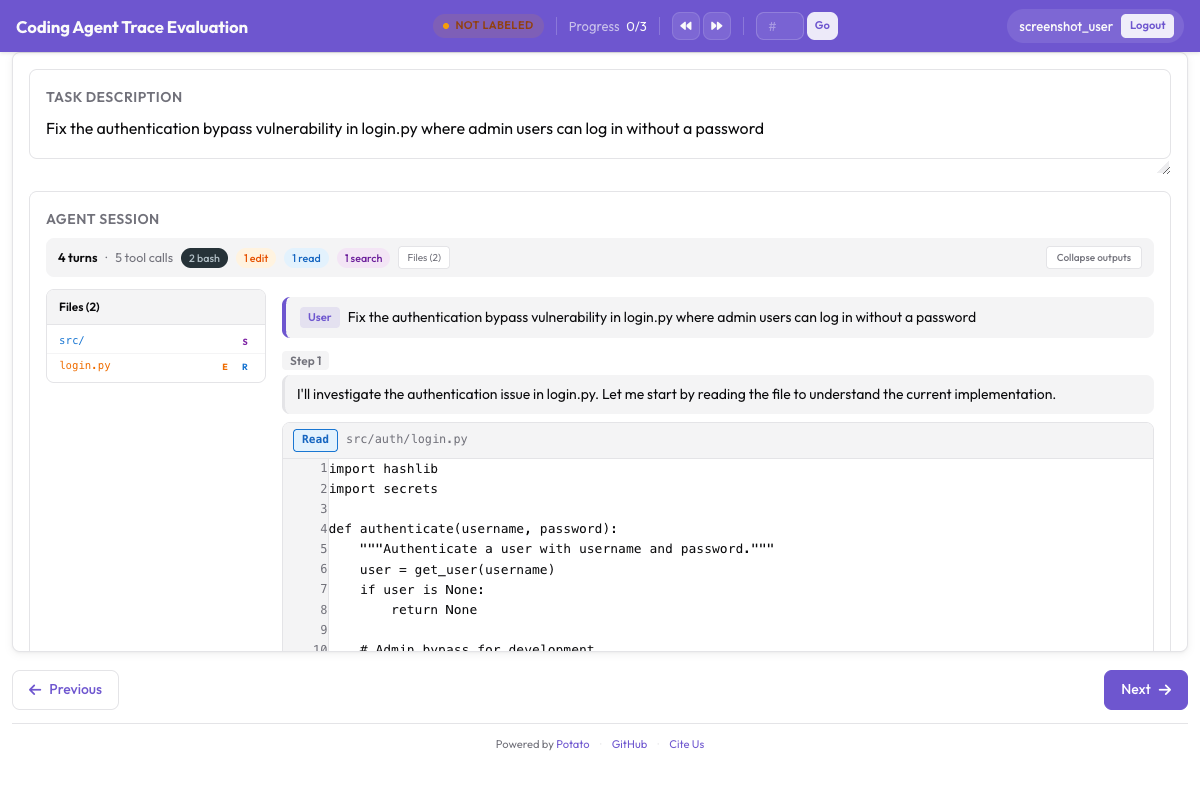 Live coding agent observation with real-time diff rendering and terminal output
Three backends
Potato gives you three backends for live observation. Each one runs a coding agent in a sandbox and streams its actions to the interface as they happen.
Ollama (fully local)
The Ollama backend runs entirely on your machine, with no API keys and no network calls. Reach for it when the codebase is sensitive or when you just want to experiment without running up an API bill.
First, install Ollama and pull a model with tool-use capabilities:
# Install Ollama
curl -fsSL https://ollama.ai/install.sh | sh

# Pull a coding-capable model
ollama pull qwen2.5-coder:32b

# Verify the model is available
ollama list
Configure Potato to use the Ollama backend:
# config.yaml
annotation_task_name: "Live Agent Observation - Ollama"
port: 8000

live_coding_agent:
  backend_type: ollama_tool_use
  ai_config:
    model: "qwen2.5-coder:32b"
    base_url: "http://localhost:11434"
    temperature: 0.2
    max_tokens: 4096
  working_dir: ./workspace       # Agent's working directory
  max_turns: 50
  sandbox_mode: container        # container (default) | bubblewrap | trusted
  sandbox_image: "python:3.11-slim"
Anthropic API (Claude with tool use)
The Anthropic API backend connects to Claude models with tool use. You get stronger reasoning and code generation than most local models give you, and in exchange you pay for the API calls.
# Set your API key
export ANTHROPIC_API_KEY="sk-ant-..."# config.yaml
annotation_task_name: "Live Agent Observation - Claude"
port: 8000
live_coding_agent:
backend_type: anthropic_tool_use
ai_config:
model: "claude-sonnet-4-20250514"
max_tokens: 8192
temperature: 0.1
system_prompt: >
You are a coding agent. You will be given a task description and
access to a codebase. Use the provided tools to read files, make
edits, and run commands to complete the task. Think step by step
and verify your changes by running tests.
working_dir: ./workspace
max_turns: 50
sandbox_mode: container
sandbox_image: "python:3.11-slim"Claude Agent SDK (full Claude Code capabilities)
The Claude Agent SDK backend is the most capable of the three, with the full set of Claude Code tools and autonomous behavior. It requires the claude-agent-sdk package.
# Install the Claude Agent SDK
pip install claude-agent-sdk# config.yaml
annotation_task_name: "Live Agent Observation - Claude Agent SDK"
port: 8000
live_coding_agent:
backend_type: claude_sdk
ai_config:
model: "claude-sonnet-4-20250514"
working_dir: ./workspace
max_turns: 50 # Maximum number of agent turns
sandbox_mode: container
sandbox_image: "node:20-slim"The annotation workflow
Once the server is up, a live observation session runs through a few stages.
Starting a session
The annotator opens the Potato interface and sees a task description input field. They paste or type the task the agent should complete, such as "Fix the failing test in tests/test_parser.py caused by the new config format" or "Add pagination support to the /api/users endpoint."
# Start the server
potato start config.yaml -p 8000
The annotator clicks "Start Agent" and the coding agent begins working. Each action appears in real time in the CodingTraceDisplay panel.
Watching the agent work
As the agent runs, each step shows up in the trace viewer:
- Thinking steps appear as collapsible gray blocks showing the agent's reasoning.
- File reads appear as syntax-highlighted code blocks with line numbers and the file path.
- File edits appear as unified diffs with red/green highlighting.
- Terminal commands appear as dark terminal blocks with the command, output, and exit code.
- File tree updates in the sidebar as files are created, modified, or read.
A progress indicator at the top shows the current step number and elapsed time. The agent's status is shown as "Thinking...", "Editing file...", "Running command...", etc.
Pause and instruction controls
While the agent is running, the annotator can step in through the control bar:
Pause: Freezes the agent after its current step completes. The agent does not proceed to the next step until resumed. Use this to carefully examine a diff or terminal output before the agent moves on.
Send Instruction: While paused (or even while running), type a natural language message that gets injected into the agent's context. For example: "Don't modify the database schema, use a migration instead" or "Check the error log at /var/log/app.log before making changes."
Resume: Continues agent execution after a pause.
Stop: Terminates the agent session entirely. The trajectory up to this point is saved.
Annotators can evaluate the agent's work using PRM annotation alongside the trace display:
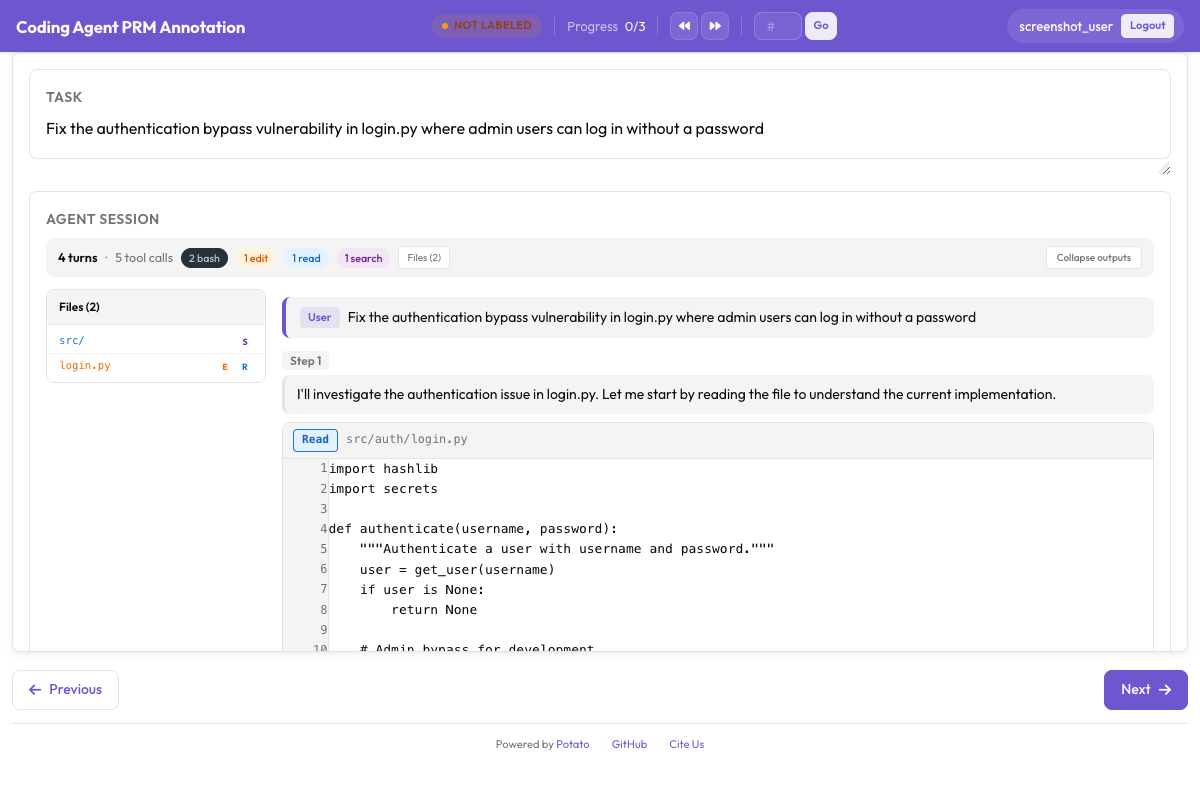 PRM annotation interface for step-level correctness labeling alongside the coding trace
The control bar comes with the live coding agent viewer. Pause, resume, instruction injection, stop, rollback and branch switching are session actions the interface drives through the live agent endpoints, so there is nothing to turn on in the config.
Git-based checkpoint system
Rollback, branching, and trajectory export all rest on the checkpoint system, which commits to git after every file change the agent makes.
How it works
When a session starts, Potato initializes a git repository in the sandbox workspace, or uses the one that is already there. After every file edit, it commits automatically with a structured message:
[potato-checkpoint] Step 7: Edit src/parser.py
- Modified lines 45-52
- Agent reasoning: Fix the regex pattern to handle escaped quotes
The result is a linear commit history that lines up one-to-one with the steps in the trajectory. Each checkpoint captures the full state of the workspace at that moment.
# You can inspect checkpoints directly with git
cd workspace/
git log --oneline

# Output:
# f8a2c1d [potato-checkpoint] Step 12: Edit tests/test_parser.py
# 3b7e9f0 [potato-checkpoint] Step 10: Edit src/parser.py
# a1c4d8e [potato-checkpoint] Step 8: Edit src/parser.py
# 9e2f6b3 [potato-checkpoint] Step 5: Edit src/config.py
# 7d0a3c1 [potato-checkpoint] Step 0: Initial state
Rollback
Click "Rollback" and pick any earlier checkpoint from the dropdown. Potato resets the workspace to that state with git checkout and rewinds the trajectory display to match, then the agent resumes from there with its context trimmed back to that step.
Use it when you watch the agent take a wrong turn. Rather than let it run and burn time, you rewind to the last good state and let it try again, maybe with an instruction nudging it somewhere better.
Branching trajectories
Branching is rollback that keeps both paths. When you roll back and the agent goes a different way, Potato creates a named git branch and tracks both trajectories:
Step 0 → Step 1 → Step 2 → Step 3 → Step 4 (Branch A: original path)
                          ↘
                           Step 3' → Step 4' → Step 5' (Branch B: after rollback)
You can branch from any checkpoint, building up a whole tree of trajectories. That is useful for preference learning, because every branch pair is already a labeled comparison: you rolled back because you judged Branch A to be wrong, which makes Branch B the preferred path from the branch point on.
Branching needs no configuration either. Potato creates the branch when you roll back and the agent then takes a different path, and tracks both trajectories for the rest of the session.
Export formats
A live session produces detailed trajectory data, and you can export it in a few shapes depending on what you are training for.
Linear trajectory export
Export each branch as an independent trajectory:
python -m potato.export \
  -c config.yaml \
  -f trajectory_correction \
-o ./training_data/{
"session_id": "session_001",
"branch": "branch-A",
"task": "Fix the failing test in tests/test_parser.py",
"steps": [
{"step_idx": 0, "type": "file_read", "path": "tests/test_parser.py", "...": "..."},
{"step_idx": 1, "type": "thinking", "content": "The test expects..."},
{"step_idx": 2, "type": "file_edit", "path": "src/parser.py", "diff": "..."},
{"step_idx": 3, "type": "bash_command", "command": "pytest tests/test_parser.py"}
],
"human_interventions": [
{"after_step": 2, "type": "instruction", "content": "Use a migration instead"}
],
"rollback_from_step": null,
"outcome": "resolved"
}Preference pairs from branches
Export branch pairs as preference data for DPO or RLHF:
The same exporter writes these: trajectory_dpo.jsonl in the output directory holds the branch comparisons as preference pairs, alongside trajectory_sft.jsonl and trajectory_corrections.json.
python -m potato.export \
  -c config.yaml \
  -f trajectory_correction \
-o ./training_data/{
"session_id": "session_001",
"task": "Fix the failing test in tests/test_parser.py",
"branch_point_step": 2,
"branch_point_reason": "Agent started modifying the wrong file",
"rejected_branch": "branch-A",
"rejected_steps": [
{"step_idx": 3, "type": "file_edit", "path": "src/wrong_file.py", "...": "..."},
{"step_idx": 4, "type": "bash_command", "command": "pytest", "exit_code": 1}
],
"chosen_branch": "branch-B",
"chosen_steps": [
{"step_idx": 3, "type": "file_edit", "path": "src/parser.py", "...": "..."},
{"step_idx": 4, "type": "bash_command", "command": "pytest", "exit_code": 0}
]
}PRM labels from live observation
You can pair live observation with PRM labeling, since a rollback point is usually the first-error step:
python -m potato.export \
  -c config.yaml \
  -f coding_eval \
  -o ./training_data/ \
  --option types=prm
Here the step you rolled back from is labeled as the first error, and the new branch's steps are labeled correct, since you accepted them.
Code review datasets
Export annotator instructions and rollback reasons as code review training data:
python -m potato.export \
  -c config.yaml \
  -f coding_eval \
  -o ./training_data/ \
  --option types=code_review
Full quick start
The whole sequence, from nothing to a running Ollama session:
# 1. Install Potato with live agent support
pip install potato-annotation[live-agents]

# 2. Install and start Ollama
curl -fsSL https://ollama.ai/install.sh | sh
ollama pull qwen2.5-coder:32b

# 3. Set up a workspace with a repo to work on
mkdir -p workspace/
git clone https://github.com/example/test-project workspace/repo

# 4. Create the config file
cat > config.yaml << 'YAML'
annotation_task_name: "Live Agent Observation"
port: 8000

live_coding_agent:
  backend_type: ollama_tool_use
  ai_config:
    model: "qwen2.5-coder:32b"
    base_url: "http://localhost:11434"
    temperature: 0.2
  working_dir: ./workspace/repo
  max_turns: 50
  sandbox_mode: trusted

annotation_schemes:
  - annotation_type: radio
    name: outcome
    description: "Final outcome"
    labels:
      - name: "resolved"
        text: "Task Fully Resolved"
      - name: "partial"
        text: "Partially Resolved"
      - name: "failed"
        text: "Failed"

  - annotation_type: text
    name: notes
    description: "Session Notes"
    placeholder: "Key observations about agent behavior..."
    label_requirement:
      required: false

output_annotation_dir: "./output/"
export_annotation_format: jsonl

user_config:
  allow_all_users: false
  users:
    - "observer1"
YAML

# 5. Start Potato
potato start config.yaml -p 8000

# 6. Open http://localhost:8000 in your browser
After logging in, paste a task like "Add input validation to the /api/users POST endpoint" and click "Start Agent." Watch it work, pause when something looks off, send instructions to steer it, and roll back to try other approaches. When you are done, rate the outcome and jot down notes.
Best practices
Start with clear, scoped tasks. The sweet spot is work that takes the agent 5 to 15 minutes. Anything shorter does not produce enough trajectory to be worth annotating; anything much longer wears the annotator out.
Leave the sandbox on in production. sandbox_mode: container is the default and keeps the agent off your host; bubblewrap is the lighter Linux alternative. trusted runs the agent's tool calls directly on the machine, which is only reasonable while you are developing against a model you trust.
Record why you rolled back. Nothing in the config enforces this, so make it a rule for your annotators: a short note at each branch point saying what went wrong. Those notes are useful training signal in their own right, and they make the preference data better.
Compare multiple backends. Run the same tasks through Ollama, the Anthropic API, and the Claude Agent SDK to get cross-agent preference data. Since only the backend section of the config changes, it is easy to set up.
Export early and often. Run an export after each session instead of saving it all for the end. You lose less if something crashes, and you can keep an eye on data quality as you go.