Confronto tra immagini e task di preferenza
Costruisci in Potato un task di confronto tra immagini con due immagini affiancate, uno schema di preferenza, ordine di presentazione casuale e un ranking per insiemi più grandi.
Questo tutorial costruisce in Potato un task di confronto tra immagini con due immagini generate affiancate, una scala di preferenza a cinque punti, domande di approfondimento per singolo criterio e le varianti con ranking e Best-Worst Scaling per insiemi di più di due immagini. La stessa costruzione serve per i dati di preferenza per RLHF, per i confronti di compressione e miglioramento dell'immagine e per i test A/B di design.
Un confronto chiede all'annotatore di scegliere tra due immagini invece di collocarne una su una scala, e così nessun annotatore deve condividere con gli altri una taratura di cosa significhi un 4 su 5. Il prezzo è che un insieme di n immagini richiede molti più giudizi per arrivare a un ordinamento completo, ed è il problema di cui si occupano le sezioni finali su ranking e Best-Worst Scaling.
Il file di dati
Ogni riga contiene un identificatore, i percorsi delle due immagini e il contesto che serve all'annotatore per giudicarle. Potato legge i nomi dei campi da item_properties, quindi i nomi li scegli tu:
{"id": "pair_001", "prompt": "A sunset over mountains", "image_a": "/media/model_a_001.png", "image_b": "/media/model_b_001.png"}
{"id": "pair_002", "prompt": "A cat on a windowsill", "image_a": "/media/model_a_002.png", "image_b": "/media/model_b_002.png"}
Mostrare due immagini affiancate
In Potato il contenuto e le domande si configurano separatamente. Il blocco instance_display dice che cosa guarda l'annotatore, e annotation_schemes dice che cosa gli viene chiesto. Due campi image con un layout orizzontale mettono le immagini una accanto all'altra, e zoomable permette all'annotatore di esaminare artefatti che alle dimensioni di visualizzazione non si vedono:
instance_display:
  layout:
    direction: horizontal
    gap: 24px
  fields:
    - key: image_a
      type: image
      label: "Image A"
      display_options:
        max_height: 512
        zoomable: true
        alt_text: "First generated image"
    - key: image_b
      type: image
      label: "Image B"
      display_options:
        max_height: 512
        zoomable: true
        alt_text: "Second generated image"
Ecco che cosa vede l'annotatore una volta configurati sia la visualizzazione sia lo schema:
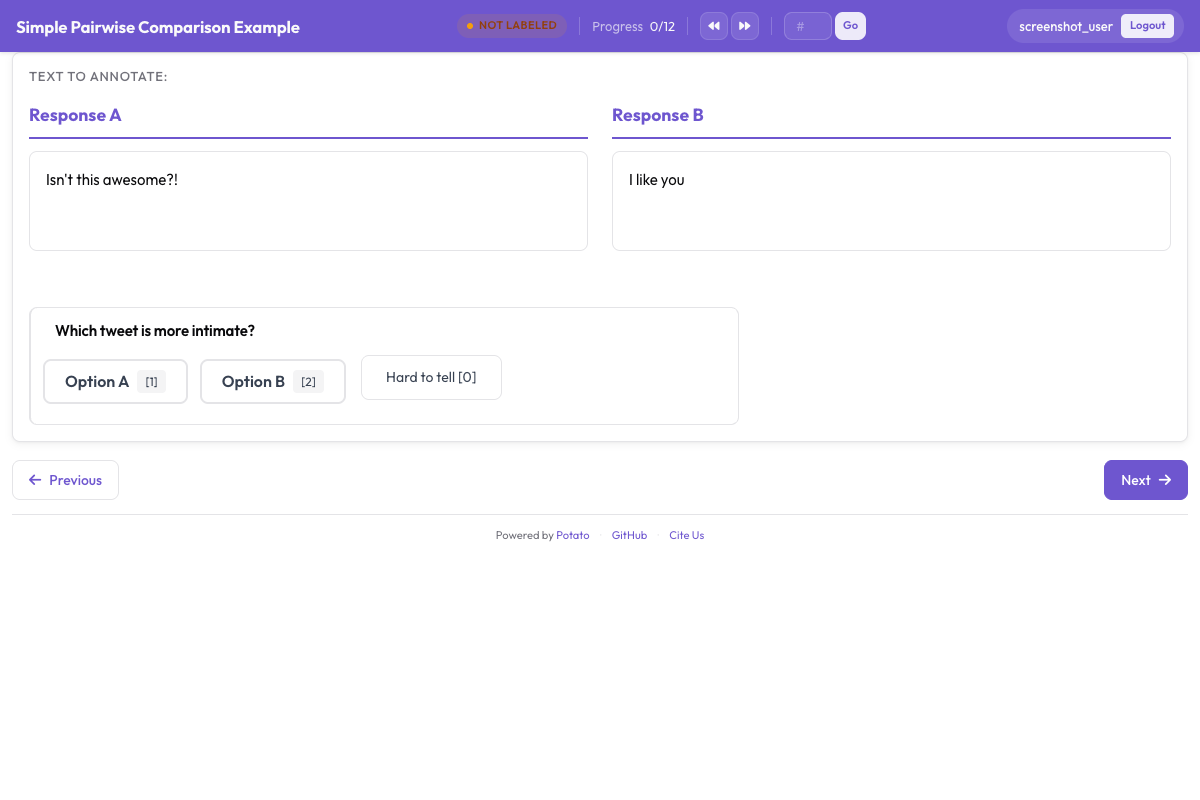 Un task di confronto che mostra i due candidati con la domanda di preferenza sotto
La domanda di preferenza
Una scala a cinque punti distingue una preferenza forte da una debole, e questo conta quando addestri un modello sul risultato, perché una coppia su cui gli annotatori si dividono a metà dà un segnale di addestramento diverso da una che tutti hanno giudicato con chiarezza. sequential_key_binding assegna alle cinque opzioni i tasti da 1 a 5, ed è la differenza tra un confronto che richiede quattro secondi e uno che ne richiede dodici.
annotation_schemes:
  - annotation_type: radio
    name: preference
    description: "Which image better matches the prompt?"
    labels:
      - name: "A is clearly better"
      - name: "A is slightly better"
      - name: "About equal"
      - name: "B is slightly better"
      - name: "B is clearly better"
    sequential_key_binding: true
    label_requirement:
      required: true
Aggiungi questo blocco alla configurazione precedente. L'opzione centrale deve dire "About equal" e non "No preference", perché le due formule descrivono giudizi diversi e gli annotatori usano un'opzione "no preference" come pulsante per saltare l'elemento.
Bias di posizione
Gli annotatori scelgono l'opzione di sinistra più spesso di quanto dovrebbero, quindi il lato su cui finisce un'immagine deve variare. Rendilo casuale quando costruisci il file di dati, scambiando image_a e image_b in una metà casuale delle righe e registrando l'orientamento di ciascuna riga, poi riporta i giudizi registrati all'orientamento originale prima di analizzarli. I campi di visualizzazione di Potato vengono mostrati nell'ordine in cui li elenchi, quindi la configurazione non può farlo al posto tuo.
I confronti tra testi funzionano diversamente. Lo schema pairwise prende i suoi due candidati da un unico campo dei dati dell'elemento, quindi randomize_order può permutarli, e Potato registra l'ordine che ogni annotatore ha effettivamente visto. Il seed deriva insieme dall'annotatore, dall'elemento e dallo schema, ed è questo che fa cadere la preferenza di una persona per la prima posizione su candidati diversi da un elemento all'altro, invece di legarla a un solo lato per tutto lo studio. Consulta la documentazione sul confronto a coppie quando gli oggetti da confrontare sono testi.
Domande su criteri specifici
Una preferenza complessiva ti dice quale immagine ha vinto e niente sul perché. Aggiungere sotto due o tre domande mirate rende leggibili i disaccordi, perché annotatori che si dividono sul giudizio complessivo spesso concordano sull'aderenza al prompt e divergono sull'estetica.
  - annotation_type: radio
    name: prompt_adherence
    description: "Which image better matches the prompt?"
    labels:
      - name: A
      - name: Tie
      - name: B

  - annotation_type: multiselect
    name: issues_a
    description: "Problems in Image A (select all that apply)"
    labels:
      - name: "Distorted faces or hands"
      - name: "Text rendering errors"
      - name: "Unnatural lighting"
      - name: "Missing elements from the prompt"
      - name: "Blurry or low quality"
      - name: "None"
Aggiungi questi schemi al blocco precedente. Tieni corta la lista dei criteri. Ogni domanda in più si moltiplica per l'intero studio, e un modulo con cinque criteri su 2000 coppie produce 10000 giudizi, ognuno dei quali richiede una propria definizione nelle istruzioni.
Confronto prima/dopo
I task di miglioramento, restauro ed editing usano la stessa costruzione a due immagini, con i lati nominati invece che casuali, perché sapere quale lato è l'originale fa parte della domanda:
instance_display:
  layout:
    direction: horizontal
    gap: 24px
  fields:
    - key: original
      type: image
      label: "Original"
      display_options:
        max_height: 512
        zoomable: true
    - key: enhanced
      type: image
      label: "Enhanced"
      display_options:
        max_height: 512
        zoomable: true

annotation_schemes:
  - annotation_type: radio
    name: enhancement_quality
    description: "How did the edit change the image?"
    labels:
      - name: "Clearly improved"
      - name: "Slightly improved"
      - name: "No noticeable change"
      - name: "Made worse"
    label_requirement:
      required: true

  - annotation_type: multiselect
    name: problems_introduced
    description: "Problems the edit introduced (select all that apply)"
    labels:
      - name: "Over-sharpening or halos"
      - name: "Color shift"
      - name: "Loss of detail"
      - name: "New artifacts"
      - name: "None"
Chiedi dei problemi introdotti separatamente dalla qualità complessiva. Un intervento che rende più nitido il soggetto e gli aggiunge aloni attorno appare come un miglioramento su una scala unica, e gli aloni sono proprio ciò che ti serve sapere.
Più di due immagini
Per un numero di candidati da tre a otto per elemento, mostrali in un campo gallery e raccogli un ordinamento completo con lo schema ranking. La galleria prende un elenco di percorsi di immagini da un unico campo, quindi il file di dati contiene un array invece di due chiavi separate:
item_properties:
  id_key: id
  text_key: prompt

instance_display:
  fields:
    - key: prompt
      type: text
      label: "Prompt"
    - key: images
      type: gallery
      display_options:
        layout: grid
        columns: 2
        thumbnail_size: 320
        zoomable: true

annotation_schemes:
  - annotation_type: ranking
    name: preference_rank
    description: "Drag the image numbers to rank them from best at the top to worst at the bottom."
    labels:
      - "Image 1"
      - "Image 2"
      - "Image 3"
      - "Image 4"
    allow_ties: false
    label_requirement:
      required: true
Le labels danno un nome alle posizioni nella galleria, quindi l'elenco deve avere una voce per ogni immagine e ogni elemento deve avere lo stesso numero di candidati. Il ranking è adatto a insiemi piccoli, perché l'annotatore confronta ogni candidato con tutti gli altri contemporaneamente. Oltre gli otto candidati circa, lo sforzo per elemento cresce più in fretta dell'informazione che ottieni in cambio.
Insiemi più grandi
Best-Worst Scaling è l'opzione da usare quando l'insieme è troppo grande per essere ordinato in una sola schermata. Gli annotatori vedono una tupla di elementi, di solito quattro, e scelgono soltanto il migliore e il peggiore, e i punteggi si calcolano su molte tuple sovrapposte:
  - annotation_type: bws
    name: quality
    description: "Select the BEST and the WORST image in this set."
    tuple_size: 4
    best_description: "Best"
    worst_description: "Worst"
Aggiungi questo schema alla configurazione precedente. Il calcolo dei punteggi avviene dopo la raccolta, dalla scheda BWS della dashboard di amministrazione o dalla riga di comando, e scrive bws_scores.tsv nella directory di output:
python -m potato.bws_scoring --config config.yaml --method bradley_terryIl metodo counting non richiede dipendenze aggiuntive ed è il riferimento trasparente. bradley_terry stima un modello sui confronti a coppie impliciti e richiede pip install choix. plackett_luce modella direttamente ogni scelta del migliore e del peggiore e non richiede nient'altro oltre a Potato. La documentazione su Best-Worst Scaling descrive la generazione delle tuple, che deve avvenire prima di tutto questo.
Istruzioni e controlli di attenzione
Nelle istruzioni scrivi che cosa significa "migliore" per questo task, perché altrimenti gli annotatori usano una propria definizione e te ne accorgi solo quando misuri l'accordo. annotation_instructions mette il testo su ogni pagina di annotazione:
annotation_instructions: |
  Judge each pair on how well it matches the prompt first, then on visual
  quality, then on how appealing it looks. Zoom in before deciding: hands,
  text, and fine texture are where generation failures show up. Mark "About
  equal" only when you have looked at both and cannot separate them.
In un task di confronto, i controlli di attenzione sono coppie con un vincitore evidente, inserite nella coda da un file a parte perché restino fuori dal tuo dataset:
attention_checks:
  enabled: true
  items_file: "data/attention_checks.json"
  frequency: 20
  min_response_time: 3.0
  failure_handling:
    warn_threshold: 2
    block_threshold: 5
Aggiungi entrambi i blocchi alla configurazione precedente. min_response_time intercetta l'errore a cui un task di confronto è più esposto, cioè un annotatore che clicca a una velocità che non gli lascia il tempo di guardare la seconda immagine.
La configurazione completa
Questa configurazione gestisce una raccolta di preferenze per RLHF con due output di modello per elemento, una preferenza a cinque punti, una domanda su un criterio e una valutazione della sicurezza del giudizio. Ogni coppia viene vista da tre annotatori, un numero sufficiente per riportare l'accordo e per ricavare un'etichetta a maggioranza.
annotation_task_name: "Generative Model Comparison"
task_description: "Compare two generated images against the prompt that produced them."

data_files:
  - data/model_outputs.json

item_properties:
  id_key: id
  text_key: prompt

instance_display:
  layout:
    direction: horizontal
    gap: 24px
  fields:
    - key: image_a
      type: image
      label: "Image A"
      display_options:
        max_height: 512
        zoomable: true
        alt_text: "First generated image"
    - key: image_b
      type: image
      label: "Image B"
      display_options:
        max_height: 512
        zoomable: true
        alt_text: "Second generated image"

annotation_instructions: |
  Judge each pair on prompt match first, then visual quality, then appeal.
  Zoom in before deciding. Mark "About equal" only when you cannot separate them.

annotation_schemes:
  - annotation_type: radio
    name: preference
    description: "Which image better represents the prompt?"
    labels:
      - name: "A is clearly better"
      - name: "A is slightly better"
      - name: "About equal"
      - name: "B is slightly better"
      - name: "B is clearly better"
    sequential_key_binding: true
    label_requirement:
      required: true

  - annotation_type: radio
    name: prompt_adherence
    description: "Which image matches the prompt more closely?"
    labels:
      - name: A
      - name: Tie
      - name: B

  - annotation_type: likert
    name: confidence
    description: "How confident are you in this judgment?"
    size: 5
    min_label: "Guessing"
    max_label: "Certain"

attention_checks:
  enabled: true
  items_file: "data/attention_checks.json"
  frequency: 20
  min_response_time: 3.0
  failure_handling:
    warn_threshold: 2
    block_threshold: 5

num_annotators_per_item: 3
output_annotation_dir: annotation_output/image-comparison/
export_annotation_format: jsonl
Avviala con potato start config.yaml -p 8000, apri la porta in un browser ed entra per verificare che la coppia venga mostrata come ti aspetti prima di mandare il link a qualcuno. Annota anche tu qualche elemento, perché uno schema che nella configurazione sembra chiaro si rivela spesso ambiguo alla terza coppia reale.
Che cosa contiene l'output
Potato scrive file per annotatore in output_annotation_dir, e export_annotation_format aggiunge un'esportazione periodica in <output_annotation_dir>/exports/<format>/. Ogni record esportato indica l'istanza, l'annotatore e l'etichetta scelta per ciascuno schema:
{"instance_id": "pair_001", "user_id": "rater_01", "labels": {"preference": {"A is slightly better": "A is slightly better"}, "confidence": {"4": "4"}}, "spans": {}, "links": {}}Ricollega questi record al tuo file di dati tramite instance_id per risalire a quale modello ha prodotto ciascun lato, e annulla lo scambio sinistra-destra applicato durante la costruzione del file prima di aggregare qualsiasi cosa. Fare questo passaggio alla fine, e non nella configurazione di annotazione, è ciò che conserva la registrazione grezza di che cosa ha effettivamente visto ogni annotatore.
Passi successivi
- Raccogli dati di preferenza su larga scala con Prolific
- Misura l'accordo tra annotatori sul risultato
- Leggi la documentazione sul confronto a coppie per i confronti tra testi, e la documentazione sorgente di Potato per il riferimento dello schema