Guarda, metti in pausa, torna indietro: osservazione dal vivo dei coding agent in Potato
Tutorial per configurare l'osservazione dal vivo dei coding agent con Ollama, l'API di Anthropic o il Claude Agent SDK. Comprende pausa, rollback, branching ed esportazione delle traiettorie.
Che cosa cambia con l'osservazione dal vivo
Quasi tutta la valutazione dei coding agent avviene a cose fatte. L'agente gira, produce una traccia e i revisori spulciano la registrazione più tardi. L'osservazione dal vivo funziona al contrario. L'annotatore guarda l'agente lavorare in tempo reale e vede ogni modifica ai file, ogni comando da terminale e ogni passo di ragionamento nel momento in cui arriva.
Questo cambia le cose che puoi fare. Se l'agente imbocca la strada sbagliata, l'annotatore può intervenire prima che ci perda tempo. Può mettere in pausa per leggere con attenzione un diff prima che l'agente vada avanti, o mandargli un'istruzione in linguaggio naturale per reindirizzarlo. La parte che trovo più utile è il rollback. Da qualsiasi checkpoint precedente puoi tornare indietro e lasciare che l'agente provi un approccio diverso. Quelle diramazioni sono il tipo di dati che serve all'apprendimento delle preferenze.
Non sostituisce l'annotazione di tracce statiche, produce un tipo di dati diverso. L'annotazione statica vince quando ne vuoi tanta a un costo prevedibile. L'osservazione dal vivo vince quando cerchi dati mirati, quando vuoi capire come fallisce un agente o quando costruisci coppie di preferenza per branching.
Per il riferimento completo della funzionalità, vedi la documentazione sorgente.
L'interfaccia del live coding agent trasmette le azioni dell'agente in tempo reale, mostrando i diff del codice e l'output del terminale mentre l'agente lavora:
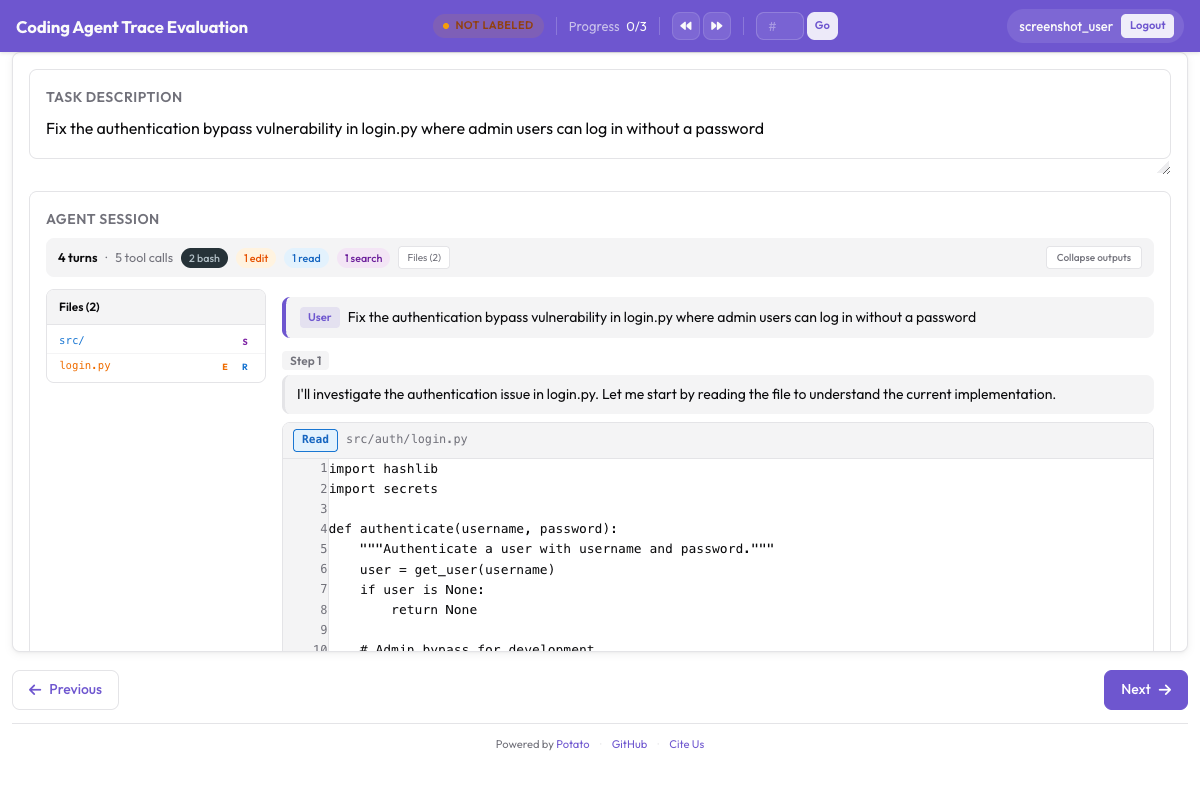 Osservazione dal vivo di un coding agent con rendering dei diff e output del terminale in tempo reale
Tre backend
Potato ti dà tre backend per l'osservazione dal vivo. Ognuno esegue un coding agent in una sandbox e trasmette le sue azioni all'interfaccia mentre accadono.
Ollama (tutto in locale)
Il backend Ollama gira interamente sulla tua macchina, senza chiavi API e senza chiamate di rete. È quello da usare quando la codebase è sensibile o quando vuoi solo sperimentare senza far salire il conto dell'API.
Per prima cosa, installa Ollama e scarica un modello capace di usare gli strumenti:
# Install Ollama
curl -fsSL https://ollama.ai/install.sh | sh

# Pull a coding-capable model
ollama pull qwen2.5-coder:32b

# Verify the model is available
ollama list
Configura Potato per usare il backend Ollama:
# config.yaml
annotation_task_name: "Live Agent Observation - Ollama"
port: 8000

live_coding_agent:
  backend_type: ollama_tool_use
  ai_config:
    model: "qwen2.5-coder:32b"
    base_url: "http://localhost:11434"
    temperature: 0.2
    max_tokens: 4096
  working_dir: ./workspace       # Agent's working directory
  max_turns: 50
  sandbox_mode: container        # container (default) | bubblewrap | trusted
  sandbox_image: "python:3.11-slim"
API di Anthropic (Claude con uso di strumenti)
Il backend dell'API di Anthropic si collega ai modelli Claude con l'uso di strumenti. Ottieni ragionamento e generazione di codice migliori di quelli della maggior parte dei modelli locali, e in cambio paghi le chiamate API.
# Set your API key
export ANTHROPIC_API_KEY="sk-ant-..."# config.yaml
annotation_task_name: "Live Agent Observation - Claude"
port: 8000
live_coding_agent:
backend_type: anthropic_tool_use
ai_config:
model: "claude-sonnet-4-20250514"
max_tokens: 8192
temperature: 0.1
system_prompt: >
You are a coding agent. You will be given a task description and
access to a codebase. Use the provided tools to read files, make
edits, and run commands to complete the task. Think step by step
and verify your changes by running tests.
working_dir: ./workspace
max_turns: 50
sandbox_mode: container
sandbox_image: "python:3.11-slim"Claude Agent SDK (tutte le capacità di Claude Code)
Il backend Claude Agent SDK è il più capace dei tre, con l'insieme completo degli strumenti di Claude Code e comportamento autonomo. Richiede il pacchetto claude-agent-sdk.
# Install the Claude Agent SDK
pip install claude-agent-sdk# config.yaml
annotation_task_name: "Live Agent Observation - Claude Agent SDK"
port: 8000
live_coding_agent:
backend_type: claude_sdk
ai_config:
model: "claude-sonnet-4-20250514"
working_dir: ./workspace
max_turns: 50 # Maximum number of agent turns
sandbox_mode: container
sandbox_image: "node:20-slim"Il flusso di annotazione
Una volta avviato il server, una sessione di osservazione dal vivo passa per qualche fase.
Avviare una sessione
L'annotatore apre l'interfaccia di Potato e trova un campo per la descrizione del task. Ci incolla o ci scrive il compito che l'agente deve svolgere, per esempio «Correggi il test che fallisce in tests/test_parser.py a causa del nuovo formato di configurazione» oppure «Aggiungi il supporto alla paginazione all'endpoint /api/users».
# Start the server
potato start config.yaml -p 8000
L'annotatore clicca su «Start Agent» e il coding agent si mette al lavoro. Ogni azione compare in tempo reale nel pannello CodingTraceDisplay.
Guardare l'agente lavorare
Mentre l'agente gira, ogni passo compare nel visualizzatore della traccia:
- I passi di ragionamento compaiono come blocchi grigi richiudibili con il ragionamento dell'agente.
- Le letture di file compaiono come blocchi di codice con evidenziazione della sintassi, numeri di riga e percorso del file.
- Le modifiche ai file compaiono come diff unificati con evidenziazione in rosso e verde.
- I comandi da terminale compaiono come blocchi scuri di terminale con comando, output ed exit code.
- L'albero dei file si aggiorna nella sidebar man mano che i file vengono creati, modificati o letti.
In alto un indicatore di avanzamento mostra il numero del passo corrente e il tempo trascorso. Lo stato dell'agente compare come «Thinking...», «Editing file...», «Running command...» e simili.
Controlli di pausa e istruzioni
Mentre l'agente è in esecuzione, l'annotatore può intervenire dalla barra dei controlli:
Pause: blocca l'agente appena il passo corrente è finito. L'agente non passa al passo successivo finché non viene ripreso. Serve per esaminare con attenzione un diff o l'output del terminale prima che l'agente vada avanti.
Invia istruzione: con l'agente in pausa (o anche in esecuzione), scrivi un messaggio in linguaggio naturale che viene iniettato nel contesto dell'agente. Per esempio «Non modificare lo schema del database, usa una migrazione» oppure «Controlla il log degli errori in /var/log/app.log prima di fare modifiche».
Resume: riprende l'esecuzione dell'agente dopo una pausa.
Stop: termina del tutto la sessione dell'agente. La traiettoria fino a quel punto viene salvata.
Gli annotatori possono valutare il lavoro dell'agente con l'annotazione PRM affiancata al display della traccia:
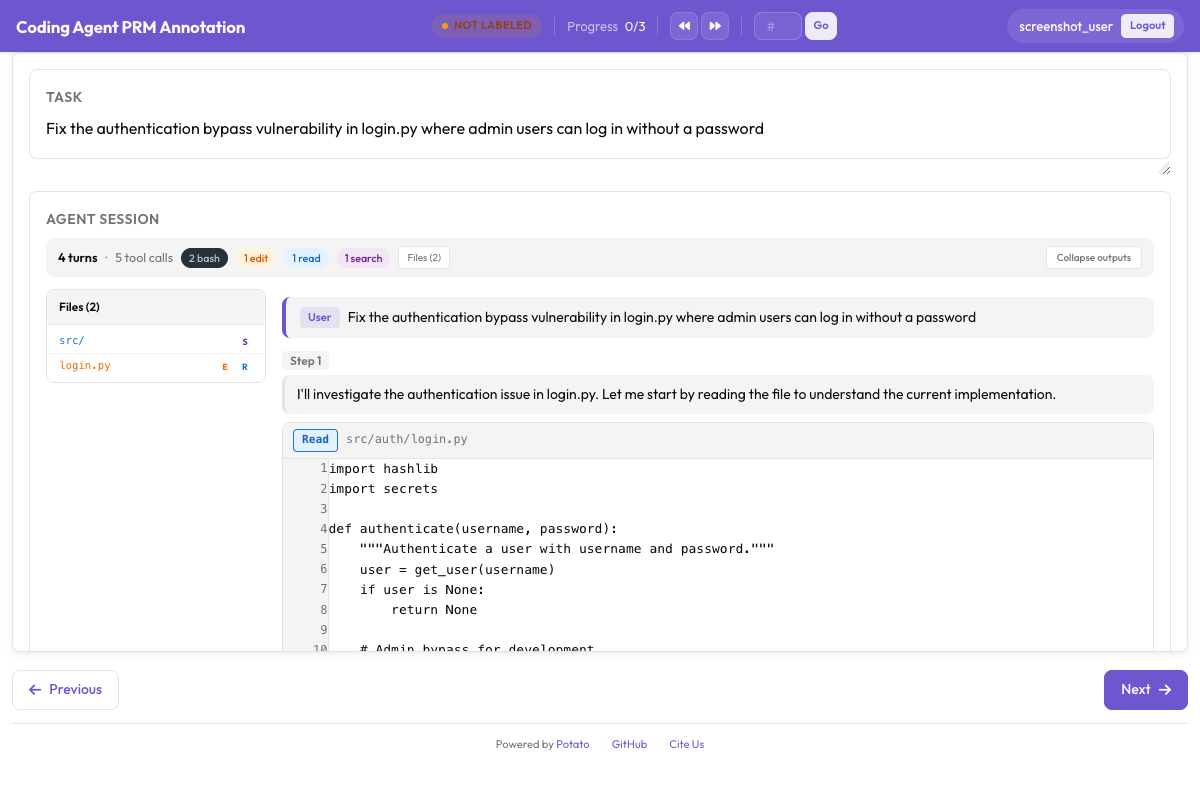 Interfaccia di annotazione PRM per etichettare la correttezza passo per passo accanto alla traccia di codice
La barra dei controlli fa parte del visualizzatore del live coding agent. Pausa, ripresa, iniezione di istruzioni, arresto, rollback e cambio di branch sono azioni di sessione che l'interfaccia esegue tramite gli endpoint del live agent, quindi nella configurazione non c'è niente da attivare.
Il sistema di checkpoint su git
Rollback, branching ed esportazione delle traiettorie si basano tutti sul sistema di checkpoint, che fa un commit su git dopo ogni modifica ai file fatta dall'agente.
Come funziona
All'avvio di una sessione, Potato inizializza un repository git nella workspace della sandbox, oppure usa quello già presente. Dopo ogni modifica a un file fa un commit in automatico con un messaggio strutturato:
[potato-checkpoint] Step 7: Edit src/parser.py
- Modified lines 45-52
- Agent reasoning: Fix the regex pattern to handle escaped quotes
Ne esce una cronologia di commit lineare che corrisponde uno a uno ai passi della traiettoria. Ogni checkpoint cattura lo stato completo della workspace in quel momento.
# You can inspect checkpoints directly with git
cd workspace/
git log --oneline

# Output:
# f8a2c1d [potato-checkpoint] Step 12: Edit tests/test_parser.py
# 3b7e9f0 [potato-checkpoint] Step 10: Edit src/parser.py
# a1c4d8e [potato-checkpoint] Step 8: Edit src/parser.py
# 9e2f6b3 [potato-checkpoint] Step 5: Edit src/config.py
# 7d0a3c1 [potato-checkpoint] Step 0: Initial state
Rollback
Clicca su «Rollback» e scegli dal menu a tendina un checkpoint precedente qualsiasi. Potato riporta la workspace a quello stato con git checkout e riavvolge di conseguenza la visualizzazione della traiettoria, poi l'agente riparte da lì con il contesto tagliato fino a quel passo.
Usalo quando vedi l'agente prendere la strada sbagliata. Invece di lasciarlo correre e bruciare tempo, torni all'ultimo stato buono e lo lasci riprovare, magari con un'istruzione che lo spinge in una direzione migliore.
Traiettorie con branching
Il branching è un rollback che tiene entrambi i percorsi. Quando torni indietro e l'agente prende un'altra strada, Potato crea un branch git con un nome e traccia entrambe le traiettorie:
Step 0 → Step 1 → Step 2 → Step 3 → Step 4 (Branch A: original path)
                          ↘
                           Step 3' → Step 4' → Step 5' (Branch B: after rollback)
Puoi diramare da qualsiasi checkpoint, costruendo un intero albero di traiettorie. È utile per l'apprendimento delle preferenze, perché ogni coppia di branch è già un confronto etichettato. Sei tornato indietro perché avevi giudicato sbagliato il branch A, e questo rende il branch B il percorso preferito dal punto di diramazione in avanti.
Nemmeno il branching richiede configurazione. Potato crea il branch quando torni indietro e l'agente prende poi un'altra strada, e traccia entrambe le traiettorie per il resto della sessione.
Formati di esportazione
Una sessione dal vivo produce dati dettagliati sulla traiettoria, che puoi esportare in forme diverse a seconda di che cosa stai addestrando.
Esportazione di traiettorie lineari
Esporta ogni branch come traiettoria indipendente:
python -m potato.export \
  -c config.yaml \
  -f trajectory_correction \
-o ./training_data/{
"session_id": "session_001",
"branch": "branch-A",
"task": "Fix the failing test in tests/test_parser.py",
"steps": [
{"step_idx": 0, "type": "file_read", "path": "tests/test_parser.py", "...": "..."},
{"step_idx": 1, "type": "thinking", "content": "The test expects..."},
{"step_idx": 2, "type": "file_edit", "path": "src/parser.py", "diff": "..."},
{"step_idx": 3, "type": "bash_command", "command": "pytest tests/test_parser.py"}
],
"human_interventions": [
{"after_step": 2, "type": "instruction", "content": "Use a migration instead"}
],
"rollback_from_step": null,
"outcome": "resolved"
}Coppie di preferenza dai branch
Esporta le coppie di branch come dati di preferenza per DPO o RLHF:
È lo stesso esportatore a scriverle. Nella directory di output, trajectory_dpo.jsonl contiene i confronti tra branch come coppie di preferenza, accanto a trajectory_sft.jsonl e trajectory_corrections.json.
python -m potato.export \
  -c config.yaml \
  -f trajectory_correction \
-o ./training_data/{
"session_id": "session_001",
"task": "Fix the failing test in tests/test_parser.py",
"branch_point_step": 2,
"branch_point_reason": "Agent started modifying the wrong file",
"rejected_branch": "branch-A",
"rejected_steps": [
{"step_idx": 3, "type": "file_edit", "path": "src/wrong_file.py", "...": "..."},
{"step_idx": 4, "type": "bash_command", "command": "pytest", "exit_code": 1}
],
"chosen_branch": "branch-B",
"chosen_steps": [
{"step_idx": 3, "type": "file_edit", "path": "src/parser.py", "...": "..."},
{"step_idx": 4, "type": "bash_command", "command": "pytest", "exit_code": 0}
]
}Etichette PRM dall'osservazione dal vivo
Puoi affiancare all'osservazione dal vivo l'etichettatura PRM, dato che un punto di rollback di solito coincide con il passo del primo errore:
python -m potato.export \
  -c config.yaml \
  -f coding_eval \
  -o ./training_data/ \
  --option types=prm
Qui il passo da cui sei tornato indietro viene etichettato come primo errore, e i passi del nuovo branch vengono etichettati come corretti, visto che li hai accettati.
Dataset di code review
Esporta le istruzioni degli annotatori e le motivazioni dei rollback come dati di addestramento per la code review:
python -m potato.export \
  -c config.yaml \
  -f coding_eval \
  -o ./training_data/ \
  --option types=code_review
Quick start completo
L'intera sequenza, da zero a una sessione Ollama funzionante:
# 1. Install Potato with live agent support
pip install potato-annotation[live-agents]

# 2. Install and start Ollama
curl -fsSL https://ollama.ai/install.sh | sh
ollama pull qwen2.5-coder:32b

# 3. Set up a workspace with a repo to work on
mkdir -p workspace/
git clone https://github.com/example/test-project workspace/repo

# 4. Create the config file
cat > config.yaml << 'YAML'
annotation_task_name: "Live Agent Observation"
port: 8000

live_coding_agent:
  backend_type: ollama_tool_use
  ai_config:
    model: "qwen2.5-coder:32b"
    base_url: "http://localhost:11434"
    temperature: 0.2
  working_dir: ./workspace/repo
  max_turns: 50
  sandbox_mode: trusted

annotation_schemes:
  - annotation_type: radio
    name: outcome
    description: "Final outcome"
    labels:
      - name: "resolved"
        text: "Task Fully Resolved"
      - name: "partial"
        text: "Partially Resolved"
      - name: "failed"
        text: "Failed"

  - annotation_type: text
    name: notes
    description: "Session Notes"
    placeholder: "Key observations about agent behavior..."
    label_requirement:
      required: false

output_annotation_dir: "./output/"
export_annotation_format: jsonl

user_config:
  allow_all_users: false
  users:
    - "observer1"
YAML

# 5. Start Potato
potato start config.yaml -p 8000

# 6. Open http://localhost:8000 in your browser
Dopo il login, incolla un task come «Aggiungi la validazione dell'input all'endpoint POST /api/users» e clicca su «Start Agent». Guardalo lavorare, metti in pausa quando qualcosa non torna, manda istruzioni per indirizzarlo e torna indietro per provare altri approcci. Alla fine valuta l'esito e prendi qualche nota.
Buone pratiche
Parti da task chiari e ben delimitati. Il punto giusto sono compiti che tengono impegnato l'agente dai 5 ai 15 minuti. Sotto non esce abbastanza traiettoria da valere l'annotazione. Molto sopra, l'annotatore si stanca.
In produzione lascia attiva la sandbox. sandbox_mode: container è il valore predefinito e tiene l'agente lontano dal tuo host. bubblewrap è l'alternativa più leggera su Linux. trusted esegue le chiamate agli strumenti dell'agente direttamente sulla macchina, il che è ragionevole solo mentre sviluppi con un modello di cui ti fidi.
Registra perché hai fatto rollback. Niente nella configurazione lo impone, quindi fanne una regola per i tuoi annotatori, con una breve nota a ogni punto di diramazione su che cosa è andato storto. Quelle note sono già di per sé un segnale utile per l'addestramento, e migliorano i dati di preferenza.
Confronta più backend. Fai girare gli stessi task su Ollama, sull'API di Anthropic e sul Claude Agent SDK per ottenere dati di preferenza tra agenti diversi. Dato che cambia solo la sezione del backend nella configurazione, è facile da impostare.
Esporta presto e spesso. Fai un'esportazione dopo ogni sessione invece di rimandare tutto alla fine. Perdi meno se qualcosa va in crash, e tieni d'occhio la qualità dei dati strada facendo.