Classificare le emozioni nel parlato
Crea in Potato un task di classificazione delle emozioni audio con forma d'onda interattiva, controlli sulla velocità di riproduzione, scale Likert e insiemi di etichette emotive configurabili.
Il riconoscimento dell'emozione nel parlato (SER) compare negli assistenti virtuali, negli strumenti per la salute mentale e nelle analisi dei call center, e tutto questo ha bisogno di audio etichettato su cui addestrarsi. Questo tutorial passa in rassegna le interfacce di annotazione per emozioni categoriche, giudizi dimensionali e clip in cui è presente più di un'emozione. Per le opzioni audio sottostanti, vedi la documentazione sull'annotazione audio.
Approcci all'annotazione delle emozioni
Ci sono alcuni modi diffusi di etichettare l'emozione nel parlato. Puoi usare categorie discrete come felice, triste o arrabbiato. Puoi valutare dimensioni continue come valenza, attivazione e dominanza. Puoi lasciare che gli annotatori marchino più emozioni insieme, con un punteggio di intensità. Oppure, sui clip più lunghi, puoi assegnare emozioni diverse a momenti diversi.
Classificazione categorica delle emozioni
Configurazione di base
annotation_task_name: "Speech Emotion Recognition"

data_files:
  - data/utterances.json

item_properties:
  id_key: id
  text_key: transcript  # Optional transcript

instance_display:
  fields:
    - key: audio_path
      type: audio
      label: "Utterance"
      display_options:
        controls: true
        show_waveform: true
        preload: metadata

annotation_schemes:
  - annotation_type: radio
    name: emotion
    description: "What emotion is expressed in this speech?"
    labels:
      - name: Happy
        description: "Joy, excitement, amusement"
        key_value: "h"
      - name: Sad
        description: "Sorrow, disappointment, grief"
        key_value: "s"
      - name: Angry
        description: "Frustration, irritation, rage"
        key_value: "a"
      - name: Fearful
        description: "Anxiety, worry, terror"
        key_value: "f"
      - name: Surprised
        description: "Astonishment, shock"
        key_value: "u"
      - name: Disgusted
        description: "Revulsion, distaste"
        key_value: "d"
      - name: Neutral
        description: "No clear emotion"
        key_value: "n"
    label_requirement:
      required: true
Potato mostra una forma d'onda interattiva con i controlli di riproduzione accanto alle etichette di annotazione:
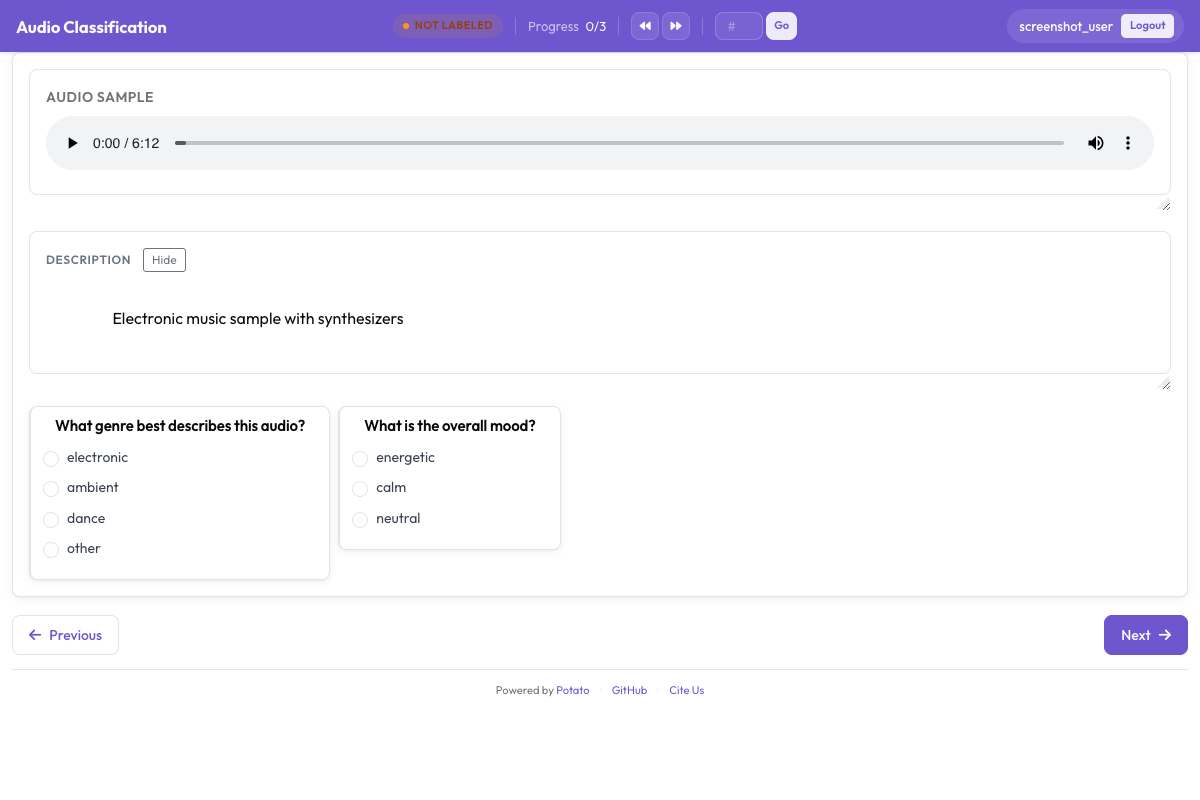 L'interfaccia di annotazione audio con una forma d'onda interattiva, i controlli di riproduzione e le etichette emotive categoriche
Aggiungere l'intensità
annotation_schemes:
  - annotation_type: radio
    name: emotion
    description: "What emotion does the speaker express?"
    labels: [Happy, Sad, Angry, Fearful, Surprised, Disgusted, Neutral]
    label_requirement:
      required: true

  - annotation_type: likert
    name: intensity
    description: "How intense is this emotion?"
    size: 5
    min_label: "Very weak"
    max_label: "Very strong"
Annotazione dimensionale delle emozioni
Il modello VAD (valenza-attivazione-dominanza) valuta ogni clip su tre scale continue, invece di costringerlo dentro un'unica categoria:
annotation_task_name: "Dimensional Emotion Rating"

annotation_schemes:
  # Valence: negative to positive
  - annotation_type: likert
    name: valence
    description: "Valence: How positive or negative?"
    size: 7
    min_label: "Very negative"
    max_label: "Very positive"

  # Arousal: calm to excited
  - annotation_type: likert
    name: arousal
    description: "Arousal: How calm or excited?"
    size: 7
    min_label: "Very calm"
    max_label: "Very excited"

  # Dominance: submissive to dominant
  - annotation_type: likert
    name: dominance
    description: "Dominance: How submissive or dominant?"
    size: 7
    min_label: "Very submissive"
    max_label: "Very dominant"
Scale visive (SAM)
In stile Self-Assessment Manikin:
annotation_schemes:
  - annotation_type: likert
    min_label: "Very negative"
    max_label: "Very positive"
    name: valence
    description: "Select the figure that matches the emotional valence"
    size: 9
Rilevamento di emozioni miste
Per il parlato che contiene più emozioni:
annotation_schemes:
  - annotation_type: multiselect
    name: emotions_present
    description: "Select ALL emotions you detect (can be multiple)"
    labels:
      - Happy
      - Sad
      - Angry
      - Fearful
      - Surprised
      - Disgusted
      - Contempt

  - annotation_type: radio
    name: primary_emotion
    description: "Which emotion is MOST prominent?"
    labels:
      - Happy
      - Sad
      - Angry
      - Fearful
      - Surprised
      - Disgusted
      - Contempt
      - Mixed (no dominant)
Annotazione completa delle emozioni
annotation_task_name: "Comprehensive Speech Emotion Annotation"

data_files:
  - data/speech_samples.json

item_properties:
  id_key: id
  text_key: transcript

instance_display:
  fields:
    - key: audio_url
      type: audio
      label: "Speech sample"
      display_options:
        controls: true
        show_waveform: true
        preload: metadata
        autoplay: false

    # Show the transcript alongside the audio
    - key: transcript
      type: text
      label: "Transcript (for reference)"

annotation_schemes:
  # Primary categorical emotion
  - annotation_type: radio
    name: primary_emotion
    description: "Primary emotion expressed"
    labels:
      - name: Happiness
        color: "#FCD34D"
        key_value: "1"
      - name: Sadness
        color: "#60A5FA"
        key_value: "2"
      - name: Anger
        color: "#F87171"
        key_value: "3"
      - name: Fear
        color: "#A78BFA"
        key_value: "4"
      - name: Surprise
        color: "#34D399"
        key_value: "5"
      - name: Disgust
        color: "#FB923C"
        key_value: "6"
      - name: Neutral
        color: "#9CA3AF"
        key_value: "7"
    label_requirement:
      required: true

  # Emotional intensity
  - annotation_type: likert
    name: intensity
    description: "Emotional intensity"
    size: 5
    min_label: "Very mild"
    max_label: "Very intense"
    label_requirement:
      required: true

  # Dimensional ratings
  - annotation_type: likert
    name: valence
    description: "Valence (negative to positive)"
    size: 7
    min_label: "Negative"
    max_label: "Positive"

  - annotation_type: likert
    name: arousal
    description: "Arousal (calm to excited)"
    size: 7
    min_label: "Calm"
    max_label: "Excited"

  # Voice quality
  - annotation_type: multiselect
    name: voice_qualities
    description: "Voice characteristics (select all that apply)"
    labels:
      - Trembling voice
      - Raised pitch
      - Lowered pitch
      - Loud/shouting
      - Soft/whisper
      - Fast speech rate
      - Slow speech rate
      - Breathy
      - Tense/strained
      - Crying
      - Laughing

  # Genuineness
  - annotation_type: radio
    name: authenticity
    description: "Does the emotion seem genuine?"
    labels:
      - Clearly genuine
      - Likely genuine
      - Uncertain
      - Likely acted/fake
      - Clearly acted/fake

  # Confidence
  - annotation_type: likert
    name: confidence
    description: "How confident are you in your annotation?"
    size: 5
    min_label: "Guessing"
    max_label: "Certain"

annotation_instructions: |
  ## Emotion Annotation Guidelines

  ### Listening Instructions
  1. Listen to the entire clip before annotating
  2. You may replay as many times as needed
  3. Focus on the VOICE, not just the words

  ### Emotion Categories
  - **Happiness**: Joy, amusement, contentment
  - **Sadness**: Sorrow, disappointment, melancholy
  - **Anger**: Frustration, irritation, rage
  - **Fear**: Anxiety, nervousness, terror
  - **Surprise**: Astonishment, startle
  - **Disgust**: Revulsion, contempt
  - **Neutral**: Calm, matter-of-fact

  ### Tips
  - Consider tone, pitch, speaking rate
  - The transcript may not match the emotion
  - When unsure between two emotions, choose the stronger one
  - Use the intensity scale for unclear cases

output_annotation_dir: annotations/
export_annotation_format: jsonl
Formato di output
{
  "instance_id": "utt_001",
  "user_id": "rater_01",
  "labels": {
    "primary_emotion": {"Surprise": "true"},
    "voice_qualities": {"Raised pitch": "true", "Fast speech rate": "true"},
    "authenticity": {"Clearly genuine": "true"},
    "confidence": {"4": "true"}
  },
  "spans": {},
  "links": {}
}
Emozione a livello di segmento
Per audio più lunghi in cui l'emozione cambia:
annotation_schemes:
  - annotation_type: audio_annotation
    name: emotion_segments
    description: "Mark time segments with different emotions"
    labels:
      - name: Happy
        color: "#FCD34D"
      - name: Sad
        color: "#60A5FA"
      - name: Angry
        color: "#F87171"
      - name: Neutral
        color: "#9CA3AF"
Controllo di qualità
Clip non ambigui con etichette note smascherano gli annotatori che rispondono a caso pur di andare avanti. Entrambi i blocchi stanno al livello più alto della configurazione, ed entrambi prendono i propri elementi da un file invece che inline:
attention_checks:
  enabled: true
  frequency: 20
  items_file: data/attention_checks.json
  min_response_time: 3.0

gold_standards:
  enabled: true
  items_file: data/gold_standards.json
  mode: mixed
  frequency: 20
  accuracy:
    min_threshold: 0.7
    evaluation_count: 10
Un elemento gold ha l'aspetto di uno dei tuoi elementi di dati con in più un gold_label, quindi viene mostrato come tutto il resto:
[
  {
    "id": "gold_001",
    "audio_path": "/audio/gold/clearly_happy.wav",
    "gold_label": { "primary_emotion": "Happiness" },
    "explanation": "Laughter and rising pitch throughout, with no ambiguity.",
    "difficulty": "easy"
  }
]
Gli elementi di controllo dell'attenzione usano expected_answer al posto di gold_label. min_response_time è il controllo utile per l'audio. Una soglia minima di tre secondi individua chiunque etichetti un clip che non può aver finito di ascoltare.
Annidare questi blocchi sotto un blocco quality_control: è un errore comune che non dà alcun avviso. Potato legge attention_checks e gold_standards dal livello più alto, e l'unica chiave che legge da quality_control è geometry_iou_tolerance, quindi un blocco annidato supera la validazione senza errori e non viene mai eseguito.
Consigli per l'annotazione delle emozioni
Ascolta tutto il clip prima di decidere e guarda a come una cosa viene detta, più che alle parole. Tieni presente che le norme espressive cambiano da cultura a cultura, per cui quello che in una suona come rabbia in un'altra può suonare come enfasi. Annotare emozioni stanca, quindi incoraggia le pause e fai discutere regolarmente al gruppo i casi di disaccordo, per restare calibrati.
Prossimi passi
- Aggiungi la diarizzazione dei parlanti per seguire le emozioni quando i parlanti sono più di uno
- Imposta il crowdsourcing per raccolte su larga scala
- Calcola l'accordo tra annotatori per i task di emozione
Documentazione su Annotazione Audio.