Creación de una tarea de análisis de sentimiento
Construye una tarea completa de clasificación de sentimiento con botones de radio, tooltips y atajos de teclado para etiquetar de forma eficiente.
El análisis de sentimiento es una de las tareas de NLP más comunes, y recopilar etiquetas limpias para ella en Potato es sencillo. Este tutorial construye una interfaz de anotación de sentimiento que puedes poner de verdad delante de los anotadores, con los atajos de teclado y los controles de calidad que hacen más rápido el etiquetado.
Visión general del proyecto
Vamos a anotar publicaciones de redes sociales. La interfaz incluye:
- Clasificación de sentimiento en tres clases (Positive, Negative, Neutral)
- Calificaciones de confianza para cada anotación
- Explicaciones de texto opcionales
- Atajos de teclado para ganar velocidad
- Medidas de control de calidad
Configuración completa
Este es el config.yaml completo:
annotation_task_name: "Social Media Sentiment Analysis"

# Data configuration
data_files:
  - "data/tweets.json"

item_properties:
  id_key: id
  text_key: text

# Annotation interface
annotation_schemes:
  # Primary sentiment label
  - annotation_type: radio
    name: sentiment
    description: "What is the overall sentiment of this post?"
    labels:
      - name: Positive
        tooltip: "Expresses happiness, satisfaction, or approval"
        key_value: "1"
      - name: Negative
        tooltip: "Expresses sadness, frustration, or disapproval"
        key_value: "2"
      - name: Neutral
        tooltip: "Factual, objective, or lacks emotional content"
        key_value: "3"
    label_requirement:
      required: true

  # Confidence rating
  - annotation_type: likert
    name: confidence
    description: "How confident are you in your sentiment label?"
    size: 5
    min_label: "Not confident"
    max_label: "Very confident"
    label_requirement:
      required: true

  # Optional explanation
  - annotation_type: text
    name: explanation
    description: "Why did you choose this label? (Optional)"
    rows: 4
    label_requirement:
      required: false
    placeholder: "Explain your reasoning..."

# Guidelines
annotation_instructions: |
  ## Sentiment Annotation Guidelines

  ### Your Task
  Classify the sentiment expressed in each social media post.

  ### Labels

  **Positive**: The author expresses positive emotions or opinions
  - Happiness, excitement, gratitude
  - Praise, recommendations, approval
  - Examples: "Love this!", "Best day ever!", "Highly recommend"

  **Negative**: The author expresses negative emotions or opinions
  - Anger, frustration, sadness
  - Complaints, criticism, disapproval
  - Examples: "Terrible service", "So disappointed", "Worst experience"

  **Neutral**: Factual or lacking clear sentiment
  - News, announcements, questions
  - Mixed or balanced opinions
  - Examples: "The store opens at 9am", "Has anyone tried this?"

  ### Tips
  - Focus on the author's sentiment, not the topic
  - Sarcasm should be labeled based on intended meaning
  - When unsure, lower your confidence rating

# User management
automatic_assignment:
  on: true
  sampling_strategy: random
  labels_per_instance: 1
  instance_per_annotator: 100
Formato de los datos de ejemplo
Crea data/tweets.json:
{"id": "t001", "text": "Just got my new laptop and I'm absolutely loving it! Best purchase of the year! #happy"}
{"id": "t002", "text": "Waited 2 hours for customer service and they still couldn't help me. Never shopping here again."}
{"id": "t003", "text": "The new coffee shop on Main Street opens tomorrow at 7am."}
{"id": "t004", "text": "This movie was okay I guess. Some good parts, some boring parts."}
{"id": "t005", "text": "Can't believe how beautiful the sunset was tonight! Nature is amazing."}
Ejecución de la tarea
Inicia el servidor de anotación:
potato start config.yamlAbre http://localhost:8000 e inicia sesión para empezar a anotar.
Esto es lo que ven tus anotadores cuando el servidor está en marcha:
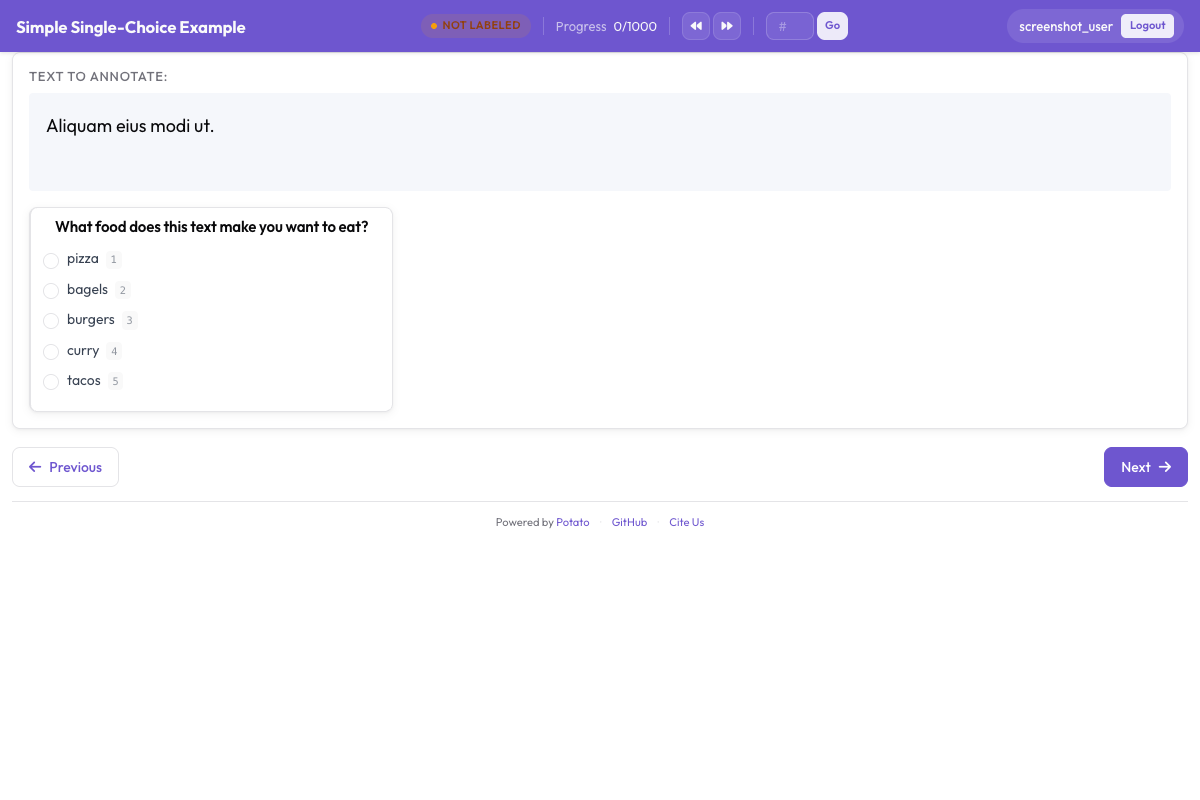 La interfaz de clasificación de sentimiento con las etiquetas en botones de radio, la escala de confianza y el campo opcional de explicación
Comprensión de la interfaz
Área principal de anotación
La interfaz muestra:
- El texto que se va a anotar (con URLs, menciones y hashtags resaltados)
- Botones de radio de sentimiento con tooltips
- Escala Likert de confianza
- Cuadro de texto opcional para la explicación
Flujo de trabajo con teclado
Cuando los anotadores cogen ritmo, el ciclo más rápido es:
- Leer el texto
- Pulsar
1,2o3para el sentimiento - Hacer clic en el nivel de confianza (o usar el ratón)
- Pulsar
Enterpara enviar
Seguimiento del progreso
La interfaz muestra:
- El progreso actual (p. ej., "15 / 100")
- El tiempo restante estimado
- Estadísticas de la sesión
Formato de salida
El trabajo de cada anotador se guarda en <output_annotation_dir>/<user>/user_state.json, diga lo que diga export_annotation_format. Ese ajuste añade una exportación periódica junto a él, de modo que con jsonl el archivo combinado es <output_annotation_dir>/exports/jsonl/annotations.jsonl, con un registro por anotador y por instancia:
{
  "instance_id": "t001",
  "user_id": "john_doe",
  "labels": {
    "sentiment": {"Positive": "true"},
    "confidence": {"5": "true"},
    "explanation": {"text_box": "Clear expression of happiness with the purchase"}
  },
  "spans": {},
  "links": {}
}
Añadir control de calidad
Verificaciones de atención
Añade elementos de referencia (gold standard) para verificar la atención de los anotadores. Para el conjunto completo de opciones de los esquemas radio y likert que se usan aquí, consulta la documentación de origen.
attention_checks:
  enabled: true
  frequency: 10          # Every 10th item
  items_file: data/attention_checks.json
  failure_handling:
    warn_threshold: 2
    block_threshold: 5
Los elementos van en items_file y no directamente en la configuración, y cada uno lleva la respuesta que debería recibir:
[
  {
    "id": "chk1",
    "text": "I am extremely happy and satisfied! This is the best!",
    "expected_answer": { "sentiment": "Positive" }
  },
  {
    "id": "chk2",
    "text": "This is absolutely terrible and I hate it completely.",
    "expected_answer": { "sentiment": "Negative" }
  }
]
Los elementos gold standard usan gold_label en lugar de expected_answer y van en gold_standards.items_file. Ten en cuenta que ambos bloques van en el nivel superior. Potato lee attention_checks desde la raíz de la configuración, así que si lo metes dentro de un bloque quality_control: queda sin leer y no se informa de ningún error.
Acuerdo entre anotadores
Para proyectos de investigación, habilita varias anotaciones por elemento:
automatic_assignment:
  on: true
  sampling_strategy: random
  labels_per_instance: 3  # Each item annotated by 3 people
  instance_per_annotator: 50
Análisis de resultados
Exporta y analiza tus anotaciones:
import json
from collections import Counter

records = []
with open('annotation_output/exports/jsonl/annotations.jsonl') as f:
    for line in f:
        records.append(json.loads(line))

def chosen(record, scheme):
    """The label picked for a single-choice scheme: the key whose value is "true"."""
    for name, value in record["labels"].get(scheme, {}).items():
        if value == "true":
            return name
    return None

sentiments = Counter(chosen(r, "sentiment") for r in records)
print(f"Sentiment distribution: {dict(sentiments)}")

# A likert stores its scale position the same way, as the label name
points = [int(p) for r in records if (p := chosen(r, "confidence"))]
print(f"Average confidence: {sum(points)/len(points):.2f}")
Próximos pasos
- Configura crowdsourcing para anotación a gran escala
- Añade sugerencias de IA para acelerar el etiquetado
- Implementa aprendizaje activo para priorizar los casos difíciles
Explora más tipos de anotación en nuestra documentación.