Observar, pausar y rebobinar: observación de agentes de coding en vivo en Potato
Tutorial para montar la observación de agentes de coding en vivo con Ollama, la API de Anthropic o el Claude Agent SDK. Incluye pausa, reversión, ramificación y exportación de trayectorias.
Qué distingue a la observación en vivo
La mayor parte de la evaluación de agentes de coding se hace a posteriori: el agente se ejecuta, produce una traza y los revisores la examinan más tarde. La observación en vivo funciona al revés. El anotador ve trabajar al agente en tiempo real y ve cada edición de archivo, cada comando de terminal y cada paso de razonamiento en el momento en que se produce.
Eso cambia lo que se puede hacer. Si el agente empieza a tomar un camino equivocado, el anotador puede intervenir antes de que pierda tiempo en él. Puede pausar para leer un diff con calma antes de que el agente siga, o enviar una instrucción en lenguaje natural para reconducirlo. Lo que a mí me resulta más útil es la reversión: desde cualquier punto de control anterior puedes rebobinar y dejar que el agente pruebe otro enfoque. Esas ramas son justo el tipo de datos que necesita el aprendizaje de preferencias.
No sustituye a la anotación de trazas estáticas; produce un tipo de datos distinto. La anotación estática gana cuando quieres muchos datos a un coste predecible. La observación en vivo gana cuando buscas datos dirigidos, intentas entender cómo falla un agente o construyes pares de preferencia a partir de ramas.
Para la referencia completa de la funcionalidad, consulta la documentación del código fuente.
La interfaz del agente de coding en vivo transmite las acciones del agente en tiempo real y muestra los diffs de código y la salida de terminal mientras el agente trabaja:
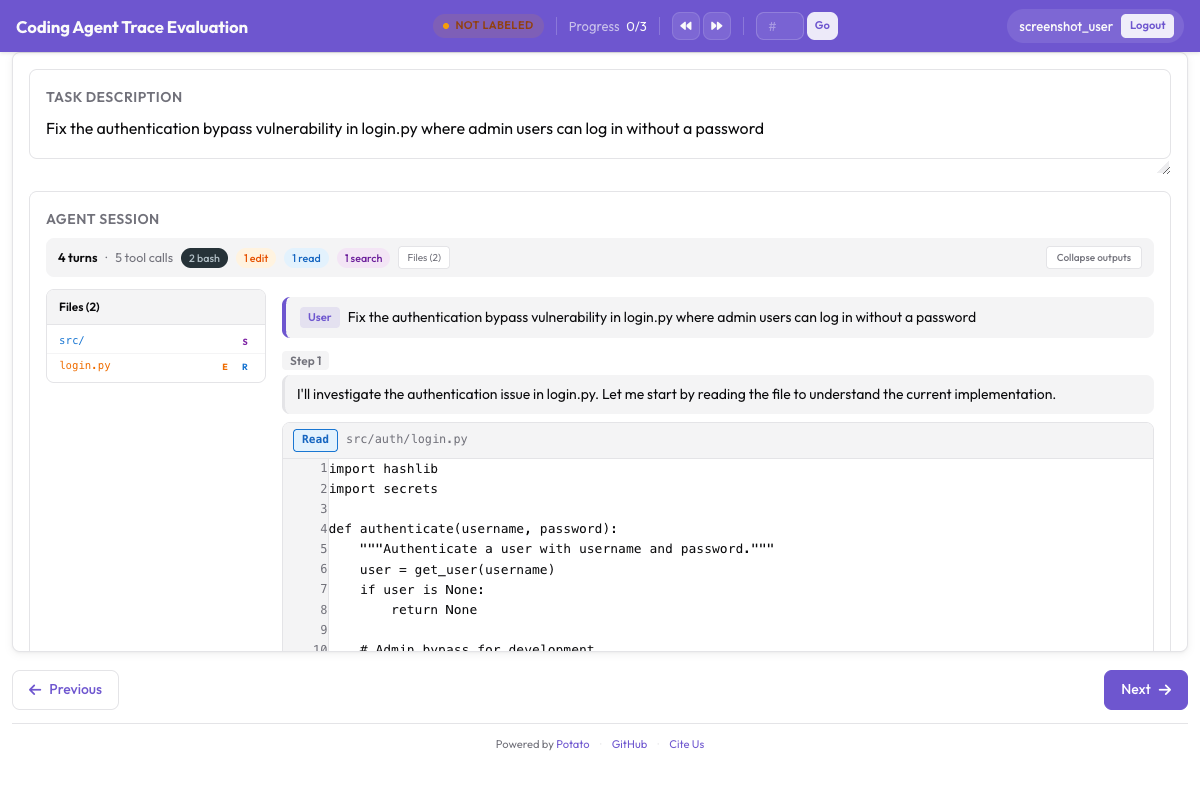 Observación de agente de coding en vivo con renderizado de diffs y salida de terminal en tiempo real
Tres backends
Potato ofrece tres backends para la observación en vivo. Cada uno ejecuta un agente de coding en un entorno aislado y transmite sus acciones a la interfaz según se producen.
Ollama (totalmente local)
El backend de Ollama se ejecuta por completo en tu máquina, sin claves de API ni llamadas de red. Es la opción cuando el código base es sensible o cuando solo quieres experimentar sin acumular factura de API.
Primero, instala Ollama y descarga un modelo con capacidad de uso de herramientas:
# Install Ollama
curl -fsSL https://ollama.ai/install.sh | sh

# Pull a coding-capable model
ollama pull qwen2.5-coder:32b

# Verify the model is available
ollama list
Configura Potato para usar el backend de Ollama:
# config.yaml
annotation_task_name: "Live Agent Observation - Ollama"
port: 8000

live_coding_agent:
  backend_type: ollama_tool_use
  ai_config:
    model: "qwen2.5-coder:32b"
    base_url: "http://localhost:11434"
    temperature: 0.2
    max_tokens: 4096
  working_dir: ./workspace       # Agent's working directory
  max_turns: 50
  sandbox_mode: container        # container (default) | bubblewrap | trusted
  sandbox_image: "python:3.11-slim"
API de Anthropic (Claude con uso de herramientas)
El backend de la API de Anthropic se conecta a modelos Claude con uso de herramientas. Obtienes mejor razonamiento y generación de código que con la mayoría de los modelos locales y, a cambio, pagas las llamadas a la API.
# Set your API key
export ANTHROPIC_API_KEY="sk-ant-..."# config.yaml
annotation_task_name: "Live Agent Observation - Claude"
port: 8000
live_coding_agent:
backend_type: anthropic_tool_use
ai_config:
model: "claude-sonnet-4-20250514"
max_tokens: 8192
temperature: 0.1
system_prompt: >
You are a coding agent. You will be given a task description and
access to a codebase. Use the provided tools to read files, make
edits, and run commands to complete the task. Think step by step
and verify your changes by running tests.
working_dir: ./workspace
max_turns: 50
sandbox_mode: container
sandbox_image: "python:3.11-slim"Claude Agent SDK (todas las capacidades de Claude Code)
El backend del Claude Agent SDK es el más capaz de los tres, con el conjunto completo de herramientas de Claude Code y comportamiento autónomo. Requiere el paquete claude-agent-sdk.
# Install the Claude Agent SDK
pip install claude-agent-sdk# config.yaml
annotation_task_name: "Live Agent Observation - Claude Agent SDK"
port: 8000
live_coding_agent:
backend_type: claude_sdk
ai_config:
model: "claude-sonnet-4-20250514"
working_dir: ./workspace
max_turns: 50 # Maximum number of agent turns
sandbox_mode: container
sandbox_image: "node:20-slim"El flujo de trabajo de anotación
Con el servidor levantado, una sesión de observación en vivo pasa por unas cuantas etapas.
Iniciar una sesión
El anotador abre la interfaz de Potato y ve un campo para introducir la descripción de la tarea. Pega o escribe la tarea que debe completar el agente, por ejemplo «Arreglar la prueba que falla en tests/test_parser.py por el nuevo formato de configuración» o «Añadir paginación al endpoint /api/users».
# Start the server
potato start config.yaml -p 8000
El anotador pulsa «Start Agent» y el agente de coding empieza a trabajar. Cada acción aparece en tiempo real en el panel CodingTraceDisplay.
Ver trabajar al agente
Según se ejecuta el agente, cada paso aparece en el visor de trazas:
- Los pasos de razonamiento aparecen como bloques grises plegables con el razonamiento del agente.
- Las lecturas de archivos aparecen como bloques de código con resaltado de sintaxis, números de línea y la ruta del archivo.
- Las ediciones de archivos aparecen como diffs unificados con resaltado en rojo y verde.
- Los comandos de terminal aparecen como bloques oscuros de terminal con el comando, la salida y el código de salida.
- El árbol de archivos de la barra lateral se actualiza según se crean, modifican o leen archivos.
Un indicador de progreso en la parte superior muestra el número de paso actual y el tiempo transcurrido. El estado del agente se muestra como «Thinking...», «Editing file...», «Running command...», etc.
Controles de pausa e instrucción
Mientras el agente trabaja, el anotador puede intervenir desde la barra de controles:
Pause: congela el agente cuando termina el paso en curso. El agente no pasa al siguiente paso hasta que se reanuda. Sirve para examinar con calma un diff o una salida de terminal antes de que el agente siga.
Send Instruction: con el agente en pausa (o incluso en marcha), escribe un mensaje en lenguaje natural que se inyecta en el contexto del agente. Por ejemplo: «No modifiques el esquema de la base de datos, usa una migración» o «Revisa el registro de errores en /var/log/app.log antes de hacer cambios».
Resume: continúa la ejecución del agente tras una pausa.
Stop: termina por completo la sesión del agente. La trayectoria hasta ese momento se guarda.
Los anotadores pueden evaluar el trabajo del agente con anotación PRM junto a la vista de la traza:
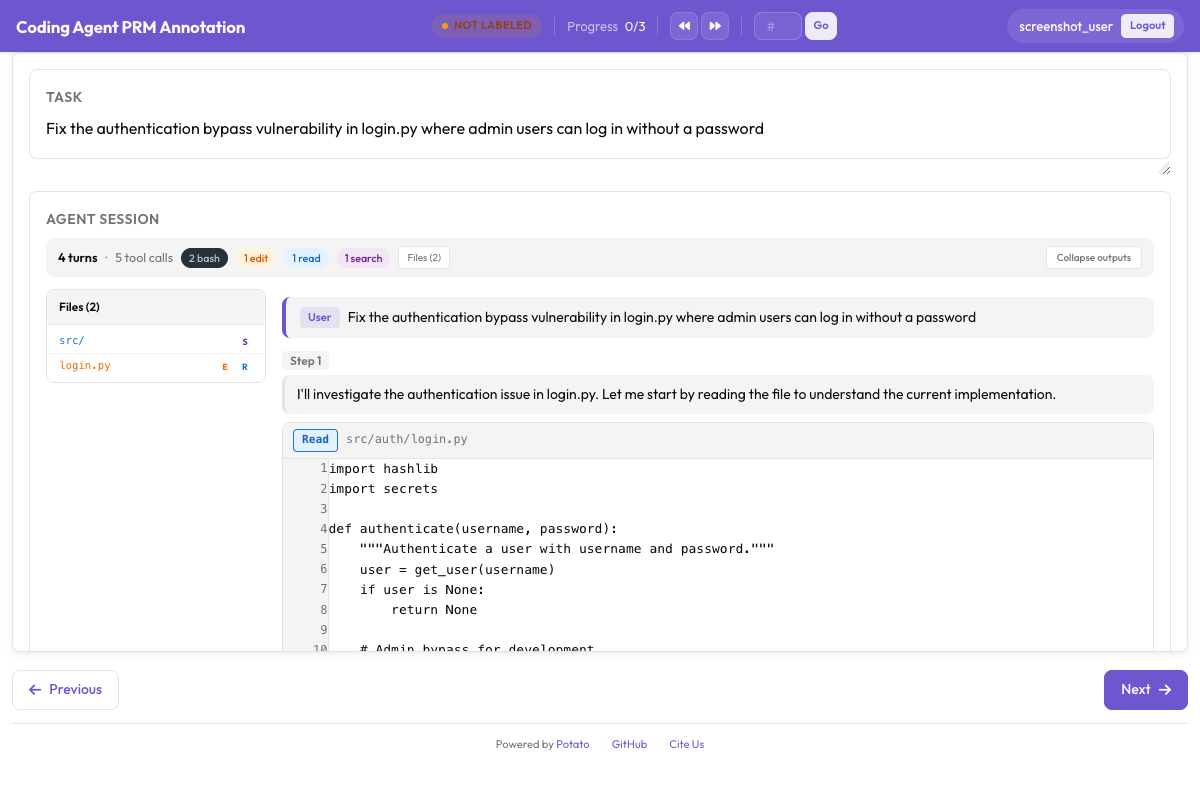 Interfaz de anotación PRM para etiquetar la corrección por paso junto a la traza de coding
La barra de controles viene con el visor del agente de coding en vivo. Pausar, reanudar, inyectar instrucciones, detener, revertir y cambiar de rama son acciones de sesión que la interfaz ejecuta a través de los endpoints del agente en vivo, así que no hay nada que activar en la configuración.
Sistema de puntos de control basado en git
La reversión, la ramificación y la exportación de trayectorias se apoyan en el sistema de puntos de control, que hace un commit en git tras cada cambio de archivo del agente.
Cómo funciona
Cuando arranca una sesión, Potato inicializa un repositorio de git en el espacio de trabajo aislado, o usa el que ya haya. Tras cada edición de archivo hace un commit automático con un mensaje estructurado:
[potato-checkpoint] Step 7: Edit src/parser.py
- Modified lines 45-52
- Agent reasoning: Fix the regex pattern to handle escaped quotes
El resultado es un historial de commits lineal que se corresponde uno a uno con los pasos de la trayectoria. Cada punto de control captura el estado completo del espacio de trabajo en ese momento.
# You can inspect checkpoints directly with git
cd workspace/
git log --oneline

# Output:
# f8a2c1d [potato-checkpoint] Step 12: Edit tests/test_parser.py
# 3b7e9f0 [potato-checkpoint] Step 10: Edit src/parser.py
# a1c4d8e [potato-checkpoint] Step 8: Edit src/parser.py
# 9e2f6b3 [potato-checkpoint] Step 5: Edit src/config.py
# 7d0a3c1 [potato-checkpoint] Step 0: Initial state
Reversión
Pulsa «Rollback» y elige cualquier punto de control anterior en el desplegable. Potato devuelve el espacio de trabajo a ese estado con git checkout y rebobina la vista de la trayectoria para que coincida, y a partir de ahí el agente sigue con su contexto recortado hasta ese paso.
Úsala cuando veas que el agente toma un desvío equivocado. En lugar de dejarlo seguir y perder tiempo, rebobinas al último estado bueno y dejas que lo intente de nuevo, quizá con una instrucción que lo empuje hacia un sitio mejor.
Trayectorias ramificadas
Ramificar es revertir conservando los dos caminos. Cuando reviertes y el agente toma otra dirección, Potato crea una rama de git con nombre y sigue ambas trayectorias:
Step 0 → Step 1 → Step 2 → Step 3 → Step 4 (Branch A: original path)
                          ↘
                           Step 3' → Step 4' → Step 5' (Branch B: after rollback)
Puedes ramificar desde cualquier punto de control y construir así todo un árbol de trayectorias. Esto es útil para el aprendizaje de preferencias, porque cada par de ramas ya es una comparación etiquetada: reviertes porque juzgaste que la rama A estaba mal, lo que convierte a la rama B en el camino preferido a partir del punto de ramificación.
La ramificación tampoco necesita configuración. Potato crea la rama cuando reviertes y el agente toma después otro camino, y sigue ambas trayectorias durante el resto de la sesión.
Formatos de exportación
Una sesión en vivo produce datos de trayectoria detallados, y puedes exportarlos en varias formas según lo que quieras entrenar.
Exportación de trayectorias lineales
Exporta cada rama como una trayectoria independiente:
python -m potato.export \
  -c config.yaml \
  -f trajectory_correction \
-o ./training_data/{
"session_id": "session_001",
"branch": "branch-A",
"task": "Fix the failing test in tests/test_parser.py",
"steps": [
{"step_idx": 0, "type": "file_read", "path": "tests/test_parser.py", "...": "..."},
{"step_idx": 1, "type": "thinking", "content": "The test expects..."},
{"step_idx": 2, "type": "file_edit", "path": "src/parser.py", "diff": "..."},
{"step_idx": 3, "type": "bash_command", "command": "pytest tests/test_parser.py"}
],
"human_interventions": [
{"after_step": 2, "type": "instruction", "content": "Use a migration instead"}
],
"rollback_from_step": null,
"outcome": "resolved"
}Pares de preferencia a partir de ramas
Exporta pares de ramas como datos de preferencia para DPO o RLHF:
El mismo exportador los escribe: trajectory_dpo.jsonl, en el directorio de salida, contiene las comparaciones entre ramas como pares de preferencia, junto a trajectory_sft.jsonl y trajectory_corrections.json.
python -m potato.export \
  -c config.yaml \
  -f trajectory_correction \
-o ./training_data/{
"session_id": "session_001",
"task": "Fix the failing test in tests/test_parser.py",
"branch_point_step": 2,
"branch_point_reason": "Agent started modifying the wrong file",
"rejected_branch": "branch-A",
"rejected_steps": [
{"step_idx": 3, "type": "file_edit", "path": "src/wrong_file.py", "...": "..."},
{"step_idx": 4, "type": "bash_command", "command": "pytest", "exit_code": 1}
],
"chosen_branch": "branch-B",
"chosen_steps": [
{"step_idx": 3, "type": "file_edit", "path": "src/parser.py", "...": "..."},
{"step_idx": 4, "type": "bash_command", "command": "pytest", "exit_code": 0}
]
}Etiquetas PRM a partir de la observación en vivo
Puedes combinar la observación en vivo con el etiquetado PRM, ya que un punto de reversión suele ser el paso del primer error:
python -m potato.export \
  -c config.yaml \
  -f coding_eval \
  -o ./training_data/ \
  --option types=prm
Aquí el paso desde el que reviertes se etiqueta como primer error, y los pasos de la nueva rama se etiquetan como correctos, porque los aceptaste.
Conjuntos de datos de revisión de código
Exporta las instrucciones del anotador y los motivos de reversión como datos de entrenamiento de revisión de código:
python -m potato.export \
  -c config.yaml \
  -f coding_eval \
  -o ./training_data/ \
  --option types=code_review
Inicio rápido completo
La secuencia entera, de cero a una sesión de Ollama en marcha:
# 1. Install Potato with live agent support
pip install potato-annotation[live-agents]

# 2. Install and start Ollama
curl -fsSL https://ollama.ai/install.sh | sh
ollama pull qwen2.5-coder:32b

# 3. Set up a workspace with a repo to work on
mkdir -p workspace/
git clone https://github.com/example/test-project workspace/repo

# 4. Create the config file
cat > config.yaml << 'YAML'
annotation_task_name: "Live Agent Observation"
port: 8000

live_coding_agent:
  backend_type: ollama_tool_use
  ai_config:
    model: "qwen2.5-coder:32b"
    base_url: "http://localhost:11434"
    temperature: 0.2
  working_dir: ./workspace/repo
  max_turns: 50
  sandbox_mode: trusted

annotation_schemes:
  - annotation_type: radio
    name: outcome
    description: "Final outcome"
    labels:
      - name: "resolved"
        text: "Task Fully Resolved"
      - name: "partial"
        text: "Partially Resolved"
      - name: "failed"
        text: "Failed"

  - annotation_type: text
    name: notes
    description: "Session Notes"
    placeholder: "Key observations about agent behavior..."
    label_requirement:
      required: false

output_annotation_dir: "./output/"
export_annotation_format: jsonl

user_config:
  allow_all_users: false
  users:
    - "observer1"
YAML

# 5. Start Potato
potato start config.yaml -p 8000

# 6. Open http://localhost:8000 in your browser
Tras iniciar sesión, pega una tarea como «Añadir validación de entrada al endpoint POST /api/users» y pulsa «Start Agent». Míralo trabajar, pausa cuando algo no cuadre, envía instrucciones para reconducirlo y revierte para probar otros enfoques. Al terminar, valora el resultado y apunta tus notas.
Buenas prácticas
Empieza con tareas claras y acotadas. El punto óptimo es trabajo que le lleve al agente entre 5 y 15 minutos. Algo más corto no produce trayectoria suficiente para que merezca la pena anotarla, y algo mucho más largo agota al anotador.
Deja activado el aislamiento en producción. sandbox_mode: container es el valor por defecto y mantiene al agente fuera de tu sistema anfitrión; bubblewrap es la alternativa más ligera en Linux. trusted ejecuta las llamadas a herramientas del agente directamente en la máquina, lo que solo es razonable mientras desarrollas con un modelo en el que confías.
Anota por qué reviertes. Nada en la configuración lo impone, así que conviértelo en una norma para tus anotadores: una nota breve en cada punto de ramificación que diga qué salió mal. Esas notas son una señal de entrenamiento útil por sí mismas y mejoran los datos de preferencia.
Compara varios backends. Pasa las mismas tareas por Ollama, la API de Anthropic y el Claude Agent SDK para obtener datos de preferencia entre agentes. Como solo cambia la sección del backend en la configuración, es fácil de montar.
Exporta pronto y a menudo. Lanza una exportación después de cada sesión en lugar de dejarlo todo para el final. Pierdes menos si algo se cae y puedes vigilar la calidad de los datos sobre la marcha.