Tareas de comparación y preferencia de imágenes
Construye en Potato una tarea de comparación de imágenes con dos imágenes lado a lado, un esquema de preferencia, orden de presentación aleatorizado y una configuración de ranking para conjuntos más grandes.
Este tutorial construye en Potato una tarea de comparación de imágenes con dos imágenes generadas lado a lado, una escala de preferencia de cinco puntos, preguntas de seguimiento por criterio, y las variantes de ranking y Best-Worst Scaling para conjuntos de más de dos. La misma construcción sirve para datos de preferencia de RLHF, comparaciones de compresión y mejora, y pruebas A/B de diseño.
Una comparación pide al anotador que elija entre dos imágenes en lugar de situar una imagen en una escala, lo que elimina la necesidad de que todos los anotadores compartan una calibración de lo que significa un 4 sobre 5. El coste es que un conjunto de n imágenes necesita muchos más juicios para producir un orden completo, y de eso se ocupan las secciones de ranking y Best-Worst Scaling del final.
El archivo de datos
Cada fila lleva un identificador, las rutas de las dos imágenes y el contexto que el anotador necesite para juzgarlas. Potato lee los nombres de los campos desde item_properties, así que los nombres los eliges tú:
{"id": "pair_001", "prompt": "A sunset over mountains", "image_a": "/media/model_a_001.png", "image_b": "/media/model_b_001.png"}
{"id": "pair_002", "prompt": "A cat on a windowsill", "image_a": "/media/model_a_002.png", "image_b": "/media/model_b_002.png"}
Mostrar dos imágenes lado a lado
En Potato, el contenido y las preguntas se configuran por separado. El bloque instance_display indica qué ve el anotador, y annotation_schemes indica qué se le pregunta. Dos campos image con un diseño horizontal colocan las imágenes una junto a otra, y zoomable permite al anotador inspeccionar artefactos que no se ven al tamaño de visualización:
instance_display:
  layout:
    direction: horizontal
    gap: 24px
  fields:
    - key: image_a
      type: image
      label: "Image A"
      display_options:
        max_height: 512
        zoomable: true
        alt_text: "First generated image"
    - key: image_b
      type: image
      label: "Image B"
      display_options:
        max_height: 512
        zoomable: true
        alt_text: "Second generated image"
Esto es lo que ve el anotador una vez configurados tanto la visualización como el esquema:
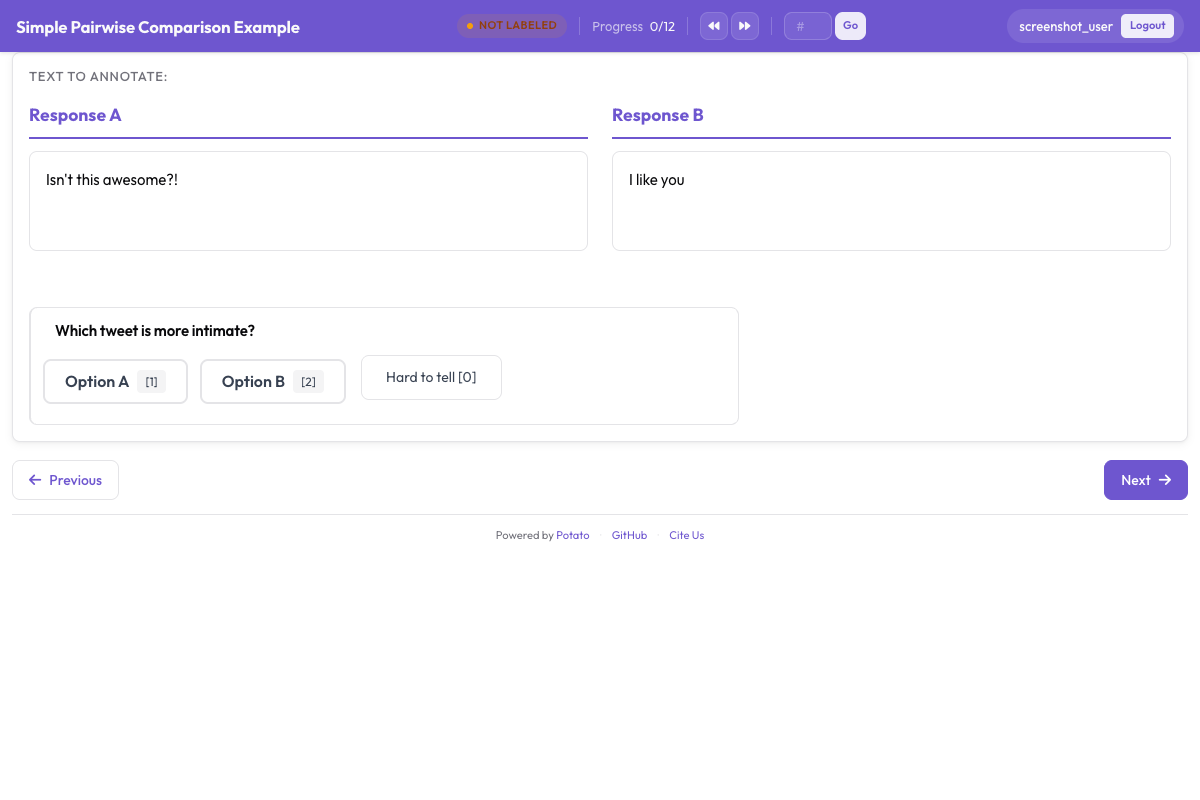 Una tarea de comparación que muestra ambos candidatos con la pregunta de preferencia debajo
La pregunta de preferencia
Una escala de cinco puntos distingue una preferencia fuerte de una débil. Eso importa cuando entrenas con el resultado, porque un par en el que los anotadores se dividen a partes iguales aporta una señal de entrenamiento distinta de la de uno que todos consideraron claro. sequential_key_binding asigna a las cinco opciones las teclas del 1 al 5, y esa es la diferencia entre una comparación que lleva cuatro segundos y otra que lleva doce.
annotation_schemes:
  - annotation_type: radio
    name: preference
    description: "Which image better matches the prompt?"
    labels:
      - name: "A is clearly better"
      - name: "A is slightly better"
      - name: "About equal"
      - name: "B is slightly better"
      - name: "B is clearly better"
    sequential_key_binding: true
    label_requirement:
      required: true
Añade este bloque a la configuración anterior. Haz que la opción central diga "About equal" en lugar de "No preference", porque ambas describen juicios distintos y los anotadores usan una opción de "sin preferencia" como botón para saltar.
Sesgo de posición
Los anotadores eligen la opción de la izquierda más a menudo de lo que deberían, así que el lado en que cae cada imagen tiene que variar. Aleatorízalo al construir el archivo de datos: intercambia image_a e image_b en una mitad aleatoria de las filas, registra en qué sentido quedó cada fila y, antes de analizar, invierte de nuevo los juicios registrados. Los campos de visualización de Potato se muestran en el orden en que los enumeras, así que la configuración no puede hacerlo por ti.
Las comparaciones de texto son distintas. El esquema pairwise toma sus dos candidatos de un único campo de los datos del ítem, así que randomize_order puede permutarlos, y Potato registra el orden que vio realmente cada anotador. La semilla se deriva del anotador, el ítem y el esquema a la vez, y por eso la preferencia de una persona por la primera posición recae en candidatos distintos según el ítem, en lugar de correlacionarse con un mismo lado durante todo el estudio. Consulta la documentación de comparación por pares cuando lo que se compara es texto.
Preguntar por criterios concretos
Una preferencia global te dice qué imagen ganó y nada sobre el porqué. Añadir debajo dos o tres preguntas acotadas hace legibles los desacuerdos, ya que los anotadores que se dividen en el juicio global a menudo coinciden en la fidelidad al prompt y discrepan en la estética.
  - annotation_type: radio
    name: prompt_adherence
    description: "Which image better matches the prompt?"
    labels:
      - name: A
      - name: Tie
      - name: B

  - annotation_type: multiselect
    name: issues_a
    description: "Problems in Image A (select all that apply)"
    labels:
      - name: "Distorted faces or hands"
      - name: "Text rendering errors"
      - name: "Unnatural lighting"
      - name: "Missing elements from the prompt"
      - name: "Blurry or low quality"
      - name: "None"
Añade estos esquemas al bloque anterior. Mantén corta la lista de criterios. Cada pregunta adicional se multiplica por todo el estudio, y un formulario de cinco criterios sobre 2000 pares son 10 000 juicios, cada uno de los cuales necesita su propia definición en las instrucciones.
Comparación de antes y después
Las tareas de mejora, restauración y edición usan la misma construcción de dos imágenes, con los lados nombrados en lugar de aleatorizados, porque saber qué lado es el original forma parte de la pregunta:
instance_display:
  layout:
    direction: horizontal
    gap: 24px
  fields:
    - key: original
      type: image
      label: "Original"
      display_options:
        max_height: 512
        zoomable: true
    - key: enhanced
      type: image
      label: "Enhanced"
      display_options:
        max_height: 512
        zoomable: true

annotation_schemes:
  - annotation_type: radio
    name: enhancement_quality
    description: "How did the edit change the image?"
    labels:
      - name: "Clearly improved"
      - name: "Slightly improved"
      - name: "No noticeable change"
      - name: "Made worse"
    label_requirement:
      required: true

  - annotation_type: multiselect
    name: problems_introduced
    description: "Problems the edit introduced (select all that apply)"
    labels:
      - name: "Over-sharpening or halos"
      - name: "Color shift"
      - name: "Loss of detail"
      - name: "New artifacts"
      - name: "None"
Pregunta por los problemas introducidos por separado de la calidad global. Una edición que enfoca el sujeto y añade halos a su alrededor se lee como una mejora en una escala única, y los halos son justo lo que necesitas saber.
Más de dos imágenes
Para entre tres y ocho candidatos por ítem, muéstralos en un campo gallery y recoge un orden completo con el esquema ranking. La galería toma una lista de rutas de imagen de un solo campo, así que el archivo de datos contiene un array en lugar de dos claves separadas:
item_properties:
  id_key: id
  text_key: prompt

instance_display:
  fields:
    - key: prompt
      type: text
      label: "Prompt"
    - key: images
      type: gallery
      display_options:
        layout: grid
        columns: 2
        thumbnail_size: 320
        zoomable: true

annotation_schemes:
  - annotation_type: ranking
    name: preference_rank
    description: "Drag the image numbers to rank them from best at the top to worst at the bottom."
    labels:
      - "Image 1"
      - "Image 2"
      - "Image 3"
      - "Image 4"
    allow_ties: false
    label_requirement:
      required: true
Los labels nombran las posiciones de la galería, así que la lista tiene que llevar una entrada por imagen y todos los ítems necesitan el mismo número de candidatos. El ranking conviene para conjuntos pequeños, ya que el anotador compara cada candidato con todos los demás a la vez. Por encima de unos ocho candidatos, el esfuerzo por ítem crece más rápido que la información que obtienes.
Conjuntos más grandes
Best-Worst Scaling es la opción cuando el conjunto es demasiado grande para ordenarlo en una sola pantalla. Los anotadores ven una tupla de elementos, normalmente cuatro, y eligen solo el mejor y el peor, y las puntuaciones se calculan a partir de muchas tuplas que se solapan:
  - annotation_type: bws
    name: quality
    description: "Select the BEST and the WORST image in this set."
    tuple_size: 4
    best_description: "Best"
    worst_description: "Worst"
Añade este esquema a la configuración anterior. La puntuación se calcula después de la recogida, desde la pestaña BWS del panel de administración o desde la línea de comandos, y escribe bws_scores.tsv en el directorio de salida:
python -m potato.bws_scoring --config config.yaml --method bradley_terryEl método counting no necesita dependencias adicionales y es la referencia transparente. bradley_terry ajusta un modelo sobre las comparaciones por pares implícitas y necesita pip install choix. plackett_luce modela directamente cada elección del mejor y del peor y no necesita nada aparte del propio Potato. La documentación de Best-Worst Scaling cubre la generación de tuplas, que tiene que hacerse antes de todo esto.
Instrucciones y controles de atención
Explica en las instrucciones qué significa "mejor" para esta tarea, porque si no, los anotadores aportan su propia definición y te enteras en la fase de acuerdo. annotation_instructions coloca el texto en cada página de anotación:
annotation_instructions: |
  Judge each pair on how well it matches the prompt first, then on visual
  quality, then on how appealing it looks. Zoom in before deciding: hands,
  text, and fine texture are where generation failures show up. Mark "About
  equal" only when you have looked at both and cannot separate them.
Los controles de atención de una tarea de comparación son pares con un ganador obvio, mezclados en la cola desde su propio archivo para que queden fuera de tu conjunto de datos:
attention_checks:
  enabled: true
  items_file: "data/attention_checks.json"
  frequency: 20
  min_response_time: 3.0
  failure_handling:
    warn_threshold: 2
    block_threshold: 5
Añade ambos bloques a la configuración anterior. min_response_time detecta el modo de fallo al que más expuesta está una tarea de comparación: un anotador que avanza a un ritmo que no deja tiempo para haber mirado la segunda imagen.
La configuración completa
Esta configuración ejecuta una recogida de preferencias para RLHF con dos salidas de modelo por ítem, una preferencia de cinco puntos, una pregunta de criterio y una valoración de confianza. Tres anotadores ven cada par, lo que basta para informar del acuerdo y tomar una etiqueta por mayoría.
annotation_task_name: "Generative Model Comparison"
task_description: "Compare two generated images against the prompt that produced them."

data_files:
  - data/model_outputs.json

item_properties:
  id_key: id
  text_key: prompt

instance_display:
  layout:
    direction: horizontal
    gap: 24px
  fields:
    - key: image_a
      type: image
      label: "Image A"
      display_options:
        max_height: 512
        zoomable: true
        alt_text: "First generated image"
    - key: image_b
      type: image
      label: "Image B"
      display_options:
        max_height: 512
        zoomable: true
        alt_text: "Second generated image"

annotation_instructions: |
  Judge each pair on prompt match first, then visual quality, then appeal.
  Zoom in before deciding. Mark "About equal" only when you cannot separate them.

annotation_schemes:
  - annotation_type: radio
    name: preference
    description: "Which image better represents the prompt?"
    labels:
      - name: "A is clearly better"
      - name: "A is slightly better"
      - name: "About equal"
      - name: "B is slightly better"
      - name: "B is clearly better"
    sequential_key_binding: true
    label_requirement:
      required: true

  - annotation_type: radio
    name: prompt_adherence
    description: "Which image matches the prompt more closely?"
    labels:
      - name: A
      - name: Tie
      - name: B

  - annotation_type: likert
    name: confidence
    description: "How confident are you in this judgment?"
    size: 5
    min_label: "Guessing"
    max_label: "Certain"

attention_checks:
  enabled: true
  items_file: "data/attention_checks.json"
  frequency: 20
  min_response_time: 3.0
  failure_handling:
    warn_threshold: 2
    block_threshold: 5

num_annotators_per_item: 3
output_annotation_dir: annotation_output/image-comparison/
export_annotation_format: jsonl
Arráncala con potato start config.yaml -p 8000, abre el puerto en un navegador e inicia sesión para comprobar que el par se muestra como esperas antes de enviar el enlace a nadie. Anota también tú algunos ítems, porque un esquema que se lee con claridad en la configuración a menudo resulta ambiguo en el tercer par real.
Qué contiene la salida
Potato escribe archivos por anotador en output_annotation_dir, y export_annotation_format añade una exportación periódica en <output_annotation_dir>/exports/<format>/. Cada registro exportado nombra la instancia, el anotador y la etiqueta elegida en cada esquema:
{"instance_id": "pair_001", "user_id": "rater_01", "labels": {"preference": {"A is slightly better": "A is slightly better"}, "confidence": {"4": "4"}}, "spans": {}, "links": {}}Une eso con tu archivo de datos por instance_id para recuperar qué modelo produjo cada lado, y deshaz el intercambio izquierda-derecha que aplicaste al construir el archivo antes de agregar nada. Hacer ese paso al final, y no en la configuración de anotación, es lo que conserva el registro bruto de lo que vio realmente cada anotador.
Próximos pasos
- Recoge datos de preferencia a escala con Prolific
- Mide el acuerdo entre anotadores sobre el resultado
- Lee la documentación de comparación por pares para comparaciones de texto, y la documentación del código fuente de Potato para la referencia del esquema