Clasificación de emociones en el habla
Crea una tarea de clasificación de emociones en audio en Potato con forma de onda interactiva, controles de velocidad de reproducción, escalas Likert y conjuntos de etiquetas de emoción configurables.
El reconocimiento de emociones en el habla (SER) aparece en asistentes virtuales, herramientas de salud mental y análisis de centros de llamadas, y todos ellos necesitan audio etiquetado para entrenarse. Este tutorial recorre interfaces de anotación para emociones categóricas, calificaciones dimensionales y clips en los que hay más de una emoción presente. Para las opciones de audio subyacentes, consulta la documentación de anotación de audio.
Enfoques de anotación de emociones
Hay varias formas habituales de etiquetar la emoción en el habla. Puedes usar categorías discretas como feliz, triste o enojado. Puedes calificar dimensiones continuas como valencia, activación y dominancia. Puedes permitir que los anotadores marquen varias emociones a la vez con calificaciones de intensidad. O, en clips más largos, puedes etiquetar emociones distintas en marcas de tiempo distintas.
Clasificación categórica de emociones
Configuración básica
annotation_task_name: "Speech Emotion Recognition"

data_files:
  - data/utterances.json

item_properties:
  id_key: id
  text_key: transcript  # Optional transcript

instance_display:
  fields:
    - key: audio_path
      type: audio
      label: "Utterance"
      display_options:
        controls: true
        show_waveform: true
        preload: metadata

annotation_schemes:
  - annotation_type: radio
    name: emotion
    description: "What emotion is expressed in this speech?"
    labels:
      - name: Happy
        description: "Joy, excitement, amusement"
        key_value: "h"
      - name: Sad
        description: "Sorrow, disappointment, grief"
        key_value: "s"
      - name: Angry
        description: "Frustration, irritation, rage"
        key_value: "a"
      - name: Fearful
        description: "Anxiety, worry, terror"
        key_value: "f"
      - name: Surprised
        description: "Astonishment, shock"
        key_value: "u"
      - name: Disgusted
        description: "Revulsion, distaste"
        key_value: "d"
      - name: Neutral
        description: "No clear emotion"
        key_value: "n"
    label_requirement:
      required: true
Potato muestra una forma de onda interactiva con controles de reproducción junto a las etiquetas de anotación:
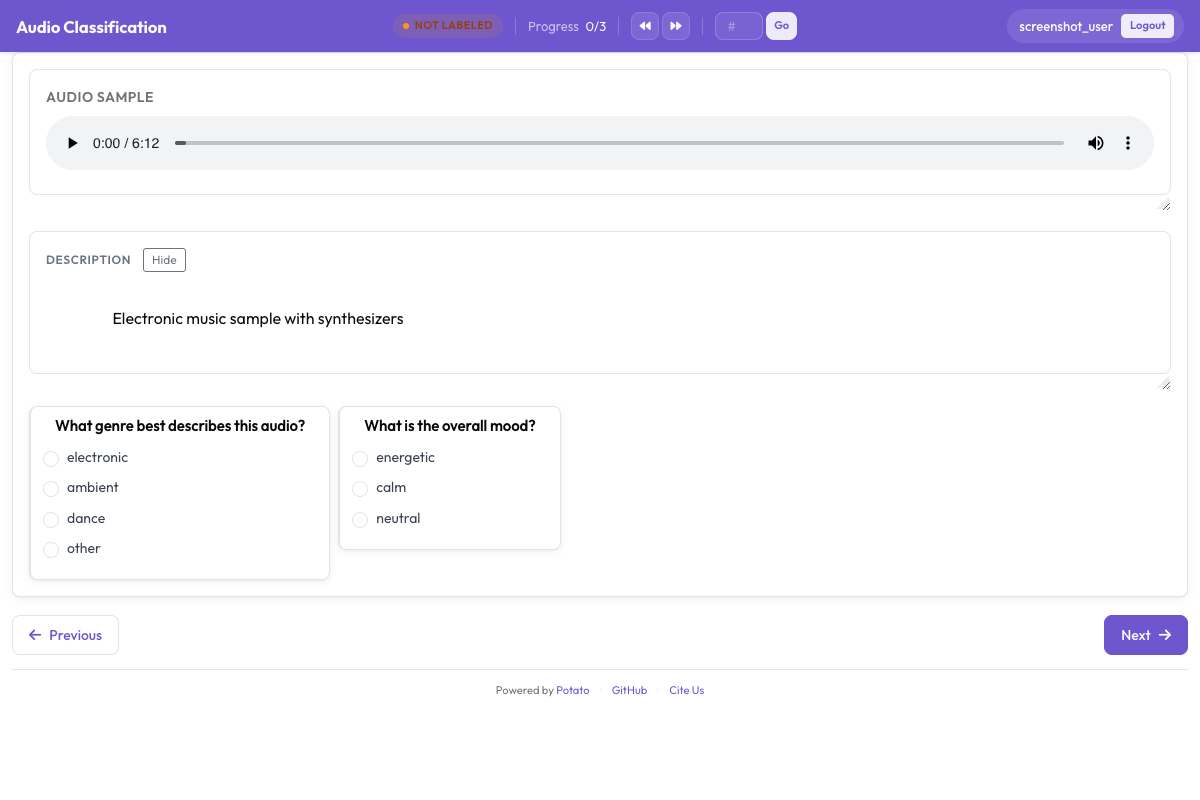 La interfaz de anotación de audio con una forma de onda interactiva, controles de reproducción y etiquetas categóricas de emoción
Añadir intensidad
annotation_schemes:
  - annotation_type: radio
    name: emotion
    description: "What emotion does the speaker express?"
    labels: [Happy, Sad, Angry, Fearful, Surprised, Disgusted, Neutral]
    label_requirement:
      required: true

  - annotation_type: likert
    name: intensity
    description: "How intense is this emotion?"
    size: 5
    min_label: "Very weak"
    max_label: "Very strong"
Anotación dimensional de emociones
El modelo VAD (valencia, activación, dominancia) califica cada clip en tres escalas continuas en lugar de forzarlo a una sola categoría:
annotation_task_name: "Dimensional Emotion Rating"

annotation_schemes:
  # Valence: negative to positive
  - annotation_type: likert
    name: valence
    description: "Valence: How positive or negative?"
    size: 7
    min_label: "Very negative"
    max_label: "Very positive"

  # Arousal: calm to excited
  - annotation_type: likert
    name: arousal
    description: "Arousal: How calm or excited?"
    size: 7
    min_label: "Very calm"
    max_label: "Very excited"

  # Dominance: submissive to dominant
  - annotation_type: likert
    name: dominance
    description: "Dominance: How submissive or dominant?"
    size: 7
    min_label: "Very submissive"
    max_label: "Very dominant"
Escalas visuales (SAM)
Al estilo del Self-Assessment Manikin:
annotation_schemes:
  - annotation_type: likert
    min_label: "Very negative"
    max_label: "Very positive"
    name: valence
    description: "Select the figure that matches the emotional valence"
    size: 9
Detección de emociones mixtas
Para habla que contiene varias emociones:
annotation_schemes:
  - annotation_type: multiselect
    name: emotions_present
    description: "Select ALL emotions you detect (can be multiple)"
    labels:
      - Happy
      - Sad
      - Angry
      - Fearful
      - Surprised
      - Disgusted
      - Contempt

  - annotation_type: radio
    name: primary_emotion
    description: "Which emotion is MOST prominent?"
    labels:
      - Happy
      - Sad
      - Angry
      - Fearful
      - Surprised
      - Disgusted
      - Contempt
      - Mixed (no dominant)
Anotación completa de emociones
annotation_task_name: "Comprehensive Speech Emotion Annotation"

data_files:
  - data/speech_samples.json

item_properties:
  id_key: id
  text_key: transcript

instance_display:
  fields:
    - key: audio_url
      type: audio
      label: "Speech sample"
      display_options:
        controls: true
        show_waveform: true
        preload: metadata
        autoplay: false

    # Show the transcript alongside the audio
    - key: transcript
      type: text
      label: "Transcript (for reference)"

annotation_schemes:
  # Primary categorical emotion
  - annotation_type: radio
    name: primary_emotion
    description: "Primary emotion expressed"
    labels:
      - name: Happiness
        color: "#FCD34D"
        key_value: "1"
      - name: Sadness
        color: "#60A5FA"
        key_value: "2"
      - name: Anger
        color: "#F87171"
        key_value: "3"
      - name: Fear
        color: "#A78BFA"
        key_value: "4"
      - name: Surprise
        color: "#34D399"
        key_value: "5"
      - name: Disgust
        color: "#FB923C"
        key_value: "6"
      - name: Neutral
        color: "#9CA3AF"
        key_value: "7"
    label_requirement:
      required: true

  # Emotional intensity
  - annotation_type: likert
    name: intensity
    description: "Emotional intensity"
    size: 5
    min_label: "Very mild"
    max_label: "Very intense"
    label_requirement:
      required: true

  # Dimensional ratings
  - annotation_type: likert
    name: valence
    description: "Valence (negative to positive)"
    size: 7
    min_label: "Negative"
    max_label: "Positive"

  - annotation_type: likert
    name: arousal
    description: "Arousal (calm to excited)"
    size: 7
    min_label: "Calm"
    max_label: "Excited"

  # Voice quality
  - annotation_type: multiselect
    name: voice_qualities
    description: "Voice characteristics (select all that apply)"
    labels:
      - Trembling voice
      - Raised pitch
      - Lowered pitch
      - Loud/shouting
      - Soft/whisper
      - Fast speech rate
      - Slow speech rate
      - Breathy
      - Tense/strained
      - Crying
      - Laughing

  # Genuineness
  - annotation_type: radio
    name: authenticity
    description: "Does the emotion seem genuine?"
    labels:
      - Clearly genuine
      - Likely genuine
      - Uncertain
      - Likely acted/fake
      - Clearly acted/fake

  # Confidence
  - annotation_type: likert
    name: confidence
    description: "How confident are you in your annotation?"
    size: 5
    min_label: "Guessing"
    max_label: "Certain"

annotation_instructions: |
  ## Emotion Annotation Guidelines

  ### Listening Instructions
  1. Listen to the entire clip before annotating
  2. You may replay as many times as needed
  3. Focus on the VOICE, not just the words

  ### Emotion Categories
  - **Happiness**: Joy, amusement, contentment
  - **Sadness**: Sorrow, disappointment, melancholy
  - **Anger**: Frustration, irritation, rage
  - **Fear**: Anxiety, nervousness, terror
  - **Surprise**: Astonishment, startle
  - **Disgust**: Revulsion, contempt
  - **Neutral**: Calm, matter-of-fact

  ### Tips
  - Consider tone, pitch, speaking rate
  - The transcript may not match the emotion
  - When unsure between two emotions, choose the stronger one
  - Use the intensity scale for unclear cases

output_annotation_dir: annotations/
export_annotation_format: jsonl
Formato de salida
{
  "instance_id": "utt_001",
  "user_id": "rater_01",
  "labels": {
    "primary_emotion": {"Surprise": "true"},
    "voice_qualities": {"Raised pitch": "true", "Fast speech rate": "true"},
    "authenticity": {"Clearly genuine": "true"},
    "confidence": {"4": "true"}
  },
  "spans": {},
  "links": {}
}
Emoción a nivel de segmento
Para audio más largo con emociones que cambian:
annotation_schemes:
  - annotation_type: audio_annotation
    name: emotion_segments
    description: "Mark time segments with different emotions"
    labels:
      - name: Happy
        color: "#FCD34D"
      - name: Sad
        color: "#60A5FA"
      - name: Angry
        color: "#F87171"
      - name: Neutral
        color: "#9CA3AF"
Control de calidad
Los clips inequívocos con etiquetas conocidas detectan a los anotadores que responden sin prestar atención. Ambos bloques van en el nivel superior de la configuración, y ambos toman sus ítems de un archivo en lugar de definirlos en línea:
attention_checks:
  enabled: true
  frequency: 20
  items_file: data/attention_checks.json
  min_response_time: 3.0

gold_standards:
  enabled: true
  items_file: data/gold_standards.json
  mode: mixed
  frequency: 20
  accuracy:
    min_threshold: 0.7
    evaluation_count: 10
Un ítem gold se ve como uno de tus ítems de datos con un gold_label añadido, así que se muestra igual que todo lo demás:
[
  {
    "id": "gold_001",
    "audio_path": "/audio/gold/clearly_happy.wav",
    "gold_label": { "primary_emotion": "Happiness" },
    "explanation": "Laughter and rising pitch throughout, with no ambiguity.",
    "difficulty": "easy"
  }
]
Los ítems de verificación de atención usan expected_answer en lugar de gold_label. min_response_time es el control útil para audio: un mínimo de tres segundos detecta a cualquiera que etiquete un clip que no ha podido terminar de escuchar.
Anidar estos bloques dentro de un bloque quality_control: es un error común y falla sin avisar. Potato lee attention_checks y gold_standards desde el nivel superior, y la única clave que lee de quality_control es geometry_iou_tolerance, así que un bloque anidado pasa la validación sin errores y nunca se ejecuta.
Consejos para la anotación de emociones
Escucha el clip completo antes de decidir y fíjate en cómo se dice algo más que en las palabras en sí. Ten en cuenta que las normas de expresión varían entre culturas, de modo que lo que en una se interpreta como enojo en otra puede interpretarse como énfasis. La anotación de emociones es agotadora, así que fomenta las pausas y haz que el equipo comente los desacuerdos con regularidad para mantenerse calibrado.
Próximos pasos
- Añade diarización de hablantes para seguir emociones con varios hablantes
- Configura crowdsourcing para la recolección a gran escala
- Calcula el acuerdo entre anotadores para tareas de emociones
Documentación en Anotación de audio.