더 나은 코딩 에이전트를 학습하기 위한 프로세스 보상 데이터 수집 방법
Potato에서 PRM 학습용 단계별 보상 라벨을 수집합니다. 첫-오류 모드와 단계별 모드를 쓰고, 내보낸 데이터를 학습용으로 정리하는 스크립트도 다룹니다.
프로세스 보상 모델이란?
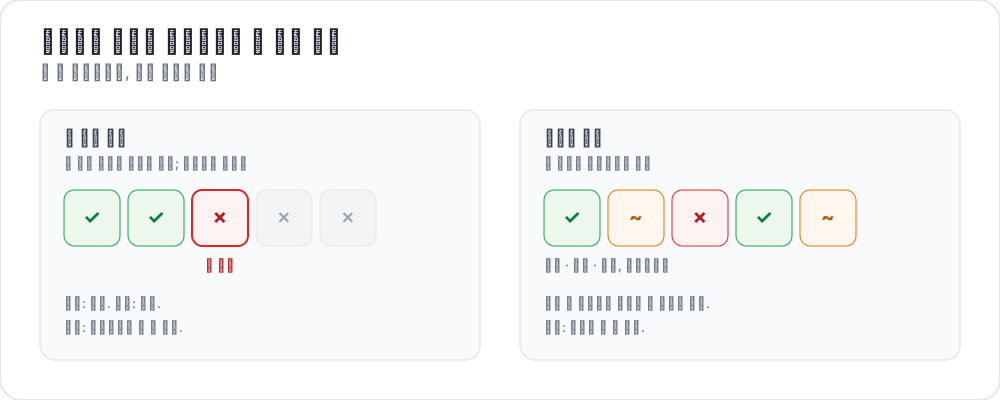 프로세스 보상을 라벨링하는 두 가지 방법
결과 보상 모델은 코딩 에이전트 궤적의 끝만 봅니다. 코드가 컴파일되었는가, 테스트가 통과했는가, 이슈가 해결되었는가? 프로세스 보상 모델은 그 대신 중간 단계마다 점수를 매깁니다. 모든 단계에 신호가 있으면 학습 과정에서 에이전트가 어디서 잘못했는지 정확히 짚어낼 수 있습니다.
최근 연구가 이 방향으로 나아가고 있습니다. AgentPRM은 에이전트 과제에 맞게 프로세스 보상을 다시 정의해, 각 행동을 정답 여부가 아니라 목표에 얼마나 다가갔는지로 채점하며, 비교한 베이스라인 대비 8배가 넘는 연산 효율을 보고합니다. ToolRM은 자연어 출력으로 학습한 보상 모델이 도구 호출을 제대로 판단하지 못한다는 점을 확인하고, 도구 전용 보상 모델과 이를 평가할 FC-RewardBench를 만들었습니다. 반대로 DeepSWE는 테스트 통과 여부라는 희소한 결과 보상만으로 코딩 에이전트를 학습시켜 SWE-bench Verified에서 Pass@1 42.2%, 테스트 타임 스케일링을 더해 59%에 도달했습니다. 프로세스 감독이 개선하려는 대상이 바로 이 결과 전용 설정입니다.
이 연구들이 모두 필요로 하는 것은 단계별 인간 어노테이션이며, 보통 이것이 병목입니다. 스키마 레퍼런스는 프로세스 보상 문서를 참고하십시오.
두 가지 어노테이션 모드
첫-오류 모드
어노테이터는 궤적을 위에서 아래로 읽으며 에이전트가 처음 잘못한 단계를 클릭합니다. 그 이전의 모든 단계는 정확으로, 그 단계와 이후의 모든 단계는 부정확으로 기록됩니다. 트레이스마다 결정이 하나뿐이라 빠르고, 한번 길을 벗어난 에이전트가 회복하지 못하는 흔한 경우에 잘 맞습니다.
annotation_schemes:
  - annotation_type: process_reward
    name: step_rewards
    description: "Click the first step where the agent makes a mistake. Steps after it are flagged automatically."
    mode: first_error
    steps_key: structured_turns
    step_text_key: content
단계별 모드
모든 단계가 각자의 라벨을 받으므로 첫-오류 모드가 잡아내지 못하는 것을 포착합니다. 부분적인 회복, 해롭지 않은 우회, 그 자체로는 괜찮지만 맥락상 틀린 단계가 그렇습니다. allow_neutral은 PRM800K 방식의 세 번째 선택지를 추가합니다.
annotation_schemes:
  - annotation_type: process_reward
    name: step_rewards
    description: "Rate each step correct, neutral, or incorrect"
    mode: per_step
    steps_key: structured_turns
    step_text_key: content
    allow_neutral: true
inline_with_trace: trueinline_with_trace는 디스플레이의 각 단계에 컨트롤을 붙입니다. 긴 트레이스에서는 별도 패널을 쓰면 어노테이터가 읽던 위치를 놓치기 때문에 이 설정이 중요합니다.
프로젝트 설정하기
1단계: 트레이스 준비
각 줄이 하나의 궤적입니다. steps_key는 단계 목록을, step_text_key는 각 단계에서 표시할 필드를 지정합니다.
{
  "id": "trace_001",
  "issue_description": "Fix the TypeError in parse_config() when the config file is empty",
  "structured_turns": [
    {"step_idx": 0, "type": "thinking", "content": "I need to find where the TypeError occurs. Let me read the file."},
    {"step_idx": 1, "type": "file_read", "content": "def parse_config(path):\n    with open(path) as f:\n        data = json.load(f)\n    return data['settings']"},
    {"step_idx": 2, "type": "thinking", "content": "When the file is empty json.load returns None, so None['settings'] raises. Add a check."},
    {"step_idx": 3, "type": "file_edit", "content": "+    if data is None:\n+        return {}"},
    {"step_idx": 4, "type": "bash_command", "content": "python -m pytest tests/test_config.py -v  ->  2 passed"}
  ]
}
다른 에이전트 포맷에서 변환하는 것은 CLI 한 단계입니다.
python -m potato.trace_converter \
  --input claude_code_sessions.json \
  --input-format claude_code \
--output data/traces.jsonl--list-formats는 지원하는 포맷을 출력하며, 여기에는 claude_code, aider, swe_agent_trajectory, swebench, react, langchain 외에 아홉 가지가 더 있습니다. 가진 데이터가 어느 포맷인지 확실하지 않으면 --auto-detect를 사용하십시오.
2단계: 설정 작성
annotation_task_name: "PRM Data Collection"
task_dir: "."

data_files:
  - "data/traces.jsonl"

item_properties:
  id_key: id
  text_key: issue_description

instance_display:
  fields:
    - key: issue_description
      type: text
      label: "Issue"

    - key: structured_turns
      type: coding_trace
      label: "Agent trajectory"
      display_options:
        diff_view: unified
        show_file_tree: true
        show_reasoning: true
        terminal_theme: dark
        collapse_long_outputs: true
        max_output_lines: 50

annotation_schemes:
  - annotation_type: process_reward
    name: step_rewards
    description: "Click the first step where the agent makes an error"
    mode: first_error
    steps_key: structured_turns
    step_text_key: content

  - annotation_type: radio
    name: outcome
    description: "Did the agent resolve the issue?"
    labels:
      - name: resolved
        text: "Fully resolved"
      - name: partial
        text: "Partially resolved"
      - name: not_resolved
        text: "Not resolved"

  - annotation_type: text
    name: error_description
    description: "If the trajectory went wrong, describe the error briefly"
    rows: 3
    placeholder: "e.g. edited the wrong file"
    label_requirement:
      required: false

num_annotators_per_item: 2

attention_checks:
  enabled: true
  items_file: "data/attention_checks.json"
  frequency: 20
  min_response_time: 20.0
  failure_handling:
    warn_threshold: 2
    block_threshold: 5

user_config:
  allow_all_users: false
  users:
    - reviewer1@example.com
    - reviewer2@example.com
    - reviewer3@example.com

output_annotation_dir: "annotation_output/"
export_annotation_format: jsonl
라벨 객체는 name으로 식별됩니다. text 필드는 어노테이터가 읽는 문구이므로, 문구가 바뀌어도 저장되는 값은 안정적인 식별자로 유지됩니다.
여기서 유용한 컨트롤은 min_response_time: 20.0입니다. diff가 포함된 여러 단계의 궤적을 20초 안에 읽는 사람은 없으므로, 트레이스별 시간 제한으로는 잡지 못하는 서두름을 잡아냅니다.
3단계: 서버 실행
potato start config.yaml -p 8000학습용 내보내기
coding_eval 익스포터는 학습 포맷을 직접 작성하므로 데이터를 가공하는 작업이 필요 없습니다.
python -m potato.export -c config.yaml -f coding_eval -o ./export/단계별 라벨이 담긴 prm_training_data.jsonl, 어노테이션으로 만든 DPO 방식의 chosen/rejected 트레이스가 담긴 preference_pairs.jsonl, swebench_results.jsonl, code_reviews.jsonl을 작성합니다. 기본적으로 네 가지를 모두 작성합니다. 범위를 좁히려면 익스포터의 types 옵션을 전달하십시오(--option types=prm,preference). 요청한 유형의 데이터가 스터디에 없으면 빈 파일을 쓰는 대신 그 사실을 알려 줍니다.
어노테이션은 스키마 이름 아래에 steps 목록과 모드로 저장됩니다. reward는 정확이면 1, 부정확이면 -1, 중립이면 0, 아무도 판단하지 않은 단계면 null입니다.
{
  "step_rewards": {
    "mode": "first_error",
    "steps": [
      {"reward": 1, "source": "human", "verified": true},
      {"reward": 1, "source": "human", "verified": true},
      {"reward": -1, "source": "human", "verified": true},
      {"reward": -1, "source": "human", "verified": true}
    ]
  }
}
익스포터가 작성하지 않는 형태가 필요할 때만 스크립트를 쓰십시오. 판단되지 않은 단계를 직접 처리하려는 것이 흔한 이유인데, 아무도 판단하지 않은 단계는 0이 아니라 null이기 때문입니다.
import json
from pathlib import Path

SCHEME = "step_rewards"

examples = []
for f in Path("export/").rglob("*.jsonl"):
    with open(f) as fh:
        for line in fh:
            rec = json.loads(line)
            payload = (rec.get("labels", rec) or {}).get(SCHEME)
            if not payload:
                continue

            steps = payload.get("steps", [])
            # Drop traces with unjudged steps rather than guessing at them.
            if any(s.get("reward") is None for s in steps):
                continue

            item = items_by_id[rec["instance_id"]]      # your own data file
            examples.append({
                "trace_id": rec["instance_id"],
                "prompt": item["issue_description"],
                "steps": [
                    {"content": src["content"], "label": s["reward"]}
                    for src, s in zip(item["structured_turns"], steps)
                ],
            })

with open("prm_labels.jsonl", "w") as out:
    for ex in examples:
        out.write(json.dumps(ex) + "\n")

print(f"Wrote {len(examples)} traces")
선호 쌍도 같은 어노테이션에서 나옵니다. 두 트레이스가 같은 이슈를 시도한 경우 익스포터는 둘을 짝짓고, 첫 오류가 더 늦게 나오거나 오류가 없는 쪽을 chosen 트레이스로 취급합니다.
분석
첫 오류가 나타나는 위치
import json
from pathlib import Path

SCHEME = "step_rewards"

traces = []
for f in Path("export/").rglob("*.jsonl"):
    with open(f) as fh:
        for line in fh:
            payload = (json.loads(line).get("labels", {}) or {}).get(SCHEME)
            if payload:
                traces.append(payload)

positions = []
all_correct = 0
for t in traces:
    steps = t.get("steps", [])
    first = next((i for i, s in enumerate(steps) if s.get("reward") == -1), None)
    if first is None:
        all_correct += 1
    elif len(steps) > 1:
        positions.append(first / (len(steps) - 1))

print(f"Traces annotated: {len(traces)}")
print(f"No errors: {all_correct} ({all_correct / len(traces):.1%})")
if positions:
    print(f"Average first-error position: {sum(positions) / len(positions):.2f} (0=start, 1=end)")
첫 오류에 대한 일치도
두 어노테이터가 같은 단계를 고르는 일은 드물고, 정확 일치는 실제 일치 정도를 과소평가합니다. 위치를 먼저 구간으로 나누면 더 유익한 비교가 됩니다.
def bin_position(steps):
    first = next((i for i, s in enumerate(steps) if s.get("reward") == -1), None)
    if first is None:
        return "all_correct"
return "early_error" if first < len(steps) / 2 else "late_error"num_annotators_per_item으로 생기는 중복을 활용해, 같은 항목을 맡은 어노테이터들 사이에서 이 구간들을 비교하십시오.
팁
속도가 필요하면 첫-오류 모드를 사용하십시오. 탐색을 안내하는 PRM을 학습하는 데는 어노테이션 비용의 일부만으로 충분한 신호를 주며, 어차피 대부분의 에이전트는 연쇄적으로 실패합니다.
세부 정보가 필요하면 단계별 모드를 사용하십시오. 부분적인 회복과 해롭지 않은 우회는 단계별 모드에서만 라벨로 존재합니다.
경험 있는 어노테이터로 시작하십시오. 코드, diff, 터미널 출력을 읽어야 하는 작업입니다. 작은 그룹으로 시작해 일치도를 측정하고, 공유 예시로 보정한 뒤 규모를 늘리십시오.
응답 시간 하한을 설정하십시오. 궤적은 길어지기 마련이고, 하한이 있으면 어노테이터가 diff를 건너뛰며 서두르는 것을 막을 수 있습니다.
보정 단계를 거치십시오. 본 어노테이션을 시작하기 전에 모두가 같은 10~20개 트레이스에 라벨을 붙이고 의견이 갈린 부분을 논의하게 하십시오.