스마트 주석 힌트를 위한 LLM 통합
OpenAI, Claude 또는 Gemini를 Potato와 통합하여 지능형 라벨 힌트, 사전 주석 제안, 키워드 강조를 제공함으로써 주석자의 처리량을 높입니다.
좋은 LLM 훅은 주석을 더 빠르고 더 일관되게 만들 수 있습니다. 이 가이드는 OpenAI, Claude, Gemini, 로컬 모델을 연결하여 주석자가 최종 결정권을 유지하면서 유용한 제안을 받도록 하는 방법을 다룹니다.
LLM 통합이 주는 것
모델은 주석자가 검토할 라벨을 미리 채우고, 텍스트에서 중요한 용어를 강조하고, 잘못되어 보이는 주석에 표시를 하고, 까다로운 경우를 설명하여 막힌 주석자가 작업할 무언가를 갖도록 할 수 있습니다.
AI 지원 계층이 어떻게 구축되는지는 소스 문서를 참고하십시오.
기본 OpenAI 통합
annotation_task_name: "AI-Assisted Sentiment Analysis"

# AI configuration
ai_support:
  enabled: true
  endpoint_type: openai

  ai_config:
    model: gpt-4
    api_key: ${OPENAI_API_KEY}
    temperature: 0.3
    max_tokens: 500

  features:
    hints:
      enabled: true
    keyword_highlighting:
      enabled: true
    label_suggestions:
      enabled: true

# ... rest of config
annotation_schemes:
  - annotation_type: radio
    name: sentiment
    labels: [Positive, Negative, Neutral]
지원되는 제공자
OpenAI
ai_support:
  enabled: true
  endpoint_type: openai

  ai_config:
    model: gpt-4  # or gpt-4o, gpt-3.5-turbo
    api_key: ${OPENAI_API_KEY}
    temperature: 0.3
    max_tokens: 500
Anthropic Claude
ai_support:
  enabled: true
  endpoint_type: anthropic

  ai_config:
    model: claude-3-sonnet-20240229
    api_key: ${ANTHROPIC_API_KEY}
    temperature: 0.3
    max_tokens: 500
Google Gemini
ai_support:
  enabled: true
  endpoint_type: google

  ai_config:
    model: gemini-1.5-pro
    api_key: ${GOOGLE_API_KEY}
로컬 모델 (Ollama)
ai_support:
  enabled: true
  endpoint_type: ollama

  ai_config:
    model: llama2  # or mistral, mixtral, etc.
    base_url: http://localhost:11434
기능: 라벨 제안
모델은 주석자가 따져볼 라벨을 제안할 수 있습니다:
ai_support:
  enabled: true
  endpoint_type: openai

  ai_config:
    model: gpt-4
    api_key: ${OPENAI_API_KEY}

  features:
    label_suggestions:
      enabled: true
      show_confidence: true

annotation_schemes:
  - annotation_type: radio
    name: category
    labels: [News, Opinion, Satire, Other]
기능: 키워드 강조
키워드 강조가 켜져 있으면, LLM이 주석 텍스트에서 관련 용어를 스스로 표시합니다:
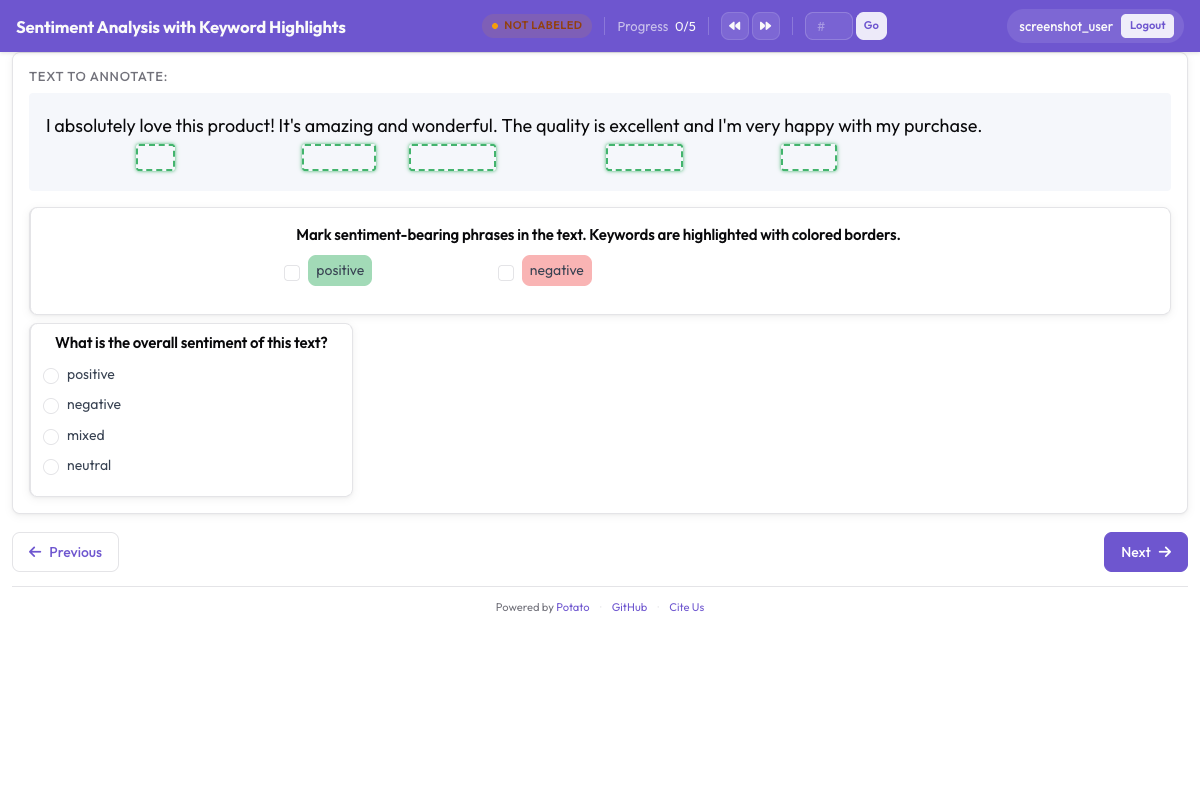
중요한 용어를 자동으로 강조하려면:
ai_support:
  enabled: true
  endpoint_type: openai

  ai_config:
    model: gpt-4
    api_key: ${OPENAI_API_KEY}

  features:
    keyword_highlighting:
      enabled: true
기능: 힌트
답을 건네주지 않으면서 주석자에게 약간의 도움을 주십시오:
ai_support:
  enabled: true
  endpoint_type: openai

  ai_config:
    model: gpt-4
    api_key: ${OPENAI_API_KEY}

  features:
    hints:
      enabled: true
힌트는 판결이 아니라 안내로 나타나므로, 어려운 경우를 따져보기는 더 쉬워지지만 선택은 여전히 주석자의 몫입니다.
완전한 AI 지원 구성
annotation_task_name: "AI-Assisted NER Annotation"

# AI Configuration
ai_support:
  enabled: true
  endpoint_type: openai

  ai_config:
    model: gpt-4
    api_key: ${OPENAI_API_KEY}
    temperature: 0.2
    max_tokens: 500

  features:
    hints:
      enabled: true
    keyword_highlighting:
      enabled: true
    label_suggestions:
      enabled: true
      show_confidence: true

  cache_config:
    disk_cache:
      enabled: true
      path: "ai_cache/cache.json"
    prefetch:
      warm_up_page_count: 50
      on_next: 5
      on_prev: 2

data_files:
  - data/texts.json

item_properties:
  id_key: id
  text_key: content

annotation_schemes:
  - annotation_type: span
    name: entities
    description: "Label named entities (AI suggestions provided)"
    labels:
      - name: PERSON
        color: "#FF6B6B"
      - name: ORG
        color: "#4ECDC4"
      - name: LOC
        color: "#45B7D1"
      - name: DATE
        color: "#96CEB4"

output_annotation_dir: "annotation_output/"
export_annotation_format: "json"
AI 제안 다루기
AI 지원이 켜져 있으면, 제안이 주석 인터페이스 옆에 자리하며, 주석자는 그것을 수락하거나 변경하거나 무시할 수 있습니다. 저장되는 주석은 항상 주석자의 결정이므로, 사람이 루프 안에 남습니다.
캐싱이 켜져 있으면 응답이 저장되므로, 같은 인스턴스가 두 번째 API 호출을 발생시키는 일은 없습니다.
사용자 지정 프롬프트
Potato는 각 주석 유형에 대한 기본 프롬프트를 포함하며, 이는 potato/ai/prompt/에 저장됩니다. 프롬프트 파일을 편집하여 이를 사용자 지정할 수 있습니다:
| 주석 유형 | 프롬프트 파일 |
|---|---|
| 라디오 버튼 | radio_prompt.txt |
| Likert 척도 | likert_prompt.txt |
| 체크박스 | checkbox_prompt.txt |
| Span 주석 | span_prompt.txt |
| 텍스트 입력 | text_prompt.txt |
프롬프트는 {text}, {labels}, {description}을 사용한 변수 치환을 지원합니다.
AI 지원 주석을 위한 팁
신중하게 시작하고 해당 작업에서 모델을 신뢰하게 될 때까지 모든 제안을 검토하십시오. 수락률을 주시하십시오. 수락률이 낮다는 것은 보통 주석자가 아니라 프롬프트에 손이 필요하다는 뜻이기 때문입니다. 실제로 보이는 오류에 맞춰 프롬프트를 조정하십시오. 사람이 주도권을 쥐도록 하십시오. AI는 돕고, 사람이 결정합니다. 그리고 시간이 지남에 따라 AI 라벨을 사람 라벨과 비교 추적하여 모델이 실제로 얼마나 정확한지 파악하십시오.
v2.2의 새 기능: 옵션 강조
Potato 2.2는 옵션 강조를 추가합니다. 이는 내용을 읽고 이산형 작업(라디오, 다중 선택, likert)에 대해 가장 가능성 높은 옵션을 표시합니다. top-k 옵션은 별을 받고, 덜 가능성 있는 것은 흐려지며, 모든 것이 클릭 가능한 상태로 유지됩니다.
ai_support:
  option_highlighting:
    enabled: true
    top_k: 3
dim_opacity: 0.4다음 단계
- 불확실한 항목의 우선순위를 정하려면 능동 학습을 활성화하십시오
- AI 지표로 품질 관리를 설정하십시오
- 프라이버시를 위한 로컬 모델에 대해 알아보십시오
- 안내형 주석을 위한 옵션 강조를 살펴보십시오
전체 AI 문서는 AI 지원에 있습니다.