자동 키워드 강조
고정 키워드 파일 또는 LLM 키워드 어시스턴트로 Potato의 키워드 강조를 구성하는 방법을 다룹니다. 레이블별 색상, 무작위 방해어, 응답 캐싱도 포함합니다.
Potato는 두 가지 방식으로 키워드를 강조합니다. keyword_highlights_file은 모델 없이 모든 항목에서 고정된 용어 목록을 표시하고, ai_support는 Keyword 버튼을 추가합니다. 어노테이터가 이 버튼을 누르면 LLM이 각 레이블과 관련된 단어를 표시합니다.
두 방식은 실패하는 방식이 다르므로, 설정보다 어느 쪽을 고르느냐가 더 중요합니다. 고정 목록은 결정적이고, 항목당 비용이 들지 않으며, 논문의 방법 섹션에 보고할 수 있지만, 주변 문장이 무슨 말을 하든 같은 문자열을 표시합니다. LLM 어시스턴트는 각 항목을 읽고 어떤 단어 목록으로도 잡아내지 못했을 구절을 표시할 수 있지만, 그 대가로 요청마다 API 호출이 한 번 필요하고 모르는 사이에 바뀔 수 있는 모델에 의존하게 됩니다.
옵션 강조와 키워드 강조가 어떻게 구현되어 있는지는 원본 문서를 참고하세요.
고정 키워드 목록
모든 어노테이터가 같은 강조를 봐야 하고, 나중에 그 강조가 정확히 무엇이었는지 밝힐 수 있어야 한다면 키워드 파일을 사용하세요. keyword_highlights_file이 CSV 또는 TSV 파일을 가리키도록 하면, Potato는 항목 텍스트에서 일치하는 모든 부분을 테두리가 있는 상자로 표시합니다.
annotation_task_name: "Sentiment with keyword highlights"
task_dir: .
output_annotation_dir: annotation_output
export_annotation_format: jsonl

data_files:
  - data/reviews.json

item_properties:
  id_key: id
  text_key: text

keyword_highlights_file: data/sentiment_keywords.tsv

ui:
  label_colors:
    sentiment:
      positive: "(22, 163, 74)"
      negative: "(239, 68, 68)"

annotation_schemes:
  - annotation_type: span
    name: sentiment
    description: "Mark the phrases that carry sentiment. Highlighted keywords are suggestions, not answers."
    labels:
      - name: positive
        tooltip: "Phrases expressing a positive opinion"
      - name: negative
        tooltip: "Phrases expressing a negative opinion"

user_config:
  allow_all_users: true
색상은 전역이 아니라 스키마별, 레이블별로 설정합니다. 어노테이터가 막 그리려는 스팬 레이블과 같은 색의 강조는 강조가 아예 없는 것보다 나쁘기 때문입니다.
키워드 파일에는 keyword 헤더 열이 필요합니다. label 열은 용어가 속한 범주를, schema 열은 그 용어와 관련된 어노테이션 스키마를 나타내며, 선택 사항인 color 열은 해당 레이블의 팔레트를 재정의합니다.
keyword,label,schema,color
excellent,positive,sentiment,(34, 197, 94)
terrible,negative,sentiment,#ef4444
excel*,positive,sentiment,
*는 임의의 단어 문자 연속과 일치하므로, excel* 한 행으로 excellent, excels, excelled를 모두 처리합니다. Potato는 한 줄에 키워드 하나씩 적은 일반 파일도 읽으며, 키워드 목록이나 {keyword: label} 맵을 담은 JSON, JSONL, YAML 파일도 읽습니다.
연구를 위한 무작위 강조
강조가 어노테이터의 행동을 바꾸는지 측정하는 중이라면, 모든 키워드를 모두에게 보여 주면 비교할 대상이 남지 않습니다. keyword_highlight_settings는 키워드를 솎아 내고 미끼 단어를 섞습니다.
keyword_highlights_file: data/keywords.csv

keyword_highlight_settings:
  keyword_probability: 0.5        # show half the matched keywords
  random_word_probability: 0.05   # highlight about 5% of other words
  random_word_label: "distractor"
  random_word_schema: "keyword"
비교를 가능하게 하는 값은 keyword_probability: 0.5입니다. 이렇게 하면 같은 코퍼스 안에서 각 어노테이터가 용어의 절반에는 강조를 보고 나머지 절반에는 강조를 보지 않게 됩니다. 이 선택은 사용자별, 인스턴스별로 캐시되고 사용자 이름과 인스턴스 id의 해시로 시드가 정해지므로, 어떤 항목으로 돌아온 어노테이터는 처음에 본 것을 그대로 봅니다. 어떤 단어가 표시되었는지는 행동 데이터의 keyword_highlights_shown 필드에 기록되므로 분석에서 이를 조건으로 삼을 수 있습니다.
LLM 키워드 어시스턴트
AI 키워드 강조는 백그라운드 프로세스가 아니라 버튼입니다. ai_support를 활성화하면 각 어노테이션 폼에 Hint, Keyword, Rationale 버튼이 생기고, Keyword를 누르면 이 항목에서 어떤 단어가 사용 가능한 각 레이블과 관련되는지 모델에 묻습니다. 답은 텍스트 위의 상자 오버레이로 돌아옵니다.
ai_support:
  enabled: true
  endpoint_type: openai

  ai_config:
    model: gpt-4o-mini
    api_key: ${OPENAI_API_KEY}
    temperature: 0.3
    max_tokens: 800
    include:
      all: true
max_tokens: 800은 기본값이며 이 어시스턴트에게는 하한에 가깝습니다. Keyword와 Rationale 프롬프트는 모든 레이블에 대해 하나의 응답으로 답하므로, 예산이 더 작으면 답이 잘리고 어시스턴트는 오류 없이 빈 상태로 표시됩니다.
include.all: true는 모든 스키마에서 어시스턴트를 켭니다. 대신 특정 페이지와 스키마에서만 켜려면 special_include를 사용하세요. 이 키는 페이지 인덱스를 어노테이션 id에, 어노테이션 id를 어시스턴트 이름 목록에 매핑합니다.
ai_support:
  enabled: true
  endpoint_type: openai
  ai_config:
    model: gpt-4o-mini
    api_key: ${OPENAI_API_KEY}
    include:
      all: false
      special_include:
        "0":
          "0": ["hint", "keyword"]
        "1":
          "1": ["hint"]
키워드 강조에는 강조할 텍스트가 필요하므로, Potato는 엔드포인트가 비전 모델이더라도 이미지 항목에서는 이 버튼을 제외합니다. 텍스트 항목에서는 비전 모델이 세 가지 어시스턴트를 모두 제공합니다.
Anthropic
ai_support:
  enabled: true
  endpoint_type: anthropic

  ai_config:
    model: claude-sonnet-4-20250514
    api_key: ${ANTHROPIC_API_KEY}
    temperature: 0.3
    max_tokens: 800
    include:
      all: true
Ollama, API 요금 없이
ai_support:
  enabled: true
  endpoint_type: ollama

  ai_config:
    model: qwen3:0.6b
    base_url: http://localhost:11434
    temperature: 0.3
    max_tokens: 800
    include:
      all: true
코퍼스가 여러분의 컴퓨터를 벗어날 수 없거나, 수만 개의 항목을 강조하고 있어서 항목당 비용이 연구 예산의 대부분을 차지하게 될 경우에는 품질이 떨어지더라도 로컬 엔드포인트를 쓸 가치가 있습니다.
대신 가능성 높은 레이블 강조하기
문제가 긴 텍스트가 아니라 긴 선택지 목록이라면 option_highlighting이 더 나은 도구입니다. 모델에 가장 가능성 높은 선택지를 물어 불투명도 100%와 별 표시로 보여 주고, 나머지는 흐리게 표시합니다. 모든 선택지는 여전히 클릭할 수 있습니다.
ai_support:
  enabled: true
  endpoint_type: openai
  ai_config:
    model: gpt-4o-mini
    api_key: ${OPENAI_API_KEY}
    temperature: 0.3
    max_tokens: 800

  option_highlighting:
    enabled: true
    top_k: 3
    dim_opacity: 0.4
    auto_apply: true
    schemas: null
    prefetch_count: 10
top_k: 3은 레이블이 8~12개인 스키마에 맞습니다. 이런 스키마에서는 표시된 선택지 세 개가 답을 숨기지 않으면서 읽을 양을 줄여 줍니다. radio, multiselect, likert, select에서 작동하며 스팬, 자유 텍스트, 슬라이더에는 효과가 없습니다.
캐싱과 프리페치
LLM 호출은 페이지 로드에 몇 초를 더하고, 기다리게 된 어노테이터는 버튼을 더 이상 누르지 않게 됩니다. 디스크 캐싱과 커서 앞쪽 프리페치가 그 대기 시간 대부분을 없애 주며, 캐시는 어노테이터가 다시 방문한 항목에 두 번 비용을 내는 일도 막아 줍니다.
ai_support:
  enabled: true
  endpoint_type: openai
  ai_config:
    model: gpt-4o-mini
    api_key: ${OPENAI_API_KEY}
    max_tokens: 800
    include:
      all: true

  cache_config:
    disk_cache:
      enabled: true
      path: annotation_output/ai_cache.json

    prefetch:
      warm_up_page_count: 10
      on_next: 5
      on_prev: 2
on_next: 5 대 on_prev: 2는 어노테이터가 이동하는 방식을 반영합니다. 이동은 대부분 앞으로 향하므로 예산도 앞쪽에 배정하고, 커서 뒤쪽에는 수정 한 번을 감당할 만큼만 남겨 둡니다.
전체 구성
두 방식은 함께 쓸 수 있습니다. 키워드 파일은 모든 어노테이터에게 같은 기본 강조를 제공하고, 어시스턴트는 고정 목록이 아무것도 말해 주지 못하는 항목을 위해 버튼 뒤에서 대기합니다.
annotation_task_name: "Entity annotation with keyword support"
task_dir: .
output_annotation_dir: annotation_output
export_annotation_format: jsonl

data_files:
  - data/documents.json

item_properties:
  id_key: id
  text_key: text

keyword_highlights_file: data/entity_keywords.csv

annotation_schemes:
  - annotation_type: span
    name: entities
    description: "Mark people, organizations and locations."
    labels:
      - name: PERSON
        color: "#FECACA"
      - name: ORG
        color: "#BBF7D0"
      - name: LOCATION
        color: "#BFDBFE"

ai_support:
  enabled: true
  endpoint_type: openai

  ai_config:
    model: gpt-4o-mini
    api_key: ${OPENAI_API_KEY}
    temperature: 0.3
    max_tokens: 800
    include:
      all: true

  cache_config:
    disk_cache:
      enabled: true
      path: annotation_output/ai_cache.json
    prefetch:
      warm_up_page_count: 10
      on_next: 5
      on_prev: 2

user_config:
  allow_all_users: true
서버를 시작하면 첫 번째 항목에 강조가 나타납니다.
potato start config.yaml -p 8000AI 키워드 강조가 활성화되어 있으면 Keyword 버튼을 눌렀을 때 어노테이션 텍스트에서 관련 용어가 표시됩니다.
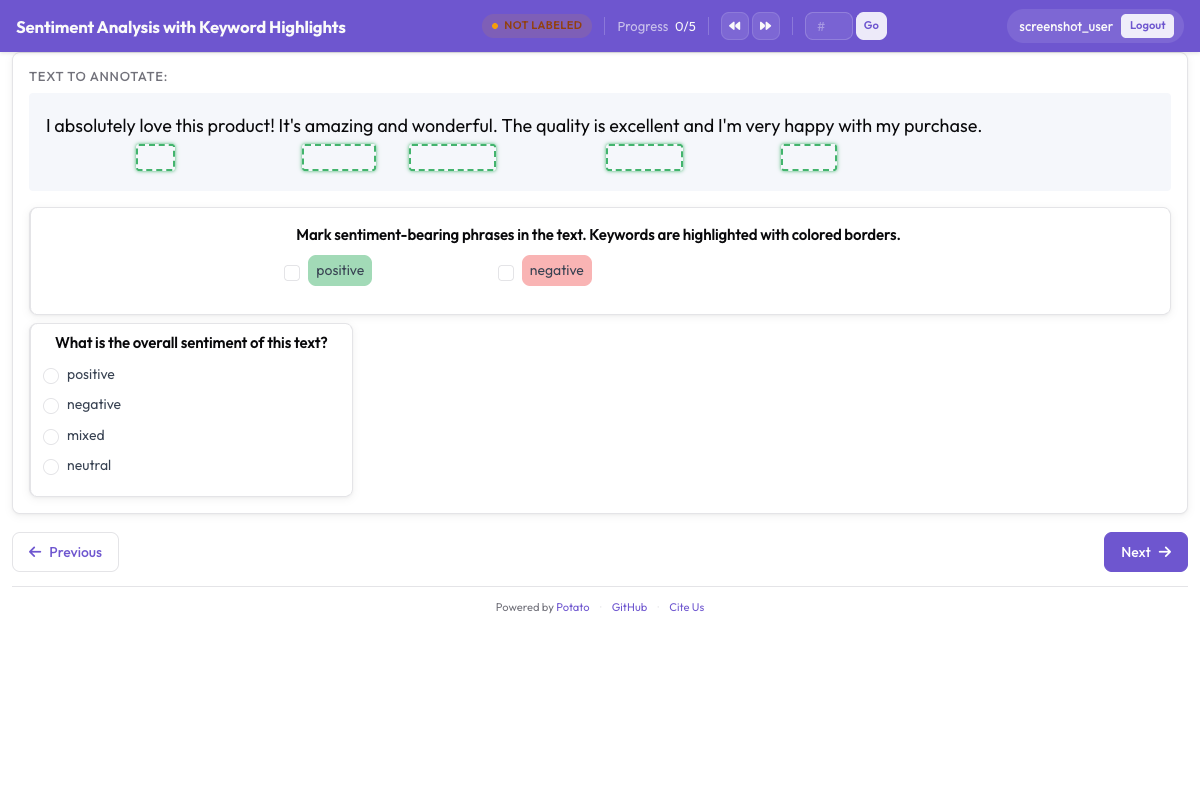 어노테이터의 주의를 이끌기 위해 상자 오버레이로 표시된 키워드와 엔티티