코딩 에이전트 어노테이션: Claude Code, Aider, SWE-Agent 트레이스 평가하기
Potato는 코딩 에이전트 트레이스를 diff와 터미널 블록으로 렌더링하며, 프로세스 보상과 코드 리뷰 스키마, Claude Code, Aider, SWE-Agent용 변환기를 제공합니다.
이제 Potato는 코딩 에이전트 세션을 직접 어노테이션합니다. 트레이스는 통합 diff, 어두운 터미널 블록, 줄 번호가 매겨진 파일 읽기, 그리고 에이전트가 건드린 모든 파일의 파일 트리로 렌더링됩니다. 코딩 에이전트 형식을 위한 변환기 세 개(claude_code, aider, swe_agent_trajectory)가 Potato가 이미 읽는 다른 열두 가지 트레이스 형식에 더해지고, 이 데이터를 위해 만든 어노테이션 스키마 두 개가 있습니다. 단계 수준의 정확성을 위한 process_reward와 diff를 GitHub 방식으로 리뷰하는 code_review입니다.
코딩 에이전트의 한 번의 실행은 파일 읽기, 편집, 터미널 명령, 추론으로 이루어진 긴 궤적입니다. 일반 텍스트 어노테이션 인터페이스는 이 모두를 글자의 벽으로 납작하게 만들어 버리고, 그래서 에이전트를 평가하는 팀들은 대개 자체 리뷰 UI를 작성했고 결국 다른 누구도 쓸 수 없는 데이터셋을 남겼습니다. 전체 레퍼런스는 코딩 에이전트 어노테이션 문서와 에이전트 평가 가이드를 참고하세요.
연구를 계획하기 전에 확인할 두 가지
Claude Code 트랜스크립트에는 모델의 사고 텍스트가 들어 있지 않습니다. 파일은 thinking 블록과 그 서명을 남기고 내용은 버립니다. 로컬 세션 40개에서 블록 6,393개를 측정했는데, 텍스트가 든 블록은 하나도 없었습니다. 변환된 트레이스는 이 개수를 보고하므로, 빠진 부분이 조용히 묻히지 않고 드러납니다. 어노테이터가 단계를 판단하는 데 추론이 필요하다면, 디스크에서 나중에 읽어 오지 말고 claude -p --output-format stream-json이나 Agent SDK로 실시간으로 캡처하세요.
트랜스크립트에는 절대 경로, 브랜치 이름, 환경 정보, 그리고 세션이 읽은 모든 소스도 담겨 있습니다. 데이터셋을 공유하기 전에 이를 가리고, 세션의 주인에게 동의를 받으세요.
트레이스 표시
코딩 트레이스는 coding_trace 표시 유형으로 렌더링되며, 어노테이터가 봐야 할 다른 요소와 함께 instance_display에 선언합니다. Potato는 무엇을 보여 줄지와 무엇을 물을지를 분리하므로, 같은 트레이스 표시를 어떤 어노테이션 스키마와도 함께 쓸 수 있습니다:
instance_display:
  layout:
    direction: vertical
    gap: 16px
  fields:
    - key: task_description
      type: text
      label: "Task"
    - key: structured_turns
      type: coding_trace
      label: "Agent Session"
      display_options:
        show_file_tree: true
        diff_view: unified
        collapse_long_outputs: true
        max_output_lines: 50
        terminal_theme: dark
        show_step_numbers: true
        show_reasoning: true
각 도구 호출은 그 도구가 한 일에 따라 렌더링되므로, 어노테이터는 diff를 이스케이프된 텍스트가 아니라 diff로 읽습니다:
| 도구 | 렌더링 |
|---|---|
Read | 줄 번호가 있는 코드 블록 |
Edit, Replace | 빨간 줄과 초록 줄로 된 통합 diff |
Write, Create | 전체가 초록색인 새 파일 코드 블록 |
Bash, Terminal, Shell | $ 프롬프트가 있는 어두운 터미널 블록 |
Grep, Glob, Search, Find | 검색 결과 코드 블록 |
| 그 밖의 모든 도구 | JSON 형식의 입력과 출력 |
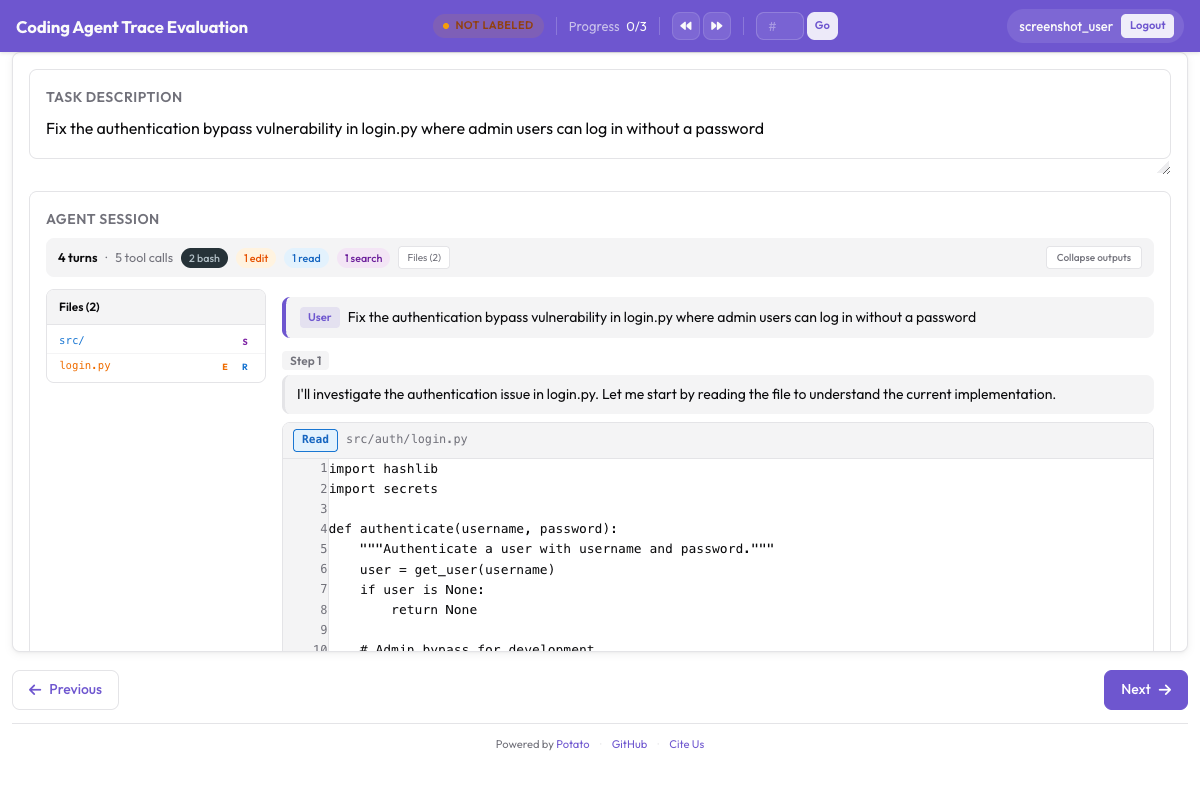 통합 diff, 터미널 출력, 파일 트리 사이드바가 있는 코딩 트레이스
max_output_lines: 50과 함께 쓰는 collapse_long_outputs는 트레이스를 읽을 수 있는지를 결정하는 설정입니다. pytest 실행 한 번이 수백 줄을 출력할 수 있고, 단계마다 그것을 스크롤해 지나가야 하는 어노테이터는 단계를 읽지 않게 됩니다.
데이터 형식
structured_turns 형식은 표시에 필요한 도구 호출 구조를 유지합니다. 각 턴에는 역할, 텍스트 내용, 도구 호출 목록이 들어 있습니다:
{
  "id": "session_001",
  "task_description": "Fix the authentication bypass in login.py",
  "model": "claude-sonnet-4-20250514",
  "structured_turns": [
    {
      "role": "assistant",
      "content": "I'll investigate the auth issue.",
      "tool_calls": [
        {
          "tool": "Read",
          "input": {"file_path": "src/auth/login.py"},
          "output": "def login(user, password):\n    if user.role == 'admin':\n        return True",
          "output_type": "code",
          "language": "python"
        },
        {
          "tool": "Bash",
          "input": {"command": "pytest tests/test_auth.py -v"},
          "output": "4 passed",
          "output_type": "terminal"
        }
      ]
    }
  ]
}output_type은 code, diff, terminal, generic 중 하나이며, 생략하면 Potato가 도구와 파일 확장자에서 추론합니다. 도구의 출력이 이름에서 짐작되는 것과 다를 때는 명시적으로 설정하세요.
이미 가진 트레이스 변환하기
변환기는 한 가지 형식을 읽어 Potato가 불러오는 JSONL을 씁니다. 그중 세 형식이 코딩 에이전트용입니다:
# Claude Code, or any Anthropic Messages API transcript
python -m potato.trace_converter -i traces.json -f claude_code -o data/traces.jsonl

# Aider chat history with SEARCH/REPLACE blocks
python -m potato.trace_converter -i chat.md -f aider -o data/traces.jsonl

# SWE-Agent trajectories
python -m potato.trace_converter -i trajectory.json -f swe_agent_trajectory -o data/traces.jsonl

# Mixed directory, format detected per file
python -m potato.trace_converter -i traces.json --auto-detect -o data/traces.jsonl
claude_code 변환기는 Claude Code 자체의 세션 트랜스크립트와 원시 Messages API 형태를 모두 읽습니다. Claude Code는 세션마다 JSONL 파일 하나를 ~/.claude/projects/<slugified-working-directory>/<session-id>.jsonl에 쓰며, 변환기는 줄마다 트레이스를 하나씩 만드는 대신 세션 하나를 트레이스 하나로 바꿉니다:
python -m potato.trace_converter \
  -i ~/.claude/projects/-home-me-myrepo/3c853f0f-....jsonl \
  --auto-detect -o data/session.jsonl
변환기는 parentUuid 체인을 따라가며 살아남은 경로만 유지하므로, 되감긴 시도는 실제로 일어난 것처럼 어노테이션되지 않고 제외된 뒤 개수만 집계됩니다. 사이드체인 메시지는 메인 턴에서 빠져 sidechain_runs로 들어갑니다. 슬래시 명령은 CLI가 스스로와 주고받는 것이므로 제외됩니다. 디스크상의 형태는 공개된 API가 아니라 CLI에 속하므로, 업그레이드를 거치면서 이 리더는 최선의 노력 수준으로 동작한다고 보세요. 모르는 레코드 유형은 무시하고, 파일이 더 이상 파싱되지 않으면 빈 트레이스를 돌려주는 대신 오류를 발생시킵니다.
프로세스 보상 어노테이션
프로세스 보상 모델은 최종 결과만 채점하는 대신 단계별로 점수를 부여하며, process_reward는 이 모델이 학습할 레이블을 수집합니다. 두 가지 모드가 속도와 세밀함을 서로 맞바꿉니다.
기본값인 first_error 모드에서는 어노테이터가 에이전트가 처음 잘못한 단계를 클릭합니다. 그 이전의 모든 단계는 정답으로, 그 단계와 이후 모든 단계는 오답으로 표시됩니다. 클릭 한 번으로 궤적 전체에 레이블이 붙기 때문에, 양이 필요할 때 쓰는 모드입니다.
annotation_schemes:
  - annotation_type: process_reward
    name: step_rewards
    description: "Click the first step where the agent makes a mistake."
    steps_key: structured_turns
    mode: first_error
per_step 모드에서는 각 단계를 따로 판단합니다. 어노테이터의 시간이 더 들지만 first_error가 줄 수 없는 신호를 얻습니다. 연쇄 표시는 오류가 회복 불가능하다고 가정하는데, 실제 에이전트는 회복하기 때문입니다. 여기에 allow_neutral을 켜면 레이블이 +1, 0, -1이라는 PRM800K 관례를 따르며, 정말로 무해한 단계는 양 극단 중 하나로 몰리지 않고 중립으로 기록됩니다:
  - annotation_type: process_reward
    name: step_rewards
    description: "Label each step as correct, neutral, or incorrect."
    steps_key: structured_turns
    step_text_key: content
    mode: per_step
    allow_neutral: true
두 스키마 중 하나를 위 설정에 추가하세요. allow_neutral이 켜져 있으면 표시하지 않은 단계는 null로 남으므로, 내보내기에서 의도적인 중립 판단과 어노테이터가 도달하지 않은 단계가 구별됩니다. allow_neutral은 per_step에만 적용되고, 중립 판단이 들어갈 자리가 없는 first_error에서는 강제로 꺼집니다.
코드 리뷰 어노테이션
code_review 스키마는 풀 리퀘스트 리뷰를 에이전트 출력에 가져옵니다. 어노테이터는 diff 줄을 클릭해 분류된 코멘트를 달고, 각 파일을 평가하고, 판정을 내립니다:
  - annotation_type: code_review
    name: review
    description: "Review the agent's code changes."
    comment_categories: [bug, style, suggestion, security]
    verdict_options: [approve, request_changes, comment_only]
    file_rating_dimensions: [correctness, quality]
이 스키마를 위 설정에 추가하세요. 파일 평가 차원은 각각 1에서 5까지 점수를 매깁니다. 기본값은 일반적인 리뷰 작업에 무난하므로, 자신의 분류 체계가 연구의 핵심일 때 덮어쓰세요. 예를 들어 보안 리뷰에서는 bug와 security가 지침 안에서 서로 다른 정의를 가진 별개의 카테고리여야 합니다.
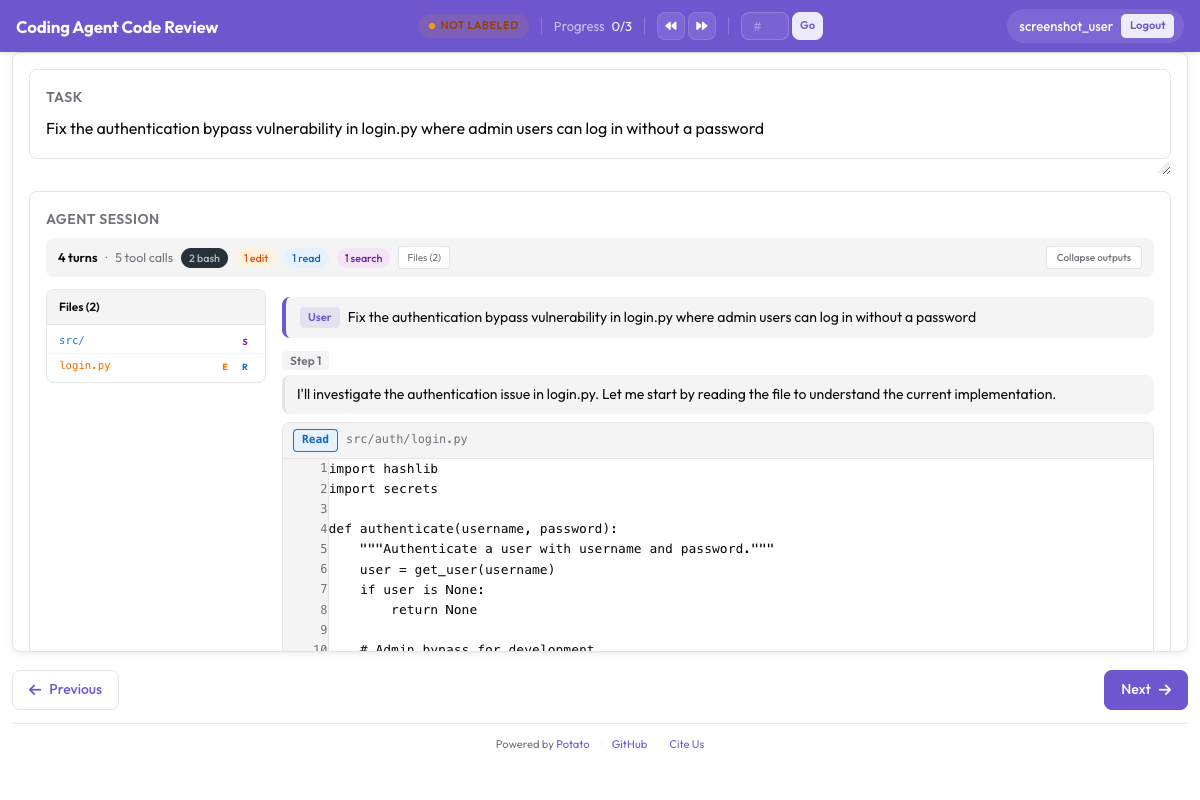 diff 인라인 코멘트, 파일별 평가, 전체 판정
코드 리뷰 튜토리얼은 코멘트 카테고리가 어노테이터가 알아차리는 것에 어떤 영향을 주는지를 포함해 리뷰 연구 전체를 차례로 설명합니다. 규모를 키우기 전에 그 연구를 트레이스 몇 개로 먼저 돌려 보세요. 설정에서는 완전해 보였던 카테고리 목록도 처음 스무 건의 리뷰가 끝나면 대개 항목이 하나 더 생기기 때문입니다.
전체 구성
이 설정은 트레이스를 렌더링하고, 작업 수준의 판정, 첫 오류 방식의 프로세스 보상, 코드 리뷰를 수집하며, 일치도를 측정할 수 있도록 트레이스마다 어노테이터 세 명을 배정합니다:
annotation_task_name: "Coding Agent Trace Evaluation"
task_description: "Judge whether the agent completed the task and review its changes."

data_files:
  - data/traces.jsonl

item_properties:
  id_key: id
  text_key: task_description

port: 8000
output_annotation_dir: annotation_output/coding-agent-eval/
export_annotation_format: jsonl

instance_display:
  layout:
    direction: vertical
    gap: 16px
  fields:
    - key: task_description
      type: text
      label: "Task"
    - key: structured_turns
      type: coding_trace
      label: "Agent Session"
      display_options:
        show_file_tree: true
        diff_view: unified
        collapse_long_outputs: true
        max_output_lines: 50
        terminal_theme: dark
        show_step_numbers: true

annotation_schemes:
  - annotation_type: radio
    name: task_success
    description: "Did the agent complete the task?"
    labels:
      - name: success
        tooltip: "Completed correctly with no issues"
      - name: partial
        tooltip: "Completed with minor issues"
      - name: failure
        tooltip: "Not completed, or completed incorrectly"
    sequential_key_binding: true

  - annotation_type: process_reward
    name: step_rewards
    description: "Click the first step where the agent makes a mistake."
    steps_key: structured_turns
    mode: first_error

  - annotation_type: code_review
    name: review
    description: "Review the agent's code changes."
    comment_categories: [bug, style, suggestion, security]
    verdict_options: [approve, request_changes, comment_only]
    file_rating_dimensions: [correctness, quality]

  - annotation_type: text
    name: notes
    description: "Anything else worth recording about this trace"
    placeholder: "Optional"

num_annotators_per_item: 3

user_config:
  allow_all_users: false
  users:
    - annotator1
    - annotator2
Potato를 설치하고, 트레이스를 변환하고, 서버를 시작하세요:
pip install potato-annotation
python -m potato.trace_converter -i ./my_traces.json --auto-detect -o data/traces.jsonl
potato start config.yaml -p 8000
저장소의 examples/agent-traces/coding-agent-evaluation/에 이 프로젝트의 작동하는 버전이 들어 있으며, 자신의 데이터를 변환하기 전에 표시를 확인하는 가장 빠른 방법입니다. 그 설정을 실행하고 어노테이터처럼 트레이스 하나를 읽어 보면, 레이블링하려는 단계의 세분성이 표시가 보여 주는 세분성과 맞는지 몇 분 안에 알 수 있습니다.
훈련용 내보내기
어노테이션은 코딩 평가 익스포터를 통해 나가며, 이 익스포터는 출력 유형마다 파일 하나를 씁니다:
python -m potato.export -c config.yaml -f coding_eval -o exports/ \
--option types=prm,preference,swebench,code_review| 유형 | 파일 | 용도 |
|---|---|---|
prm | prm_training_data.jsonl | 프로세스 보상 모델 훈련 |
preference | preference_pairs.jsonl | 쌍별 어노테이션을 바탕으로 한 DPO 또는 RLHF |
swebench | swebench_results.jsonl | SWE-bench 호환 평가 |
code_review | code_reviews.jsonl | 구조화된 리뷰 데이터 |
preference 유형은 쌍별 어노테이션이 있어야 만들어지므로, 프로세스 보상만 수집하는 연구에서는 나머지 세 가지가 생성됩니다. 스키마를 설계하기 전에 네 가지 중 무엇이 필요한지 정하세요. 나중에 쌍별 비교를 추가하면 모든 트레이스를 상대 트레이스와 비교해 한 번 더 어노테이션해야 하기 때문입니다.
에이전트가 일하는 모습 지켜보기
기록된 트레이스는 전체 그림의 절반입니다. live_coding_agent는 어노테이션 페이지 안에서 에이전트를 실행하고, 어노테이터는 샌드박스 처리된 작업 디렉터리에서 Ollama, Anthropic, Claude SDK 백엔드로 동작하는 에이전트를 지켜보며 개입하고, 되돌리고, 다른 지시로 다시 실행합니다. 백엔드와 샌드박스 모드는 라이브 코딩 에이전트 문서에서 다룹니다.
팀에서 코딩 에이전트를 평가하다가 이 구성으로 다룰 수 없는 문제를 만나면 GitHub 저장소에 이슈를 열어 주세요. 새 변환기는 대략 potato/trace_converter/converters/ 안의 파일 하나이므로, Potato가 아직 읽지 못하는 형식은 걸림돌이 아니라 기여할 거리입니다.