Confrontare agenti AI fianco a fianco: modalità binaria, a scala e multidimensione
Configura il confronto a coppie tra agenti in Potato con tre modalità: preferenza binaria, scala continua e giudizio multicriterio per dimensione con giustificazione obbligatoria.
Perché il confronto a coppie nella valutazione degli agenti
Chiedere a qualcuno di valutare la trace di un agente di coding su una scala da 1 a 10 produce dati rumorosi, perché ognuno calibra quella scala a modo suo. Il 7 di un annotatore è il 5 di un altro. Il confronto a coppie aggira il problema. Invece di valutare le trace isolatamente, gli annotatori ne guardano due affiancate e dicono quale è migliore. Un giudizio testa a testa è più facile da formulare, più coerente tra persone diverse ed è esattamente quello che serve per la Direct Preference Optimization (DPO) e il Reinforcement Learning from Human Feedback (RLHF).
È lo stesso approccio usato per addestrare i reward model nell'allineamento dei modelli linguistici, e si trasferisce senza attriti agli agenti di coding: raccogli preferenze umane tra coppie di trajectory di agenti, addestraci sopra un reward model, poi usa quel modello per guidare l'addestramento dell'agente o per scegliere il migliore tra N candidati in fase di inferenza.
Potato ha tre modalità di confronto a coppie, ciascuna adatta a un diverso bisogno di valutazione e a un diverso budget di dati.
L'interfaccia mette due trace fianco a fianco:
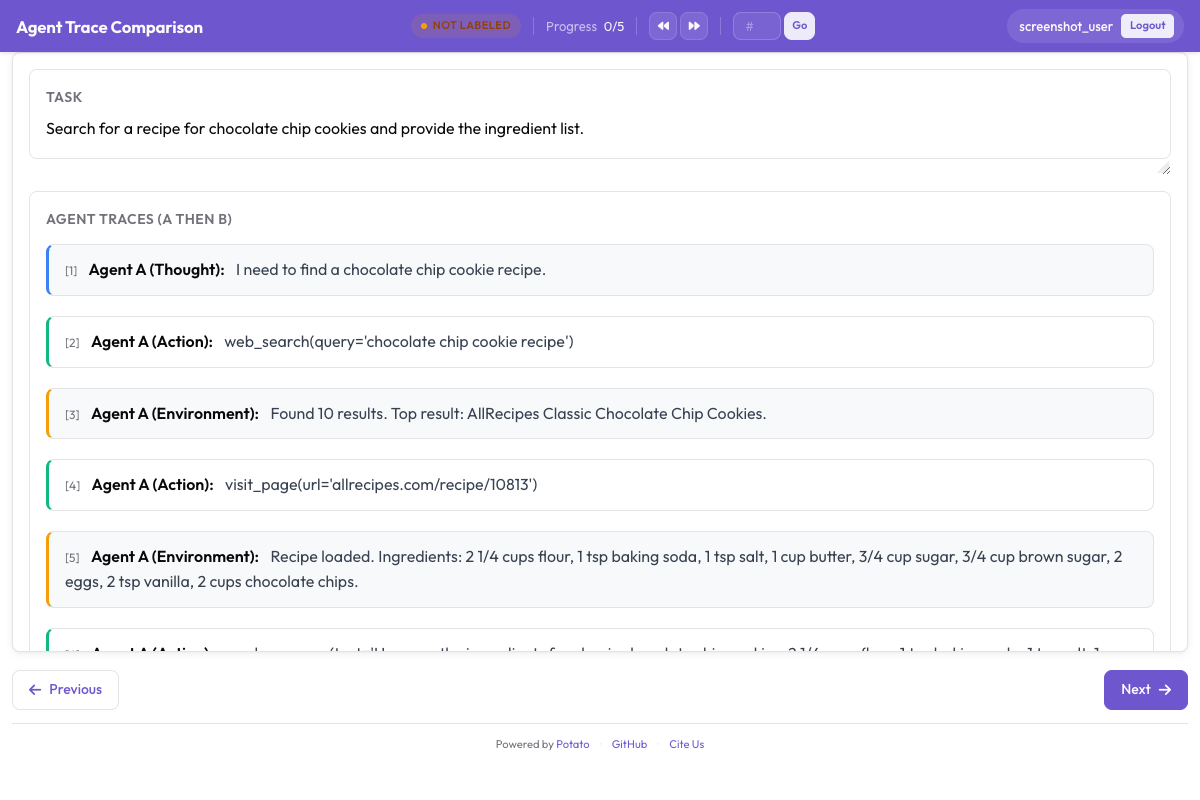 Annotators compare two agent traces and select which approach was better
Modalità 1: preferenza binaria
È la modalità più semplice e rapida. L'annotatore vede due trace affiancate e fa clic su quella migliore. Un pulsante di pareggio facoltativo copre i casi in cui entrambe sono ugualmente buone o ugualmente scadenti.
Quando usare la modalità binaria
Scegli la modalità binaria quando ti servono molti dati di preferenza in poco tempo. Va bene per addestrare reward model di base, calcolare i tassi di vittoria degli agenti e costruire classifiche Elo. Lo svantaggio è che perdi le sfumature: sai quale trace ha vinto, ma non di quanto né su quali fronti.
Configurazione
annotation_task_name: "Agent Comparison - Binary"
task_dir: "."
port: 8000

data_files:
  - "data/paired_traces.jsonl"

item_properties:
  id_key: "id"
  text_key: "task"

instance_display:
  fields:
    - key: "task"
      type: text
      label: "Task"

annotation_schemes:
  - annotation_type: pairwise
    name: preference
    description: "Which agent produced a better solution?"
    mode: binary
    items_key: "responses"
    show_labels: true
    labels:
      - "Agent A"
      - "Agent B"
    allow_tie: true
    tie_label: "Tie (equally good or equally bad)"
    randomize_order: true
    sequential_key_binding: true
    label_requirement:
      required: true

  - annotation_type: radio
    name: confidence
    description: "How confident are you in this judgment?"
    labels:
      - "Very confident"
      - "Somewhat confident"
      - "Not confident"

output_annotation_dir: "annotation_output/"
export_annotation_format: jsonl

user_config:
  allow_all_users: true
Il flusso di lavoro di annotazione
L'annotatore riceve uno schermo diviso. A sinistra la Trace A viene resa con il CodingTraceDisplay completo: diff, blocchi di terminale, letture di file, ragionamento. A destra la Trace B per lo stesso compito. Ogni lato scorre in modo indipendente.
La descrizione del compito sta sopra entrambe le trace, così l'annotatore sa che cosa stavano cercando di fare i due agenti.
Sotto ci sono tre pulsanti: «Agent A is better», «Agent B is better» e «Tie». Con randomize_order attivo, quale agente sia A e quale B viene mescolato per ogni elemento, così gli annotatori non possono prendere l'abitudine di scegliere sempre il lato sinistro o quello destro.
Per una valutazione più fine, l'interfaccia supporta anche più dimensioni:
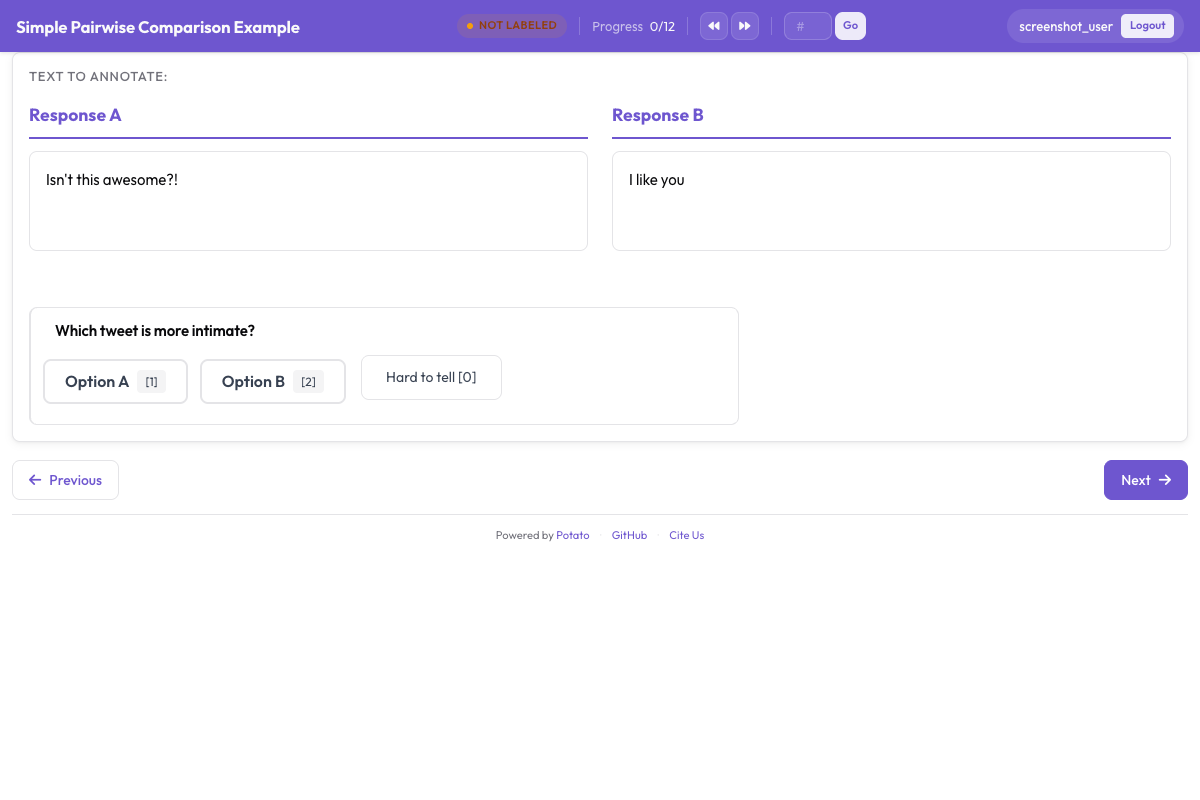 Binary preference, continuous scale, and multi-dimension modes are available
Modalità 2: scala continua
La modalità a scala permette all'annotatore di dire quanto una trace è migliore, non solo quale ha vinto. Invece di un singolo clic trascina un cursore che va da «A much better» a sinistra a «B much better» a destra, con «Equal» al centro.
Quando usare la modalità a scala
Usa la modalità a scala quando conta l'intensità della preferenza e non solo la sua direzione. Un cursore vicino all'estremo indica un divario di qualità netto; vicino al centro significa che le due trace erano vicine. DPO e pipeline simili possono pesare gli esempi in base a quell'intensità, dando più peso ai casi netti.
Configurazione
annotation_schemes:
  - annotation_type: pairwise
    name: preference_scale
    description: "Which agent produced a better solution, and by how much?"
    mode: scale
    items_key: "responses"
    labels:
      - "Agent A"
      - "Agent B"
    scale:
      min: -3
      max: 3
      step: 1
      default: 0
      labels:
        min: "A is much better"
        max: "B is much better"
        center: "Equal"
    label_requirement:
      required: true
Usare una scala a 5 punti
Per annotare più in fretta con un po' meno granularità, scendi a una scala a 5 punti:
annotation_schemes:
  - annotation_type: pairwise
    name: multi_dim_comparison
    description: "Compare the two solutions along each dimension"
    mode: multi_dimension
    items_key: "responses"
    labels:
      - "Agent A"
      - "Agent B"
    dimensions:
      - name: correctness
        description: "Which solution actually fixes the stated problem?"
        allow_tie: true
      - name: efficiency
        description: "Which takes fewer unnecessary steps, file reads, or redundant edits?"
        allow_tie: true
      - name: code_quality
        description: "Which is more readable, better named, and closer to existing patterns?"
        allow_tie: true
      - name: communication
        description: "Which explains its reasoning more clearly and identifies the root cause?"
        allow_tie: true
      - name: robustness
        description: "Which handles edge cases and verifies its changes?"
        allow_tie: true
    justification:
      required: true
      reason_categories:
        - "More correct"
        - "More efficient"
        - "Better written"
        - "Better explained"
      min_rationale_chars: 20
      rationale_placeholder: "Which agent was better here, and why?"
Modalità 3: confronto multidimensione
È la modalità più dettagliata. Invece di una singola preferenza complessiva, l'annotatore giudica ogni trace su più dimensioni indipendenti. Ogni dimensione riceve la propria scelta A/B/pareggio e ogni scelta richiede una giustificazione scritta.
Quando usare la modalità multidimensione
Usala quando vuoi sapere non solo quale agente ha vinto, ma perché. Una trace può avere codice corretto ed efficienza pessima; un'altra può essere efficiente ma ignorare un caso limite. I dati per dimensione che ne escono possono addestrare reward model specifici per dimensione o tornare come riscontro dettagliato a chi sviluppa l'agente.
Configurazione
attention_checks:
  enabled: true
  items_file: "data/attention_checks.json"
  frequency: 20
  min_response_time: 10.0
  failure_handling:
    warn_threshold: 2
    block_threshold: 5
Preparare i dati delle trace appaiate
Tutte e tre le modalità prendono in input trace appaiate. Ogni riga del file JSONL contiene due trace che hanno affrontato lo stesso compito.
Formato dei dati
{
  "id": "pair_001",
  "task_description": "Fix the IndexError in process_batch() when the input list is empty",
  "repo": "myorg/myproject",
  "trace_a": {
    "agent": "claude_code",
    "model": "claude-sonnet-4-20250514",
    "structured_turns": [
      {
        "step_idx": 0,
        "type": "file_read",
        "path": "src/batch.py",
        "content": "def process_batch(items):\n    result = items[0]\n    ...",
        "start_line": 10,
        "end_line": 25
      },
      {
        "step_idx": 1,
        "type": "file_edit",
        "path": "src/batch.py",
        "diff": "--- a/src/batch.py\n+++ b/src/batch.py\n@@ -10,3 +10,5 @@\n def process_batch(items):\n+    if not items:\n+        return []\n     result = items[0]\n"
      },
      {
        "step_idx": 2,
        "type": "bash_command",
        "command": "python -m pytest tests/test_batch.py -v",
        "output": "PASSED",
        "exit_code": 0
      }
    ]
  },
  "trace_b": {
    "agent": "swe_agent",
    "model": "gpt-4o",
    "structured_turns": [
      {
        "step_idx": 0,
        "type": "bash_command",
        "command": "find . -name '*.py' | xargs grep 'process_batch'",
        "output": "src/batch.py:def process_batch(items):\ntests/test_batch.py:    process_batch([])",
        "exit_code": 0
      },
      {
        "step_idx": 1,
        "type": "file_read",
        "path": "src/batch.py",
        "content": "def process_batch(items):\n    result = items[0]\n    ...",
        "start_line": 1,
        "end_line": 50
      },
      {
        "step_idx": 2,
        "type": "file_edit",
        "path": "src/batch.py",
        "diff": "--- a/src/batch.py\n+++ b/src/batch.py\n@@ -10,3 +10,6 @@\n def process_batch(items):\n+    if items is None or len(items) == 0:\n+        logger.warning('Empty input to process_batch')\n+        return []\n     result = items[0]\n"
      },
      {
        "step_idx": 3,
        "type": "bash_command",
        "command": "python -m pytest tests/ -v",
        "output": "PASSED (12 tests)",
        "exit_code": 0
      }
    ]
  }
}
Costruire le coppie a partire da trace singole
Se hai trace singole che hanno affrontato gli stessi compiti, l'utilità di appaiamento le assembla per te:
# Generate all possible pairs for each task
potato pair-traces \
  --input ./data/individual_traces.jsonl \
  --output ./data/paired_traces.jsonl \
  --pair_by "task_id" \
  --strategy "all_pairs"

# Or sample a fixed number of pairs per task
potato pair-traces \
  --input ./data/individual_traces.jsonl \
  --output ./data/paired_traces.jsonl \
  --pair_by "task_id" \
  --strategy "sample" \
  --pairs_per_task 3
Esportare i dati di confronto
Coppie di preferenza per DPO/RLHF
Il formato di esportazione principale per i confronti a coppie sono le coppie di preferenza per l'addestramento DPO o RLHF:
potato export \
  --format dpo_preferences \
  --project ./output/ \
  --output ./training_data/preferences.jsonl
Per la modalità binaria l'output è semplice:
{
  "prompt": "Fix the IndexError in process_batch() when the input list is empty",
  "chosen": {"agent": "claude_code", "trace_id": "trace_a_001", "steps": [...]},
  "rejected": {"agent": "swe_agent", "trace_id": "trace_b_001", "steps": [...]},
  "annotator": "judge1",
  "confidence": "high"
}
La modalità a scala aggiunge l'intensità della preferenza:
{
  "prompt": "Fix the IndexError in process_batch()",
  "chosen": {"agent": "claude_code", "trace_id": "trace_a_001"},
  "rejected": {"agent": "swe_agent", "trace_id": "trace_b_001"},
  "preference_strength": 0.83,
  "scale_value": 2,
  "justification": "Agent A found and fixed the bug in fewer steps with cleaner code"
}
La modalità multidimensione porta con sé le preferenze per dimensione:
{
  "prompt": "Fix the IndexError in process_batch()",
  "chosen": {"agent": "claude_code", "trace_id": "trace_a_001"},
  "rejected": {"agent": "swe_agent", "trace_id": "trace_b_001"},
  "overall_preference": "A",
  "dimensions": {
    "correctness": {"preference": "Tie", "justification": "Both correctly fix the bug"},
    "efficiency": {"preference": "A", "justification": "A solves it in 3 steps vs 4"},
    "code_quality": {"preference": "B", "justification": "B adds logging and handles None"},
    "communication": {"preference": "A", "justification": "A's reasoning is more focused"},
    "robustness": {"preference": "B", "justification": "B runs full test suite, not just one file"}
  },
  "weighted_score_a": 0.55,
  "weighted_score_b": 0.45
}
Analisi: tassi di vittoria, punteggi Elo e dettaglio per dimensione
Calcolare i tassi di vittoria
import json
from collections import defaultdict

with open("training_data/preferences.jsonl") as f:
    prefs = [json.loads(line) for line in f]

wins = defaultdict(lambda: {"wins": 0, "losses": 0, "ties": 0})

for pref in prefs:
    agent_chosen = pref["chosen"]["agent"]
    agent_rejected = pref["rejected"]["agent"]

    if agent_chosen == agent_rejected:
        continue  # Skip self-comparisons

    if pref.get("overall_preference") == "Tie":
        wins[agent_chosen]["ties"] += 1
        wins[agent_rejected]["ties"] += 1
    else:
        wins[agent_chosen]["wins"] += 1
        wins[agent_rejected]["losses"] += 1

print("Agent Win Rates:")
print("-" * 55)
for agent, record in sorted(wins.items()):
    total = record["wins"] + record["losses"] + record["ties"]
    win_rate = (record["wins"] + 0.5 * record["ties"]) / total * 100
    print(f"  {agent:<20} {win_rate:5.1f}%  "
          f"(W:{record['wins']} L:{record['losses']} T:{record['ties']})")
Calcolare i punteggi Elo
import json
import math
from collections import defaultdict

def compute_elo(preferences, k=32, initial_rating=1500):
    """Compute Elo ratings from pairwise preferences."""
    ratings = defaultdict(lambda: initial_rating)

    for pref in preferences:
        agent_a = pref["chosen"]["agent"]
        agent_b = pref["rejected"]["agent"]

        ra = ratings[agent_a]
        rb = ratings[agent_b]

        # Expected scores
        ea = 1.0 / (1.0 + math.pow(10, (rb - ra) / 400))
        eb = 1.0 / (1.0 + math.pow(10, (ra - rb) / 400))

        overall = pref.get("overall_preference", "A")
        if overall == "Tie":
            sa, sb = 0.5, 0.5
        else:
            # "chosen" is the winner
            sa, sb = 1.0, 0.0

        ratings[agent_a] = ra + k * (sa - ea)
        ratings[agent_b] = rb + k * (sb - eb)

    return dict(ratings)

with open("training_data/preferences.jsonl") as f:
    prefs = [json.loads(line) for line in f]

ratings = compute_elo(prefs)

print("Elo Ratings:")
print("-" * 35)
for agent, rating in sorted(ratings.items(), key=lambda x: -x[1]):
    print(f"  {agent:<20} {rating:.0f}")
Dettaglio per dimensione
Per i confronti multidimensione, guarda su quali dimensioni ciascun agente se la cava meglio:
import json
from collections import defaultdict

with open("training_data/preferences.jsonl") as f:
    prefs = [json.loads(line) for line in f]

# Only process multi-dimension annotations
multi_dim = [p for p in prefs if "dimensions" in p]

dim_wins = defaultdict(lambda: defaultdict(lambda: {"A": 0, "B": 0, "Tie": 0}))

for pref in multi_dim:
    agent_a = pref["chosen"]["agent"]
    agent_b = pref["rejected"]["agent"]
    pair_key = f"{agent_a} vs {agent_b}"

    for dim_name, dim_data in pref["dimensions"].items():
        dim_wins[dim_name][pair_key][dim_data["preference"]] += 1

print("Per-Dimension Win Rates:")
print("=" * 60)
for dim_name, matchups in sorted(dim_wins.items()):
    print(f"\n  {dim_name.upper()}")
    print(f"  {'-' * 50}")
    for pair, counts in matchups.items():
        total = counts["A"] + counts["B"] + counts["Tie"]
        a_rate = (counts["A"] + 0.5 * counts["Tie"]) / total * 100
        print(f"    {pair}: A={a_rate:.0f}% B={100-a_rate:.0f}%  "
              f"(A:{counts['A']} B:{counts['B']} Tie:{counts['Tie']})")
Che cosa funziona nella pratica
Scegliere la modalità
La modalità binaria è la scelta giusta quando vuoi migliaia di preferenze in fretta, un reward model generico o una classifica. Metti in conto all'incirca 1-2 minuti per confronto.
La modalità a scala si ripaga quando l'intensità della preferenza entra nella tua pipeline di addestramento. La DPO con pesatura sul margine tiene conto della differenza tra una preferenza forte (cursore all'estremo) e una debole (cursore vicino al centro). Metti in conto 2-3 minuti per confronto.
La modalità multidimensione vale il tempo in più quando devi sapere dove gli agenti sono forti e dove deboli, quando addestri reward model specifici per dimensione o quando devi consegnare un report dettagliato a chi sviluppa gli agenti. Metti in conto 4-6 minuti per confronto.
Quanti confronti servono
Per tassi di vittoria affidabili raccogli almeno 100 confronti per ogni coppia di agenti. Per punteggi Elo su cinque o più agenti, tra i 200 e i 300 confronti totali portano le classifiche a stabilizzarsi. Per i reward model DPO punta a 1.000 o più coppie di preferenza che coprano sia compiti facili sia difficili.
Randomizzare l'ordine
Imposta sempre randomize_order: true. Il bias di posizione, cioè la tendenza a preferire la trace che compare a sinistra o nella prima scheda, è ben documentato negli studi di valutazione umana. Abbina la randomizzazione al controllo attention_checks.type: "duplicate_reversed" per individuare chi si limita a cliccare sempre dallo stesso lato.
Gestire i pareggi
In modalità binaria consenti i pareggi ma tieni d'occhio la loro frequenza. Se supera il 30%, probabilmente gli agenti sono troppo vicini per una scelta binaria e conviene passare alla modalità a scala o multidimensione. In modalità a scala il pareggio è semplicemente il punto centrale. In modalità multidimensione i pareggi sulle singole dimensioni sono attesi e ti dicono qualcosa.
Nascondere l'identità dell'agente
Tieni show_agent_identity: false a meno che tu non abbia un motivo concreto per mostrarla. Se gli annotatori sanno quale agente ha prodotto una trace, tendono a favorire quello che già si aspettano essere più forte.
Combinare le modalità
Per una valutazione approfondita, esegui prima la modalità binaria su un ampio insieme di coppie per ottenere le classifiche generali, poi la modalità multidimensione su un sottoinsieme più piccolo e stratificato per il dettaglio diagnostico. I confronti binari alimentano l'addestramento del reward model; quelli multidimensione ti dicono dove concentrare i miglioramenti dell'agente.
Per il riferimento di configurazione dietro queste modalità, vedi la documentazione sorgente. Per una panoramica più ampia sulla valutazione degli agenti dall'inizio alla fine, il punto di partenza è la guida alla valutazione degli agenti.