Bildvergleich und Präferenzaufgaben
So baust du in Potato eine Bildvergleichsaufgabe mit zwei Bildern nebeneinander, einem Präferenzschema, zufälliger Darstellungsreihenfolge und einem Ranking-Aufbau für größere Bildmengen.
Dieses Tutorial baut in Potato eine Bildvergleichsaufgabe mit zwei generierten Bildern nebeneinander, einer fünfstufigen Präferenzskala, Folgefragen zu einzelnen Kriterien sowie den Varianten Ranking und Best-Worst Scaling für Mengen mit mehr als zwei Bildern. Derselbe Aufbau eignet sich für RLHF-Präferenzdaten, Vergleiche von Kompression und Bildverbesserung und A/B-Tests an Designs.
Ein Vergleich verlangt von Annotierenden, zwischen zwei Bildern zu wählen, statt ein einzelnes Bild auf einer Skala einzuordnen. Damit müssen nicht alle Annotierenden dieselbe Vorstellung davon teilen, was eine 4 von 5 bedeutet. Der Preis dafür: Eine Menge von n Bildern braucht deutlich mehr Urteile, bis eine vollständige Rangfolge entsteht, und genau darum geht es in den Abschnitten zu Ranking und Best-Worst Scaling am Ende.
Die Datendatei
Jede Zeile enthält eine Kennung, die Pfade der beiden Bilder und den Kontext, den Annotierende zum Beurteilen brauchen. Potato liest die Feldnamen aus item_properties, die Namen selbst kannst du also frei wählen:
{"id": "pair_001", "prompt": "A sunset over mountains", "image_a": "/media/model_a_001.png", "image_b": "/media/model_b_001.png"}
{"id": "pair_002", "prompt": "A cat on a windowsill", "image_a": "/media/model_a_002.png", "image_b": "/media/model_b_002.png"}
Zwei Bilder nebeneinander anzeigen
Inhalt und Fragen werden in Potato getrennt konfiguriert. Der Block instance_display legt fest, was Annotierende sehen, und annotation_schemes, was sie gefragt werden. Zwei image-Felder mit horizontalem Layout stellen die Bilder nebeneinander, und mit zoomable können Annotierende Artefakte untersuchen, die in Anzeigegröße nicht zu sehen sind:
instance_display:
  layout:
    direction: horizontal
    gap: 24px
  fields:
    - key: image_a
      type: image
      label: "Image A"
      display_options:
        max_height: 512
        zoomable: true
        alt_text: "First generated image"
    - key: image_b
      type: image
      label: "Image B"
      display_options:
        max_height: 512
        zoomable: true
        alt_text: "Second generated image"
So sieht es für Annotierende aus, sobald Anzeige und Schema konfiguriert sind:
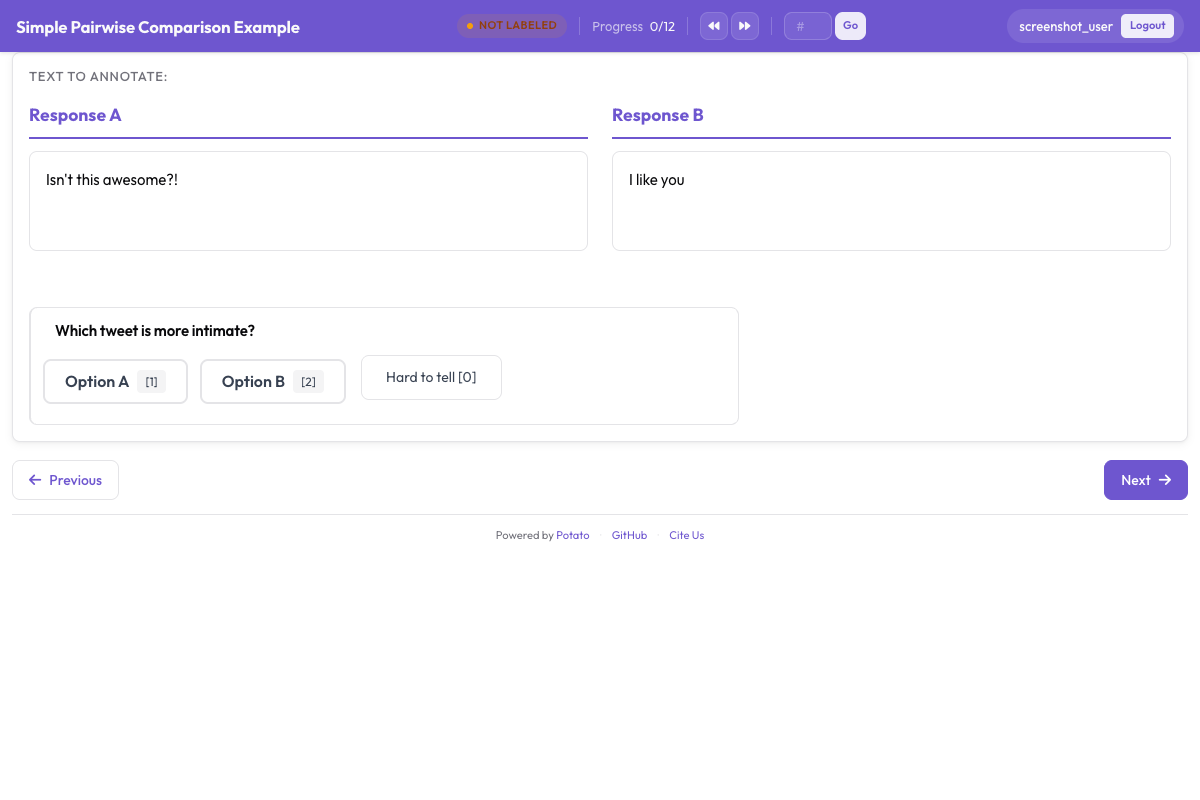 Eine Vergleichsaufgabe, die beide Kandidaten mit der Präferenzfrage darunter zeigt
Die Präferenzfrage
Eine fünfstufige Skala trennt eine starke von einer schwachen Präferenz. Das zählt, wenn du auf dem Ergebnis trainierst, denn ein Paar, bei dem sich die Annotierenden gleichmäßig aufteilen, liefert ein anderes Trainingssignal als eines, das alle eindeutig entschieden haben. sequential_key_binding legt die fünf Optionen auf die Tasten 1 bis 5, und das ist der Unterschied zwischen einem Vergleich, der vier Sekunden dauert, und einem, der zwölf dauert.
annotation_schemes:
  - annotation_type: radio
    name: preference
    description: "Which image better matches the prompt?"
    labels:
      - name: "A is clearly better"
      - name: "A is slightly better"
      - name: "About equal"
      - name: "B is slightly better"
      - name: "B is clearly better"
    sequential_key_binding: true
    label_requirement:
      required: true
Füge diesen Block zur Konfiguration oben hinzu. Lass die mittlere Option "About equal" statt "No preference" lauten, denn beide beschreiben unterschiedliche Urteile, und Annotierende benutzen eine Option „keine Präferenz“ als Überspringen-Knopf.
Positionseffekt
Annotierende wählen die linke Option häufiger, als sie sollten, also muss die Seite, auf der ein Bild landet, variieren. Randomisiere sie beim Erstellen der Datendatei: Tausche image_a und image_b in einer zufälligen Hälfte der Zeilen, halte fest, wie herum jede Zeile steht, und dreh die erfassten Urteile vor der Analyse wieder zurück. Potatos Anzeigefelder erscheinen in der Reihenfolge, in der du sie aufführst, die Konfiguration kann das also nicht für dich übernehmen.
Bei Textvergleichen ist es anders. Das Schema pairwise bezieht seine beiden Kandidaten aus einem einzigen Feld der Item-Daten, daher kann randomize_order sie vertauschen, und Potato speichert die Reihenfolge, die jede annotierende Person tatsächlich gesehen hat. Der Seed wird aus Annotierendem, Item und Schema zusammen abgeleitet. Deshalb fällt die Vorliebe einer Person für die erste Position von Item zu Item auf verschiedene Kandidaten, statt über die ganze Studie mit einer Seite zu korrelieren. Wenn Texte verglichen werden, sieh in die Dokumentation zum paarweisen Vergleich.
Nach einzelnen Kriterien fragen
Eine Gesamtpräferenz sagt dir, welches Bild gewonnen hat, aber nichts über den Grund. Zwei oder drei eng gefasste Fragen darunter machen Uneinigkeit nachvollziehbar, denn Annotierende, die beim Gesamturteil auseinanderliegen, stimmen oft bei der Treue zum Prompt überein und unterscheiden sich bei der Ästhetik.
  - annotation_type: radio
    name: prompt_adherence
    description: "Which image better matches the prompt?"
    labels:
      - name: A
      - name: Tie
      - name: B

  - annotation_type: multiselect
    name: issues_a
    description: "Problems in Image A (select all that apply)"
    labels:
      - name: "Distorted faces or hands"
      - name: "Text rendering errors"
      - name: "Unnatural lighting"
      - name: "Missing elements from the prompt"
      - name: "Blurry or low quality"
      - name: "None"
Füge diese Schemata zum Block oben hinzu. Halte die Liste der Kriterien kurz. Jede zusätzliche Frage vervielfacht sich über die ganze Studie, und ein Formular mit fünf Kriterien bei 2000 Paaren ergibt 10 000 Urteile, die jeweils eine eigene Definition in den Anweisungen brauchen.
Vorher-Nachher-Vergleich
Aufgaben zu Bildverbesserung, Restaurierung und Bearbeitung nutzen denselben Zwei-Bild-Aufbau, wobei die Seiten benannt statt randomisiert sind, weil die Frage, welche Seite das Original ist, zur Aufgabe gehört:
instance_display:
  layout:
    direction: horizontal
    gap: 24px
  fields:
    - key: original
      type: image
      label: "Original"
      display_options:
        max_height: 512
        zoomable: true
    - key: enhanced
      type: image
      label: "Enhanced"
      display_options:
        max_height: 512
        zoomable: true

annotation_schemes:
  - annotation_type: radio
    name: enhancement_quality
    description: "How did the edit change the image?"
    labels:
      - name: "Clearly improved"
      - name: "Slightly improved"
      - name: "No noticeable change"
      - name: "Made worse"
    label_requirement:
      required: true

  - annotation_type: multiselect
    name: problems_introduced
    description: "Problems the edit introduced (select all that apply)"
    labels:
      - name: "Over-sharpening or halos"
      - name: "Color shift"
      - name: "Loss of detail"
      - name: "New artifacts"
      - name: "None"
Frag nach eingeführten Problemen getrennt von der Gesamtqualität. Eine Bearbeitung, die das Motiv schärft und Halos darum erzeugt, wirkt auf einer einzigen Skala wie eine Verbesserung, dabei sind die Halos genau das, was du wissen musst.
Mehr als zwei Bilder
Bei drei bis acht Kandidaten pro Item zeigst du sie in einem gallery-Feld und erhebst mit dem Schema ranking eine vollständige Rangfolge. Die Galerie nimmt eine Liste von Bildpfaden aus einem einzigen Feld, die Datendatei enthält also ein Array statt zweier getrennter Schlüssel:
item_properties:
  id_key: id
  text_key: prompt

instance_display:
  fields:
    - key: prompt
      type: text
      label: "Prompt"
    - key: images
      type: gallery
      display_options:
        layout: grid
        columns: 2
        thumbnail_size: 320
        zoomable: true

annotation_schemes:
  - annotation_type: ranking
    name: preference_rank
    description: "Drag the image numbers to rank them from best at the top to worst at the bottom."
    labels:
      - "Image 1"
      - "Image 2"
      - "Image 3"
      - "Image 4"
    allow_ties: false
    label_requirement:
      required: true
Die labels benennen die Positionen in der Galerie, daher braucht die Liste einen Eintrag pro Bild, und jedes Item muss gleich viele Kandidaten haben. Ranking passt zu kleinen Mengen, weil Annotierende jeden Kandidaten gleichzeitig mit allen anderen vergleichen. Ab etwa acht Kandidaten wächst der Aufwand pro Item schneller als die Information, die du zurückbekommst.
Größere Mengen
Best-Worst Scaling ist die Wahl, wenn die Menge zu groß ist, um sie auf einem Bildschirm zu ranken. Annotierende sehen ein Tupel von Elementen, meist vier, und wählen nur das beste und das schlechteste, und die Scores werden über viele sich überschneidende Tupel berechnet:
  - annotation_type: bws
    name: quality
    description: "Select the BEST and the WORST image in this set."
    tuple_size: 4
    best_description: "Best"
    worst_description: "Worst"
Füge dieses Schema zur Konfiguration oben hinzu. Die Auswertung läuft nach der Erhebung, über den BWS-Tab im Admin-Dashboard oder auf der Kommandozeile, und schreibt bws_scores.tsv ins Ausgabeverzeichnis:
python -m potato.bws_scoring --config config.yaml --method bradley_terryDie Methode counting braucht keine zusätzlichen Abhängigkeiten und ist die transparente Basislinie. bradley_terry passt ein Modell an die implizierten paarweisen Vergleiche an und benötigt pip install choix. plackett_luce modelliert jede Best- und Worst-Wahl direkt und braucht nichts außer Potato selbst. Die Dokumentation zu Best-Worst Scaling behandelt die Tupelerzeugung, die vor alldem stattfinden muss.
Anweisungen und Aufmerksamkeitstests
Schreib in die Anweisungen, was „besser“ in dieser Aufgabe heißt, sonst bringen Annotierende ihre eigene Definition mit, und du merkst es erst bei der Übereinstimmungsanalyse. annotation_instructions setzt den Text auf jede Annotationsseite:
annotation_instructions: |
  Judge each pair on how well it matches the prompt first, then on visual
  quality, then on how appealing it looks. Zoom in before deciding: hands,
  text, and fine texture are where generation failures show up. Mark "About
  equal" only when you have looked at both and cannot separate them.
Aufmerksamkeitstests in einer Vergleichsaufgabe sind Paare mit einem offensichtlichen Sieger, die aus einer eigenen Datei in die Warteschlange gemischt werden, damit sie nicht in deinem Datensatz landen:
attention_checks:
  enabled: true
  items_file: "data/attention_checks.json"
  frequency: 20
  min_response_time: 3.0
  failure_handling:
    warn_threshold: 2
    block_threshold: 5
Füge beide Blöcke zur Konfiguration oben hinzu. min_response_time fängt die Fehlerart ab, der eine Vergleichsaufgabe am stärksten ausgesetzt ist: Annotierende, die sich in einem Tempo durchklicken, das keine Zeit lässt, das zweite Bild überhaupt anzusehen.
Die vollständige Konfiguration
Diese Konfiguration führt eine RLHF-Präferenzerhebung mit zwei Modellausgaben pro Item, einer fünfstufigen Präferenz, einer Kriteriumsfrage und einer Konfidenzbewertung durch. Drei Annotierende sehen jedes Paar, was reicht, um die Übereinstimmung zu berichten und ein Mehrheitslabel zu bilden.
annotation_task_name: "Generative Model Comparison"
task_description: "Compare two generated images against the prompt that produced them."

data_files:
  - data/model_outputs.json

item_properties:
  id_key: id
  text_key: prompt

instance_display:
  layout:
    direction: horizontal
    gap: 24px
  fields:
    - key: image_a
      type: image
      label: "Image A"
      display_options:
        max_height: 512
        zoomable: true
        alt_text: "First generated image"
    - key: image_b
      type: image
      label: "Image B"
      display_options:
        max_height: 512
        zoomable: true
        alt_text: "Second generated image"

annotation_instructions: |
  Judge each pair on prompt match first, then visual quality, then appeal.
  Zoom in before deciding. Mark "About equal" only when you cannot separate them.

annotation_schemes:
  - annotation_type: radio
    name: preference
    description: "Which image better represents the prompt?"
    labels:
      - name: "A is clearly better"
      - name: "A is slightly better"
      - name: "About equal"
      - name: "B is slightly better"
      - name: "B is clearly better"
    sequential_key_binding: true
    label_requirement:
      required: true

  - annotation_type: radio
    name: prompt_adherence
    description: "Which image matches the prompt more closely?"
    labels:
      - name: A
      - name: Tie
      - name: B

  - annotation_type: likert
    name: confidence
    description: "How confident are you in this judgment?"
    size: 5
    min_label: "Guessing"
    max_label: "Certain"

attention_checks:
  enabled: true
  items_file: "data/attention_checks.json"
  frequency: 20
  min_response_time: 3.0
  failure_handling:
    warn_threshold: 2
    block_threshold: 5

num_annotators_per_item: 3
output_annotation_dir: annotation_output/image-comparison/
export_annotation_format: jsonl
Starte sie mit potato start config.yaml -p 8000, öffne den Port im Browser und melde dich an, um zu prüfen, ob das Paar so dargestellt wird, wie du es erwartest, bevor du den Link irgendwohin schickst. Annotiere auch selbst ein paar Items, denn ein Schema, das sich in der Konfiguration klar liest, erweist sich oft beim dritten echten Paar als mehrdeutig.
Was die Ausgabe enthält
Potato schreibt Dateien pro Annotierendem unter output_annotation_dir, und export_annotation_format ergänzt einen regelmäßigen Export unter <output_annotation_dir>/exports/<format>/. Jeder exportierte Datensatz nennt die Instanz, die annotierende Person und das für jedes Schema gewählte Label:
{"instance_id": "pair_001", "user_id": "rater_01", "labels": {"preference": {"A is slightly better": "A is slightly better"}, "confidence": {"4": "4"}}, "spans": {}, "links": {}}Verknüpfe das über instance_id wieder mit deiner Datendatei, um herauszufinden, welches Modell welche Seite erzeugt hat, und mach den Links-rechts-Tausch, den du beim Erstellen der Datei angewendet hast, rückgängig, bevor du irgendetwas aggregierst. Diesen Schritt zuletzt zu erledigen statt in der Annotationskonfiguration bewahrt die Rohaufzeichnung dessen, was jede annotierende Person tatsächlich gesehen hat.
Nächste Schritte
- Sammle Präferenzdaten in großem Umfang mit Prolific
- Miss die Übereinstimmung zwischen Annotierenden im Ergebnis
- Lies die Dokumentation zum paarweisen Vergleich für Textvergleiche und die Potato-Quelldokumentation als Referenz für das Schema