Annotation von Coding-Agenten: Traces aus Claude Code, Aider und SWE-Agent evaluieren
Potato stellt Traces von Coding-Agenten als Diffs und Terminalblöcke dar, mit Schemata für Process Reward und Code-Review und Konvertern für Claude Code, Aider und SWE-Agent.
Potato annotiert Sitzungen von Coding-Agenten jetzt direkt. Ein Trace erscheint als Unified Diffs, dunkle Terminalblöcke, Dateilesevorgänge mit Zeilennummern und ein Dateibaum aller Dateien, die der Agent angefasst hat. Dazu kommen drei Konverter für Formate von Coding-Agenten (claude_code, aider und swe_agent_trajectory) neben den zwölf anderen Trace-Formaten, die Potato bereits liest, und zwei Annotationsschemata für genau diese Daten: process_reward für die Korrektheit auf Schrittebene und code_review für ein Review der Diffs im Stil von GitHub.
Ein Lauf eines Coding-Agenten ist eine lange Trajektorie aus Dateilesevorgängen, Änderungen, Terminalkommandos und Reasoning. Eine reine Textannotationsoberfläche macht daraus eine Zeichenwand. Deshalb haben Teams, die Agenten evaluieren, meist ihre eigene Review-Oberfläche geschrieben und am Ende Datensätze erzeugt, die sonst niemand nutzen kann. Die vollständige Referenz steht in der Dokumentation zur Annotation von Coding-Agenten und im Leitfaden zur Agent-Evaluation.
Zwei Dinge, die man vor der Planung einer Studie prüfen sollte
Transkripte von Claude Code enthalten den Thinking-Text des Modells nicht. Die Dateien behalten den thinking-Block und seine Signatur und verwerfen den Inhalt. Gemessen wurden 6393 Blöcke in 40 lokalen Sitzungen, und keiner davon enthielt Text. Der konvertierte Trace meldet die Anzahl, damit die Lücke sichtbar ist und nicht stillschweigend bleibt. Wenn Annotatoren das Reasoning brauchen, um die Schritte zu beurteilen, sollte man es live mit claude -p --output-format stream-json oder dem Agent SDK aufzeichnen, statt es nachträglich von der Festplatte zu lesen.
Transkripte enthalten außerdem absolute Pfade, Branch-Namen, Details zur Umgebung und jeden Quelltext, den die Sitzung gelesen hat. Vor der Weitergabe eines Datensatzes also schwärzen, und die Einwilligung derjenigen einholen, deren Sitzungen es sind.
Die Trace-Anzeige
Coding-Traces werden über den Anzeigetyp coding_trace dargestellt, der in instance_display neben allem anderen deklariert wird, was der Annotator sehen soll. Potato trennt das Angezeigte vom Gefragten, daher funktioniert dieselbe Trace-Anzeige unter jedem Annotationsschema:
instance_display:
  layout:
    direction: vertical
    gap: 16px
  fields:
    - key: task_description
      type: text
      label: "Task"
    - key: structured_turns
      type: coding_trace
      label: "Agent Session"
      display_options:
        show_file_tree: true
        diff_view: unified
        collapse_long_outputs: true
        max_output_lines: 50
        terminal_theme: dark
        show_step_numbers: true
        show_reasoning: true
Jeder Tool-Aufruf wird danach dargestellt, was das Tool getan hat. Der Annotator liest einen Diff also als Diff und nicht als maskierten Text:
| Tool | Darstellung |
|---|---|
Read | Codeblock mit Zeilennummern |
Edit, Replace | Unified Diff mit roten und grünen Zeilen |
Write, Create | Codeblock für eine neue Datei, komplett grün |
Bash, Terminal, Shell | Dunkler Terminalblock mit einem $-Prompt |
Grep, Glob, Search, Find | Codeblock mit den Suchergebnissen |
| Alles andere | Ein- und Ausgabe als formatiertes JSON |
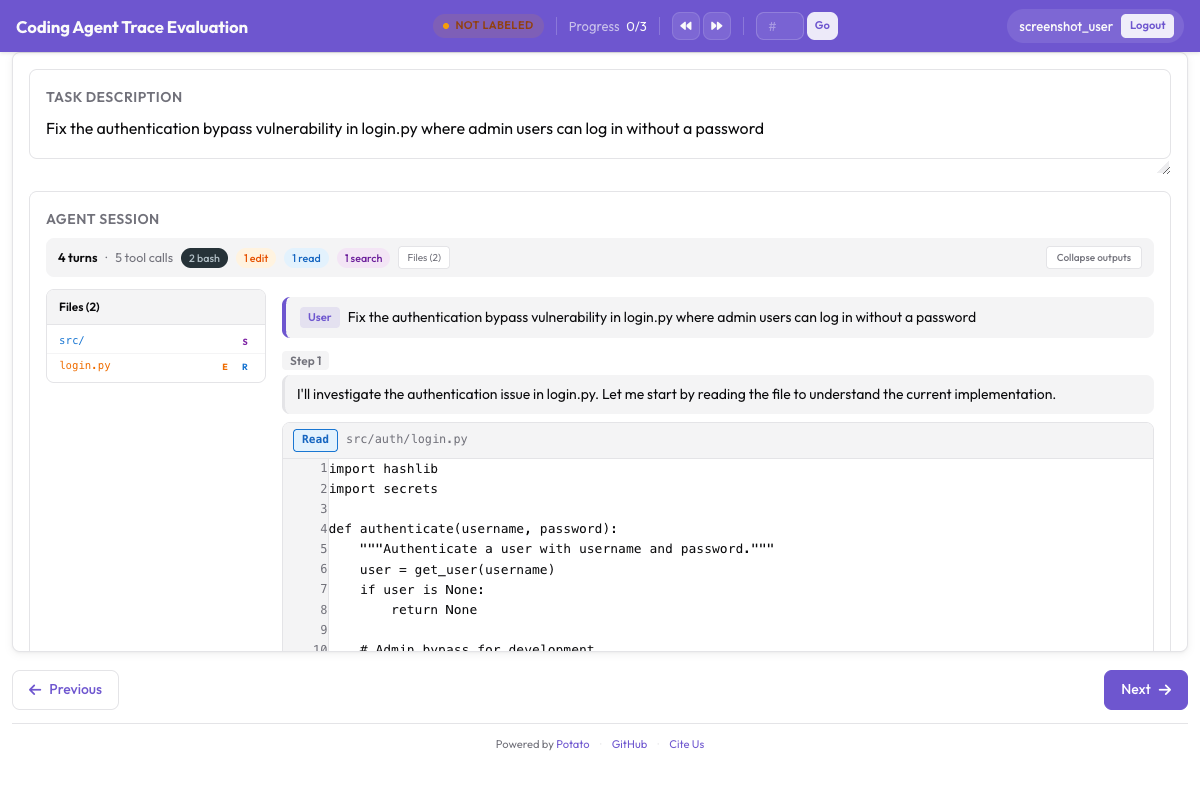 Ein Coding-Trace mit Unified Diffs, Terminalausgabe und dem Dateibaum in der Seitenleiste
collapse_long_outputs mit max_output_lines: 50 ist die Einstellung, die entscheidet, ob ein Trace lesbar ist. Ein einzelner pytest-Lauf kann mehrere hundert Zeilen ausgeben, und ein Annotator, der bei jedem Schritt daran vorbeiscrollen muss, hört auf, die Schritte zu lesen.
Das Datenformat
Das Format structured_turns erhält die Struktur der Tool-Aufrufe, die die Anzeige braucht. Jeder Turn trägt eine Rolle, den Textinhalt und eine Liste von Tool-Aufrufen:
{
  "id": "session_001",
  "task_description": "Fix the authentication bypass in login.py",
  "model": "claude-sonnet-4-20250514",
  "structured_turns": [
    {
      "role": "assistant",
      "content": "I'll investigate the auth issue.",
      "tool_calls": [
        {
          "tool": "Read",
          "input": {"file_path": "src/auth/login.py"},
          "output": "def login(user, password):\n    if user.role == 'admin':\n        return True",
          "output_type": "code",
          "language": "python"
        },
        {
          "tool": "Bash",
          "input": {"command": "pytest tests/test_auth.py -v"},
          "output": "4 passed",
          "output_type": "terminal"
        }
      ]
    }
  ]
}
output_type nimmt code, diff, terminal oder generic an, und Potato leitet den Wert aus dem Tool und der Dateiendung ab, wenn man ihn weglässt. Explizit setzen sollte man ihn, wenn die Ausgabe eines Tools nicht dem entspricht, was sein Name nahelegt.
Vorhandene Traces konvertieren
Der Konverter liest ein Format und schreibt die JSONL-Datei, die Potato lädt. Drei seiner Formate gehören zu Coding-Agenten:
# Claude Code, or any Anthropic Messages API transcript
python -m potato.trace_converter -i traces.json -f claude_code -o data/traces.jsonl

# Aider chat history with SEARCH/REPLACE blocks
python -m potato.trace_converter -i chat.md -f aider -o data/traces.jsonl

# SWE-Agent trajectories
python -m potato.trace_converter -i trajectory.json -f swe_agent_trajectory -o data/traces.jsonl

# Mixed directory, format detected per file
python -m potato.trace_converter -i traces.json --auto-detect -o data/traces.jsonl
Der Konverter claude_code liest sowohl die eigenen Sitzungstranskripte von Claude Code als auch die rohe Form der Messages API. Claude Code schreibt pro Sitzung eine JSONL-Datei unter ~/.claude/projects/<slugified-working-directory>/<session-id>.jsonl, und der Konverter macht aus einer Sitzung einen einzigen Trace statt einen pro Zeile:
python -m potato.trace_converter \
  -i ~/.claude/projects/-home-me-myrepo/3c853f0f-....jsonl \
  --auto-detect -o data/session.jsonl
Er folgt der parentUuid-Kette und behält nur den übrig gebliebenen Pfad. Zurückgespulte Versuche werden verworfen und gezählt, statt annotiert zu werden, als hätten sie stattgefunden. Sidechain-Nachrichten landen in sidechain_runs, außerhalb der Haupt-Turns. Slash-Befehle werden verworfen, da dort die CLI mit sich selbst spricht. Das Format auf der Festplatte gehört der CLI und nicht einer veröffentlichten API, daher ist der Reader über Upgrades hinweg als Best-Effort zu betrachten. Er ignoriert Datensatztypen, die er nicht kennt, und wirft einen Fehler, statt einen leeren Trace zurückzugeben, wenn sich eine Datei nicht mehr parsen lässt.
Process-Reward-Annotation
Ein Process Reward Model vergibt Kredit Schritt für Schritt, statt nur das Endergebnis zu bewerten, und process_reward sammelt die Labels, auf denen es trainiert wird. Zwei Modi wägen Tempo gegen Detailtiefe ab.
Im Modus first_error, dem Standard, klickt der Annotator auf den ersten Schritt, an dem der Agent danebenlag. Jeder Schritt davor wird als korrekt markiert, dieser Schritt und alle danach als inkorrekt. Ein Klick labelt die ganze Trajektorie, und deshalb ist dies der Modus, wenn man Menge braucht.
annotation_schemes:
  - annotation_type: process_reward
    name: step_rewards
    description: "Click the first step where the agent makes a mistake."
    steps_key: structured_turns
    mode: first_error
Im Modus per_step wird jeder Schritt für sich beurteilt. Das kostet mehr Zeit der Annotatoren und liefert das Signal, das first_error nicht liefern kann, denn eine Kaskade setzt voraus, dass ein Fehler nicht behebbar ist, und echte Agenten erholen sich von Fehlern. Schaltet man dazu allow_neutral ein, folgen die Labels der PRM800K-Konvention von +1, 0 und -1, bei der ein wirklich harmloser Schritt als neutral erfasst wird, statt an einen der Pole gedrängt zu werden:
  - annotation_type: process_reward
    name: step_rewards
    description: "Label each step as correct, neutral, or incorrect."
    steps_key: structured_turns
    step_text_key: content
    mode: per_step
    allow_neutral: true
Eines der beiden Schemata in die Konfiguration oben einfügen. Mit eingeschaltetem allow_neutral bleibt ein nicht markierter Schritt null, sodass der Export ein bewusstes neutrales Urteil von einem Schritt unterscheidet, bis zu dem der Annotator nie gekommen ist. allow_neutral gilt nur für per_step und wird in first_error zwangsweise abgeschaltet, weil dort kein Platz für ein neutrales Urteil ist.
Code-Review-Annotation
Das Schema code_review bringt das Review von Pull Requests zur Ausgabe von Agenten. Annotatoren klicken auf eine Diff-Zeile, um einen kategorisierten Kommentar anzuhängen, bewerten jede Datei und geben ein Urteil ab:
  - annotation_type: code_review
    name: review
    description: "Review the agent's code changes."
    comment_categories: [bug, style, suggestion, security]
    verdict_options: [approve, request_changes, comment_only]
    file_rating_dimensions: [correctness, quality]
Dieses Schema in die Konfiguration oben einfügen. Die Dimensionen der Dateibewertung werden jeweils von 1 bis 5 bewertet. Die Standardwerte passen für allgemeine Review-Arbeit. Überschreiben sollte man sie, wenn die eigene Taxonomie der Kern der Studie ist, etwa bei einem Sicherheits-Review, in dem bug und security getrennte Kategorien mit getrennten Definitionen in den Anweisungen sein müssen.
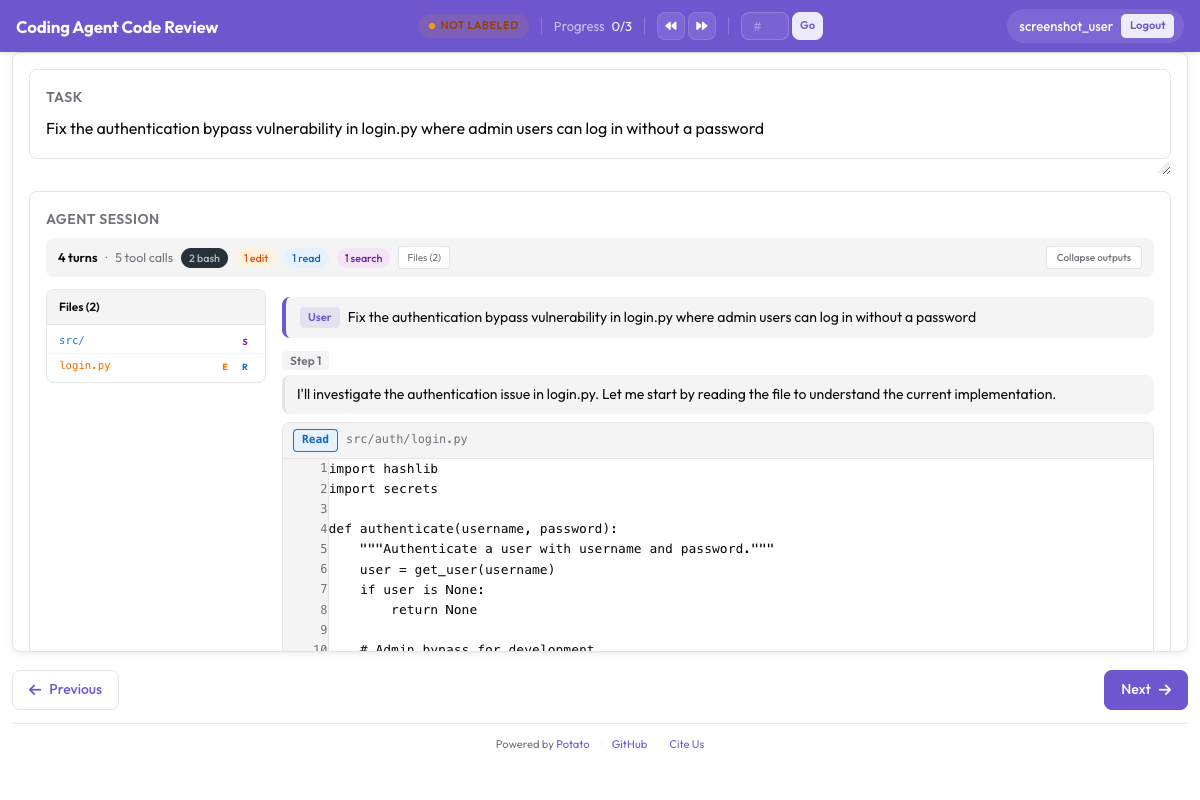 Inline-Kommentare im Diff, Bewertungen pro Datei und das Gesamturteil
Das Tutorial zum Code-Review geht eine vollständige Review-Studie durch, einschließlich der Frage, wie die Kommentarkategorien prägen, was Annotatoren bemerken. Diese Studie sollte man erst an einer Handvoll Traces laufen lassen, bevor man sie hochskaliert, denn eine Kategorienliste, die in der Konfiguration vollständig aussah, bekommt nach den ersten zwanzig Reviews meist noch einen Eintrag dazu.
Eine vollständige Konfiguration
Diese Konfiguration stellt Traces dar und sammelt ein Urteil auf Aufgabenebene, Process Rewards im First-Error-Modus und ein Code-Review, mit drei Annotatoren pro Trace, damit sich die Übereinstimmung messen lässt:
annotation_task_name: "Coding Agent Trace Evaluation"
task_description: "Judge whether the agent completed the task and review its changes."

data_files:
  - data/traces.jsonl

item_properties:
  id_key: id
  text_key: task_description

port: 8000
output_annotation_dir: annotation_output/coding-agent-eval/
export_annotation_format: jsonl

instance_display:
  layout:
    direction: vertical
    gap: 16px
  fields:
    - key: task_description
      type: text
      label: "Task"
    - key: structured_turns
      type: coding_trace
      label: "Agent Session"
      display_options:
        show_file_tree: true
        diff_view: unified
        collapse_long_outputs: true
        max_output_lines: 50
        terminal_theme: dark
        show_step_numbers: true

annotation_schemes:
  - annotation_type: radio
    name: task_success
    description: "Did the agent complete the task?"
    labels:
      - name: success
        tooltip: "Completed correctly with no issues"
      - name: partial
        tooltip: "Completed with minor issues"
      - name: failure
        tooltip: "Not completed, or completed incorrectly"
    sequential_key_binding: true

  - annotation_type: process_reward
    name: step_rewards
    description: "Click the first step where the agent makes a mistake."
    steps_key: structured_turns
    mode: first_error

  - annotation_type: code_review
    name: review
    description: "Review the agent's code changes."
    comment_categories: [bug, style, suggestion, security]
    verdict_options: [approve, request_changes, comment_only]
    file_rating_dimensions: [correctness, quality]

  - annotation_type: text
    name: notes
    description: "Anything else worth recording about this trace"
    placeholder: "Optional"

num_annotators_per_item: 3

user_config:
  allow_all_users: false
  users:
    - annotator1
    - annotator2
Potato installieren, die Traces konvertieren und den Server starten:
pip install potato-annotation
python -m potato.trace_converter -i ./my_traces.json --auto-detect -o data/traces.jsonl
potato start config.yaml -p 8000
Das Repository enthält unter examples/agent-traces/coding-agent-evaluation/ eine funktionierende Version dieses Projekts, und damit sieht man die Anzeige am schnellsten, bevor man eigene Daten konvertiert. Diese Konfiguration starten, einen Trace so lesen, wie ein Annotator es tun würde, und nach wenigen Minuten weiß man, ob die Schrittgranularität, die man labeln will, der Granularität entspricht, die die Anzeige zeigt.
Export fürs Training
Annotationen verlassen Potato über den Exporter für Coding-Evaluation, der pro Ausgabetyp eine Datei schreibt:
python -m potato.export -c config.yaml -f coding_eval -o exports/ \
--option types=prm,preference,swebench,code_review| Typ | Datei | Wofür sie dient |
|---|---|---|
prm | prm_training_data.jsonl | Training von Process Reward Models |
preference | preference_pairs.jsonl | DPO oder RLHF, aus paarweisen Annotationen |
swebench | swebench_results.jsonl | Mit SWE-bench kompatible Evaluation |
code_review | code_reviews.jsonl | Strukturierte Review-Daten |
Der Typ preference braucht paarweise Annotationen als Grundlage, daher liefert eine Studie, die nur Process Rewards sammelt, die anderen drei. Man sollte festlegen, welche der vier man will, bevor man die Schemata entwirft, denn einen paarweisen Vergleich nachträglich hinzuzufügen heißt, jeden Trace ein zweites Mal gegen einen Partner zu annotieren.
Einem Agenten bei der Arbeit zusehen
Aufgezeichnete Traces sind die eine Hälfte des Bildes. live_coding_agent führt einen Agenten innerhalb der Annotationsseite aus. Dort sehen Annotatoren ihm bei der Arbeit zu, greifen ein, setzen zurück und spielen den Lauf mit anderen Anweisungen erneut ab, gegen ein Ollama-, Anthropic- oder Claude-SDK-Backend in einem abgeschotteten Arbeitsverzeichnis. Die Dokumentation zum Live-Coding-Agenten beschreibt die Backends und die Sandbox-Modi.
Wenn Ihr Team Coding-Agenten evaluiert und auf etwas stößt, das dieses Setup nicht abdeckt, öffnen Sie ein Issue im GitHub-Repository. Ein neuer Konverter ist ungefähr eine Datei in potato/trace_converter/converters/, also ist ein Format, das Potato noch nicht liest, eher ein möglicher Beitrag als ein Hindernis.