Emotionen in Sprache klassifizieren
Erstelle in Potato eine Aufgabe zur Emotionsklassifikation auf Audio mit interaktiver Wellenform, Steuerung der Abspielgeschwindigkeit, Likert-Skalen und konfigurierbaren Emotionslabelsätzen.
Emotionserkennung in Sprache (SER) steckt in Sprachassistenten, in Anwendungen für psychische Gesundheit und in der Auswertung von Callcentern, und alles davon braucht gelabeltes Audio zum Trainieren. Dieses Tutorial geht Annotationsoberflächen für kategoriale Emotionen, dimensionale Bewertungen und Clips mit mehr als einer Emotion durch. Die zugrunde liegenden Audio-Optionen stehen in der Dokumentation zur Audio-Annotation.
Ansätze für Emotionsannotation
Es gibt einige übliche Wege, Sprachemotion zu labeln. Du kannst diskrete Kategorien wie fröhlich, traurig oder wütend verwenden. Du kannst kontinuierliche Dimensionen wie Valenz, Erregung und Dominanz bewerten. Du kannst Annotierende mehrere Emotionen gleichzeitig mit Intensitätsbewertungen markieren lassen. Oder du taggst bei längeren Clips verschiedene Emotionen zu verschiedenen Zeitmarken.
Kategoriale Emotionsklassifikation
Grundeinrichtung
annotation_task_name: "Speech Emotion Recognition"

data_files:
  - data/utterances.json

item_properties:
  id_key: id
  text_key: transcript  # Optional transcript

instance_display:
  fields:
    - key: audio_path
      type: audio
      label: "Utterance"
      display_options:
        controls: true
        show_waveform: true
        preload: metadata

annotation_schemes:
  - annotation_type: radio
    name: emotion
    description: "What emotion is expressed in this speech?"
    labels:
      - name: Happy
        description: "Joy, excitement, amusement"
        key_value: "h"
      - name: Sad
        description: "Sorrow, disappointment, grief"
        key_value: "s"
      - name: Angry
        description: "Frustration, irritation, rage"
        key_value: "a"
      - name: Fearful
        description: "Anxiety, worry, terror"
        key_value: "f"
      - name: Surprised
        description: "Astonishment, shock"
        key_value: "u"
      - name: Disgusted
        description: "Revulsion, distaste"
        key_value: "d"
      - name: Neutral
        description: "No clear emotion"
        key_value: "n"
    label_requirement:
      required: true
Potato rendert neben den Annotationslabels eine interaktive Wellenform mit Wiedergabesteuerung:
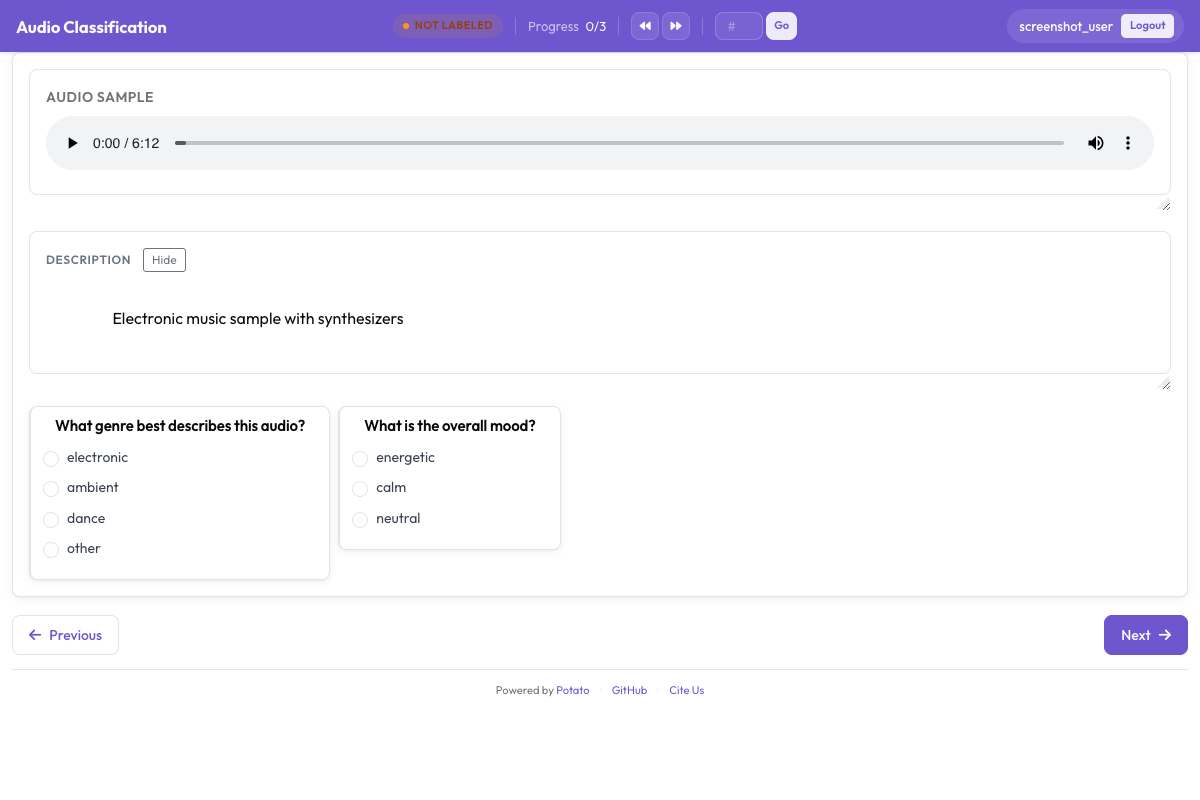 Die Audio-Annotationsoberfläche mit interaktiver Wellenform, Wiedergabesteuerung und kategorialen Emotionslabels
Intensität ergänzen
annotation_schemes:
  - annotation_type: radio
    name: emotion
    description: "What emotion does the speaker express?"
    labels: [Happy, Sad, Angry, Fearful, Surprised, Disgusted, Neutral]
    label_requirement:
      required: true

  - annotation_type: likert
    name: intensity
    description: "How intense is this emotion?"
    size: 5
    min_label: "Very weak"
    max_label: "Very strong"
Dimensionale Emotionsannotation
Das VAD-Modell (Valence-Arousal-Dominance) bewertet jeden Clip auf drei kontinuierlichen Skalen, statt ihn in eine Kategorie zu zwingen:
annotation_task_name: "Dimensional Emotion Rating"

annotation_schemes:
  # Valence: negative to positive
  - annotation_type: likert
    name: valence
    description: "Valence: How positive or negative?"
    size: 7
    min_label: "Very negative"
    max_label: "Very positive"

  # Arousal: calm to excited
  - annotation_type: likert
    name: arousal
    description: "Arousal: How calm or excited?"
    size: 7
    min_label: "Very calm"
    max_label: "Very excited"

  # Dominance: submissive to dominant
  - annotation_type: likert
    name: dominance
    description: "Dominance: How submissive or dominant?"
    size: 7
    min_label: "Very submissive"
    max_label: "Very dominant"
Bildskalen (SAM)
Im Stil des Self-Assessment Manikin:
annotation_schemes:
  - annotation_type: likert
    min_label: "Very negative"
    max_label: "Very positive"
    name: valence
    description: "Select the figure that matches the emotional valence"
    size: 9
Gemischte Emotionen erkennen
Für Sprache mit mehreren Emotionen:
annotation_schemes:
  - annotation_type: multiselect
    name: emotions_present
    description: "Select ALL emotions you detect (can be multiple)"
    labels:
      - Happy
      - Sad
      - Angry
      - Fearful
      - Surprised
      - Disgusted
      - Contempt

  - annotation_type: radio
    name: primary_emotion
    description: "Which emotion is MOST prominent?"
    labels:
      - Happy
      - Sad
      - Angry
      - Fearful
      - Surprised
      - Disgusted
      - Contempt
      - Mixed (no dominant)
Vollständige Emotionsannotation
annotation_task_name: "Comprehensive Speech Emotion Annotation"

data_files:
  - data/speech_samples.json

item_properties:
  id_key: id
  text_key: transcript

instance_display:
  fields:
    - key: audio_url
      type: audio
      label: "Speech sample"
      display_options:
        controls: true
        show_waveform: true
        preload: metadata
        autoplay: false

    # Show the transcript alongside the audio
    - key: transcript
      type: text
      label: "Transcript (for reference)"

annotation_schemes:
  # Primary categorical emotion
  - annotation_type: radio
    name: primary_emotion
    description: "Primary emotion expressed"
    labels:
      - name: Happiness
        color: "#FCD34D"
        key_value: "1"
      - name: Sadness
        color: "#60A5FA"
        key_value: "2"
      - name: Anger
        color: "#F87171"
        key_value: "3"
      - name: Fear
        color: "#A78BFA"
        key_value: "4"
      - name: Surprise
        color: "#34D399"
        key_value: "5"
      - name: Disgust
        color: "#FB923C"
        key_value: "6"
      - name: Neutral
        color: "#9CA3AF"
        key_value: "7"
    label_requirement:
      required: true

  # Emotional intensity
  - annotation_type: likert
    name: intensity
    description: "Emotional intensity"
    size: 5
    min_label: "Very mild"
    max_label: "Very intense"
    label_requirement:
      required: true

  # Dimensional ratings
  - annotation_type: likert
    name: valence
    description: "Valence (negative to positive)"
    size: 7
    min_label: "Negative"
    max_label: "Positive"

  - annotation_type: likert
    name: arousal
    description: "Arousal (calm to excited)"
    size: 7
    min_label: "Calm"
    max_label: "Excited"

  # Voice quality
  - annotation_type: multiselect
    name: voice_qualities
    description: "Voice characteristics (select all that apply)"
    labels:
      - Trembling voice
      - Raised pitch
      - Lowered pitch
      - Loud/shouting
      - Soft/whisper
      - Fast speech rate
      - Slow speech rate
      - Breathy
      - Tense/strained
      - Crying
      - Laughing

  # Genuineness
  - annotation_type: radio
    name: authenticity
    description: "Does the emotion seem genuine?"
    labels:
      - Clearly genuine
      - Likely genuine
      - Uncertain
      - Likely acted/fake
      - Clearly acted/fake

  # Confidence
  - annotation_type: likert
    name: confidence
    description: "How confident are you in your annotation?"
    size: 5
    min_label: "Guessing"
    max_label: "Certain"

annotation_instructions: |
  ## Emotion Annotation Guidelines

  ### Listening Instructions
  1. Listen to the entire clip before annotating
  2. You may replay as many times as needed
  3. Focus on the VOICE, not just the words

  ### Emotion Categories
  - **Happiness**: Joy, amusement, contentment
  - **Sadness**: Sorrow, disappointment, melancholy
  - **Anger**: Frustration, irritation, rage
  - **Fear**: Anxiety, nervousness, terror
  - **Surprise**: Astonishment, startle
  - **Disgust**: Revulsion, contempt
  - **Neutral**: Calm, matter-of-fact

  ### Tips
  - Consider tone, pitch, speaking rate
  - The transcript may not match the emotion
  - When unsure between two emotions, choose the stronger one
  - Use the intensity scale for unclear cases

output_annotation_dir: annotations/
export_annotation_format: jsonl
Ausgabeformat
{
  "instance_id": "utt_001",
  "user_id": "rater_01",
  "labels": {
    "primary_emotion": {"Surprise": "true"},
    "voice_qualities": {"Raised pitch": "true", "Fast speech rate": "true"},
    "authenticity": {"Clearly genuine": "true"},
    "confidence": {"4": "true"}
  },
  "spans": {},
  "links": {}
}
Emotion auf Segmentebene
Für längeres Audio mit wechselnden Emotionen:
annotation_schemes:
  - annotation_type: audio_annotation
    name: emotion_segments
    description: "Mark time segments with different emotions"
    labels:
      - name: Happy
        color: "#FCD34D"
      - name: Sad
        color: "#60A5FA"
      - name: Angry
        color: "#F87171"
      - name: Neutral
        color: "#9CA3AF"
Qualitätskontrolle
Eindeutige Clips mit bekannten Labels entlarven Annotierende, die sich nur durchklicken. Beide Blöcke stehen auf der obersten Ebene der Konfiguration, und beide beziehen ihre Items aus einer Datei statt inline:
attention_checks:
  enabled: true
  frequency: 20
  items_file: data/attention_checks.json
  min_response_time: 3.0

gold_standards:
  enabled: true
  items_file: data/gold_standards.json
  mode: mixed
  frequency: 20
  accuracy:
    min_threshold: 0.7
    evaluation_count: 10
Ein Gold-Item sieht aus wie eines deiner Daten-Items mit einem zusätzlichen gold_label und wird deshalb genauso dargestellt wie alles andere:
[
  {
    "id": "gold_001",
    "audio_path": "/audio/gold/clearly_happy.wav",
    "gold_label": { "primary_emotion": "Happiness" },
    "explanation": "Laughter and rising pitch throughout, with no ambiguity.",
    "difficulty": "easy"
  }
]
Items für Aufmerksamkeitsprüfungen verwenden expected_answer statt gold_label. min_response_time ist bei Audio die nützliche Stellschraube. Eine Untergrenze von drei Sekunden erwischt alle, die einen Clip labeln, den sie gar nicht zu Ende gehört haben können.
Diese Blöcke unter einem quality_control:-Block zu verschachteln ist ein häufiger Fehler, und er schlägt still fehl. Potato liest attention_checks und gold_standards von der obersten Ebene, und der einzige Schlüssel, den es aus quality_control liest, ist geometry_iou_tolerance. Ein verschachtelter Block besteht deshalb die Validierung ohne Fehler und läuft nie.
Hinweise zur Emotionsannotation
Hör den ganzen Clip an, bevor du dich entscheidest, und achte darauf, wie etwas gesagt wird, statt auf die Wörter selbst. Denk daran, dass Ausdrucksnormen sich zwischen Kulturen unterscheiden, sodass etwas, das in der einen nach Wut klingt, in der anderen einfach Nachdruck sein kann. Emotionen zu annotieren ermüdet, ermuntere also zu Pausen und lass das Team regelmäßig über Uneinigkeiten sprechen, damit die Kalibrierung hält.
Nächste Schritte
- Ergänze Sprecherdiarisierung, um Emotion über mehrere Sprecher zu verfolgen
- Richte Crowdsourcing für Erhebungen in großem Umfang ein
- Berechne die Inter-Annotator-Übereinstimmung für Emotionsaufgaben
Dokumentation unter Audio-Annotation.