Qualitative Coding with Codebooks, Memos, and In-Vivo Codes
QDA Mode in Potato 2.6 gives qualitative researchers a living codebook, in-vivo coding, and analyst memos over a whole corpus.
If you have ever coded interview transcripts, you know the software story. The serious tools for qualitative data analysis (QDA), like NVivo, ATLAS.ti, MAXQDA, and Dedoose, are capable and expensive. They live on the desktop, lock your project in a proprietary file, and make collaboration a licensing negotiation. Plenty of researchers end up coding in a spreadsheet instead, then lose the thread halfway through because a spreadsheet has no idea what a code is.
Potato started on the other side of the fence, as a text-annotation tool for NLP and machine-learning datasets. Over the last few releases it grew the pieces a qualitative workflow needs: spans over passages, a shared codebook, agreement metrics. The upcoming 2.6 release ties them together into a mode shaped for qualitative work.
The QDA Mode documentation has the full option list.
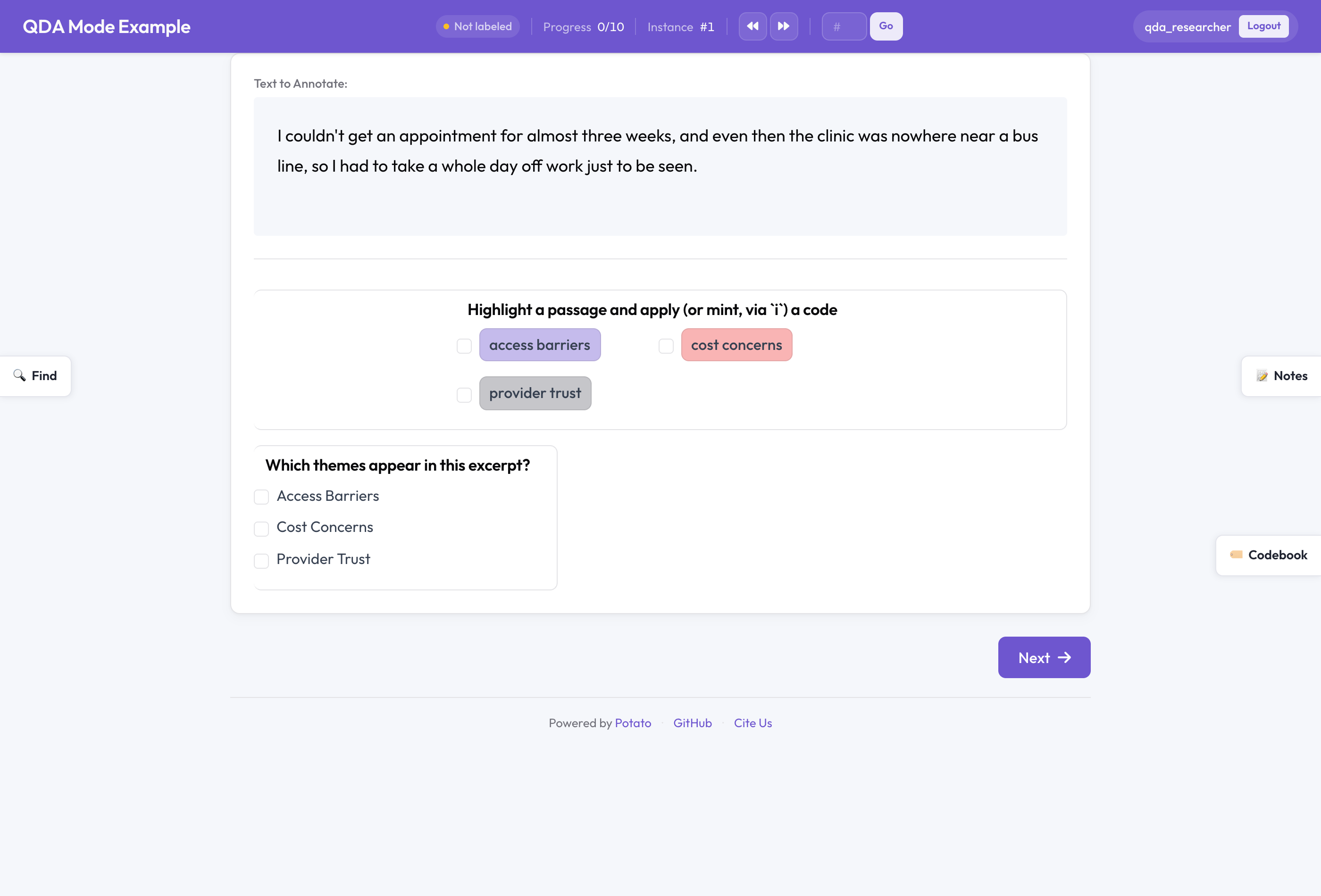 Potato in QDA Mode
One switch
Most of Potato's machinery is shared across very different tasks. The same span scheme that labels named entities for an NER dataset can label passages in an interview. The two jobs need the same features and different defaults. A crowdsourced NER project wants a fixed label set and overlap sampling to measure agreement. A lone researcher coding twenty interviews wants to invent codes as they read and keep private notes about what they are seeing.
QDA Mode is the single switch for the second case:
qda_mode:
  enabled: true            # compose codebook + memos + cases + search
Setting qda_mode.enabled: true flips Potato's universal features to their qualitative defaults. The codebook becomes editable while you code instead of locked. The memos sidebar turns on. Cases turn on, with auto-detection. In-vivo coding becomes available on any span scheme you mark as codebook-backed.
| Feature | Standard default | Under QDA Mode |
|---|---|---|
| Codebook mode | fixed | open: add, rename, recolor, move, or delete codes as you go |
| Memos sidebar | off | on |
| Cases | off | on, with auto-detect |
| Annotator search-and-claim | off | available (search.annotator_claim: true) |
| In-vivo coding key | i | active on any codebook-backed span scheme |
None of this is locked in. QDA Mode only changes the starting point; every default can be overridden. The one exception is a guardrail: if you attach a crowdsourcing backend like Prolific or SONA, Potato force-locks the codebook to fixed so paid annotators cannot reshape the shared scheme out from under you.
The pieces
A living codebook
In grounded-theory-style coding, the codebook is not something you write up front. It grows as you read. You notice a recurring idea, name it, and a week later realize two of your codes are really the same one and merge them.
A span scheme becomes part of the codebook when you mark it:
annotation_schemes:
- annotation_type: span    # span + codebook = qualitative coding
  name: codes
  description: Highlight a passage and apply (or mint, via `i`) a code
  codebook: true
  labels: [access barriers, cost concerns, provider trust]
Those labels are a starting set. Under the open codebook mode you add, rename, recolor, move, and delete codes while you work. The extensible mode lets coders add codes but not delete shared ones; fixed is the locked-down classic for when you have settled on a scheme.
In-vivo coding
In-vivo coding takes the participant's own words as the code. Someone says "I just couldn't get a callback," and "couldn't get a callback" becomes the code, verbatim.
Select a passage on a codebook-backed span scheme and press the in-vivo key (codebook_invivo_key, default i). Potato mints a code straight from the highlighted text. As you do this across a corpus, the risk is fragmentation: you end up with "no callback," "couldn't get a callback," and "never called back" as three codes for one idea. The code composer surfaces near-duplicate codes as you type, so you reuse an existing code instead of minting another.
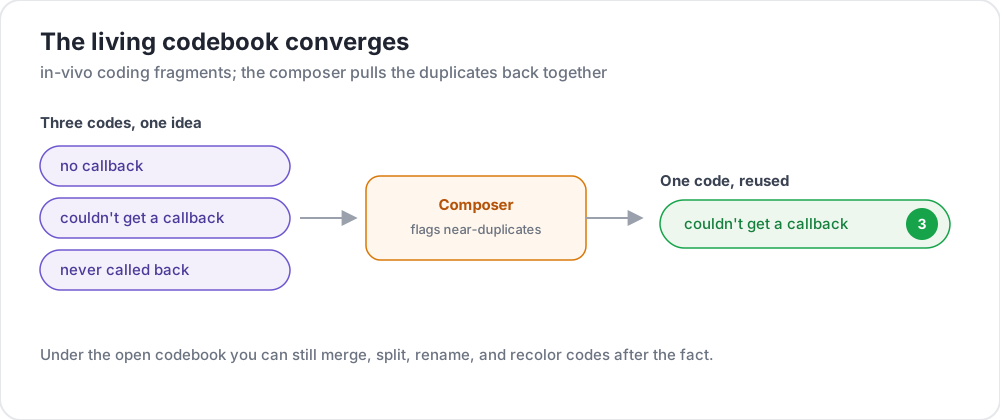 The living codebook converges instead of fragmenting
Memos
Coding without notes loses the reasoning behind the codes. Memos are analytic notes attached to an instance or to a specific text selection. You can keep them private or share them with the team. They are where the "why did I code this that way" lives, and they export alongside the quotations so your audit trail survives the project.
Cases
A case groups excerpts into a unit of analysis: a participant, a document, a site visit. Once excerpts are grouped, case-level attributes get lifted up so you can tabulate codes against participant variables. If each interview carries a condition field, the admin crosstab can show how a code distributes across conditions.
cases:
  enabled: true
  key: participant_id
  attributes: [condition]
Search
A corpus is only navigable if you can jump to any mention of a word. QDA Mode includes FTS5 full-text search over the whole dataset. With annotator_claim: true, a coder can pull any search match straight into their own queue, which is how a single analyst moves through a corpus by theme rather than reading strictly front to back.
search:
  enabled: true
  annotator_claim: true
How it fits together
The codebook, memos, cases, and search all read and write the same project database, so a code minted in one place is immediately searchable and exportable everywhere else.
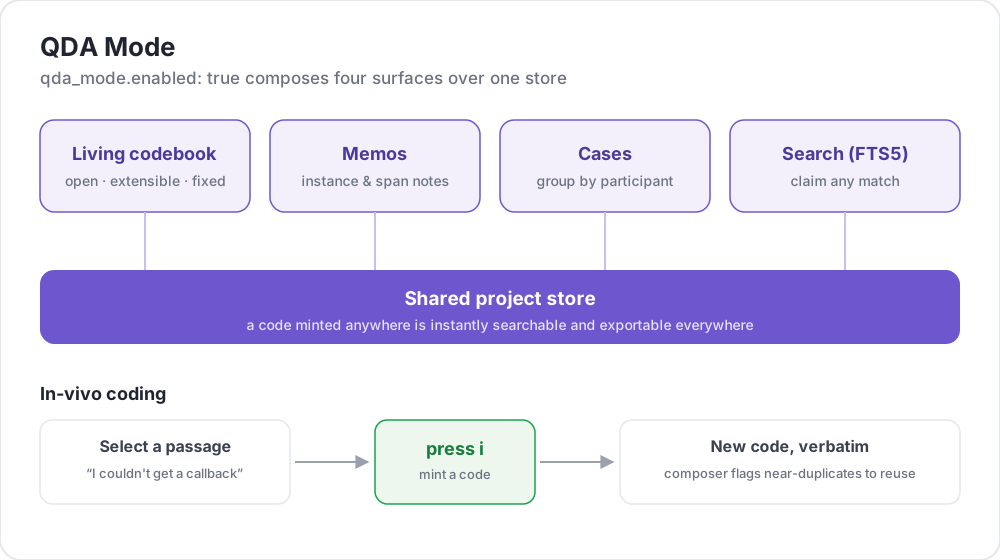 How QDA Mode composes its pieces over a shared store
A complete config
Here is a small but complete study. The cases, search, and memo blocks are optional (QDA Mode already turns cases and memos on), so you only write them to tune a default like the case key.
annotation_task_name: My Qualitative Study
task_dir: .
output_annotation_dir: annotation_output/
data_files:
- data/interviews.json
item_properties:
  id_key: id
  text_key: text

qda_mode:
  enabled: true

codebook_invivo_key: i

cases:
  enabled: true
  key: participant_id
  attributes: [condition]

search:
  enabled: true
  annotator_claim: true

annotation_schemes:
- annotation_type: span
  name: codes
  description: Highlight a passage and apply (or mint, via `i`) a code
  labels: [access barriers, cost concerns, provider trust]
Run it from the repository root once 2.6 is installed:
python potato/flask_server.py start examples/advanced/qda-mode-example/config.yaml -p 8000Getting your coding back out
Two exporters turn coded data into the deliverables a qualitative paper needs:
codebookgives one row per code, with its hierarchy, description, color, and use count.quotation_reportgives one row per coded span: the quote, its character offsets, the source instance, and the coder. Addinclude_memos=trueto append your memos.
python -m potato.export -c config.yaml --format quotation_report \
  --option include_memos=true -o quotations.csv
If more than one person codes the same material, you will want a reliability number. Potato reports Cohen's and Fleiss' kappa over the codes, which landed in the 2.5 release alongside these exporters.
Where this fits
QDA Mode does not try to out-feature NVivo on every axis. What it offers is a different trade: free, open source, web-based, and collaborative, sitting in the same tool as your machine-learning annotation and your agent evaluation. If your lab already runs Potato for labeling, qualitative coding is now one config block away rather than a separate piece of licensed desktop software.
QDA Mode ships in Potato 2.6. The full documentation covers every option, and the inter-annotator agreement guide explains the reliability metrics.