Confidence Annotation
Add confidence ratings paired with other annotations in Potato using Likert scales or sliders to capture how certain an annotator was about a decision.
The confidence annotation schema lets annotators rate their confidence in another annotation they have made. It pairs a confidence scale (Likert or slider) with a target annotation schema, which records how certain the annotator was alongside the choice itself.
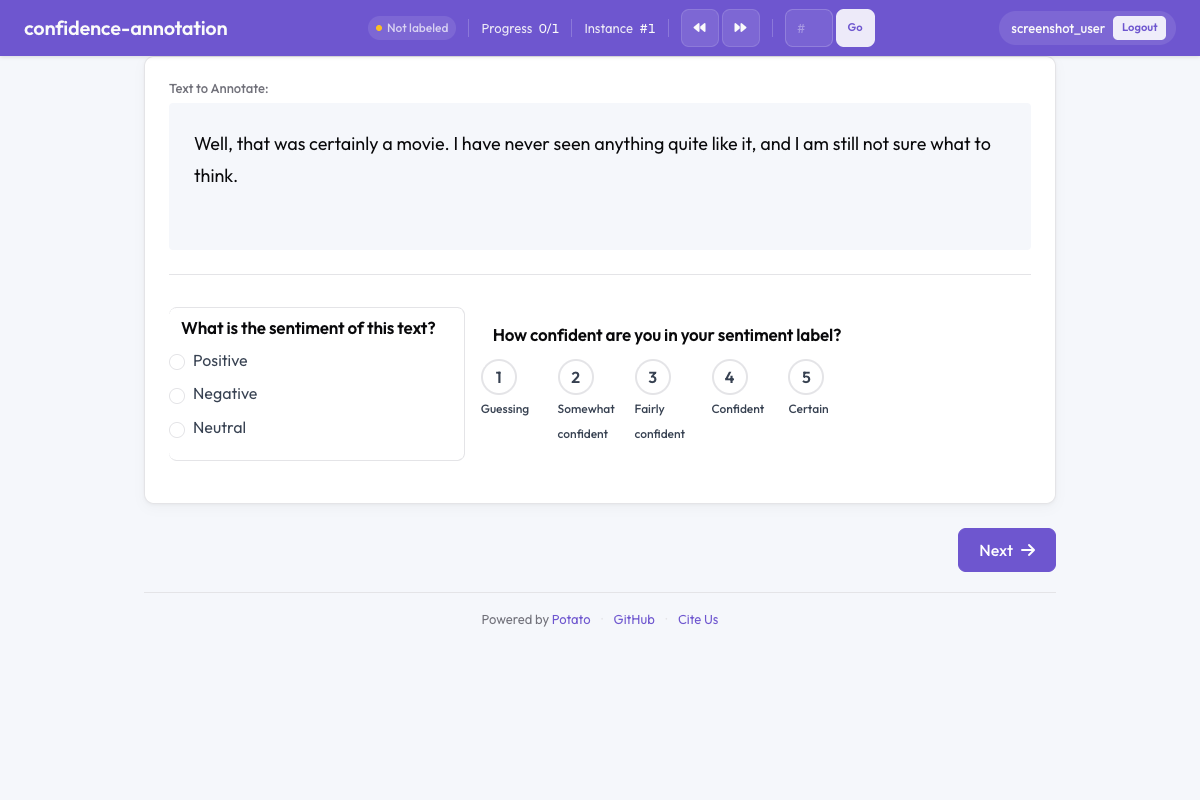 Confidence annotation in Potato
Overview
Confidence ratings give you a per-item measure of how hard the decision was, which is what identifies ambiguous items, supports weighting during aggregation, and flags candidates for adjudication. When configured, a confidence widget appears alongside the target annotation and asks the annotator how sure they are of their decision.
Quick Start
Point target_schema at the annotation the rating is about, so the pair can be read back together. A 5-point Likert scale is the default and the fastest for an annotator to answer:
annotation_schemes:
  - annotation_type: radio
    name: sentiment
    description: What is the sentiment of this text?
    labels: ["Positive", "Negative", "Neutral"]

  - annotation_type: confidence
    name: sentiment_confidence
    description: How confident are you in your sentiment label?
    target_schema: sentiment
    scale_type: likert
    scale_points: 5
Configuration Options
| Field | Type | Default | Description |
|---|---|---|---|
annotation_type | string | Required | Must be "confidence" |
name | string | Required | Unique identifier for this schema |
description | string | Required | Instructions displayed to annotators |
target_schema | string | Optional | Name of the annotation schema this confidence rating applies to |
scale_type | string | "likert" | Type of scale: "likert" for discrete points or "slider" for continuous |
scale_points | integer | 5 | Number of points on the Likert scale (ignored for slider) |
labels | array | Optional | Custom labels for scale points (e.g., ["Not confident", "Very confident"]) |
min_value | number | 0 | Minimum slider value (slider only) |
max_value | number | 100 | Maximum slider value (slider only) |
step | number | 1 | Increment between selectable slider values (slider only) |
left_label | string | "Not confident" | Label at the low end of the slider (slider only) |
right_label | string | "Very confident" | Label at the high end of the slider (slider only) |
label_requirement.required | boolean | false | Whether the confidence rating must be completed before moving on |
Without labels, a Likert scale uses Potato's own wording, from "Guessing" through "Somewhat confident", "Fairly confident", and "Confident" to "Certain", truncated to scale_points.
Examples
Likert Confidence Scale
Naming every point removes the guesswork about what a middle value means, which matters when several annotators have to use the scale the same way:
annotation_schemes:
  - annotation_type: radio
    name: toxicity
    description: Is this comment toxic?
    labels: ["Toxic", "Not Toxic"]

  - annotation_type: confidence
    name: toxicity_confidence
    description: How confident are you in your toxicity judgment?
    target_schema: toxicity
    scale_type: likert
    scale_points: 5
    labels: ["Not at all confident", "Slightly confident", "Moderately confident", "Very confident", "Extremely confident"]
Slider Confidence Scale
A slider records a finer-grained value than a 5-point scale, at the cost of a slower answer and values that are harder to compare across annotators. The 0 to 100 range below matches the wording of the instruction:
annotation_schemes:
  - annotation_type: radio
    name: stance
    description: What stance does the author take?
    labels: ["Support", "Oppose", "Neutral"]

  - annotation_type: confidence
    name: stance_confidence
    description: Rate your confidence from 0 (guessing) to 100 (certain).
    target_schema: stance
    scale_type: slider
    min_value: 0
    max_value: 100
    step: 1
    left_label: "Guessing"
    right_label: "Certain"
Required Confidence Rating
An optional confidence rating is the one annotators skip when they are moving quickly, which leaves the ratings you do collect biased toward careful items. Set label_requirement.required to true on the confidence scheme to block submission until the rating is answered:
annotation_schemes:
  - annotation_type: multiselect
    name: topics
    description: Select all topics that apply.
    labels: ["Politics", "Economy", "Health", "Education"]

  - annotation_type: confidence
    name: topics_confidence
    description: How confident are you in your topic selections?
    target_schema: topics
    scale_type: likert
    scale_points: 3
    labels: ["Low", "Medium", "High"]
Standalone Confidence (No Target)
Confidence annotations can also be used without a target schema for general self-assessment, such as recording domain familiarity once per item:
annotation_schemes:
  - annotation_type: confidence
    name: task_familiarity
    description: How familiar are you with this topic area?
    scale_type: likert
    scale_points: 5
    labels: ["Not familiar", "Slightly familiar", "Somewhat familiar", "Very familiar", "Expert"]
Output Format
{
  "toxicity_confidence": {
    "labels": {
      "confidence": 4
    }
  }
}
For Likert scales, values run from 1 to scale_points. For sliders, values run from min_value to max_value, and the slider starts at the midpoint of that range.
Best Practices
- Pair the rating with a target schema - a confidence rating is most useful when
target_schemalinks it to a specific decision - Use Likert for speed - discrete scales are faster to answer and easier to compare across annotators
- Use sliders for fine-grained measurement - when you need precise confidence values for downstream analysis
- Make confidence required - optional ratings get skipped, which biases the ratings you collect
- Analyze confidence patterns - low-confidence items are good candidates for adjudication or additional annotations
Further Reading
- Likert Scales - Ordinal rating scales
- Slider - Continuous value annotation
- Quality Control - Attention checks and gold standards
For implementation details, see the source documentation.