Esquemas de Anotação
Defina esquemas de anotação em YAML com radio, multiselect, span, likert, slider, text e mais 55 tipos. Configure rótulos, perguntas e campos obrigatórios.
Os esquemas de anotação definem as tarefas de rotulagem para os seus anotadores. O Potato oferece suporte a 61 tipos de anotação, que podem ser combinados para criar tarefas de anotação complexas.
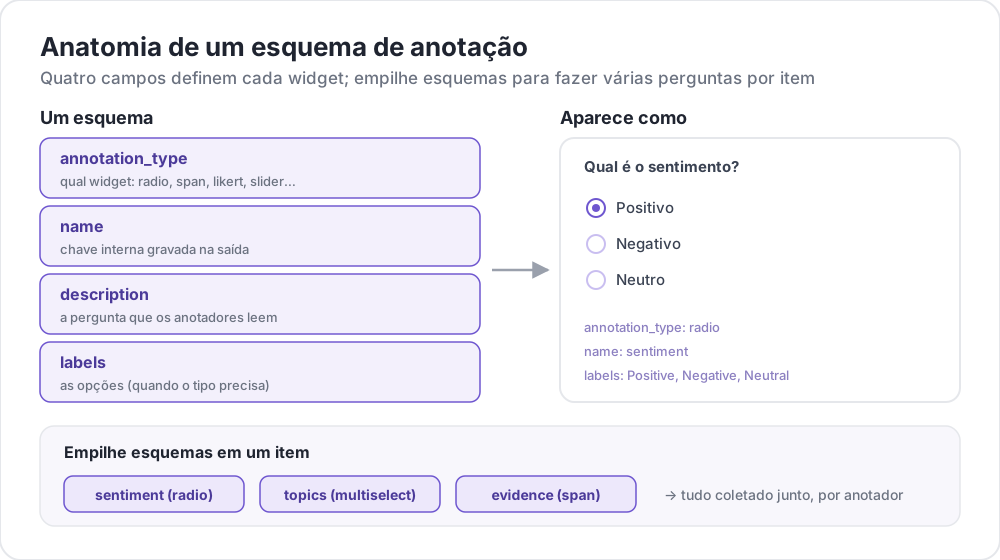 Anatomia de um esquema de anotação
Estrutura Básica
Cada esquema é definido no array annotation_schemes:
annotation_schemes:
  - annotation_type: radio
    name: sentiment
    description: "What is the sentiment?"
    labels:
      - Positive
      - Negative
      - Neutral
Campos Obrigatórios
Todo esquema tem estes três campos. Cada tipo acrescenta seus próprios campos obrigatórios, listados junto a cada tipo mais abaixo.
| Campo | Descrição |
|---|---|
annotation_type | Tipo de anotação (radio, multiselect, likert, span, text, number, slider, multirate, select, pairwise, bws, soft_label, confidence, constant_sum, range_slider, semantic_differential, hierarchical_multiselect, card_sort, rubric_eval, extractive_qa, error_span, triage, coreference, span_link e outros) |
name | Identificador interno (sem espaços, usado na saída) |
description | Instruções exibidas aos anotadores |
Tipos de Anotação Suportados
1. Radio (Escolha Única)
Selecione exatamente uma opção de uma lista:
- annotation_type: radio
  name: sentiment
  description: "What is the sentiment of this text?"
  labels:
    - Positive
    - Negative
    - Neutral

  # Assigns keys 1, 2, 3... in the order the labels are listed
  sequential_key_binding: true

  # Horizontal layout instead of vertical
  horizontal: true
As associações sequenciais mapeiam os dígitos 1-9 nos nove primeiros rótulos, então reordenar a lista de rótulos também reatribui as teclas. Para uma associação que sobreviva a uma reordenação, dê a cada rótulo sua própria tecla (veja Atalhos de Teclado).
2. Escala Likert
Escalas de avaliação com extremos rotulados:
- annotation_type: likert
  name: agreement
  description: "How much do you agree with this statement?"
  size: 5  # Number of scale points
  min_label: "Strongly Disagree"
  max_label: "Strongly Agree"

  # Show the numeric value of the selected point
  displaying_score: true
size é obrigatório, junto com os dois rótulos dos extremos. Cinco pontos dão aos anotadores um ponto médio neutro; um número par força uma direção.
3. Multiselect (Escolha Múltipla)
Selecione várias opções de uma lista:
- annotation_type: multiselect
  name: topics
  description: "Select all relevant topics"
  labels:
    - Politics
    - Technology
    - Sports
    - Entertainment
    - Science

  # Require at least one box before the annotator can move on
  label_requirement:
    required: true

  # Allow free text response
  has_free_response: true
has_free_response adiciona uma caixa de texto "outro". Vale a pena ativá-la enquanto o conjunto de rótulos ainda está sendo revisado, porque as entradas que ela coleta apontam as categorias que estão faltando.
4. Anotação de Span
Destaque e rotule segmentos de texto:
- annotation_type: span
  name: entities
  description: "Highlight named entities in the text"
  labels:
    - PERSON
    - ORGANIZATION
    - LOCATION
    - DATE

  # Show the label name on each highlighted span
  show_span_labels: true

  # Ctrl/Cmd+click to add non-contiguous ranges to one annotation
  allow_discontinuous: false

  # Keyboard shortcuts for labels
  sequential_key_binding: true
allow_discontinuous cobre spans formados por intervalos separados, como antecedentes divididos, e não spans que se sobrepõem. Deixe a opção desativada, a menos que o fenômeno que você está rotulando realmente se interrompa em uma lacuna, já que o gesto de Ctrl/Cmd+clique é fácil de acionar por acidente.
5. Slider
Intervalo numérico contínuo:
- annotation_type: slider
  name: confidence
  description: "How confident are you in your answer? (0 = not at all, 100 = completely)"
  min_value: 0
  max_value: 100
  starting_value: 50
  step: 1

  # Shows min_value and max_value at the ends of the track
show_labels: truemin_value, max_value e starting_value são todos obrigatórios. Um slider não aceita uma lista labels. Adicionar uma faz a pergunta passar para um layout de botões radio e o slider desaparece, então coloque qualquer texto para os extremos da escala em description. O valor inicial é onde o controle de cada anotador fica antes de ser tocado, então um ponto médio evita ancorar os anotadores em direção a qualquer um dos extremos.
6. Entrada de Texto
Respostas em texto livre:
- annotation_type: text
  name: explanation
  description: "Explain your reasoning"

  # Multi-line input
  rows: 4

  # Require a minimum length and show a running count
  min_chars: 20
  show_char_count: true

  # Placeholder text
  placeholder: "Enter your explanation here..."

  # Disable paste (for transcription tasks)
  allow_paste: false
allow_paste: false é importante em tarefas de transcrição e de evocação livre, em que uma resposta colada é copiada da fonte em vez de produzida pelo anotador.
7. Entrada Numérica
Entrada numérica com restrições:
- annotation_type: number
  name: count
  description: "How many entities are mentioned?"
  min: 0
  max: 100
  step: 1
8. Multirate (Avaliação em Matriz)
Avalie vários itens na mesma escala:
- annotation_type: multirate
  name: quality_aspects
  description: "Rate each aspect of the response"

  # Rows: the items being rated
  options:
    - Accuracy
    - Fluency
    - Relevance

  # Columns: the shared rating scale
  labels:
    - Poor
    - Fair
    - Good
    - Very Good
    - Excellent

  # Randomize row order per annotator
  option_randomization: true

  # Layout options
  arrangement: "vertical"
  display_config:
    num_columns: 2
options e labels são ambos obrigatórios, já que uma matriz precisa de linhas e colunas. Aleatorizar a ordem das linhas distribui qualquer efeito de ordem entre os itens, em vez de concentrá-lo no aspecto que por acaso aparece primeiro na lista.
Opções Comuns
Atalhos de Teclado
Acelere a anotação com associações de teclas:
# Automatic sequential binding: digits 1, 2, 3... in label order
sequential_key_binding: true
Para uma associação que não mude quando a lista de rótulos muda, passe objetos de rótulo e dê a cada um deles um key_value:
labels:
  - name: Positive
    key_value: "1"
  - name: Negative
    key_value: "2"
  - name: Neutral
    key_value: "3"
Tooltips
Forneça dicas ao passar o mouse sobre rótulos individuais. Os tooltips pertencem ao rótulo, não ao esquema, por isso são configurados dentro de labels:
labels:
  - name: Positive
    tooltip: "Expresses happiness, approval, or satisfaction"
  - name: Negative
    tooltip: "Expresses sadness, anger, or disappointment"
  - name: Neutral
    tooltip: "No clear emotional content"
Para orientações formatadas, aponte tooltip_file para um arquivo HTML:
labels:
  - name: Economic
    tooltip_file: "config/tooltips/economic.html"
Cores dos Rótulos
Cores personalizadas para distinção visual, definidas uma única vez para todo o projeto em ui:
ui:
  label_colors:
    entities:
      PERSON: "#3b82f6"
      LOCATION: "#10b981"
      ORGANIZATION: "#f59e0b"
As cores são indexadas pelo nome do esquema e depois pelo rótulo. Uma cor também pode ser definida em um rótulo individual, ao lado do seu tooltip:
labels:
  - name: positive
    color: "#22C55E"
    tooltip: "Positive sentiment"
Campos Obrigatórios
Torne um esquema obrigatório antes do envio:
- annotation_type: radio
  name: sentiment
  description: "What is the sentiment?"
  label_requirement:
    required: true
  labels:
    - Positive
    - Negative
Para exigir uma opção específica em vez de qualquer resposta, indique-a com required_label, que aceita um único rótulo ou uma lista.
Múltiplos Esquemas
Combine vários tipos de anotação por instância:
annotation_schemes:
  # Primary classification
  - annotation_type: radio
    name: sentiment
    description: "Overall sentiment"
    labels:
      - Positive
      - Negative
      - Neutral
    label_requirement:
      required: true
    sequential_key_binding: true

  # Confidence rating
  - annotation_type: likert
    name: confidence
    description: "How confident are you?"
    size: 5
    min_label: "Guessing"
    max_label: "Certain"

  # Topic tags
  - annotation_type: multiselect
    name: topics
    description: "Select all relevant topics"
    labels:
      - Politics
      - Technology
      - Sports
      - Entertainment
    has_free_response: true

  # Notes
  - annotation_type: text
    name: notes
    description: "Any additional observations"
    rows: 4
    label_requirement:
      required: false
Aqui apenas o rótulo de sentimento é obrigatório. Deixar a avaliação de confiança e as notas como opcionais limita o conjunto obrigatório ao único campo de que o estudo depende, para que os anotadores não fiquem bloqueados por uma caixa sem peso na análise.
Recursos Avançados
Comparação Pareada
Compare dois itens. Os itens vêm da própria instância e são indicados por items_key:
- annotation_type: pairwise
  name: preference
  description: "Which response is better?"
  mode: binary
  items_key: "responses"   # Field holding a list of 2+ items

  # Labels for the two sides
  show_labels: true
  labels:
    - "Response A"
    - "Response B"

  # Tie option (opt-in)
  allow_tie: true
  tie_label: "No preference"
O arquivo de dados fornece o par, então cada linha traz uma lista com pelo menos dois itens:
{"id": "1", "responses": ["First response text", "Second response text"]}Vale a pena adicionar um botão de empate quando pares realmente equivalentes são comuns, porque sem ele os anotadores desempatam de forma arbitrária e esse ruído aparece como discordância.
Best-Worst Scaling
Ordene itens selecionando o melhor e o pior de uma tupla. As tuplas são montadas por um bloco bws_config de nível superior, e não pelo esquema, e um esquema bws sem esse bloco exibe uma pergunta sobre uma lista de itens vazia:
bws_config:
  tuple_size: 4              # Items per tuple
  min_item_appearances: 8    # Minimum appearances per item across tuples
  seed: 42
  scoring:
    method: counting         # counting | bradley_terry | plackett_luce

annotation_schemes:
  - annotation_type: bws
    name: ranking
    description: "Sentiment Intensity"
    best_description: "Which sentence expresses the MOST positive sentiment?"
    worst_description: "Which sentence expresses the LEAST positive sentiment?"
    tuple_size: 4
    sequential_key_binding: true
Cada linha do arquivo de dados é um item, e o Potato sorteia as tuplas a partir desse conjunto. Aumentar min_item_appearances torna a pontuação de cada item mais precisa, ao custo de mais comparações.
Dropdown Select
Seleção única que economiza espaço:
- annotation_type: select
  name: category
  description: "Select a category"
  labels:
    - Category A
    - Category B
    - Category C
    - Category D
    - Category E

  # Vary the option order between annotators
  randomize_order: true
Um dropdown esconde as opções até ser aberto, por isso é adequado para conjuntos longos de rótulos, em que os botões de rádio empurrariam o texto para fora da tela. Para conjuntos curtos, os botões de rádio são mais rápidos, porque exigem um clique em vez de dois.
Referência de Formato de Dados
Entrada
Os esquemas de anotação funcionam com o seu formato de dados:
{
  "id": "doc_1",
  "text": "This is the text to annotate."
}
Saída
As anotações são salvas com os nomes dos esquemas como chaves:
{
  "id": "doc_1",
  "annotations": {
    "sentiment": "Positive",
    "confidence": 4,
    "topics": ["Technology", "Science"],
    "entities": [
      {"start": 0, "end": 4, "label": "ORGANIZATION", "text": "This"}
    ],
    "notes": "Clear positive sentiment about technology."
  }
}
Boas Práticas
1. Rótulos Claros
Use rótulos inequívocos e distintos:
Estes rótulos nomeiam pontos distintos em uma única dimensão:
labels:
  - Strongly Positive
  - Somewhat Positive
  - Neutral
  - Somewhat Negative
  - Strongly Negative
Estes não. Dois anotadores não vão traçar a mesma fronteira entre "OK", "Fine" e "Acceptable", e a discordância resultante diz respeito ao conjunto de rótulos, não aos dados:
labels:
  - Good
  - OK
  - Fine
  - Acceptable
2. Tooltips Úteis
Adicione tooltips para rótulos com nuances:
labels:
  - name: Sarcasm
    tooltip: "The text says the opposite of what it means"
  - name: Irony
    tooltip: "A mismatch between expectation and reality"
3. Atalhos de Teclado
Ative atalhos para tarefas de alto volume:
sequential_key_binding: true4. Ordem Lógica
Ordene os rótulos de forma consistente:
- Os mais comuns primeiro
- Em ordem alfabética
- Por intensidade (de baixa para alta)
5. Limite as Opções
Escolhas demais deixam a anotação mais lenta:
- Radio: 2-7 opções
- Multiselect: 5-15 opções
- Likert: 5-7 pontos
6. Teste Primeiro
Anote você mesmo alguns exemplos antes de colocar a tarefa em produção, para identificar:
- Rótulos ambíguos
- Categorias ausentes
- Instruções pouco claras