इमेज तुलना और प्राथमिकता वाले कार्य
Potato में इमेज तुलना का कार्य बनाइए, जिसमें दो इमेज साथ-साथ दिखें, प्राथमिकता की एक स्कीम हो, दिखाने का क्रम बेतरतीब हो और बड़े समूहों के लिए रैंकिंग का सेटअप हो।
यह ट्यूटोरियल Potato में इमेज तुलना का एक कार्य बनाता है, जिसमें दो जनरेट की गई इमेज साथ-साथ दिखती हैं, पाँच अंकों का प्राथमिकता पैमाना होता है, हर कसौटी पर अलग से पूछे जाने वाले सवाल होते हैं, और दो से ज़्यादा इमेज वाले समूहों के लिए रैंकिंग और Best-Worst Scaling के रूप होते हैं। यही ढाँचा RLHF के प्राथमिकता डेटा, कम्प्रेशन और इमेज सुधार की तुलना, और डिज़ाइन के A/B परीक्षणों के लिए भी काम करता है।
तुलना में एनोटेटर से एक इमेज को किसी पैमाने पर रखने के बजाय दो इमेज में से एक चुनने को कहा जाता है, इसलिए हर एनोटेटर को यह साझा समझ रखने की ज़रूरत नहीं रहती कि 5 में से 4 का मतलब क्या है। इसकी क़ीमत यह है कि n इमेज के समूह को पूरे क्रम में लगाने के लिए कहीं ज़्यादा निर्णय चाहिए, और अंत में रैंकिंग और Best-Worst Scaling वाले खंड इसी समस्या से निपटते हैं।
डेटा फ़ाइल
हर पंक्ति में एक पहचानकर्ता, दोनों इमेज के पाथ, और वह संदर्भ होता है जिसकी एनोटेटर को उन्हें परखने के लिए ज़रूरत है। Potato फ़ील्ड के नाम item_properties से पढ़ता है, इसलिए नाम आप अपनी मर्ज़ी से रख सकते हैं:
{"id": "pair_001", "prompt": "A sunset over mountains", "image_a": "/media/model_a_001.png", "image_b": "/media/model_b_001.png"}
{"id": "pair_002", "prompt": "A cat on a windowsill", "image_a": "/media/model_a_002.png", "image_b": "/media/model_b_002.png"}
दो इमेज साथ-साथ दिखाना
Potato में सामग्री और सवाल अलग-अलग कॉन्फ़िगर होते हैं। instance_display ब्लॉक बताता है कि एनोटेटर क्या देखता है, और annotation_schemes बताता है कि उससे क्या पूछा जाता है। क्षैतिज लेआउट वाले दो image फ़ील्ड इमेज को एक-दूसरे के बगल में रखते हैं, और zoomable से एनोटेटर उन खामियों को जाँच सकता है जो सामान्य आकार में दिखाई नहीं देतीं:
instance_display:
  layout:
    direction: horizontal
    gap: 24px
  fields:
    - key: image_a
      type: image
      label: "Image A"
      display_options:
        max_height: 512
        zoomable: true
        alt_text: "First generated image"
    - key: image_b
      type: image
      label: "Image B"
      display_options:
        max_height: 512
        zoomable: true
        alt_text: "Second generated image"
डिस्प्ले और स्कीम दोनों कॉन्फ़िगर हो जाने के बाद एनोटेटर को यह दिखता है:
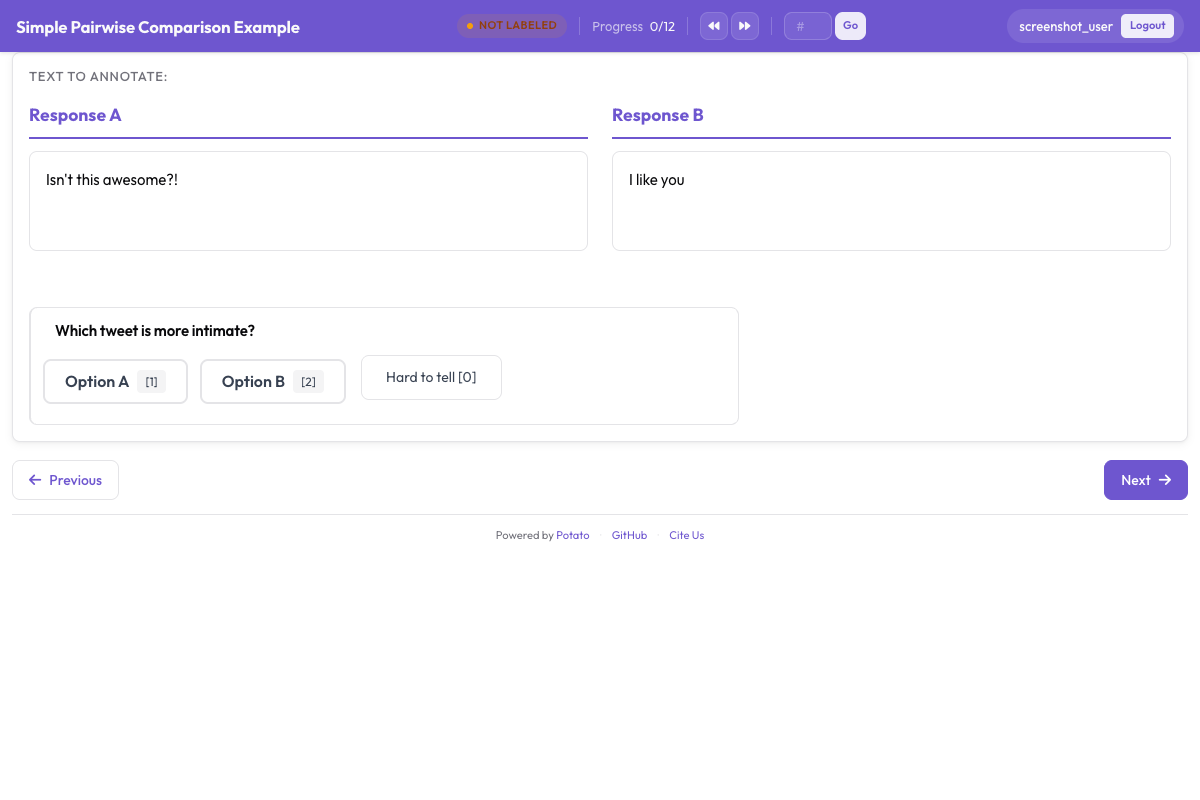 तुलना का कार्य, जिसमें दोनों उम्मीदवार और उनके नीचे प्राथमिकता का सवाल दिखता है
प्राथमिकता का सवाल
पाँच अंकों का पैमाना मज़बूत प्राथमिकता को कमज़ोर प्राथमिकता से अलग करता है। नतीजे पर मॉडल प्रशिक्षित करते समय यह मायने रखता है, क्योंकि जिस जोड़े पर एनोटेटर बराबर बँट गए उसका प्रशिक्षण संकेत उस जोड़े से अलग है जिसे सबने साफ़ तौर पर तय किया। sequential_key_binding पाँचों विकल्पों को 1 से 5 तक की कुंजियाँ देता है, और इसी से फ़र्क़ पड़ता है कि एक तुलना चार सेकंड लेती है या बारह।
annotation_schemes:
  - annotation_type: radio
    name: preference
    description: "Which image better matches the prompt?"
    labels:
      - name: "A is clearly better"
      - name: "A is slightly better"
      - name: "About equal"
      - name: "B is slightly better"
      - name: "B is clearly better"
    sequential_key_binding: true
    label_requirement:
      required: true
यह ब्लॉक ऊपर वाले कॉन्फ़िगरेशन में जोड़िए। बीच वाले विकल्प में "No preference" के बजाय "About equal" लिखिए, क्योंकि दोनों अलग-अलग निर्णय बताते हैं और एनोटेटर "no preference" विकल्प को आगे बढ़ जाने के बटन की तरह इस्तेमाल करते हैं।
स्थिति का पूर्वाग्रह
एनोटेटर बाईं ओर वाला विकल्प ज़रूरत से ज़्यादा बार चुनते हैं, इसलिए कोई इमेज किस तरफ़ दिखेगी यह बदलता रहना चाहिए। इसे डेटा फ़ाइल बनाते समय बेतरतीब कीजिए: बेतरतीब ढंग से चुनी गई आधी पंक्तियों में image_a और image_b की अदला-बदली कीजिए, हर पंक्ति का रुख़ दर्ज कीजिए, और विश्लेषण से पहले दर्ज निर्णयों को वापस पलट दीजिए। Potato के डिस्प्ले फ़ील्ड उसी क्रम में दिखते हैं जिसमें आप उन्हें लिखते हैं, इसलिए कॉन्फ़िगरेशन यह काम आपके लिए नहीं कर सकता।
टेक्स्ट की तुलना अलग है। pairwise स्कीम अपने दोनों उम्मीदवार आइटम डेटा के एक ही फ़ील्ड से लेती है, इसलिए randomize_order उनका क्रम बदल सकता है, और Potato दर्ज करता है कि हर एनोटेटर ने असल में कौन-सा क्रम देखा। सीड एनोटेटर, आइटम और स्कीम तीनों को मिलाकर बनता है, और इसी वजह से किसी व्यक्ति का पहली स्थिति की ओर झुकाव अलग-अलग आइटम में अलग-अलग उम्मीदवारों पर पड़ता है, पूरे अध्ययन में किसी एक तरफ़ से जुड़ा नहीं रहता। जब तुलना टेक्स्ट की हो तो pairwise तुलना का दस्तावेज़ देखिए।
विशिष्ट कसौटियों पर सवाल
कुल प्राथमिकता बताती है कि कौन-सी इमेज जीती, पर यह नहीं बताती कि क्यों। उसके नीचे दो-तीन सीमित सवाल जोड़ने से असहमतियाँ समझ में आने लगती हैं, क्योंकि जो एनोटेटर कुल निर्णय पर बँट जाते हैं वे अक्सर prompt से मेल पर सहमत होते हैं और सौंदर्य पर असहमत।
  - annotation_type: radio
    name: prompt_adherence
    description: "Which image better matches the prompt?"
    labels:
      - name: A
      - name: Tie
      - name: B

  - annotation_type: multiselect
    name: issues_a
    description: "Problems in Image A (select all that apply)"
    labels:
      - name: "Distorted faces or hands"
      - name: "Text rendering errors"
      - name: "Unnatural lighting"
      - name: "Missing elements from the prompt"
      - name: "Blurry or low quality"
      - name: "None"
ये स्कीम ऊपर वाले ब्लॉक में जोड़िए। कसौटियों की सूची छोटी रखिए। हर अतिरिक्त सवाल पूरे अध्ययन में कई गुना हो जाता है, और 2,000 जोड़ों पर पाँच कसौटियों वाला फ़ॉर्म 10,000 निर्णय बनता है, जिनमें से हर एक की निर्देशों में अपनी परिभाषा चाहिए।
पहले और बाद की तुलना
सुधार, बहाली और संपादन वाले कार्य भी दो इमेज वाला यही ढाँचा इस्तेमाल करते हैं, बस दोनों तरफ़ बेतरतीब होने के बजाय नाम से तय होती हैं, क्योंकि कौन-सी तरफ़ मूल इमेज है यह सवाल का ही हिस्सा है:
instance_display:
  layout:
    direction: horizontal
    gap: 24px
  fields:
    - key: original
      type: image
      label: "Original"
      display_options:
        max_height: 512
        zoomable: true
    - key: enhanced
      type: image
      label: "Enhanced"
      display_options:
        max_height: 512
        zoomable: true

annotation_schemes:
  - annotation_type: radio
    name: enhancement_quality
    description: "How did the edit change the image?"
    labels:
      - name: "Clearly improved"
      - name: "Slightly improved"
      - name: "No noticeable change"
      - name: "Made worse"
    label_requirement:
      required: true

  - annotation_type: multiselect
    name: problems_introduced
    description: "Problems the edit introduced (select all that apply)"
    labels:
      - name: "Over-sharpening or halos"
      - name: "Color shift"
      - name: "Loss of detail"
      - name: "New artifacts"
      - name: "None"
संपादन से आई समस्याओं के बारे में कुल गुणवत्ता से अलग पूछिए। जो संपादन मुख्य विषय को ज़्यादा शार्प कर देता है और उसके चारों ओर हेलो जोड़ देता है, वह एक ही पैमाने पर सुधार जैसा दिखता है, जबकि आपको जानना उन्हीं हेलो के बारे में है।
दो से ज़्यादा इमेज
हर आइटम में तीन से आठ उम्मीदवार हों तो उन्हें gallery फ़ील्ड में दिखाइए और ranking स्कीम से पूरा क्रम इकट्ठा कीजिए। गैलरी एक ही फ़ील्ड से इमेज पाथ की सूची लेती है, इसलिए डेटा फ़ाइल में दो अलग कुंजियों के बजाय एक array होता है:
item_properties:
  id_key: id
  text_key: prompt

instance_display:
  fields:
    - key: prompt
      type: text
      label: "Prompt"
    - key: images
      type: gallery
      display_options:
        layout: grid
        columns: 2
        thumbnail_size: 320
        zoomable: true

annotation_schemes:
  - annotation_type: ranking
    name: preference_rank
    description: "Drag the image numbers to rank them from best at the top to worst at the bottom."
    labels:
      - "Image 1"
      - "Image 2"
      - "Image 3"
      - "Image 4"
    allow_ties: false
    label_requirement:
      required: true
labels गैलरी में स्थितियों के नाम हैं, इसलिए सूची में हर इमेज के लिए एक प्रविष्टि होनी चाहिए और हर आइटम में उम्मीदवारों की संख्या बराबर होनी चाहिए। रैंकिंग छोटे समूहों के लिए ठीक है, क्योंकि एनोटेटर हर उम्मीदवार की तुलना बाक़ी सब से एक साथ करता है। लगभग आठ उम्मीदवारों से ऊपर प्रति आइटम मेहनत उस जानकारी से तेज़ी से बढ़ती है जो आपको बदले में मिलती है।
बड़े समूह
जब समूह इतना बड़ा हो कि एक स्क्रीन पर रैंक न हो सके, तब Best-Worst Scaling विकल्प है। एनोटेटर आइटम का एक tuple देखते हैं, आम तौर पर चार का, और सिर्फ़ सबसे अच्छा और सबसे ख़राब चुनते हैं, और स्कोर एक-दूसरे पर चढ़े कई tuple के आधार पर निकाले जाते हैं:
  - annotation_type: bws
    name: quality
    description: "Select the BEST and the WORST image in this set."
    tuple_size: 4
    best_description: "Best"
    worst_description: "Worst"
यह स्कीम ऊपर वाले कॉन्फ़िगरेशन में जोड़िए। स्कोरिंग संग्रह के बाद चलती है, एडमिन डैशबोर्ड के BWS टैब से या कमांड लाइन से, और आउटपुट डायरेक्टरी में bws_scores.tsv लिखती है:
python -m potato.bws_scoring --config config.yaml --method bradley_terrycounting विधि को कोई अतिरिक्त निर्भरता नहीं चाहिए और यह पारदर्शी आधार-रेखा है। bradley_terry निहित pairwise तुलनाओं पर एक मॉडल फ़िट करती है और इसके लिए pip install choix चाहिए। plackett_luce सबसे अच्छे और सबसे ख़राब के हर चुनाव को सीधे मॉडल करती है और इसे Potato के अलावा कुछ नहीं चाहिए। Best-Worst Scaling का दस्तावेज़ tuple बनाने की प्रक्रिया बताता है, जो इस सब से पहले होनी चाहिए।
निर्देश और ध्यान की जाँच
निर्देशों में लिखिए कि इस कार्य में "बेहतर" का मतलब क्या है, क्योंकि वरना एनोटेटर अपनी परिभाषा ले आते हैं और आपको इसका पता सहमति मापने के चरण में चलता है। annotation_instructions यह टेक्स्ट हर एनोटेशन पेज पर दिखाता है:
annotation_instructions: |
  Judge each pair on how well it matches the prompt first, then on visual
  quality, then on how appealing it looks. Zoom in before deciding: hands,
  text, and fine texture are where generation failures show up. Mark "About
  equal" only when you have looked at both and cannot separate them.
तुलना वाले कार्य में ध्यान की जाँच ऐसे जोड़े होते हैं जिनमें जीतने वाला साफ़ दिखे। उन्हें उनकी अपनी फ़ाइल से कतार में मिलाया जाता है ताकि वे आपके डेटासेट से बाहर रहें:
attention_checks:
  enabled: true
  items_file: "data/attention_checks.json"
  frequency: 20
  min_response_time: 3.0
  failure_handling:
    warn_threshold: 2
    block_threshold: 5
दोनों ब्लॉक ऊपर वाले कॉन्फ़िगरेशन में जोड़िए। min_response_time उस चूक को पकड़ता है जिसका ख़तरा तुलना वाले कार्य में सबसे ज़्यादा है, यानी ऐसा एनोटेटर जो इतनी तेज़ी से क्लिक करता जाए कि दूसरी इमेज देखने का समय ही न बचे।
पूरा कॉन्फ़िगरेशन
यह कॉन्फ़िगरेशन RLHF के लिए प्राथमिकता संग्रह चलाता है, जिसमें हर आइटम में मॉडल के दो आउटपुट, पाँच अंकों की प्राथमिकता, एक कसौटी का सवाल और भरोसे की रेटिंग है। हर जोड़ा तीन एनोटेटर देखते हैं, जो सहमति बताने और बहुमत का लेबल निकालने के लिए काफ़ी है।
annotation_task_name: "Generative Model Comparison"
task_description: "Compare two generated images against the prompt that produced them."

data_files:
  - data/model_outputs.json

item_properties:
  id_key: id
  text_key: prompt

instance_display:
  layout:
    direction: horizontal
    gap: 24px
  fields:
    - key: image_a
      type: image
      label: "Image A"
      display_options:
        max_height: 512
        zoomable: true
        alt_text: "First generated image"
    - key: image_b
      type: image
      label: "Image B"
      display_options:
        max_height: 512
        zoomable: true
        alt_text: "Second generated image"

annotation_instructions: |
  Judge each pair on prompt match first, then visual quality, then appeal.
  Zoom in before deciding. Mark "About equal" only when you cannot separate them.

annotation_schemes:
  - annotation_type: radio
    name: preference
    description: "Which image better represents the prompt?"
    labels:
      - name: "A is clearly better"
      - name: "A is slightly better"
      - name: "About equal"
      - name: "B is slightly better"
      - name: "B is clearly better"
    sequential_key_binding: true
    label_requirement:
      required: true

  - annotation_type: radio
    name: prompt_adherence
    description: "Which image matches the prompt more closely?"
    labels:
      - name: A
      - name: Tie
      - name: B

  - annotation_type: likert
    name: confidence
    description: "How confident are you in this judgment?"
    size: 5
    min_label: "Guessing"
    max_label: "Certain"

attention_checks:
  enabled: true
  items_file: "data/attention_checks.json"
  frequency: 20
  min_response_time: 3.0
  failure_handling:
    warn_threshold: 2
    block_threshold: 5

num_annotators_per_item: 3
output_annotation_dir: annotation_output/image-comparison/
export_annotation_format: jsonl
इसे potato start config.yaml -p 8000 से शुरू कीजिए, ब्राउज़र में वह पोर्ट खोलिए, और लॉग इन करके देखिए कि जोड़ा वैसा ही दिख रहा है जैसा आप चाहते हैं, उसके बाद ही लिंक किसी को भेजिए। कुछ आइटम ख़ुद भी एनोटेट कीजिए, क्योंकि जो स्कीम कॉन्फ़िगरेशन में साफ़ लगती है वह अक्सर तीसरे असली जोड़े पर अस्पष्ट निकलती है।
आउटपुट में क्या होता है
Potato output_annotation_dir के नीचे हर एनोटेटर की फ़ाइलें लिखता है, और export_annotation_format <output_annotation_dir>/exports/<format>/ के नीचे समय-समय पर एक्सपोर्ट जोड़ता है। हर एक्सपोर्ट किए गए रिकॉर्ड में इंस्टेंस, एनोटेटर और हर स्कीम के लिए चुना गया लेबल होता है:
{"instance_id": "pair_001", "user_id": "rater_01", "labels": {"preference": {"A is slightly better": "A is slightly better"}, "confidence": {"4": "4"}}, "spans": {}, "links": {}}इसे instance_id के ज़रिए अपनी डेटा फ़ाइल से वापस जोड़िए ताकि पता चले कि किस तरफ़ की इमेज किस मॉडल ने बनाई, और कुछ भी एकत्र करने से पहले फ़ाइल बनाते समय की गई बाएँ-दाएँ की अदला-बदली को उलट दीजिए। यह क़दम एनोटेशन कॉन्फ़िगरेशन में करने के बजाय आख़िर में करने से यह कच्चा रिकॉर्ड बचा रहता है कि हर एनोटेटर ने असल में क्या देखा।
अगले क़दम
- Prolific के साथ बड़े पैमाने पर प्राथमिकता डेटा इकट्ठा कीजिए
- नतीजे पर एनोटेटरों के बीच सहमति मापिए
- टेक्स्ट की तुलना के लिए pairwise तुलना का दस्तावेज़ पढ़िए, और स्कीम के संदर्भ के लिए Potato का सोर्स दस्तावेज़