Regarder, mettre en pause, revenir en arrière : l'observation d'agents de coding en direct dans Potato
Tutoriel de mise en place de l'observation d'agents de coding en direct avec Ollama, l'API Anthropic ou le Claude Agent SDK. Couvre la pause, le retour arrière, le branchement et l'exportation des trajectoires.
Ce qui distingue l'observation en direct
L'évaluation des agents de coding se fait le plus souvent après coup. L'agent tourne, produit une trace, et les relecteurs épluchent l'enregistrement plus tard. L'observation en direct fonctionne dans l'autre sens. L'annotateur regarde l'agent travailler en temps réel et voit chaque modification de fichier, chaque commande dans le terminal et chaque étape de raisonnement au moment où elle survient.
Cela change ce que vous pouvez faire. Si l'agent part sur une mauvaise piste, l'annotateur peut intervenir avant qu'il n'y perde du temps. Il peut mettre en pause pour lire un diff attentivement avant que l'agent ne passe à la suite, ou envoyer une instruction en langage courant pour le réorienter. La possibilité que je trouve la plus utile est le retour arrière. Depuis n'importe quel point de contrôle antérieur, vous pouvez rembobiner et laisser l'agent tenter une autre approche. Ces branches sont le type de données dont l'apprentissage de préférences a besoin.
Cela ne remplace pas l'annotation de traces statiques, cela produit un autre type de données. L'annotation statique l'emporte quand vous en voulez beaucoup à un coût prévisible. L'observation en direct l'emporte quand vous cherchez des données ciblées, que vous essayez de comprendre comment un agent échoue, ou que vous construisez des paires de préférence par branchement.
Pour la référence complète de la fonctionnalité, voir la documentation source.
L'interface d'agent de coding en direct diffuse les actions de l'agent en temps réel, en affichant les diffs de code et la sortie du terminal au fil du travail :
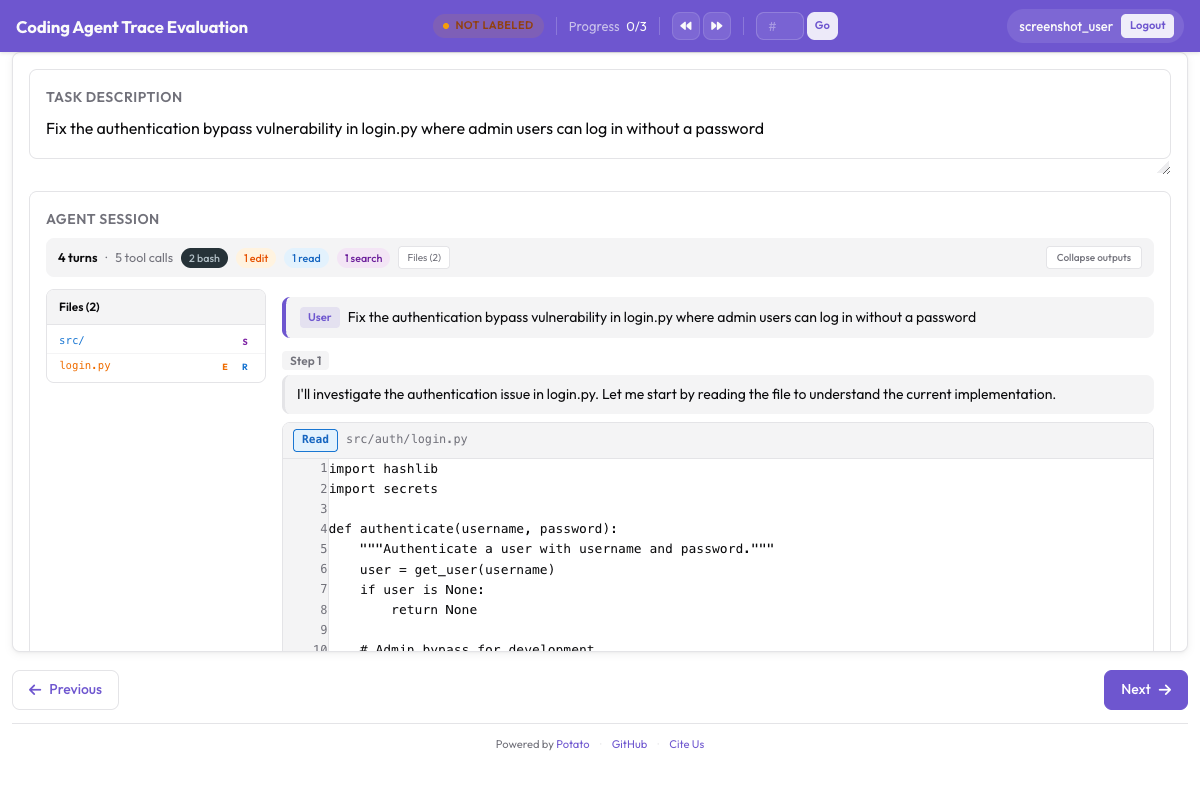 Observation d'un agent de coding en direct, avec rendu des diffs et sortie du terminal en temps réel
Trois backends
Potato propose trois backends pour l'observation en direct. Chacun exécute un agent de coding dans un bac à sable et diffuse ses actions vers l'interface au fur et à mesure.
Ollama (entièrement local)
Le backend Ollama tourne entièrement sur votre machine, sans clé d'API ni appel réseau. C'est le choix à faire quand la base de code est sensible, ou simplement quand vous voulez expérimenter sans faire grimper une facture d'API.
Commencez par installer Ollama et récupérer un modèle capable d'utiliser des outils :
# Install Ollama
curl -fsSL https://ollama.ai/install.sh | sh

# Pull a coding-capable model
ollama pull qwen2.5-coder:32b

# Verify the model is available
ollama list
Configurez Potato pour utiliser le backend Ollama :
# config.yaml
annotation_task_name: "Live Agent Observation - Ollama"
port: 8000

live_coding_agent:
  backend_type: ollama_tool_use
  ai_config:
    model: "qwen2.5-coder:32b"
    base_url: "http://localhost:11434"
    temperature: 0.2
    max_tokens: 4096
  working_dir: ./workspace       # Agent's working directory
  max_turns: 50
  sandbox_mode: container        # container (default) | bubblewrap | trusted
  sandbox_image: "python:3.11-slim"
API Anthropic (Claude avec usage d'outils)
Le backend de l'API Anthropic se connecte aux modèles Claude avec usage d'outils. Vous obtenez un meilleur raisonnement et une meilleure génération de code qu'avec la plupart des modèles locaux, et en échange vous payez les appels d'API.
# Set your API key
export ANTHROPIC_API_KEY="sk-ant-..."# config.yaml
annotation_task_name: "Live Agent Observation - Claude"
port: 8000
live_coding_agent:
backend_type: anthropic_tool_use
ai_config:
model: "claude-sonnet-4-20250514"
max_tokens: 8192
temperature: 0.1
system_prompt: >
You are a coding agent. You will be given a task description and
access to a codebase. Use the provided tools to read files, make
edits, and run commands to complete the task. Think step by step
and verify your changes by running tests.
working_dir: ./workspace
max_turns: 50
sandbox_mode: container
sandbox_image: "python:3.11-slim"Claude Agent SDK (toutes les capacités de Claude Code)
Le backend Claude Agent SDK est le plus capable des trois, avec l'ensemble complet des outils de Claude Code et un comportement autonome. Il nécessite le paquet claude-agent-sdk.
# Install the Claude Agent SDK
pip install claude-agent-sdk# config.yaml
annotation_task_name: "Live Agent Observation - Claude Agent SDK"
port: 8000
live_coding_agent:
backend_type: claude_sdk
ai_config:
model: "claude-sonnet-4-20250514"
working_dir: ./workspace
max_turns: 50 # Maximum number of agent turns
sandbox_mode: container
sandbox_image: "node:20-slim"Le déroulé de l'annotation
Une fois le serveur en route, une session d'observation en direct passe par quelques étapes.
Démarrer une session
L'annotateur ouvre l'interface de Potato et voit un champ de saisie pour la description de la tâche. Il y colle ou y saisit la tâche que l'agent doit accomplir, par exemple « Corriger le test en échec dans tests/test_parser.py causé par le nouveau format de config » ou « Ajouter la pagination au point d'entrée /api/users ».
# Start the server
potato start config.yaml -p 8000
L'annotateur clique sur « Start Agent » et l'agent de coding se met au travail. Chaque action apparaît en temps réel dans le panneau CodingTraceDisplay.
Regarder l'agent travailler
Pendant que l'agent tourne, chaque étape apparaît dans la visionneuse de trace :
- Les étapes de réflexion apparaissent en blocs gris repliables qui montrent le raisonnement de l'agent.
- Les lectures de fichiers apparaissent en blocs de code avec coloration syntaxique, numéros de ligne et chemin du fichier.
- Les modifications de fichiers apparaissent en diffs unifiés avec surlignage rouge/vert.
- Les commandes de terminal apparaissent en blocs de terminal sombres, avec la commande, la sortie et le code de retour.
- L'arborescence de fichiers se met à jour dans la barre latérale à mesure que les fichiers sont créés, modifiés ou lus.
Un indicateur de progression en haut affiche le numéro de l'étape courante et le temps écoulé. L'état de l'agent est affiché sous forme de « Thinking... », « Editing file... », « Running command... », etc.
Commandes de pause et d'instruction
Pendant que l'agent tourne, l'annotateur peut intervenir depuis la barre de commandes :
Pause : fige l'agent une fois son étape en cours terminée. L'agent ne passe pas à l'étape suivante tant qu'il n'a pas repris. Servez-vous-en pour examiner attentivement un diff ou une sortie de terminal avant que l'agent ne continue.
Envoyer une instruction : pendant la pause (ou même pendant l'exécution), saisissez un message en langage naturel qui est injecté dans le contexte de l'agent. Par exemple « Ne modifie pas le schéma de la base de données, utilise plutôt une migration » ou « Consulte le journal d'erreurs dans /var/log/app.log avant de faire des modifications ».
Resume : relance l'exécution de l'agent après une pause.
Stop : met fin à la session de l'agent. La trajectoire produite jusque-là est enregistrée.
Les annotateurs peuvent évaluer le travail de l'agent avec l'annotation PRM, à côté de l'affichage de la trace :
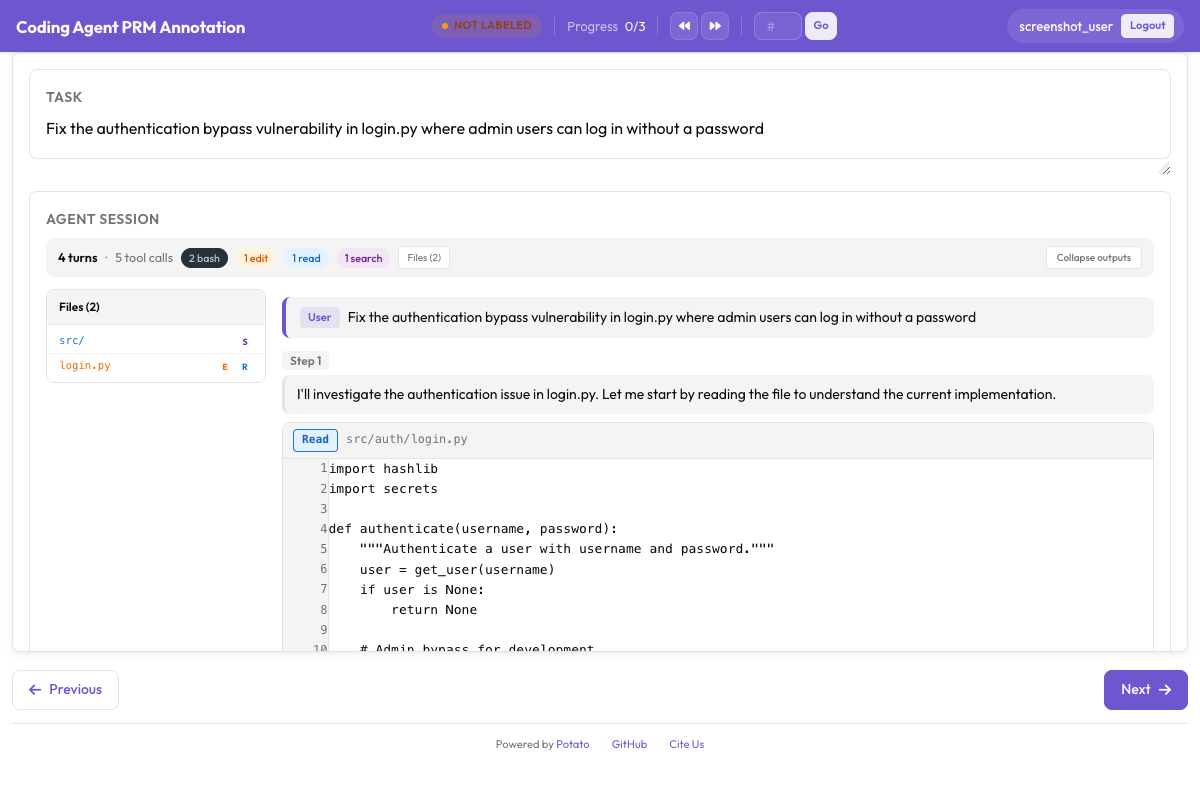 Interface d'annotation PRM pour l'étiquetage de la justesse par étape, à côté de la trace de coding
La barre de commandes fait partie de la visionneuse de l'agent de coding en direct. La pause, la reprise, l'injection d'instructions, l'arrêt, le retour arrière et le changement de branche sont des actions de session que l'interface déclenche via les points d'entrée du live agent. Il n'y a donc rien à activer dans la config.
Système de points de contrôle git
Le retour arrière, le branchement et l'exportation de trajectoires reposent tous sur le système de points de contrôle, qui commite dans git après chaque modification de fichier faite par l'agent.
Fonctionnement
Au démarrage d'une session, Potato initialise un dépôt git dans l'espace de travail du bac à sable, ou reprend celui qui s'y trouve déjà. Après chaque modification de fichier, il commite automatiquement avec un message structuré :
[potato-checkpoint] Step 7: Edit src/parser.py
- Modified lines 45-52
- Agent reasoning: Fix the regex pattern to handle escaped quotes
On obtient un historique de commits linéaire qui correspond un pour un aux étapes de la trajectoire. Chaque point de contrôle capture l'état complet de l'espace de travail à cet instant.
# You can inspect checkpoints directly with git
cd workspace/
git log --oneline

# Output:
# f8a2c1d [potato-checkpoint] Step 12: Edit tests/test_parser.py
# 3b7e9f0 [potato-checkpoint] Step 10: Edit src/parser.py
# a1c4d8e [potato-checkpoint] Step 8: Edit src/parser.py
# 9e2f6b3 [potato-checkpoint] Step 5: Edit src/config.py
# 7d0a3c1 [potato-checkpoint] Step 0: Initial state
Retour arrière
Cliquez sur « Rollback » et choisissez un point de contrôle antérieur dans la liste déroulante. Potato ramène l'espace de travail à cet état avec git checkout et rembobine l'affichage de la trajectoire pour qu'il corresponde, puis l'agent repart de là avec son contexte tronqué jusqu'à cette étape.
Servez-vous-en quand vous voyez l'agent prendre un mauvais virage. Plutôt que de le laisser tourner et perdre du temps, vous revenez au dernier bon état et le laissez réessayer, éventuellement avec une instruction qui l'oriente dans une meilleure direction.
Trajectoires qui bifurquent
Le branchement est un retour arrière qui garde les deux chemins. Quand vous revenez en arrière et que l'agent part dans une autre direction, Potato crée une branche git nommée et suit les deux trajectoires :
Step 0 → Step 1 → Step 2 → Step 3 → Step 4 (Branch A: original path)
                          ↘
                           Step 3' → Step 4' → Step 5' (Branch B: after rollback)
Vous pouvez bifurquer depuis n'importe quel point de contrôle et construire ainsi tout un arbre de trajectoires. C'est utile pour l'apprentissage de préférences, parce que chaque paire de branches est déjà une comparaison étiquetée. Vous êtes revenu en arrière parce que vous jugiez la branche A mauvaise, ce qui fait de la branche B le chemin préféré à partir du point de bifurcation.
Le branchement ne demande pas non plus de configuration. Potato crée la branche quand vous revenez en arrière et que l'agent prend ensuite un autre chemin, et il suit les deux trajectoires jusqu'à la fin de la session.
Formats d'exportation
Une session en direct produit des données de trajectoire détaillées, que vous pouvez exporter sous plusieurs formes selon ce que vous entraînez.
Exportation de trajectoires linéaires
Exportez chaque branche comme une trajectoire indépendante :
python -m potato.export \
  -c config.yaml \
  -f trajectory_correction \
-o ./training_data/{
"session_id": "session_001",
"branch": "branch-A",
"task": "Fix the failing test in tests/test_parser.py",
"steps": [
{"step_idx": 0, "type": "file_read", "path": "tests/test_parser.py", "...": "..."},
{"step_idx": 1, "type": "thinking", "content": "The test expects..."},
{"step_idx": 2, "type": "file_edit", "path": "src/parser.py", "diff": "..."},
{"step_idx": 3, "type": "bash_command", "command": "pytest tests/test_parser.py"}
],
"human_interventions": [
{"after_step": 2, "type": "instruction", "content": "Use a migration instead"}
],
"rollback_from_step": null,
"outcome": "resolved"
}Paires de préférence issues des branches
Exportez les paires de branches comme données de préférence pour du DPO ou du RLHF :
C'est le même exportateur qui les écrit. Dans le répertoire de sortie, trajectory_dpo.jsonl contient les comparaisons de branches sous forme de paires de préférence, à côté de trajectory_sft.jsonl et de trajectory_corrections.json.
python -m potato.export \
  -c config.yaml \
  -f trajectory_correction \
-o ./training_data/{
"session_id": "session_001",
"task": "Fix the failing test in tests/test_parser.py",
"branch_point_step": 2,
"branch_point_reason": "Agent started modifying the wrong file",
"rejected_branch": "branch-A",
"rejected_steps": [
{"step_idx": 3, "type": "file_edit", "path": "src/wrong_file.py", "...": "..."},
{"step_idx": 4, "type": "bash_command", "command": "pytest", "exit_code": 1}
],
"chosen_branch": "branch-B",
"chosen_steps": [
{"step_idx": 3, "type": "file_edit", "path": "src/parser.py", "...": "..."},
{"step_idx": 4, "type": "bash_command", "command": "pytest", "exit_code": 0}
]
}Étiquettes PRM issues de l'observation en direct
Vous pouvez associer l'observation en direct à un étiquetage PRM, puisqu'un point de retour arrière est en général l'étape de la première erreur :
python -m potato.export \
  -c config.yaml \
  -f coding_eval \
  -o ./training_data/ \
  --option types=prm
Ici, l'étape depuis laquelle vous êtes revenu en arrière est étiquetée comme première erreur, et les étapes de la nouvelle branche sont étiquetées correctes, puisque vous les avez acceptées.
Jeux de données de revue de code
Exportez les instructions des annotateurs et les motifs de retour arrière comme données d'entraînement de revue de code :
python -m potato.export \
  -c config.yaml \
  -f coding_eval \
  -o ./training_data/ \
  --option types=code_review
Démarrage rapide complet
La séquence entière, de rien du tout à une session Ollama qui tourne :
# 1. Install Potato with live agent support
pip install potato-annotation[live-agents]

# 2. Install and start Ollama
curl -fsSL https://ollama.ai/install.sh | sh
ollama pull qwen2.5-coder:32b

# 3. Set up a workspace with a repo to work on
mkdir -p workspace/
git clone https://github.com/example/test-project workspace/repo

# 4. Create the config file
cat > config.yaml << 'YAML'
annotation_task_name: "Live Agent Observation"
port: 8000

live_coding_agent:
  backend_type: ollama_tool_use
  ai_config:
    model: "qwen2.5-coder:32b"
    base_url: "http://localhost:11434"
    temperature: 0.2
  working_dir: ./workspace/repo
  max_turns: 50
  sandbox_mode: trusted

annotation_schemes:
  - annotation_type: radio
    name: outcome
    description: "Final outcome"
    labels:
      - name: "resolved"
        text: "Task Fully Resolved"
      - name: "partial"
        text: "Partially Resolved"
      - name: "failed"
        text: "Failed"

  - annotation_type: text
    name: notes
    description: "Session Notes"
    placeholder: "Key observations about agent behavior..."
    label_requirement:
      required: false

output_annotation_dir: "./output/"
export_annotation_format: jsonl

user_config:
  allow_all_users: false
  users:
    - "observer1"
YAML

# 5. Start Potato
potato start config.yaml -p 8000

# 6. Open http://localhost:8000 in your browser
Une fois connecté, collez une tâche du genre « Ajouter la validation des entrées au point d'entrée POST /api/users » et cliquez sur « Start Agent ». Regardez l'agent travailler, mettez en pause quand quelque chose cloche, envoyez des instructions pour l'orienter, et revenez en arrière pour essayer d'autres approches. À la fin, notez le résultat et consignez vos observations.
Bonnes pratiques
Commencez par des tâches claires et cadrées. Le bon calibre est un travail qui occupe l'agent de 5 à 15 minutes. Plus court, la trajectoire produite ne vaut pas la peine d'être annotée. Beaucoup plus long, l'annotateur s'épuise.
Laissez le bac à sable activé en production. sandbox_mode: container est la valeur par défaut et tient l'agent à l'écart de votre système hôte. bubblewrap est l'alternative plus légère sous Linux. trusted exécute les appels d'outils de l'agent directement sur la machine, ce qui n'est raisonnable que pendant le développement, avec un modèle auquel vous faites confiance.
Consignez pourquoi vous êtes revenu en arrière. Rien dans la config ne l'impose, alors faites-en une règle pour vos annotateurs, avec une courte note à chaque point de bifurcation qui dit ce qui a dérapé. Ces notes sont un signal d'entraînement utile en soi, et elles améliorent les données de préférence.
Comparez plusieurs backends. Passez les mêmes tâches par Ollama, l'API Anthropic et le Claude Agent SDK pour obtenir des données de préférence entre agents. Comme seule la section backend de la config change, c'est simple à mettre en place.
Exportez tôt et souvent. Lancez une exportation après chaque session plutôt que de tout garder pour la fin. Vous perdez moins en cas de plantage, et vous gardez un œil sur la qualité des données au fil de l'eau.