Revue de code façon PR GitHub pour les agents de coding IA
Mettez en place l'annotation de revue de code façon PR GitHub dans Potato : commentaires en ligne sur le diff, notes de qualité par fichier et verdicts d'approbation ou de rejet pour la sortie des agents de coding.
Pourquoi l'annotation de revue de code compte
La plupart des bancs d'essai pour agents de coding ramènent l'évaluation à un binaire : les tests passent-ils, oui ou non ? SWE-bench annonce un pourcentage de tickets résolus. HumanEval annonce un pass@k. Ces métriques servent aux classements, mais elles n'apprennent rien sur la qualité du code.
Un agent peut faire passer tous les tests et écrire quand même du code que personne ne voudrait maintenir : du code avec une faille de sécurité, un chemin lent, ou un style qui va à l'encontre du reste de la base de code. Un relecteur humain demanderait des modifications sur cette PR même si les tests sont au vert. Si vous voulez des agents qui écrivent du code que les gens fusionnent vraiment, il faut relire le code, pas seulement lancer les tests.
Le schéma d'annotation code_review de Potato fait entrer l'expérience de revue de PR GitHub dans un outil d'annotation. Les annotateurs voient des diffs unifiés avec coloration syntaxique, cliquent sur les lignes du diff pour ajouter des commentaires en ligne, notent les fichiers sur deux dimensions de qualité et rendent un verdict d'approbation, de demande de modifications ou de simple commentaire, comme pour la revue d'une vraie pull request. Pour la référence complète du schéma, voir la documentation d'annotation des agents de coding et le guide d'évaluation des agents.
Voici l'interface de revue de code dans Potato, avec les commentaires en ligne sur le diff et les notes par fichier :
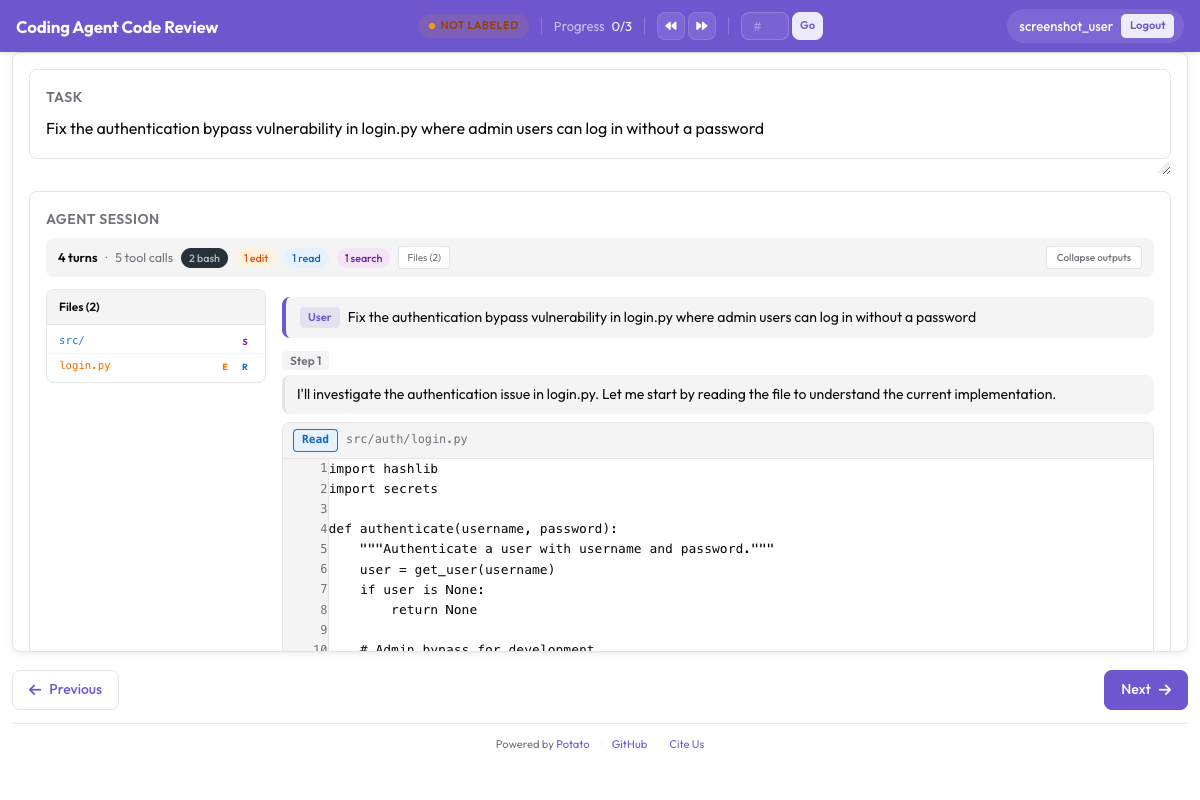 L'interface de revue de code de Potato, avec commentaires en ligne sur le diff et notes de qualité par fichier
Vue d'ensemble du schéma de revue de code
Le schéma code_review comporte trois couches :
- Commentaires en ligne sur le diff : les annotateurs cliquent sur n'importe quelle ligne du diff pour y rattacher un commentaire catégorisé (bug, style, performance, sécurité, logique, suggestion, question)
- Notes par fichier : chaque fichier modifié reçoit des notes indépendantes de justesse (1-5) et de qualité du code (1-5)
- Verdict global : l'annotateur rend un verdict final : approuver, demander des modifications ou commenter seulement
Cela reproduit une vraie revue de code, ce qui la rend naturelle pour des développeurs, et la sortie structurée qu'elle produit se transpose directement à l'entraînement de modèles de revue de code.
CodingTraceDisplay : comment les diffs sont rendus
Le composant CodingTraceDisplay affiche les traces d'agents de coding comme une suite d'appels d'outils et de leurs sorties, avec un traitement particulier pour les modifications de fichiers. Quand l'agent modifie un fichier, l'affichage montre un diff unifié avec :
- Lignes rouges : lignes supprimées (préfixées par
-) - Lignes vertes : lignes ajoutées (préfixées par
+) - Lignes grises : lignes de contexte (inchangées)
- Numéros de ligne : anciens et nouveaux numéros dans la gouttière
- Coloration syntaxique : coloration adaptée au langage, selon l'extension du fichier
- Clic pour commenter : cliquer sur une ligne ouvre un formulaire de commentaire ancré à cette ligne
Le diff est calculé automatiquement à partir des opérations d'édition de l'agent. Si l'agent a utilisé un outil de recherche-remplacement, Potato reconstruit les états avant/après et génère le diff unifié.
Pour les agents qui produisent plusieurs modifications de fichiers dans une même trace (courant pour les corrections de bugs réelles), chaque fichier obtient sa propre section de diff repliable, à la manière de l'onglet « Files changed » d'une PR GitHub.
Le CodingTraceDisplay affiche les modifications de code avec une coloration syntaxique correcte :
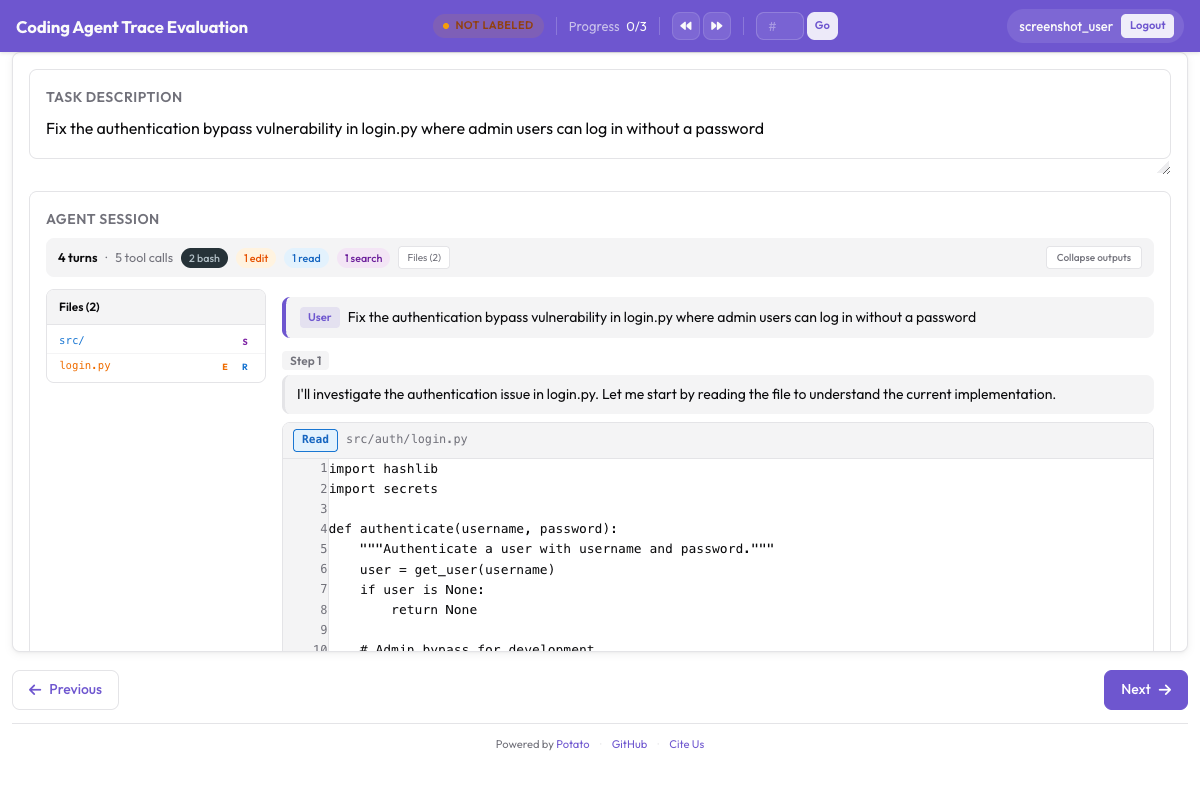 CodingTraceDisplay affichant des diffs unifiés avec coloration syntaxique et une barre latérale d'arborescence de fichiers
Catégories de commentaires
Quand un annotateur clique sur une ligne du diff pour ajouter un commentaire, il choisit une catégorie :
| Catégorie | Couleur | Description | Exemple |
|---|---|---|---|
bug | Rouge | Le code contient une erreur fonctionnelle | « Ceci lèvera une NullPointerException si user vaut None » |
style | Bleu | Problème de style ou de convention | « Le projet utilise snake_case pour les fonctions, pas camelCase » |
performance | Orange | Code inefficace | « Ceci interroge la base de données dans une boucle ; utilisez une requête groupée » |
security | Violet | Faille de sécurité | « La saisie utilisateur est passée directement à la requête SQL sans assainissement » |
logic | Jaune | Problème de logique qui ne provoque pas forcément une panne immédiate | « Cette condition devrait être >= et non >, décalage d'un cran à la borne » |
suggestion | Vert | Suggestion d'amélioration, pas une erreur | « Envisagez un gestionnaire de contexte ici, la gestion des ressources sera plus propre » |
question | Gris | Clarification nécessaire | « Pourquoi cet import a-t-il été ajouté ? Il ne semble pas utilisé » |
Chaque commentaire dispose aussi d'un corps en texte libre où l'annotateur explique le problème en détail, exactement comme on rédige un vrai commentaire de PR.
Notes par fichier
Après avoir relu le diff de chaque fichier, l'annotateur le note sur deux dimensions :
Justesse (1-5) :
- 1 : ne fonctionne pas, introduit de nouveaux bugs
- 2 : fonctionne partiellement, problèmes importants
- 3 : fonctionne dans le cas nominal mais rate les cas limites
- 4 : fonctionne correctement, problèmes mineurs
- 5 : entièrement juste, traite les cas limites comme il faut
Qualité du code (1-5) :
- 1 : non maintenable, aucune structure
- 2 : mauvaise qualité, problèmes de style et de conception importants
- 3 : acceptable, respecte les conventions de base
- 4 : bonne qualité, propre et lisible
- 5 : excellent, idiomatique, bien documenté
Options de verdict
Après avoir relu tous les fichiers, l'annotateur choisit l'un des trois verdicts :
- Approuver : le code est prêt à être fusionné tel quel, ou avec des retouches négligeables
- Demander des modifications : le code demande des révisions importantes avant fusion
- Commenter seulement : donner un retour sans trancher sur la fusion
Cela correspond directement aux trois états de revue de PR de GitHub.
Mise en place pas à pas
Étape 1 : convertir les traces d'agents de coding
Les traces d'agents de coding arrivent dans de nombreux formats. Voici des exemples pour trois agents répandus.
Depuis Claude Code (export JSON) :
python -m potato.trace_converter \
  --input claude_code_sessions/ \
  --output data/code_traces.jsonl \
  --input-format claude_code
Depuis Aider (historique de conversation) :
python -m potato.trace_converter \
  --input aider_logs/ \
  --output data/code_traces.jsonl \
  --input-format aider
Depuis SWE-Agent (répertoire de trajectoires) :
python -m potato.trace_converter \
  --input swe_agent_trajectories/ \
  --output data/code_traces.jsonl \
  --input-format swe_agent_trajectory
Le convertisseur produit un format JSONL standardisé. Chaque ligne contient une trace avec la tâche, les étapes de l'agent et les diffs de fichiers :
{
  "trace_id": "swe_bench_123",
  "task": "Fix the TypeError in django/db/models/query.py when calling .values() on an empty QuerySet",
  "repo": "django/django",
  "base_commit": "a1b2c3d",
  "steps": [
    {
      "type": "thought",
      "content": "Let me look at the QuerySet.values() method to understand the TypeError."
    },
    {
      "type": "action",
      "tool": "search",
      "input": "def values",
      "file": "django/db/models/query.py"
    },
    {
      "type": "observation",
      "content": "Found at line 234: def values(self, *fields):\n    ..."
    },
    {
      "type": "action",
      "tool": "edit",
      "file": "django/db/models/query.py",
      "old_content": "    def values(self, *fields):\n        clone = self._clone()\n        clone.query.set_values(fields)",
      "new_content": "    def values(self, *fields):\n        clone = self._clone()\n        if not fields and not self.query.values_select:\n            return clone\n        clone.query.set_values(fields)"
    },
    {
      "type": "action",
      "tool": "edit",
      "file": "tests/queries/test_values.py",
      "old_content": "class ValuesTests(TestCase):",
      "new_content": "class ValuesTests(TestCase):\n    def test_empty_queryset_values(self):\n        \"\"\"Calling .values() on empty QuerySet should not raise TypeError.\"\"\"\n        qs = Author.objects.none()\n        result = list(qs.values())\n        self.assertEqual(result, [])"
    }
  ],
  "files_changed": [
    {
      "path": "django/db/models/query.py",
      "diff": "--- a/django/db/models/query.py\n+++ b/django/db/models/query.py\n@@ -234,6 +234,8 @@\n     def values(self, *fields):\n         clone = self._clone()\n+        if not fields and not self.query.values_select:\n+            return clone\n         clone.query.set_values(fields)"
    },
    {
      "path": "tests/queries/test_values.py",
      "diff": "--- a/tests/queries/test_values.py\n+++ b/tests/queries/test_values.py\n@@ -1,4 +1,10 @@\n class ValuesTests(TestCase):\n+    def test_empty_queryset_values(self):\n+        \"\"\"Calling .values() on empty QuerySet should not raise TypeError.\"\"\"\n+        qs = Author.objects.none()\n+        result = list(qs.values())\n+        self.assertEqual(result, [])"
    }
  ]
}
Étape 2 : configurer le schéma de revue de code
Créez votre config.yaml :
annotation_task_name: "Coding Agent Code Review"

data_files:
  - "data/code_traces.jsonl"

item_properties:
  id_key: "trace_id"
  text_key: "task"

# Display coding agent traces with diff rendering
instance_display:
  fields:
    - key: task
      type: text
      label: "Task"

    - key: steps
      type: coding_trace
      label: "Agent changes"
      display_options:
        diff_view: unified
        show_file_tree: true
        show_reasoning: true
        terminal_theme: dark
        collapse_long_outputs: true
        max_output_lines: 200

annotation_schemes:
  - annotation_type: code_review
    name: review
    description: "Review the agent's code changes as you would a pull request"
    comment_categories: [bug, style, performance, security, logic, suggestion, question]
    file_rating_dimensions: [correctness, quality]
    verdict_options: [approve, request_changes, comment_only]

output_annotation_dir: "annotation_output/"
export_annotation_format: jsonl
Étape 3 : lancer le serveur d'annotation
potato start config.yaml -p 8000Rendez-vous sur http://localhost:8000. Vous verrez la première trace d'agent de coding avec la description de la tâche, les étapes de raisonnement de l'agent et les diffs de fichiers rendus avec coloration syntaxique.
Étape 4 : le déroulé pour l'annotateur
Voici le flux de revue habituel :
- Lire la tâche : comprendre ce qui a été demandé à l'agent (par exemple, « Corriger le TypeError dans django/db/models/query.py »)
- Parcourir la trace : faire défiler les étapes de raisonnement de l'agent pour saisir son approche
- Relire le diff de chaque fichier :
- Lire le diff avec la coloration syntaxique
- Cliquer sur une ligne pour ajouter un commentaire en ligne
- Choisir une catégorie de commentaire (bug, style, performance, etc.)
- Rédiger le corps du commentaire pour expliquer le problème
- Noter le fichier sur la justesse (1-5) et la qualité du code (1-5)
- Rendre un verdict : approuver, demander des modifications ou commenter seulement
- Envoyer : cliquer sur « Submit » ou appuyer sur Ctrl+Entrée
Des raccourcis clavier accélèrent le travail :
| Raccourci | Action |
|---|---|
j / k | Naviguer entre les fichiers |
c | Ouvrir un commentaire sur la ligne sélectionnée |
1-5 | Attribuer la note de la dimension courante |
a | Mettre le verdict sur approuver |
r | Mettre le verdict sur demander des modifications |
Ctrl+Enter | Envoyer la revue |
Format d'exportation
Chaque revue envoyée produit un objet JSON structuré :
{
  "trace_id": "swe_bench_123",
  "annotator": "reviewer_01",
  "timestamp": "2026-03-22T14:32:11Z",
  "review": {
    "inline_comments": [
      {
        "file": "django/db/models/query.py",
        "line": 236,
        "side": "right",
        "category": "logic",
        "body": "This early return skips set_values entirely, but if fields are provided later via .values('name'), the previous empty .values() call will have returned a clone that never went through set_values. Consider checking if this clone is still valid downstream."
      },
      {
        "file": "tests/queries/test_values.py",
        "line": 5,
        "side": "right",
        "category": "suggestion",
        "body": "Consider adding a test case for .values() followed by .values('name') to verify the chaining behavior after your fix."
      }
    ],
    "file_ratings": [
      {
        "file": "django/db/models/query.py",
        "correctness": 3,
        "code_quality": 4
      },
      {
        "file": "tests/queries/test_values.py",
        "correctness": 4,
        "code_quality": 4
      }
    ],
    "verdict": "request_changes"
  }
}
Ce format structuré s'utilise directement pour entraîner des modèles de revue de code et pour l'analyse agrégée.
Analyse : exploiter les données de revue
Charger les revues
import json
import pandas as pd
from pathlib import Path

reviews = []
for f in Path("output/").glob("*.jsonl"):
    with open(f) as fh:
        for line in fh:
            reviews.append(json.loads(line))

print(f"Loaded {len(reviews)} code reviews")
Répartition des catégories de commentaires
from collections import Counter

all_comments = []
for rev in reviews:
    for comment in rev["review"]["inline_comments"]:
        all_comments.append(comment)

category_counts = Counter(c["category"] for c in all_comments)
print("Comment categories:")
for cat, count in category_counts.most_common():
    print(f"  {cat}: {count}")
Notes moyennes par fichier
ratings = []
for rev in reviews:
    for fr in rev["review"]["file_ratings"]:
        ratings.append(fr)

ratings_df = pd.DataFrame(ratings)
print("Average ratings by file:")
print(
    ratings_df.groupby("file")[["correctness", "code_quality"]]
    .mean()
    .round(2)
    .to_string()
)
Répartition des verdicts
verdict_counts = Counter(rev["review"]["verdict"] for rev in reviews)
total = sum(verdict_counts.values())
print("Verdict distribution:")
for verdict, count in verdict_counts.most_common():
    print(f"  {verdict}: {count} ({count/total*100:.1f}%)")
Taux de bugs par agent
Si vos traces comportent un champ agent, vous pouvez comparer les taux de bugs entre agents :
agent_bugs = {}
for rev in reviews:
    agent = rev.get("agent", "unknown")
    bug_count = sum(
        1 for c in rev["review"]["inline_comments"]
        if c["category"] == "bug"
    )
    if agent not in agent_bugs:
        agent_bugs[agent] = []
    agent_bugs[agent].append(bug_count)

print("Average bugs per review by agent:")
for agent, bugs in sorted(agent_bugs.items()):
    print(f"  {agent}: {sum(bugs)/len(bugs):.2f} (n={len(bugs)})")
Cas d'usage
Entraîner des modèles de revue de code
Les commentaires en ligne structurés, les notes par fichier et les verdicts issus de l'annotation de revue de code de Potato font d'excellentes données d'entraînement pour des modèles de revue de code automatisée. Chaque revue apporte :
- Un retour localisé, rattaché à des lignes précises du diff
- Des problèmes catégorisés (bug, style ou performance)
- Des signaux de qualité à plusieurs granularités (ligne, fichier, ensemble)
C'est le format de données qu'utilisent des outils comme CodeRabbit ou le relecteur IA de Graphite, mais produit par des experts humains plutôt que distillé depuis un LLM.
Évaluer des agents de coding sur SWE-bench
SWE-bench vous dit si l'agent a résolu le ticket (tests au vert), pas si le code est fusionnable. En passant les solutions SWE-bench par une annotation de revue de code, vous distinguez les agents qui résolvent les tickets avec du code propre de ceux qui les résolvent avec des bricolages. Le classement obtenu est plus nuancé et colle mieux au vécu des développeurs.
Constituer des jeux de données de qualité de code
Agrégez les données de revue de code sur de nombreuses traces pour constituer des jeux de données des problèmes de qualité récurrents dans le code généré par IA. Ces jeux de données servent à :
- Affiner les modèles de génération de code pour éviter les erreurs courantes
- Construire des linters propres aux motifs du code généré par IA
- Entraîner des classifieurs qui signalent les problèmes probables dans la sortie de l'agent avant la revue humaine
Résumé
Le schéma code_review de Potato place le déroulé de revue de PR GitHub à l'intérieur de l'évaluation d'agents. Les commentaires en ligne, les notes par fichier et les verdicts que vous recueillez vous donnent des données structurées sur la qualité du code, ce qui vous en apprend bien plus qu'un résultat de test réussite/échec. Ce sont ces données qu'il vous faut, que vous entraîniez un modèle de revue de code, que vous sépariez les solutions SWE-bench propres des bricolages, ou que vous établissiez simplement une base de référence de qualité pour votre agent.