बोली में भावों का वर्गीकरण
Potato में इंटरैक्टिव waveform, प्लेबैक गति के नियंत्रण, Likert स्केल और कॉन्फ़िगर किए जा सकने वाले भाव लेबल सेट के साथ ऑडियो भाव वर्गीकरण का कार्य बनाइए।
Speech emotion recognition (SER) वर्चुअल असिस्टेंट, मानसिक स्वास्थ्य के टूल और कॉल-सेंटर विश्लेषण में काम आता है, और इन सबको प्रशिक्षण के लिए लेबल किया हुआ ऑडियो चाहिए। यह ट्यूटोरियल श्रेणीगत भावों, आयामी रेटिंग, और ऐसे क्लिप के लिए एनोटेशन इंटरफ़ेस दिखाता है जिनमें एक से ज़्यादा भाव मौजूद हों। नीचे चलने वाले ऑडियो विकल्पों के लिए ऑडियो एनोटेशन दस्तावेज़ देखें।
भाव एनोटेशन के तरीक़े
बोली में भाव लेबल करने के कुछ आम तरीक़े हैं। आप happy, sad या angry जैसी अलग-अलग श्रेणियाँ इस्तेमाल कर सकते हैं। आप valence, arousal और dominance जैसे सतत आयामों पर रेटिंग ले सकते हैं। आप एनोटेटरों को एक साथ कई भाव, तीव्रता की रेटिंग के साथ, चिह्नित करने दे सकते हैं। या लंबे क्लिप के लिए अलग-अलग समय पर अलग-अलग भाव टैग कर सकते हैं।
श्रेणीगत भाव वर्गीकरण
बुनियादी सेटअप
annotation_task_name: "Speech Emotion Recognition"

data_files:
  - data/utterances.json

item_properties:
  id_key: id
  text_key: transcript  # Optional transcript

instance_display:
  fields:
    - key: audio_path
      type: audio
      label: "Utterance"
      display_options:
        controls: true
        show_waveform: true
        preload: metadata

annotation_schemes:
  - annotation_type: radio
    name: emotion
    description: "What emotion is expressed in this speech?"
    labels:
      - name: Happy
        description: "Joy, excitement, amusement"
        key_value: "h"
      - name: Sad
        description: "Sorrow, disappointment, grief"
        key_value: "s"
      - name: Angry
        description: "Frustration, irritation, rage"
        key_value: "a"
      - name: Fearful
        description: "Anxiety, worry, terror"
        key_value: "f"
      - name: Surprised
        description: "Astonishment, shock"
        key_value: "u"
      - name: Disgusted
        description: "Revulsion, distaste"
        key_value: "d"
      - name: Neutral
        description: "No clear emotion"
        key_value: "n"
    label_requirement:
      required: true
Potato एनोटेशन लेबल के साथ-साथ प्लेबैक नियंत्रण वाला एक इंटरैक्टिव waveform दिखाता है:
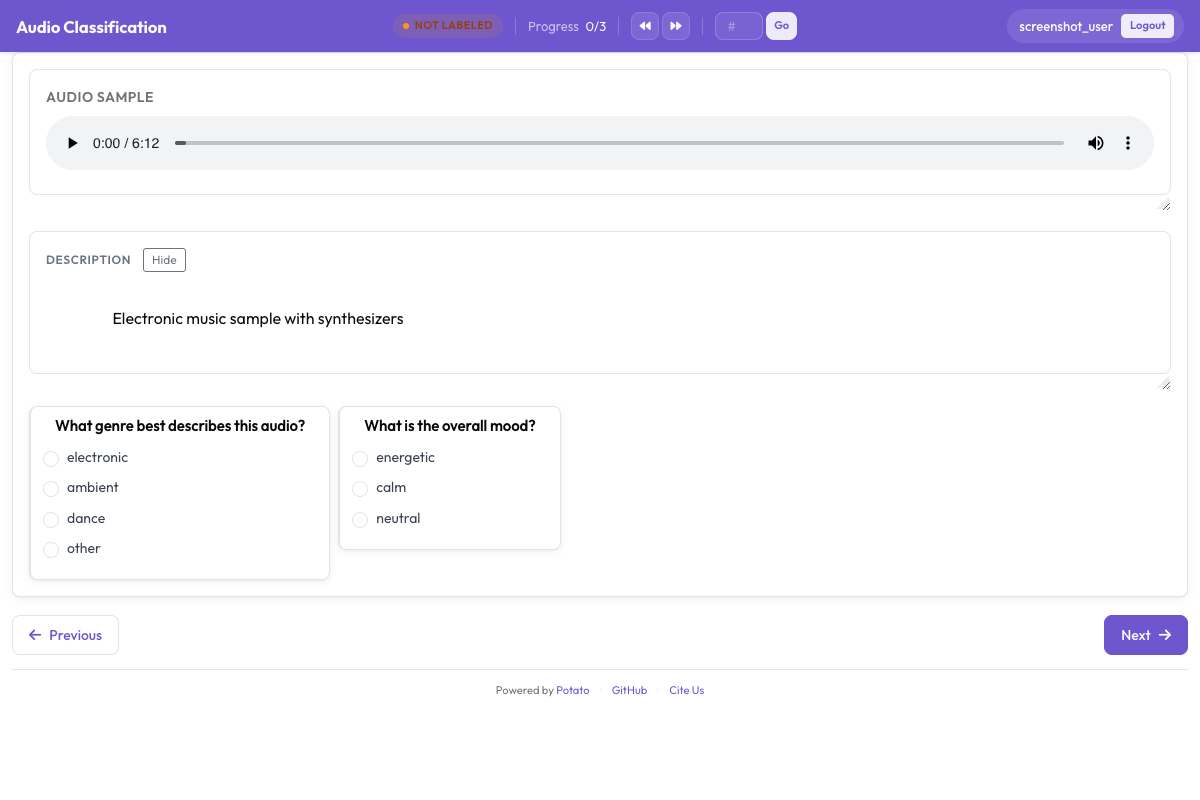 ऑडियो एनोटेशन इंटरफ़ेस, जिसमें प्लेबैक नियंत्रण वाला इंटरैक्टिव waveform और श्रेणीगत भाव लेबल दिख रहे हैं
तीव्रता जोड़ना
annotation_schemes:
  - annotation_type: radio
    name: emotion
    description: "What emotion does the speaker express?"
    labels: [Happy, Sad, Angry, Fearful, Surprised, Disgusted, Neutral]
    label_requirement:
      required: true

  - annotation_type: likert
    name: intensity
    description: "How intense is this emotion?"
    size: 5
    min_label: "Very weak"
    max_label: "Very strong"
आयामी भाव एनोटेशन
VAD (Valence-Arousal-Dominance) मॉडल हर क्लिप को किसी एक श्रेणी में ठूँसने के बजाय तीन सतत स्केल पर आँकता है:
annotation_task_name: "Dimensional Emotion Rating"

annotation_schemes:
  # Valence: negative to positive
  - annotation_type: likert
    name: valence
    description: "Valence: How positive or negative?"
    size: 7
    min_label: "Very negative"
    max_label: "Very positive"

  # Arousal: calm to excited
  - annotation_type: likert
    name: arousal
    description: "Arousal: How calm or excited?"
    size: 7
    min_label: "Very calm"
    max_label: "Very excited"

  # Dominance: submissive to dominant
  - annotation_type: likert
    name: dominance
    description: "Dominance: How submissive or dominant?"
    size: 7
    min_label: "Very submissive"
    max_label: "Very dominant"
दृश्य स्केल (SAM)
Self-Assessment Manikin की शैली में:
annotation_schemes:
  - annotation_type: likert
    min_label: "Very negative"
    max_label: "Very positive"
    name: valence
    description: "Select the figure that matches the emotional valence"
    size: 9
मिले-जुले भावों की पहचान
ऐसी बोली के लिए जिसमें कई भाव हों:
annotation_schemes:
  - annotation_type: multiselect
    name: emotions_present
    description: "Select ALL emotions you detect (can be multiple)"
    labels:
      - Happy
      - Sad
      - Angry
      - Fearful
      - Surprised
      - Disgusted
      - Contempt

  - annotation_type: radio
    name: primary_emotion
    description: "Which emotion is MOST prominent?"
    labels:
      - Happy
      - Sad
      - Angry
      - Fearful
      - Surprised
      - Disgusted
      - Contempt
      - Mixed (no dominant)
पूरा भाव एनोटेशन
annotation_task_name: "Comprehensive Speech Emotion Annotation"

data_files:
  - data/speech_samples.json

item_properties:
  id_key: id
  text_key: transcript

instance_display:
  fields:
    - key: audio_url
      type: audio
      label: "Speech sample"
      display_options:
        controls: true
        show_waveform: true
        preload: metadata
        autoplay: false

    # Show the transcript alongside the audio
    - key: transcript
      type: text
      label: "Transcript (for reference)"

annotation_schemes:
  # Primary categorical emotion
  - annotation_type: radio
    name: primary_emotion
    description: "Primary emotion expressed"
    labels:
      - name: Happiness
        color: "#FCD34D"
        key_value: "1"
      - name: Sadness
        color: "#60A5FA"
        key_value: "2"
      - name: Anger
        color: "#F87171"
        key_value: "3"
      - name: Fear
        color: "#A78BFA"
        key_value: "4"
      - name: Surprise
        color: "#34D399"
        key_value: "5"
      - name: Disgust
        color: "#FB923C"
        key_value: "6"
      - name: Neutral
        color: "#9CA3AF"
        key_value: "7"
    label_requirement:
      required: true

  # Emotional intensity
  - annotation_type: likert
    name: intensity
    description: "Emotional intensity"
    size: 5
    min_label: "Very mild"
    max_label: "Very intense"
    label_requirement:
      required: true

  # Dimensional ratings
  - annotation_type: likert
    name: valence
    description: "Valence (negative to positive)"
    size: 7
    min_label: "Negative"
    max_label: "Positive"

  - annotation_type: likert
    name: arousal
    description: "Arousal (calm to excited)"
    size: 7
    min_label: "Calm"
    max_label: "Excited"

  # Voice quality
  - annotation_type: multiselect
    name: voice_qualities
    description: "Voice characteristics (select all that apply)"
    labels:
      - Trembling voice
      - Raised pitch
      - Lowered pitch
      - Loud/shouting
      - Soft/whisper
      - Fast speech rate
      - Slow speech rate
      - Breathy
      - Tense/strained
      - Crying
      - Laughing

  # Genuineness
  - annotation_type: radio
    name: authenticity
    description: "Does the emotion seem genuine?"
    labels:
      - Clearly genuine
      - Likely genuine
      - Uncertain
      - Likely acted/fake
      - Clearly acted/fake

  # Confidence
  - annotation_type: likert
    name: confidence
    description: "How confident are you in your annotation?"
    size: 5
    min_label: "Guessing"
    max_label: "Certain"

annotation_instructions: |
  ## Emotion Annotation Guidelines

  ### Listening Instructions
  1. Listen to the entire clip before annotating
  2. You may replay as many times as needed
  3. Focus on the VOICE, not just the words

  ### Emotion Categories
  - **Happiness**: Joy, amusement, contentment
  - **Sadness**: Sorrow, disappointment, melancholy
  - **Anger**: Frustration, irritation, rage
  - **Fear**: Anxiety, nervousness, terror
  - **Surprise**: Astonishment, startle
  - **Disgust**: Revulsion, contempt
  - **Neutral**: Calm, matter-of-fact

  ### Tips
  - Consider tone, pitch, speaking rate
  - The transcript may not match the emotion
  - When unsure between two emotions, choose the stronger one
  - Use the intensity scale for unclear cases

output_annotation_dir: annotations/
export_annotation_format: jsonl
आउटपुट प्रारूप
{
  "instance_id": "utt_001",
  "user_id": "rater_01",
  "labels": {
    "primary_emotion": {"Surprise": "true"},
    "voice_qualities": {"Raised pitch": "true", "Fast speech rate": "true"},
    "authenticity": {"Clearly genuine": "true"},
    "confidence": {"4": "true"}
  },
  "spans": {},
  "links": {}
}
सेगमेंट-स्तर पर भाव
लंबे ऑडियो के लिए, जिसमें भाव बदलते रहते हैं:
annotation_schemes:
  - annotation_type: audio_annotation
    name: emotion_segments
    description: "Mark time segments with different emotions"
    labels:
      - name: Happy
        color: "#FCD34D"
      - name: Sad
        color: "#60A5FA"
      - name: Angry
        color: "#F87171"
      - name: Neutral
        color: "#9CA3AF"
गुणवत्ता नियंत्रण
जिन क्लिप में कोई अस्पष्टता नहीं और जिनके लेबल पहले से पता हैं, वे उन एनोटेटरों को पकड़ लेते हैं जो बिना सुने बस क्लिक करते जा रहे हैं। दोनों ब्लॉक config के शीर्ष स्तर पर रहते हैं, और दोनों अपने आइटम config में सीधे लिखने के बजाय एक फ़ाइल से लेते हैं:
attention_checks:
  enabled: true
  frequency: 20
  items_file: data/attention_checks.json
  min_response_time: 3.0

gold_standards:
  enabled: true
  items_file: data/gold_standards.json
  mode: mixed
  frequency: 20
  accuracy:
    min_threshold: 0.7
    evaluation_count: 10
gold आइटम दिखने में आपके किसी भी डेटा आइटम जैसा ही होता है, बस उसमें एक gold_label जुड़ा होता है, इसलिए वह बाक़ी सब की तरह ही दिखाया जाता है:
[
  {
    "id": "gold_001",
    "audio_path": "/audio/gold/clearly_happy.wav",
    "gold_label": { "primary_emotion": "Happiness" },
    "explanation": "Laughter and rising pitch throughout, with no ambiguity.",
    "difficulty": "easy"
  }
]
attention-check आइटम gold_label की जगह expected_answer इस्तेमाल करते हैं। ऑडियो के लिए काम का नियंत्रण min_response_time है। तीन सेकंड की न्यूनतम सीमा हर उस व्यक्ति को पकड़ लेती है जो ऐसे क्लिप पर लेबल लगा रहा है जिसे वह पूरा सुन ही नहीं सकता था।
इन्हें quality_control: ब्लॉक के अंदर रखना एक आम ग़लती है, और यह चुपचाप विफल होती है। Potato attention_checks और gold_standards को शीर्ष स्तर से पढ़ता है, और quality_control से वह सिर्फ़ geometry_iou_tolerance कुंजी पढ़ता है, इसलिए अंदर रखा गया ब्लॉक बिना किसी त्रुटि के सत्यापन पार कर लेता है और कभी चलता ही नहीं।
भाव एनोटेशन के सुझाव
तय करने से पहले पूरा क्लिप सुनिए, और इस पर ध्यान दीजिए कि बात कही कैसे गई है, न कि सिर्फ़ शब्दों पर। याद रखिए कि भाव जताने के तरीक़े संस्कृति के साथ बदलते हैं, इसलिए जो एक जगह ग़ुस्सा लगता है वह दूसरी जगह ज़ोर देना भर हो सकता है। भाव एनोटेशन थका देता है, इसलिए बीच-बीच में विराम को बढ़ावा दीजिए, और टीम को असहमतियों पर नियमित बात करने दीजिए ताकि सब एक ही समझ पर बने रहें।
अगले क़दम
- कई वक्ताओं पर भाव देखने के लिए speaker diarization जोड़िए
- बड़े पैमाने पर डेटा जुटाने के लिए क्राउडसोर्सिंग सेट कीजिए
- भाव कार्यों के लिए अंतर-एनोटेटर सहमति निकालिए
दस्तावेज़ ऑडियो एनोटेशन पर हैं।