كيف تجمع بيانات مكافأة العملية لتدريب وكلاء برمجة أفضل
اجمع وسوم المكافأة لكل خطوة لتدريب PRM في Potato، بوضع الخطأ الأول ووضع كل خطوة، مع سكربت يهيّئ الملف المصدَّر للتدريب.
ما نماذج مكافأة العملية؟
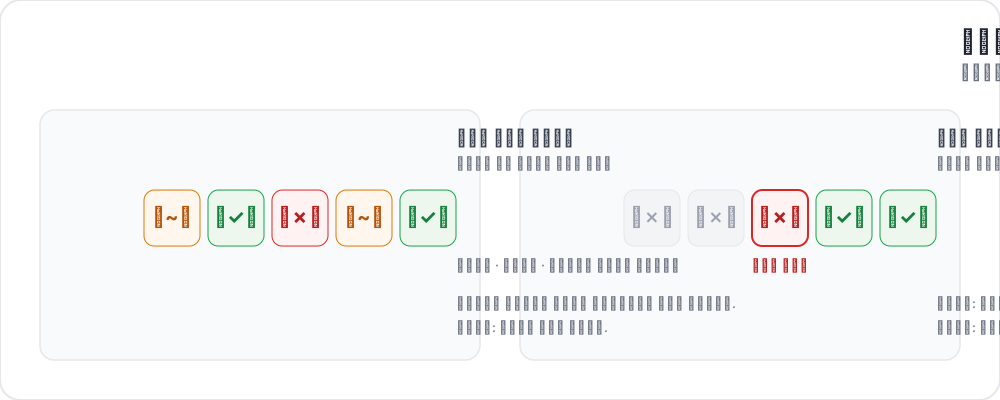 طريقتان لتوسيم مكافآت العملية
لا تنظر نماذج مكافأة النتيجة إلا إلى نهاية مسار وكيل البرمجة: هل تُرجم الكود؟ هل نجحت الاختبارات؟ هل حُلّت المشكلة؟ أما نماذج مكافأة العملية فتعطي درجة لكل خطوة وسيطة بدل ذلك. ومع إشارة عند كل خطوة، يستطيع التدريب تحديد موضع خطأ الوكيل بدقة.
دفعت أعمال حديثة هذا الاتجاه. يعيد AgentPRM تعريف مكافآت العملية لمهام الوكلاء، فيقيّم كل إجراء بمقدار التقدّم الذي يحرزه نحو الهدف بدلاً من صوابه، ويذكر كفاءة حوسبية أفضل بأكثر من 8 أضعاف مقارنةً بالأسس التي يقارن بها. ووجد ToolRM أن نماذج المكافأة المدرَّبة على مخرجات لغوية تحكم على استدعاءات الأدوات حكماً سيئاً، فبنى نماذج مكافأة خاصة بالأدوات إلى جانب FC-RewardBench لتقييمها. وفي المقابل، يدرّب DeepSWE وكيل برمجة بمكافأة نتيجة متفرّقة وحدها، أي هل تنجح الاختبارات، ويبلغ 42.2% في Pass@1 و59% مع توسيع الحوسبة وقت الاختبار على SWE-bench Verified. هذا هو الإعداد القائم على النتيجة وحدها الذي تحاول مراقبة العملية تحسينه.
وما تحتاج إليه هذه الأعمال كلها هو تعليق بشري على مستوى الخطوة، وهذا عادةً هو عنق الزجاجة. للاطلاع على مرجع المخطط، انظر وثائق مكافأة العملية.
وضعا التعليق التوضيحي
وضع الخطأ الأول
يقرأ المعلّق المسار من أعلاه إلى أسفله وينقر على أول خطوة يخطئ فيها الوكيل. تُسجَّل كل خطوة سابقة صحيحة، وتُسجَّل تلك الخطوة وكل ما بعدها خاطئة. وهو سريع لأن كل تتبع يحتاج إلى قرار واحد، ويناسب الحالة الشائعة التي لا يتعافى فيها الوكيل بعد خروجه عن المسار.
annotation_schemes:
  - annotation_type: process_reward
    name: step_rewards
    description: "Click the first step where the agent makes a mistake. Steps after it are flagged automatically."
    mode: first_error
    steps_key: structured_turns
    step_text_key: content
وضع كل خطوة
تنال كل خطوة وسمها الخاص، وهذا يلتقط ما لا يلتقطه وضع الخطأ الأول: التعافي الجزئي، أو التفافاً غير ضار، أو خطوة سليمة بذاتها لكنها خاطئة في سياقها. ويضيف allow_neutral الخيار الثالث على طريقة PRM800K.
annotation_schemes:
  - annotation_type: process_reward
    name: step_rewards
    description: "Rate each step correct, neutral, or incorrect"
    mode: per_step
    steps_key: structured_turns
    step_text_key: content
    allow_neutral: true
    inline_with_trace: true
يُلحق inline_with_trace أدوات التحكم بكل خطوة داخل العرض، وهذا مهم في التتبع الطويل، حيث تجعل اللوحة المنفصلة المعلّق يفقد موضعه.
إعداد المشروع
الخطوة 1: جهّز التتبعات
كل سطر مسار واحد. يسمّي steps_key قائمة الخطوات، ويسمّي step_text_key الحقل الذي يُعرض من كل خطوة:
{
  "id": "trace_001",
  "issue_description": "Fix the TypeError in parse_config() when the config file is empty",
  "structured_turns": [
    {"step_idx": 0, "type": "thinking", "content": "I need to find where the TypeError occurs. Let me read the file."},
    {"step_idx": 1, "type": "file_read", "content": "def parse_config(path):\n    with open(path) as f:\n        data = json.load(f)\n    return data['settings']"},
    {"step_idx": 2, "type": "thinking", "content": "When the file is empty json.load returns None, so None['settings'] raises. Add a check."},
    {"step_idx": 3, "type": "file_edit", "content": "+    if data is None:\n+        return {}"},
    {"step_idx": 4, "type": "bash_command", "content": "python -m pytest tests/test_config.py -v  ->  2 passed"}
  ]
}
التحويل من صيغة وكيل أخرى خطوة في سطر الأوامر:
python -m potato.trace_converter \
  --input claude_code_sessions.json \
  --input-format claude_code \
  --output data/traces.jsonl
يطبع --list-formats الصيغ المدعومة، ومنها claude_code وaider وswe_agent_trajectory وswebench وreact وlangchain وتسع صيغ أخرى. استخدم --auto-detect حين لا تكون متأكداً من صيغة ملفك.
الخطوة 2: اكتب التهيئة
annotation_task_name: "PRM Data Collection"
task_dir: "."

data_files:
  - "data/traces.jsonl"

item_properties:
  id_key: id
  text_key: issue_description

instance_display:
  fields:
    - key: issue_description
      type: text
      label: "Issue"

    - key: structured_turns
      type: coding_trace
      label: "Agent trajectory"
      display_options:
        diff_view: unified
        show_file_tree: true
        show_reasoning: true
        terminal_theme: dark
        collapse_long_outputs: true
        max_output_lines: 50

annotation_schemes:
  - annotation_type: process_reward
    name: step_rewards
    description: "Click the first step where the agent makes an error"
    mode: first_error
    steps_key: structured_turns
    step_text_key: content

  - annotation_type: radio
    name: outcome
    description: "Did the agent resolve the issue?"
    labels:
      - name: resolved
        text: "Fully resolved"
      - name: partial
        text: "Partially resolved"
      - name: not_resolved
        text: "Not resolved"

  - annotation_type: text
    name: error_description
    description: "If the trajectory went wrong, describe the error briefly"
    rows: 3
    placeholder: "e.g. edited the wrong file"
    label_requirement:
      required: false

num_annotators_per_item: 2

attention_checks:
  enabled: true
  items_file: "data/attention_checks.json"
  frequency: 20
  min_response_time: 20.0
  failure_handling:
    warn_threshold: 2
    block_threshold: 5

user_config:
  allow_all_users: false
  users:
    - reviewer1@example.com
    - reviewer2@example.com
    - reviewer3@example.com

output_annotation_dir: "annotation_output/"
export_annotation_format: jsonl
يُعرَّف كائن الوسم بمفتاح name. أما الحقل text فهو ما يقرؤه المعلّق، فتبقى القيمة المخزَّنة معرّفاً ثابتاً حتى لو تغيّرت الصياغة.
min_response_time: 20.0 هو أداة التحكم المفيدة هنا. لا أحد يقرأ مساراً متعدد الخطوات فيه diffs في عشرين ثانية، فهو يلتقط الاستعجال الذي لا يلتقطه حدّ زمني لكل تتبع.
الخطوة 3: شغّل الخادم
potato start config.yaml -p 8000التصدير للتدريب
يكتب المصدِّر coding_eval صيغ التدريب مباشرة، فلا تحتاج إلى تهيئتها بنفسك:
python -m potato.export -c config.yaml -f coding_eval -o ./export/يكتب الملف prm_training_data.jsonl بالوسوم على مستوى الخطوة، وpreference_pairs.jsonl بتتبعات مختارة ومرفوضة على طريقة DPO مبنية من التعليقات، وswebench_results.jsonl، وcode_reviews.jsonl. تُكتب الأربعة كلها افتراضياً. ولتضييق ذلك، مرّر خيار المصدِّر types: --option types=prm,preference. وإن لم يجد نوع مطلوب أي بيانات في الدراسة، أبلغ بذلك بدل كتابة ملف فارغ.
يُخزَّن التعليق تحت اسم المخطط على شكل قائمة steps مع الوضع. قيمة reward هي 1 للصحيح، و-1 للخاطئ، و0 للمحايد، وnull لخطوة لم يحكم عليها أحد:
{
  "step_rewards": {
    "mode": "first_error",
    "steps": [
      {"reward": 1, "source": "human", "verified": true},
      {"reward": 1, "source": "human", "verified": true},
      {"reward": -1, "source": "human", "verified": true},
      {"reward": -1, "source": "human", "verified": true}
    ]
  }
}
لا تلجأ إلى سكربت إلا حين تحتاج إلى شكل لا يكتبه المصدِّر. والسبب المعتاد هو أن تعالج بنفسك الخطوات التي لم يُحكم عليها، لأن قيمة الخطوة التي لم يحكم عليها أحد هي null وليست 0:
import json
from pathlib import Path

SCHEME = "step_rewards"

examples = []
for f in Path("export/").rglob("*.jsonl"):
    with open(f) as fh:
        for line in fh:
            rec = json.loads(line)
            payload = (rec.get("labels", rec) or {}).get(SCHEME)
            if not payload:
                continue

            steps = payload.get("steps", [])
            # Drop traces with unjudged steps rather than guessing at them.
            if any(s.get("reward") is None for s in steps):
                continue

            item = items_by_id[rec["instance_id"]]      # your own data file
            examples.append({
                "trace_id": rec["instance_id"],
                "prompt": item["issue_description"],
                "steps": [
                    {"content": src["content"], "label": s["reward"]}
                    for src, s in zip(item["structured_turns"], steps)
                ],
            })

with open("prm_labels.jsonl", "w") as out:
    for ex in examples:
        out.write(json.dumps(ex) + "\n")

print(f"Wrote {len(examples)} traces")
تأتي أزواج التفضيل من التعليقات نفسها. حين يحاول تتبعان حلّ المشكلة نفسها، يقرن المصدِّر بينهما ويعدّ التتبع الذي يأتي خطؤه الأول متأخراً، أو الذي لا خطأ فيه، هو التتبع المختار.
التحليل
أين يقع الخطأ الأول
import json
from pathlib import Path

SCHEME = "step_rewards"

traces = []
for f in Path("export/").rglob("*.jsonl"):
    with open(f) as fh:
        for line in fh:
            payload = (json.loads(line).get("labels", {}) or {}).get(SCHEME)
            if payload:
                traces.append(payload)

positions = []
all_correct = 0
for t in traces:
    steps = t.get("steps", [])
    first = next((i for i, s in enumerate(steps) if s.get("reward") == -1), None)
    if first is None:
        all_correct += 1
    elif len(steps) > 1:
        positions.append(first / (len(steps) - 1))

print(f"Traces annotated: {len(traces)}")
print(f"No errors: {all_correct} ({all_correct / len(traces):.1%})")
if positions:
    print(f"Average first-error position: {sum(positions) / len(positions):.2f} (0=start, 1=end)")
الاتفاق على الخطأ الأول
نادراً ما يختار معلّقان الخطوة نفسها، والاتفاق التام يقلّل من قدر اتفاقهما الفعلي. تقسيم الموضع إلى فئات أولاً يعطي مقارنة أكثر إفادة:
def bin_position(steps):
    first = next((i for i, s in enumerate(steps) if s.get("reward") == -1), None)
    if first is None:
        return "all_correct"
    return "early_error" if first < len(steps) / 2 else "late_error"
قارن هذه الفئات بين المعلّقين الذين يتشاركون العناصر، مستفيداً من التداخل الذي يعطيك إياه num_annotators_per_item.
نصائح
استخدم وضع الخطأ الأول للسرعة. لتدريب PRM يوجّه البحث، يعطي إشارة كافية بجزء من كلفة التعليق، ومعظم الوكلاء يفشلون على شكل سلسلة متتالية على أي حال.
استخدم وضع كل خطوة حين تحتاج إلى التفصيل. التعافي الجزئي والالتفافات غير الضارة لا توجد وسوماً إلا في وضع كل خطوة.
ابدأ بمعلّقين ذوي خبرة. يعني هذا قراءة الكود والـ diffs ومخرجات الطرفية. ابدأ بمجموعة صغيرة، وقِس الاتفاق، وعايِر على أمثلة مشتركة، ثم وسّع.
اضبط حداً أدنى لزمن الاستجابة. تطول المسارات، والحدّ الأدنى يمنع المعلّقين من تجاوز الـ diffs مسرعين.
أجرِ جولة معايرة. اجعل الجميع يوسّمون العشرة إلى العشرين تتبعاً نفسها، وناقشوا مواضع الاختلاف قبل أن يبدأ التعليق الإنتاجي.