رسم مربعات الإحاطة لاكتشاف الأجسام
أنشئ مهمة لاكتشاف الأجسام في Potato، من تكوين أولي بثلاث تسميات إلى تكوين إنتاجي للقطات القيادة، ثم صدّر النتائج إلى COCO أو YOLO.
يبني هذا الدليل التعليمي مهمة توسيم لاكتشاف الأجسام في Potato، بدءًا من تكوين بثلاث تسميات وانتهاءً بتصدير COCO أو YOLO الذي يُدرَّب عليه المكتشف. للاطلاع على القائمة الكاملة لأدوات الصور وخياراتها، راجع وثائق توسيم الصور.
ملف البيانات
كل سطر في ملف البيانات صورة واحدة. يحتاج Potato إلى معرّف وإلى حقل يحمل رابط الصورة أو مسارها، ويحدد item_properties أي حقل هو أيّ منهما:
{"id": "img_001", "image_url": "https://example.com/street_001.jpg"}
{"id": "img_002", "image_url": "/static/images/street_002.jpg"}
يُحَل المسار النسبي انطلاقًا من media_directory، لذا لا تحتاج الصور المحلية إلى خادم ملفات قيد التشغيل.
تكوين أدنى
يتولى مخطط image_annotation مساحة الرسم. يحتاج إلى اسم، ووصف يقرؤه المُوسِّمون بوصفه التعليمات، والأدوات المراد تفعيلها، ومجموعة التسميات:
annotation_task_name: "Object Detection Annotation"
task_dir: "."
output_annotation_dir: "annotation_output/"

data_files:
  - "data/images.json"

item_properties:
  id_key: id
  text_key: image_url

annotation_schemes:
  - annotation_type: image_annotation
    name: objects
    description: "Draw a box around every car, person, and bicycle"
    tools:
      - bbox
    labels:
      - name: car
        color: "#FF6B6B"
      - name: person
        color: "#4ECDC4"
      - name: bicycle
        color: "#45B7D1"
البدء بثلاث تسميات اختيار مقصود. كل تسمية تضيفها قرار على المُوسِّم أن يتخذه عند كل جسم، وحالة حدية يجب أن يُشرح له كيف يحسمها، لذا ابدأ بالفئات التي يحتاجها النموذج فعلًا وأضف البقية بعد أن تثبت الإرشادات.
شغّل الخادم وافتح المهمة:
potato start config.yaml -p 8000ما يفعله المُوسِّم
يختار المُوسِّم تسمية، ثم يسحب مستطيلًا حول كل جسم، ويعدّل الزوايا حتى يصبح المربع محكمًا:
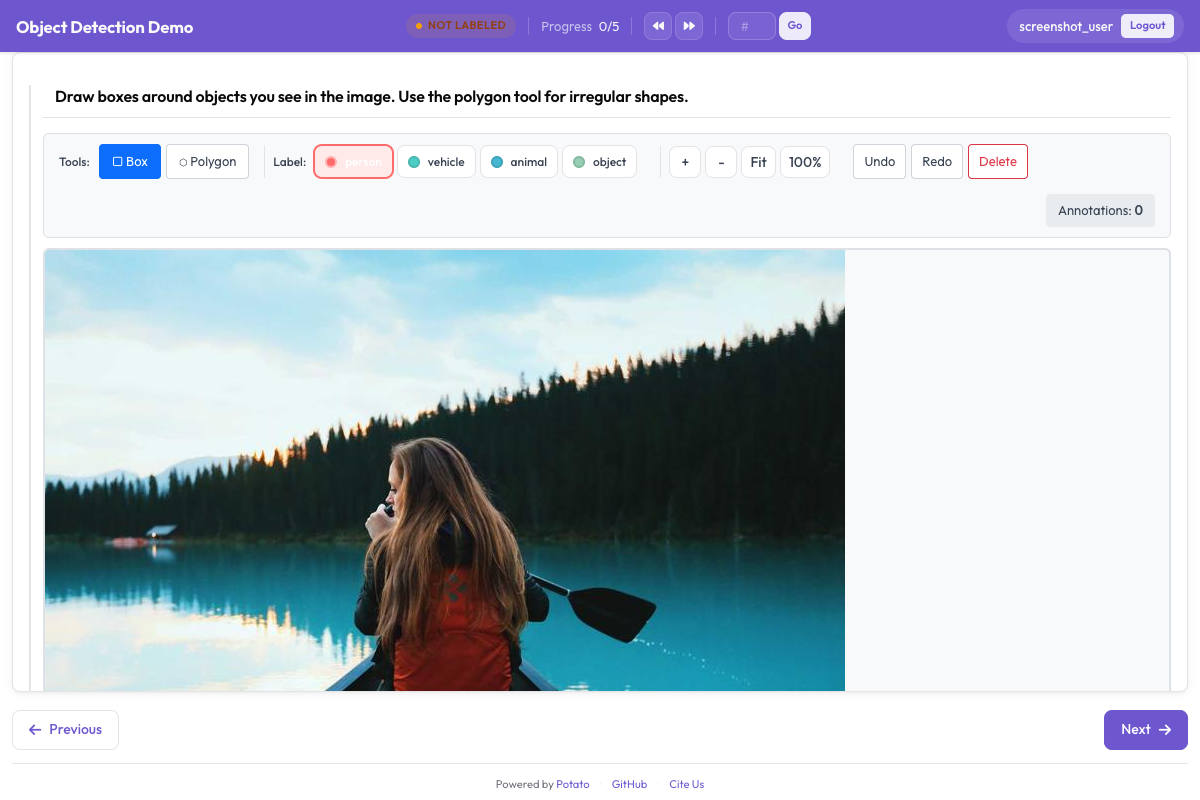 تتيح أداة مربعات الإحاطة للمُوسِّمين رسم مناطق مستطيلة على الصور وتسميتها
التكبير والتحريك مفعّلان افتراضيًا، وهذا مهم للأجسام الصغيرة أو البعيدة. يمكن تعطيل كليهما بـ zoom_enabled: false وpan_enabled: false عندما تكون الصور متجانسة ولا تفعل عناصر التحكم الإضافية سوى إعاقة العمل.
اختصارات التسميات
في ملف اختصارات المفاتيح الافتراضي v7، تأخذ الأدوات مفاتيح حرفية، فالمفتاح r يختار أداة المربع، وp المضلع، وb الفرشاة. تُضبط اختصارات التسميات لكل تسمية عبر key_value، والأرقام هي الخيار الآمن، لأن التسمية التي يتعارض key_value الخاص بها مع مفتاح أداة تُطلق الإجراءين معًا:
annotation_schemes:
  - annotation_type: image_annotation
    name: objects
    description: "Annotate all visible objects"
    tools:
      - bbox
    labels:
      - name: person
        color: "#FF6B6B"
        key_value: "1"

      - name: car
        color: "#4ECDC4"
        key_value: "2"

      - name: motorcycle
        color: "#45B7D1"
        key_value: "3"

      - name: bicycle
        color: "#96CEB4"
        key_value: "4"

      - name: traffic_light
        color: "#FFEAA7"
        key_value: "5"

      - name: stop_sign
        color: "#DDA0DD"
        key_value: "6"
الألوان تستحق أن تختارها بدل قبول ما يأتي افتراضيًا. في مشاهد المرور المزدحمة يبحث المُوسِّم عمّا فاته، ولونان متشابهان على فئتين متجاورتين يبطئان هذا البحث. اضبط keybinding_profile: legacy إذا كان المُوسِّمون قد تعلّموا مفاتيح Potato السابقة للإصدار 2.8 وتفضّل ألا تعيد تدريبهم.
إضافة خصائص الأجسام
لا يملك Potato كتلة خصائص لكل مربع. يُقرأ من تسمية image_annotation كلٌّ من name وcolor وkey_value، ويُتجاهل أي شيء آخر في قاموس التسمية، لذا فإن قائمة attributes: المتداخلة لا تفعل شيئًا، ولا يظهر أي سؤال بعد رسم المربع.
هناك طريقتان لالتقاط المعلومة نفسها. الأولى أن تدمج التمييز في مجموعة التسميات، فتصبح الخاصية جزءًا مما يختاره المُوسِّم:
annotation_schemes:
  - annotation_type: image_annotation
    name: objects
    description: "Draw a box around each object"
    tools:
      - bbox
    labels:
      - name: person
        color: "#FF6B6B"
      - name: person_occluded
        color: "#C44536"
والثانية أن تسأل عن الصورة ككل بمخطط ثانٍ. ينطبق ذلك على العنصر لا على مربع بعينه، وهذا هو الثمن: تعرف أن شيئًا في الصورة كان محجوبًا، لكنك لا تعرف أي مربع كان:
  - annotation_type: multiselect
    name: image_conditions
    description: "Conditions affecting this image"
    labels:
      - Heavy occlusion
      - Truncated objects
      - Low light
الاستيراد من VIA هو الموضع الوحيد الذي تبقى فيه الخصائص: يقرأ via_importer حقل region_attributes لكل منطقة ويدمجه في التسمية. هذا مفهوم يخص وقت الاستيراد، لا التكوين.
اشتراط مربع واحد على الأقل
الصورة التي لا تحتوي على مربعات غامضة، إذ قد تعني أن المُوسِّم لم يجد شيئًا أو أنه تخطّى العنصر. يفرض min_annotations هذا التمييز برفض أي إرسال يحتوي على أشكال أقل من الحد الأدنى، لذا تحتاج الصورة الفارغة فعلًا إلى تسمية سلبية صريحة:
annotation_schemes:
  - annotation_type: image_annotation
    name: objects
    description: "Draw a box around every traffic participant"
    tools:
      - bbox
    labels: [...]
    min_annotations: 1
التحكم في حجم عرض الصورة
تتبع مساحة الرسم الصورة المعروضة، فالصورة التي تُعرض صغيرة تمنح المُوسِّم لوحة رسم صغيرة. يحدد instance_display الحجم، ويبقى التكبير متاحًا للعمل على التفاصيل:
instance_display:
  fields:
    - key: image_url
      type: image
      label: "Frame"
      display_options:
        max_width: 1200
        max_height: 800
        zoomable: true
تكوين إنتاجي
يحمل تكوين القيادة أدناه الفئات الخمس التي تحتاجها مجموعة بيانات لاكتشاف الأجسام. تحتفظ التسميات باختصارات رقمية كي تبقى يد المُوسِّم اليسرى على صف الأرقام، ويصح min_annotations: 1 هنا لأن كل إطار في هذه البيانات يحتوي على مشارك واحد على الأقل في حركة المرور:
annotation_task_name: "Autonomous Driving - Object Detection"
task_dir: "."
output_annotation_dir: "annotation_output/"

data_files:
  - "data/driving_frames.json"

item_properties:
  id_key: id
  text_key: frame_path

annotation_schemes:
  - annotation_type: image_annotation
    name: objects
    description: "Annotate all traffic participants and objects"
    tools:
      - bbox
    min_annotations: 1
    labels:
      - name: vehicle
        color: "#FF6B6B"
        key_value: "1"

      - name: pedestrian
        color: "#4ECDC4"
        key_value: "2"

      - name: cyclist
        color: "#45B7D1"
        key_value: "3"

      - name: traffic_sign
        color: "#FFEAA7"
        key_value: "4"

      - name: traffic_light
        color: "#DDA0DD"
        key_value: "5"
خمس فئات تقع بالفعل عند حدّ ما تغطيه الاختصارات الرقمية بارتياح. بعد عشر فئات يصبح المُوسِّم منشغلًا بالبحث عن المفاتيح بدل قراءة الإطار، وعند هذه النقطة يصبح تقسيم المهمة إلى مهمتين أفضل من إضافة تسمية أخرى.
شكل التوسيمات
يخزّن Potato كل الأشكال من صورة واحدة في مصفوفة JSON مسطّحة، أيًّا كانت الأداة التي رسمتها. تُطبَّع الإحداثيات إلى المدى من 0 إلى 1 نسبةً إلى الصورة، لذا تبقى التوسيمات صحيحة عندما تُعرض الصورة لاحقًا بحجم مختلف:
[
  {
    "type": "bbox",
    "label": "vehicle",
    "color": "#FF6B6B",
    "coordinates": {"x": 0.234, "y": 0.352, "width": 0.120, "height": 0.130}
  },
  {
    "type": "bbox",
    "label": "pedestrian",
    "color": "#4ECDC4",
    "coordinates": {"x": 0.427, "y": 0.370, "width": 0.026, "height": 0.139}
  }
]
يحمل bbox هندسته تحت coordinates بالصيغة {x, y, width, height}. تحمل المضلعات قائمة نقاط تحت المفتاح نفسه، بينما تحمل الأقنعة ترميز طول التتابع (run-length encoding) تحت rle.
التصدير للتدريب
تقرأ شيفرة تدريب المكتشفات صيغة COCO أو YOLO، وPotato يكتب الاثنتين:
python -m potato.export --config config.yaml --format coco --output ./export/
python -m potato.export --config config.yaml --format yolo --output ./export/
يختلف التصديران في أكثر من الصياغة. يكتب COCO ملف annotations.json واحدًا بمربعات بالبكسل على شكل [x, y, width, height]، ولا ينسخ الصور، لذا تشير قيم file_name إلى المكان الذي توجد فيه الصور أصلًا. أما YOLO فيكتب ملفًا نصيًا لكل صورة بإحداثيات مركز مُطبَّعة، ويقسم الصور والتسميات إلى مجلدَي train/ وval/، ويضيف data.yaml وclasses.txt كي يتمكن التدريب من قراءة قائمة الفئات دون أن تُمرَّر إليه على حدة.
الحفاظ على اتساق المربعات
ارسم المربعات محكمة حول الجسم، لأن كل بكسل من الخلفية داخل المربع بكسل يتعلم النموذج أن يعدّه جزءًا من المقدمة. دوّن طريقة التعامل مع الحالات الصعبة (الحجب، والأجسام المقطوعة عند حافة الإطار، والانعكاسات) وراجعوا معًا دفعة من الأمثلة في الأسبوع الأول، حين يكون تغيير الإرشادات لا يزال رخيصًا. راقب عدد المربعات وتوزيعات أحجامها لكل مُوسِّم طوال الدراسة، لأن التحول المفاجئ يعني عادةً أن شخصًا ما بدأ يفهم قاعدة بشكل مختلف، لا أن الصور تغيّرت.
الخطوات التالية
- أضف توسيم المضلعات عندما تكون المربعات أخشن مما تتطلبه المهمة
- استخدم مجموعات النقاط المفتاحية لتقدير الوضعيات
- أعدّ ضبط الجودة قبل أن تتجاوز الدراسة عددًا قليلًا من المُوسِّمين
لبقية خيارات الصور، راجع توسيم الصور.