Per-Step Error Localization: Using Trajectory Evaluation to Find Where Agents Fail
Use Potato's trajectory_eval schema for per-step error localization with a hierarchical error taxonomy, severity weights, and a running quality score across agent traces.
Pass rates and failure modes
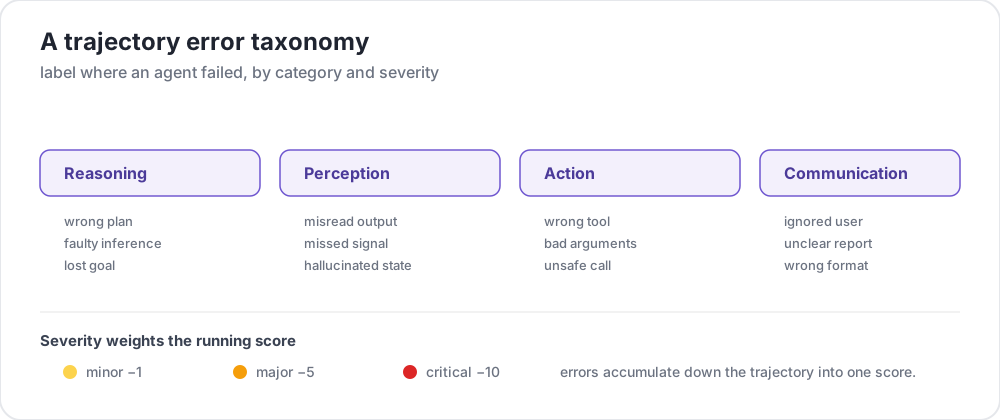 A trajectory error taxonomy
You run your agent on a benchmark. It scores 63% on task completion. Now what?
A pass/fail number tells you the agent failed on 37% of tasks and nothing else. It doesn't tell you where in the trace things went wrong, what type of error the agent made, or how bad it was. Was it a single catastrophic mistake on step 2, or fifteen steps of minor reasoning errors piling up? Did the agent misuse a tool, or reason from a false premise?
Without per-step error localization, you can't diagnose failure modes, decide what to fix first, or build training data for process reward models.
Potato's trajectory_eval schema fixes this. Annotators walk each step of a trace and record:
- Correctness: is this step correct, incorrect, or partially correct?
- Error type: a category and a subtype from a taxonomy you define
- Severity: minor, major, or critical, each with a score weight
- Rationale: a free-text explanation of the error
- Running score: a cumulative score that drops by the severity weight at each error
For the schema reference, see the source documentation.
Trajectory eval schema overview
The schema evaluates multi-step traces in sequence. Instead of one overall rating, it produces a structured annotation for every step, so you end up with a map of where and why the run failed.
At each step the annotator sees the step content, marks correctness, and on anything other than correct picks an error category and subtype, assigns a severity, and optionally writes a rationale. The running score at the top updates as they go.
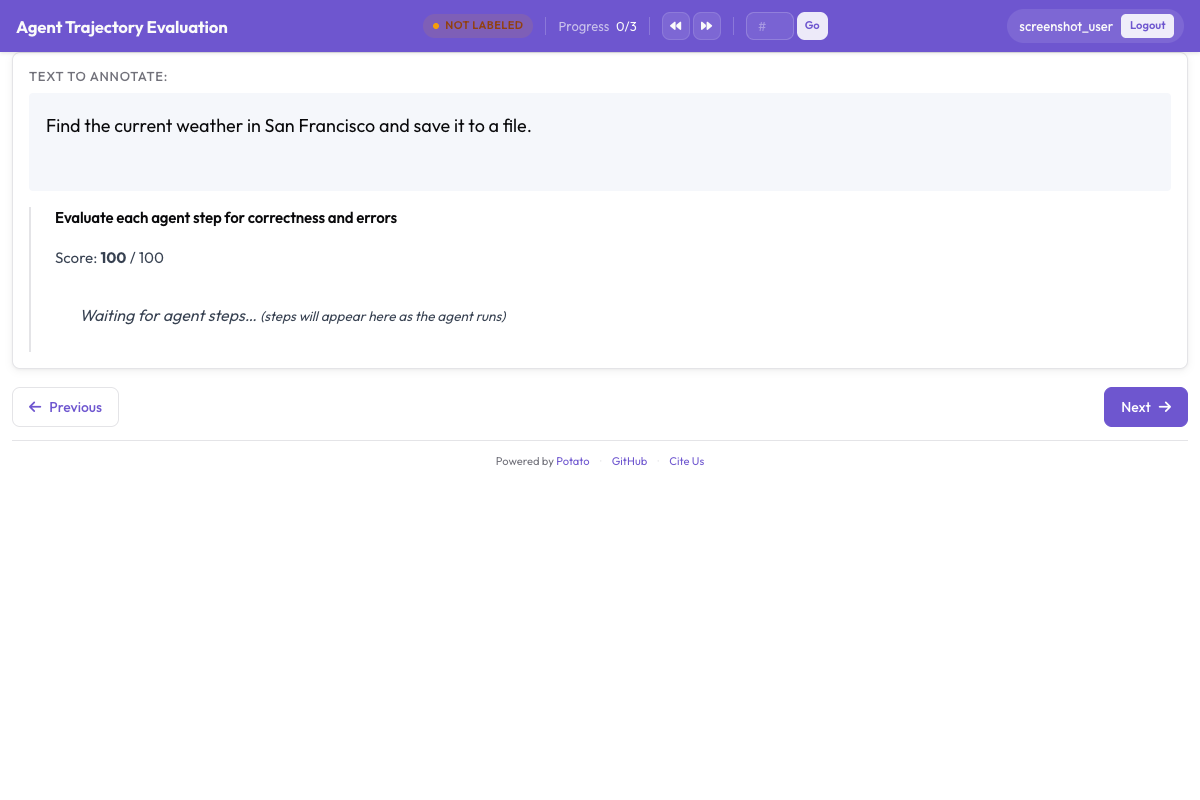 Each step gets a correctness rating, error type, and severity level with a running score that decrements based on severity
Configuration options
| Option | Description |
|---|---|
steps_key | The field in each item holding the list of steps |
step_text_key | Which field within a step to display |
correctness_options | The correctness labels, defaulting to correct and incorrect |
error_types | The taxonomy, as categories each carrying a list of subtypes |
severities | Severity levels, each with a name and a score weight |
show_score | Whether to show the running quality score |
max_score | The score to start from |
The taxonomy is two levels deep: a category with a flat list of subtype names. Longer descriptions of what each subtype means belong in your annotation guidelines rather than in the config, since the schema stores names rather than definitions.
Designing a hierarchical error taxonomy
Your taxonomy decides whether the labels aggregate into anything. Get it right and you can pool errors across traces and spot systematic patterns. Here is a four-category starting point, with the definitions you would hand annotators.
Reasoning errors
The agent's reasoning is flawed, even when what it sees and does is fine.
| Subtype | Description | Example |
|---|---|---|
logical_error | Invalid logical inference | "Since A implies B, and B is true, A must be true" |
incorrect_assumption | Assumes something unsupported by evidence | Assumes a file exists without checking |
over_generalization | Too broad a conclusion from limited evidence | "This function failed once, so the API is broken" |
circular_reasoning | The conclusion is used as a premise | "The answer is X because X is correct" |
incorrect_calculation | Computation error | Off-by-one in a loop bound |
Perception errors
The agent misreads, misinterprets, or misses information in its observations.
| Subtype | Description | Example |
|---|---|---|
missed_element | Fails to notice relevant information | Overlooks an error message in terminal output |
misidentified_element | Misinterprets what it sees | Reads a 404 as a successful response |
hallucinated_element | Refers to something not present | References a parameter that does not exist |
outdated_reference | Uses stale information | Uses a variable value that was overwritten |
Action errors
The agent takes the wrong action, or the right action the wrong way.
| Subtype | Description | Example |
|---|---|---|
wrong_tool | Inappropriate tool for the task | Uses grep when find is needed |
wrong_arguments | Right tool, wrong parameters | Passes the wrong path to an edit command |
premature_termination | Stops before the task is done | Answers after finding partial information |
unnecessary_action | Adds no value | Re-reads a file it just read |
destructive_action | Causes harm | Deletes a file without a backup |
Communication errors
These show up in what the agent tells the user about its own work.
| Subtype | Description | Example |
|---|---|---|
unclear_explanation | Confusing or ambiguous | Describes a fix without saying what was broken |
missing_context | Omits critical context | Reports success without mentioning caveats |
incorrect_summary | Does not match the actions taken | Claims 3 files edited when 2 changed |
overconfident_claim | States uncertainty as certainty | "This will definitely fix the issue", untested |
Severity levels and score weights
Each error carries a severity, and each severity carries a weight that moves the running score:
| Severity | Weight | Meaning |
|---|---|---|
minor | -1 | Does not derail the trace, such as an unnecessary action |
major | -5 | Wastes effort or produces partly wrong results, such as the wrong tool |
critical | -10 | Breaks the trace or causes harm, such as a destructive action |
The score starts at max_score and drops at each error. A trace ending at 85 had a few minor issues; one ending at 40 had several major failures.
severities:
  - name: minor
    weight: -1
  - name: major
    weight: -5
  - name: critical
    weight: -10
Full YAML configuration
annotation_task_name: "Agent Trajectory Error Localization"
task_dir: "."

data_files:
  - "data/traces.jsonl"

item_properties:
  id_key: "trace_id"
  text_key: "task"

instance_display:
  fields:
    - key: "task"
      type: text
      label: "Task"
    - key: "trace"
      type: agent_trace
      label: "Agent trace"
      display_options:
        show_step_numbers: true
        show_timestamps: false
        step_type_colors:
          thought: "#E8F0FE"
          action: "#FFF3E0"
          observation: "#F1F8E9"
          code: "#F3E5F5"

annotation_instructions: |
  Walk the trace one step at a time. Mark a step incorrect only when it is
  wrong on the information available at that step, not with hindsight. When
  several categories apply, choose the most specific one.

annotation_schemes:
  - annotation_type: trajectory_eval
    name: step_errors
    description: "Mark each step and classify any error"
    steps_key: trace
    step_text_key: content
    correctness_options:
      - correct
      - incorrect
      - partially_correct
    error_types:
      - name: reasoning
        subtypes:
          - logical_error
          - incorrect_assumption
          - over_generalization
          - circular_reasoning
          - incorrect_calculation
      - name: perception
        subtypes:
          - missed_element
          - misidentified_element
          - hallucinated_element
          - outdated_reference
      - name: action
        subtypes:
          - wrong_tool
          - wrong_arguments
          - premature_termination
          - unnecessary_action
          - destructive_action
      - name: communication
        subtypes:
          - unclear_explanation
          - missing_context
          - incorrect_summary
          - overconfident_claim
    severities:
      - name: minor
        weight: -1
      - name: major
        weight: -5
      - name: critical
        weight: -10
    show_score: true
    max_score: 100

  - annotation_type: radio
    name: overall_success
    description: "Did the run succeed overall?"
    labels:
      - success
      - partial
      - failure
    sequential_key_binding: true

output_annotation_dir: "annotation_output/"
export_annotation_format: jsonl

user_config:
  allow_all_users: true
Step-by-step setup
1. Prepare your agent traces
Traces go in JSONL, one per line, each with an id, a task description, and a list of steps. steps_key names the list and step_text_key names the field within each step to show:
{
  "trace_id": "trace_042",
  "task": "Find the bug in the calculate_discount function and fix it",
  "trace": [
    {
      "type": "thought",
      "content": "I need to look at calculate_discount to find the bug."
    },
    {
      "type": "action",
      "content": "search('def calculate_discount')"
    },
    {
      "type": "observation",
      "content": "Found in pricing.py line 45:\ndef calculate_discount(price, discount_pct):\n    return price * discount_pct / 100"
    },
    {
      "type": "thought",
      "content": "It returns the discount amount rather than the discounted price."
    },
    {
      "type": "action",
      "content": "edit_file('pricing.py:45', 'return price - (price * discount_pct / 100)')"
    },
    {
      "type": "observation",
      "content": "File edited successfully."
    }
  ]
}
If your traces are in another format, convert them first. The converter reads one file and writes canonical JSONL:
python -m potato.trace_converter \
  --input raw_traces.json \
  --input-format react \
  --output data/traces.jsonl
--list-formats prints what it supports, which includes react, langchain, langfuse, webarena, openai, anthropic, swebench, and otel. Use --auto-detect instead of --input-format when you are not sure which one you have.
2. Adapt the taxonomy
Start from the four categories above and trim or extend for your agent. A coding agent usually earns its own category:
error_types:
  - name: code_quality
    subtypes:
      - syntax_error
      - runtime_error
      - logic_bug
      - style_violation
Keep the subtype names stable once collection starts. Renaming one mid-study splits the same failure mode across two labels in the export.
For coding traces, use the coding_trace display instead, which renders diffs and terminal output:
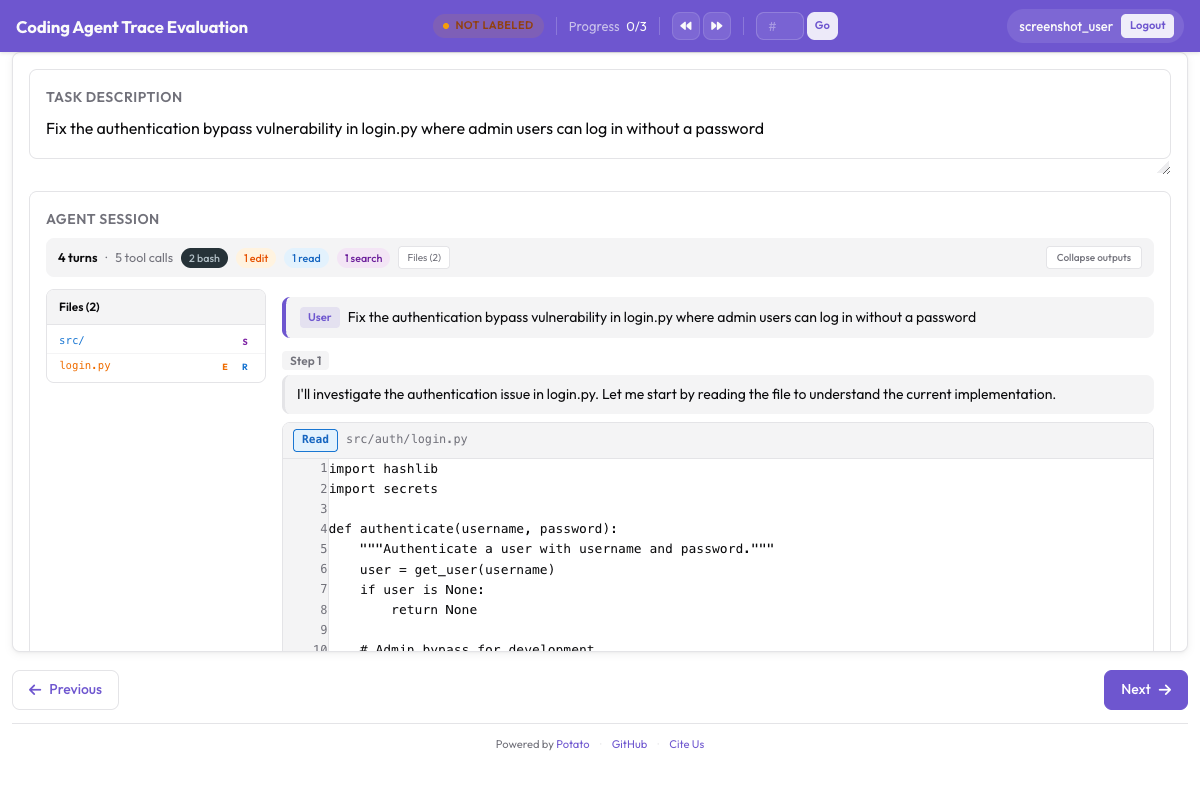 Coding trace display renders diffs, terminal blocks, and file reads alongside trajectory evaluation controls
3. Launch the server
potato start config.yaml -p 80004. Write annotation guidelines
The schema stores subtype names, not definitions, so the definitions have to live somewhere the annotator can see. Put the tables above into annotation_instructions or your guidelines document, and settle at least these four questions:
- When a step is incorrect rather than correct-but-suboptimal
- Which category wins when several apply
- What separates minor from major from critical, with examples
- Whether to judge a step on the information available then, or with hindsight
The annotation workflow
The task sits at the top, the trace below it, and the running score reads 100 in the corner.
For each step the annotator reads it in the context of the steps before it, marks correctness, and on an error picks the category, then the subtype, then the severity, and writes a rationale. The score updates as they go: a major error at step 3 takes it to 95, a critical one at step 7 to 85.
At the end they give the overall success rating and submit.
What the output contains
Each annotated trace carries a steps list and the final score. Correct steps record only their index and correctness; errors carry the category in error_type and the specific one in error_subtype:
{
  "steps": [
    {"step_index": 0, "correctness": "correct"},
    {
      "step_index": 1,
      "correctness": "incorrect",
      "error_type": "action",
      "error_subtype": "wrong_tool",
      "severity": "major",
      "rationale": "Should have used a more specific selector"
    }
  ],
  "score": 95
}
error_type is the category and error_subtype is the leaf. Reading error_type expecting wrong_tool is the mistake that makes an analysis look like every failure was an action error.
Analyzing the results
Loading annotation data
import json
import pandas as pd
from pathlib import Path

SCHEME = "step_errors"

traces = []
for f in Path("annotation_output/").rglob("*.jsonl"):
    with open(f) as fh:
        for line in fh:
            rec = json.loads(line)
            payload = rec.get("labels", rec).get(SCHEME)
            if not payload:
                continue
            traces.append({
                "instance_id": rec.get("instance_id"),
                "annotator": rec.get("user_id"),
                "steps": payload.get("steps", []),
                "score": payload.get("score"),
            })

print(f"Loaded {len(traces)} annotated traces")
Error distribution
errors = []
for t in traces:
    for step in t["steps"]:
        if step.get("correctness") == "correct":
            continue
        errors.append({
            "instance_id": t["instance_id"],
            "step_index": step.get("step_index"),
            "category": step.get("error_type"),
            "subtype": step.get("error_subtype"),
            "severity": step.get("severity"),
        })

error_df = pd.DataFrame(errors)
print(f"Total errors: {len(error_df)}\n")
print("By category:\n", error_df["category"].value_counts(), "\n")
print("Top subtypes:\n", error_df["subtype"].value_counts().head(10), "\n")
print("By severity:\n", error_df["severity"].value_counts())
Where errors land in a trace
Normalizing position reveals whether failures cluster at the start, when the agent is orienting, or at the end, when it is wrapping up:
import matplotlib.pyplot as plt

positions = []
for t in traces:
    n = len(t["steps"])
    if n < 2:
        continue
    for step in t["steps"]:
        if step.get("correctness") != "correct":
            positions.append(step["step_index"] / (n - 1))

plt.figure(figsize=(10, 4))
plt.hist(positions, bins=20, edgecolor="black", alpha=0.7)
plt.xlabel("Normalized position in trace (0 = start, 1 = end)")
plt.ylabel("Error count")
plt.title("Where do agent errors occur?")
plt.tight_layout()
plt.savefig("error_position_distribution.png", dpi=150)
Score distributions
The score is computed for you, so read it rather than recomputing it:
score_df = pd.DataFrame([
    {"instance_id": t["instance_id"], "score": t["score"]}
    for t in traces if t["score"] is not None
])

print(score_df["score"].describe())
Failure modes by impact
Frequency alone over-weights minor errors. Multiplying by severity ranks what actually costs you:
WEIGHT = {"minor": 1, "major": 5, "critical": 10}

modes = (
    error_df.assign(w=error_df["severity"].map(WEIGHT))
    .groupby(["category", "subtype"])
    .agg(count=("w", "size"), avg_weight=("w", "mean"))
)
modes["impact"] = modes["count"] * modes["avg_weight"]

print("By frequency:\n", modes.sort_values("count", ascending=False).head(10).to_string())
print("\nBy impact:\n", modes.sort_values("impact", ascending=False).head(10).to_string())
Research context
Per-step error localization lines up with several recent threads in agent evaluation.
TRAIL (Patronus AI, 2025) annotated 148 agent traces from GAIA and SWE-bench Lite against a taxonomy of more than 20 error types, 841 errors in total. The result worth noting is how hard localization turned out to be: the best long-context reasoning model they tested reached 11% joint accuracy on error category plus location. That is the job trajectory_eval hands to human annotators, and it is why the labels are worth paying for.
AgentRewardBench (McGill NLP, 2025) went after the judges instead. It collects 1,302 web-agent trajectories across five benchmarks, has an expert review each one for success, side effects, and repetition, then scores twelve LLM judges against those reviews. No judge led on every benchmark, and the rule-based evaluations the benchmarks ship with underreported how often agents actually succeeded. If you plan to automate part of this taxonomy with a model, that is the shape of the check you need.
The step-level correctness and severity labels also feed process reward model training directly, since each annotated step is a training example with a ground-truth quality signal.
Anthropic's Demystifying evals for AI agents makes the operational version of the same argument: grade the transcript rather than only the outcome, and use explicit rubrics for how the agent called tools and talked to the user. It also warns against scoring against a prescribed step sequence, because agents keep finding valid paths the eval designer did not anticipate. Hold onto that when applying this taxonomy. A step is an error because it was wrong, not because it was unexpected.
Summary
trajectory_eval turns agent evaluation from a pass/fail check into a diagnostic. With a two-level taxonomy, severity weights, and a running score, you can see which step went wrong, what kind of error it was, how bad it was, and where errors cluster across traces. The step-level labels are also ready to use as process reward model training data.
Start with the four categories here, keep the definitions in your guidelines where annotators can read them, and refine the subtypes once you have seen the failures your agent actually produces.