Оценка ИИ-агентов: человеческая разметка трасс агентов
Как выстроить человеческую оценку вывода ИИ-агента в Potato, от импорта трасс через устройство схем на уровне трассы и шагов до разбора выгруженных результатов.
Конвертируйте трассы агента командой python -m potato.trace_converter, выводите их через поле отображения agent_trace и собирайте вердикт по трассе целиком вместе с пошаговой оценкой trajectory_eval. Именно пошаговая оценка находит шаг, на котором запуск пошёл не так.
Доля успехов показывает, как часто агент доводит задачу до конца, и ничего не говорит о том, почему провалились неудачные запуски. Два агента с одинаковой долей успехов в 62% могут проваливаться по совершенно разным причинам. Один выбирает не тот инструмент, другой правильно рассуждает над плохим результатом поиска, и исправлять это нужно по-разному. Человеческая оценка на уровне шагов разводит эти случаи, потому что разметчик отмечает, какой шаг сломался и как именно.
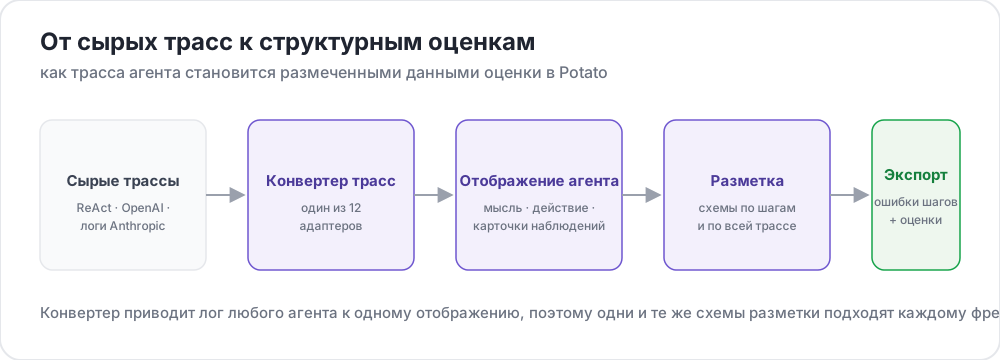 От сырых трасс к структурированным оценкам
В этом руководстве конвейер собирается для агента в стиле ReAct, который отвечает на вопросы поиском в вебе. Конфигурации проверены на Potato 2.9.1:
pip install --upgrade potato-annotationШаг 1: конвертируйте трассы
В Potato зарегистрировано 15 конвертеров трасс, и CLI выводит их список с описаниями:
python -m potato.trace_converter --list-formatsВ список входят react, openai, anthropic, langchain, langfuse, multi_agent, mcp, otel, atif, webarena, web_agent, swebench, swe_agent_trajectory, claude_code и aider. Выгрузки запусков LangSmith идут через langchain, а логи CrewAI, AutoGen и LangGraph через multi_agent.
Конвертер react читает трассу, шаги которой содержат ключи thought, action и observation:
{
  "id": "trace_001",
  "task": "What is the capital of Australia and what is its population?",
  "steps": [
    {"thought": "I need the capital of Australia and then its population.",
     "action": "search('capital of Australia')",
     "observation": "Canberra is the capital city of Australia."},
    {"thought": "Now I need Canberra's population.",
     "action": "search('Canberra population 2025')",
     "observation": "Canberra has a population of approximately 467,000 as of 2025."},
    {"thought": "I have both pieces of information.",
     "action": "finish('Canberra, approximately 467,000')"}
  ],
  "metadata": {"agent": "GPT-4", "tokens": 2340}
}
Файл конвертируется одной командой:
python -m potato.trace_converter \
  --input raw_traces.json \
  --input-format react \
  --output data/traces.jsonl
Если вы не уверены, какой конвертер подходит, передайте --auto-detect вместо --input-format, и реестр выберет конвертер по сигнатурам полей. Как только формат известен, указывайте его явно, потому что автоопределение берёт первый подошедший конвертер, а у нескольких форматов наборы полей пересекаются.
Все конвертеры пишут одну и ту же каноническую структуру, поэтому одна конфигурация работает с разными фреймворками. В каждой строке есть id, task_description и conversation, то есть список реплик, у каждой из которых есть speaker и text. Конвертер, у которого есть agent_name, metadata_table и screenshots, записывает и их:
{
  "id": "trace_001",
  "task_description": "What is the capital of Australia and what is its population?",
  "agent_name": "GPT-4",
  "metadata_table": [{"Property": "Steps", "Value": "3"},
                     {"Property": "tokens", "Value": "2340"}],
  "conversation": [
    {"speaker": "Agent (Thought)", "text": "I need the capital of Australia and then its population."},
    {"speaker": "Agent (Action)", "text": "search('capital of Australia')"},
    {"speaker": "Environment", "text": "Canberra is the capital city of Australia."}
  ]
}
Шаг 2: выведите трассу на экран
Отображение agent_trace выводит каждую реплику карточкой с цветом по типу шага, так что разметчик читает ход запуска, а не кусок JSON:
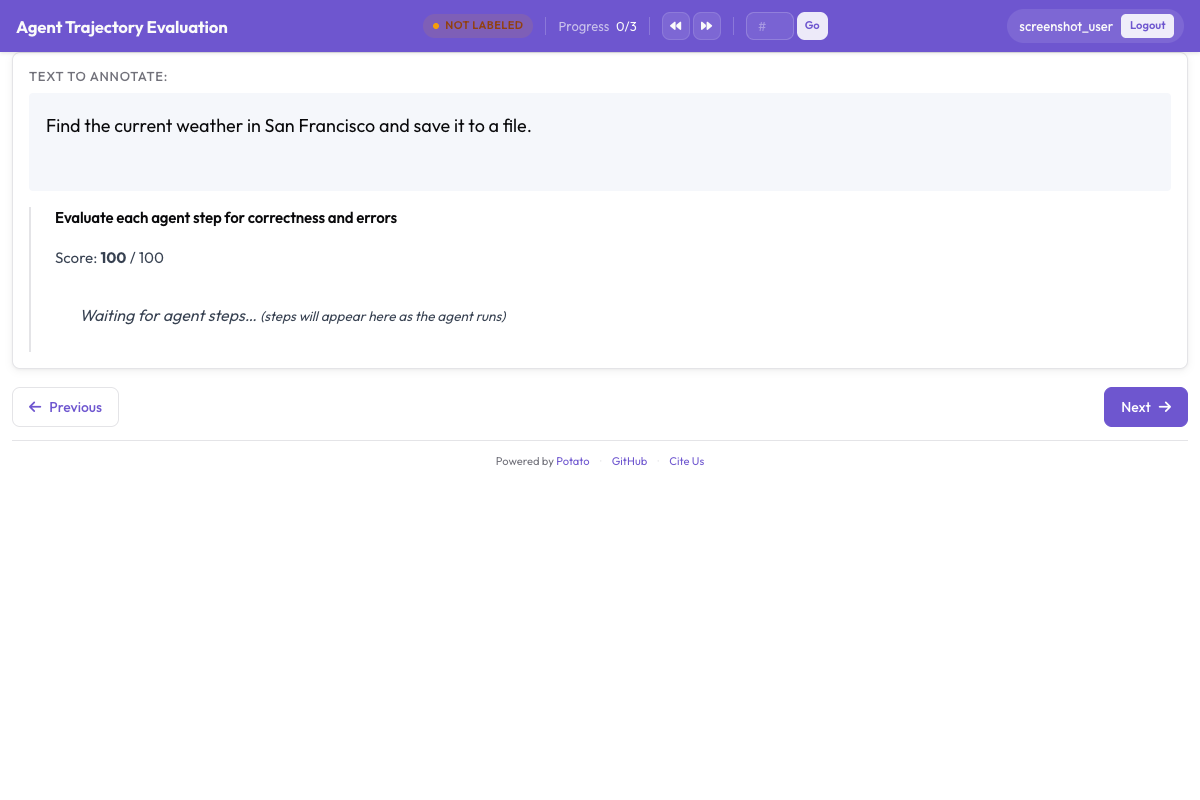
instance_display определяет, что попадает на страницу и в каком порядке. Описание задачи стоит сверху, потому что разметчик должен знать, о чём просили агента, прежде чем любой шаг обретёт смысл, а таблица метаданных стоит под ним в компактном поле-таблице:
instance_display:
  layout:
    direction: vertical
    gap: 16px

  fields:
    - key: task_description
      type: text
      label: "Task"

    - key: metadata_table
      type: spreadsheet
      label: "Trace Info"
      display_options:
        compact: true
        max_height: 120

    - key: conversation
      type: agent_trace
      label: "Agent Trace"
      span_target: true
      display_options:
        show_step_numbers: true
        show_summary: true
        collapse_observations: true
        step_type_colors:
          thought: "#e8f4fd"
          action: "#fff3e0"
          observation: "#e8f5e9"
Свёрнутые наблюдения не дают длинным результатам поиска вытеснить остальную трассу за пределы экрана. Трасса с дюжиной полных результатов поиска превращается в основном в прокрутку, и разметчик теряет место, где он находится в запуске. Параметр span_target: true на том же поле позволяет схеме фрагментов отметить точные слова галлюцинированного утверждения внутри реплики, а это более тонкая запись, чем пометка всего шага как неверного.
Шаг 3: оценка трассы целиком
Трассу целиком покрывают три вопроса. Успех задачи даёт главное число, правильность ответа отделяет верный ответ, полученный плохим путём, от неверного, а эффективность различает двух агентов, которые оба справились:
annotation_schemes:
  - annotation_type: radio
    name: task_success
    description: "Did the agent complete the task?"
    labels:
      - name: "Success"
        tooltip: "Fully completed correctly"
      - name: "Partial success"
        tooltip: "Completed with errors or omissions"
      - name: "Failure"
        tooltip: "Not completed"
    label_requirement:
      required: true
    sequential_key_binding: true

  - annotation_type: radio
    name: answer_correctness
    description: "Is the agent's final answer factually correct?"
    labels:
      - name: "Correct"
      - name: "Partially correct"
      - name: "Incorrect"
      - name: "Cannot determine"
    label_requirement:
      required: true

  - annotation_type: likert
    name: efficiency
    description: "Did the agent reach the answer without wasted steps?"
    size: 5
    min_label: "Many unnecessary steps"
    max_label: "No wasted steps"

  - annotation_type: text
    name: evaluator_notes
    description: "Anything the ratings above do not capture"
    multiline: true
    rows: 3
Вариант «Cannot determine» нужен не зря. Без него разметчик, у которого нет способа проверить ответ, либо угадывает, либо помечает ответ как неверный, и оба варианта вносят шум в то самое число, которое для вас важнее всего.
Шаг 4: пошаговая оценка
trajectory_eval выводит каждый шаг карточкой с собственными элементами управления и держит метку правильности, таксономию ошибок и серьёзность в одной схеме вместо трёх. Укажите в steps_key поле, где лежат шаги (для конвертированной трассы это conversation), а в step_text_key ключ внутри каждого шага, который нужно показывать:
annotation_schemes:
  - annotation_type: trajectory_eval
    name: step_evaluation
    description: "Mark each step and classify anything that went wrong"
    steps_key: conversation
    step_text_key: text
    correctness_options:
      - correct
      - partially_correct
      - incorrect
      - unnecessary
    error_types:
      - name: reasoning
        subtypes:
          - logical_error
          - factual_error
          - planning_error
      - name: execution
        subtypes:
          - wrong_tool
          - wrong_args
          - api_error
      - name: termination
        subtypes:
          - premature_stop
          - redundant_step
    severities:
      - name: minor
        weight: -1
      - name: major
        weight: -5
      - name: critical
        weight: -10
    show_score: true
    max_score: 100
Веса серьёзности превращают список отмеченных шагов в одно сопоставимое число на трассу, и значения по умолчанию стоит менять, а не принимать как есть. Вес говорит, насколько критическая ошибка хуже мелкой именно в вашей задаче, и в оценке безопасности это соотношение гораздо круче, чем в задаче поиска.
Второе решение, которое стоит принять осознанно, это держать unnecessary отдельно от incorrect. Лишний шаг тратит токены и время, но ошибки не вносит, а если слить их вместе, пропадёт разница между агентом, который блуждает, и агентом, который ошибается.
Шаг 5: полная конфигурация
Всё вышеописанное в одном файле:
annotation_task_name: "ReAct Agent Evaluation"
task_dir: "."
output_annotation_dir: "output/"

data_files:
  - "data/traces.jsonl"

item_properties:
  id_key: id
  text_key: task_description

instance_display:
  layout:
    direction: vertical
    gap: 16px
  fields:
    - key: task_description
      type: text
      label: "Task"
    - key: metadata_table
      type: spreadsheet
      label: "Trace Info"
      display_options:
        compact: true
        max_height: 120
    - key: conversation
      type: agent_trace
      label: "Agent Trace"
      span_target: true
      display_options:
        show_step_numbers: true
        show_summary: true
        collapse_observations: true

annotation_schemes:
  - annotation_type: radio
    name: task_success
    description: "Did the agent complete the task?"
    labels:
      - name: "Success"
      - name: "Partial success"
      - name: "Failure"
    label_requirement:
      required: true
    sequential_key_binding: true

  - annotation_type: radio
    name: answer_correctness
    description: "Is the agent's final answer factually correct?"
    labels:
      - name: "Correct"
      - name: "Partially correct"
      - name: "Incorrect"
      - name: "Cannot determine"
    label_requirement:
      required: true

  - annotation_type: likert
    name: efficiency
    description: "Did the agent reach the answer without wasted steps?"
    size: 5
    min_label: "Many unnecessary steps"
    max_label: "No wasted steps"

  - annotation_type: text
    name: evaluator_notes
    description: "Anything the ratings above do not capture"
    multiline: true
    rows: 3

  - annotation_type: trajectory_eval
    name: step_evaluation
    description: "Mark each step and classify anything that went wrong"
    steps_key: conversation
    step_text_key: text
    correctness_options: [correct, partially_correct, incorrect, unnecessary]
    error_types:
      - name: reasoning
        subtypes: [logical_error, factual_error, planning_error]
      - name: execution
        subtypes: [wrong_tool, wrong_args, api_error]
      - name: termination
        subtypes: [premature_stop, redundant_step]
    severities:
      - name: minor
        weight: -1
      - name: major
        weight: -5
      - name: critical
        weight: -10
    show_score: true
    max_score: 100

export_annotation_format: jsonl
Запустите сервер и откройте http://localhost:8000:
potato start config.yaml -p 8000Как выглядит сеанс разметки
На странице показаны задача, таблица сведений о трассе и карточки шагов. Пошаговые элементы управления прикреплены к каждой карточке, а схемы уровня трассы стоят под трассой. Порядок, в котором работают разметчики, важнее, чем кажется. Если сначала оценить шаги, а потом трассу, общий вердикт опирается на то, что запуск сделал на самом деле, а если сначала оценить успех, это впечатление обычно окрашивает все последующие оценки шагов.
Три привычки стоит прописать в инструкциях для разметчиков. Разворачивайте свёрнутые наблюдения, а не доверяйте строке сводки, потому что неверно прочитанный результат поиска чаще всего и даёт неправильный ответ, который выглядит хорошо обоснованным. Сверяйте итоговый ответ с эталоном до оценки успеха задачи, если в наборе данных эталон есть. Возвращайтесь к шагу через таймлайн шагов, когда более поздний шаг показывает, что более ранний был неверен с самого начала.
Шаг 6: выгрузка и анализ
Экспортёр JSONL записывает annotations.jsonl, по одной записи на каждую пару экземпляра и разметчика:
python -m potato.export --config config.yaml --format jsonl --output ./export/Каждая запись содержит instance_id, user_id, labels, spans и links, а ответы по схемам лежат в labels под ключами с именами схем:
import json
import pandas as pd

records = [json.loads(line) for line in open("export/annotations.jsonl")]

df = pd.DataFrame([
    {"trace": r["instance_id"], "annotator": r["user_id"], **r["labels"]}
    for r in records
])

print(df["task_success"].value_counts())
Если трасс больше нескольких сотен, выгружайте вместо этого в Parquet и запрашивайте файл на месте. Выгрузка Parquet записывает annotations.parquet со столбцами instance_id, user_id и отдельным столбцом на каждую схему разметки, так что имя схемы становится столбцом, а не значением:
python -m potato.export --config config.yaml --format parquet --output ./export/import duckdb
print(duckdb.sql("""
SELECT task_success, COUNT(*) AS n
FROM 'export/annotations.parquet'
GROUP BY task_success
ORDER BY n DESC
"""))Читать в первую очередь стоит пошаговые оценки. Подсчёт подтипов ошибок по всем трассам показывает, есть ли у агента один систематический сбой или длинный хвост не связанных между собой, и прицельного исправления заслуживает только первый случай.
Шаг 7: больше разметчиков и этап квалификации
Оценка агентов достаточно субъективна, чтобы одна оценка на трассу была измерением без планки погрешности. Три разметчика на трассу дают показатель согласия, а случайное распределение не даёт перекрытию сосредоточиться на трассах, которые просто оказались в начале файла:
num_annotators_per_item: 3
assignment_strategy: random
Этап квалификации выявляет разметчиков, не понявших таксономию ошибок, до того как они потратят день на её непоследовательное применение. Блок обучения держит их на трассах с известными ответами, пока они не пройдут проверку:
training:
  enabled: true
  data_file: "data/training_traces.jsonl"
  passing_criteria:
    min_correct: 4
  allow_retry: true
  failure_action: "repeat_training"
Другие фреймворки агентов
Отображение и схемы от фреймворка не зависят, меняется только конвертер. У трасс OpenAI Chat Completions и у сообщений Anthropic с блоками tool_use свой конвертер у каждого, а мультиагентные логи CrewAI, AutoGen и LangGraph делят один:
python -m potato.trace_converter --input runs.json --input-format openai --output data/traces.jsonl
python -m potato.trace_converter --input runs.json --input-format anthropic --output data/traces.jsonl
python -m potato.trace_converter --input runs.json --input-format multi_agent --output data/traces.jsonl
Агентам, пишущим код, нужно другое отображение, потому что diff, прочитанный как строка JSON, проверить невозможно. Отображение coding_trace выводит unified diff с деревом файлов и сворачивает длинный вывод терминала:
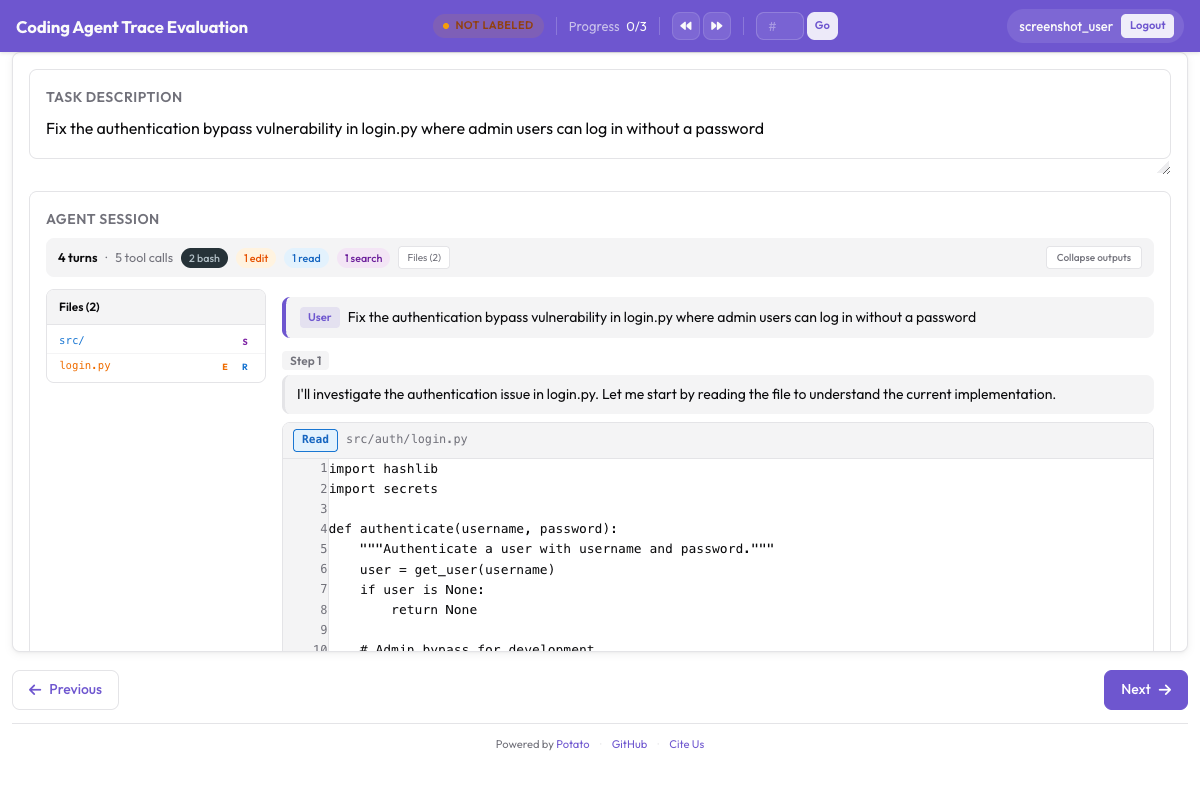
instance_display:
  fields:
    - key: structured_turns
      type: coding_trace
      label: "Agent Session"
      display_options:
        show_file_tree: true
        diff_view: unified
        collapse_long_outputs: true
        max_output_lines: 50
Агентам, работающим в браузере, нужны скриншоты, наложения действий и лента кадров, чтобы по ним перемещаться:
instance_display:
  fields:
    - key: steps
      type: web_agent_trace
      label: "Agent Browsing Trace"
      display_options:
        show_overlays: true
        show_filmstrip: true
        show_thought: true
        screenshot_max_width: 900
В статье Разметка агентов, работающих в браузере разобраны формат наложений и режим создания, который записывает новые трассы.
Подробности реализации всего этого есть в руководстве по оценке агентов и в документации по трассам агентов. Если вы настраиваете первую оценку, конвертируйте десять трасс, запустите конфигурацию выше и разметьте их сами до того, как писать инструкции, потому что нужная вам таксономия ошибок обычно не та, которую вы написали бы заранее.
Что почитать дальше
- Документация по агентной разметке
- Разметка агентов, работающих в браузере
- Solo Mode, чтобы совместить агентную разметку с совместной оценкой людьми и LLM
- Best-Worst Scaling, чтобы ранжировать выводы агентов сравнением
- Выгрузка в Parquet, для анализа в большом масштабе