Classificando Emoções na Fala
Crie uma tarefa de classificação de emoções em áudio no Potato com exibição interativa de forma de onda, controles de velocidade de reprodução, escalas Likert e conjuntos de rótulos de emoção configuráveis.
O reconhecimento de emoções na fala (SER) aparece em assistentes virtuais, ferramentas de saúde mental e análises de central de atendimento, e tudo isso precisa de áudio rotulado para o treinamento. Este tutorial percorre interfaces de anotação para emoções categóricas, classificações dimensionais e trechos em que mais de uma emoção está presente. Para as opções de áudio subjacentes, consulte a documentação de anotação de áudio.
Abordagens de Anotação de Emoção
Há algumas maneiras comuns de rotular a emoção na fala. Você pode usar categorias discretas como feliz, triste ou bravo. Você pode classificar dimensões contínuas como valência, excitação e dominância. Você pode deixar os anotadores marcarem várias emoções ao mesmo tempo com classificações de intensidade. Ou, para trechos mais longos, você pode marcar emoções diferentes em diferentes marcas de tempo.
Classificação Categórica de Emoção
Configuração Básica
annotation_task_name: "Speech Emotion Recognition"

data_files:
  - data/utterances.json

item_properties:
  id_key: id
  text_key: transcript  # Optional transcript

instance_display:
  fields:
    - key: audio_path
      type: audio
      label: "Utterance"
      display_options:
        controls: true
        show_waveform: true
        preload: metadata

annotation_schemes:
  - annotation_type: radio
    name: emotion
    description: "What emotion is expressed in this speech?"
    labels:
      - name: Happy
        description: "Joy, excitement, amusement"
        key_value: "h"
      - name: Sad
        description: "Sorrow, disappointment, grief"
        key_value: "s"
      - name: Angry
        description: "Frustration, irritation, rage"
        key_value: "a"
      - name: Fearful
        description: "Anxiety, worry, terror"
        key_value: "f"
      - name: Surprised
        description: "Astonishment, shock"
        key_value: "u"
      - name: Disgusted
        description: "Revulsion, distaste"
        key_value: "d"
      - name: Neutral
        description: "No clear emotion"
        key_value: "n"
    label_requirement:
      required: true
O Potato renderiza uma forma de onda interativa com controles de reprodução ao lado dos rótulos de anotação:
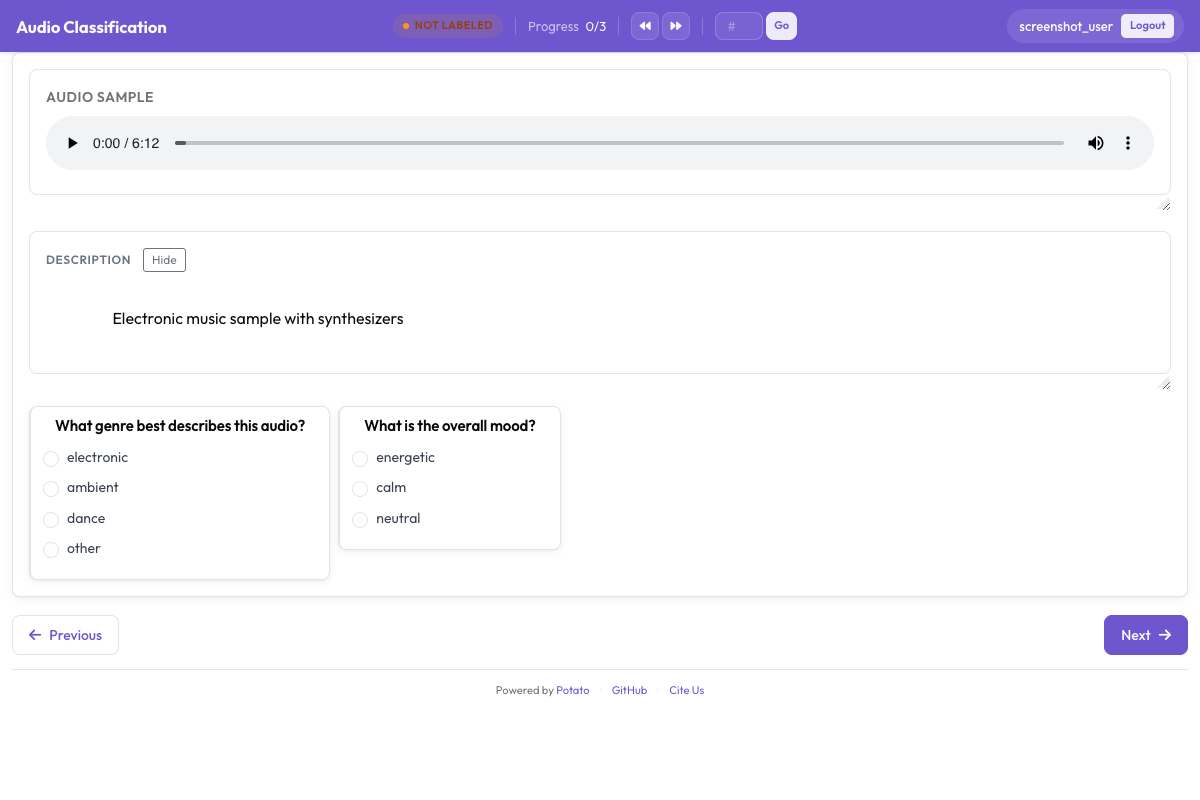 A interface de anotação de áudio mostrando uma forma de onda interativa com controles de reprodução e rótulos de emoção categóricos
Adicionando Intensidade
annotation_schemes:
  - annotation_type: radio
    name: emotion
    description: "What emotion does the speaker express?"
    labels: [Happy, Sad, Angry, Fearful, Surprised, Disgusted, Neutral]
    label_requirement:
      required: true

  - annotation_type: likert
    name: intensity
    description: "How intense is this emotion?"
    size: 5
    min_label: "Very weak"
    max_label: "Very strong"
Anotação Dimensional de Emoção
O modelo VAD (Valência-Excitação-Dominância) classifica cada trecho em três escalas contínuas, em vez de forçá-lo a uma única categoria:
annotation_task_name: "Dimensional Emotion Rating"

annotation_schemes:
  # Valence: negative to positive
  - annotation_type: likert
    name: valence
    description: "Valence: How positive or negative?"
    size: 7
    min_label: "Very negative"
    max_label: "Very positive"

  # Arousal: calm to excited
  - annotation_type: likert
    name: arousal
    description: "Arousal: How calm or excited?"
    size: 7
    min_label: "Very calm"
    max_label: "Very excited"

  # Dominance: submissive to dominant
  - annotation_type: likert
    name: dominance
    description: "Dominance: How submissive or dominant?"
    size: 7
    min_label: "Very submissive"
    max_label: "Very dominant"
Escalas Visuais (SAM)
Estilo Self-Assessment Manikin:
annotation_schemes:
  - annotation_type: likert
    min_label: "Very negative"
    max_label: "Very positive"
    name: valence
    description: "Select the figure that matches the emotional valence"
    size: 9
Detecção de Emoções Mistas
Para fala que contém múltiplas emoções:
annotation_schemes:
  - annotation_type: multiselect
    name: emotions_present
    description: "Select ALL emotions you detect (can be multiple)"
    labels:
      - Happy
      - Sad
      - Angry
      - Fearful
      - Surprised
      - Disgusted
      - Contempt

  - annotation_type: radio
    name: primary_emotion
    description: "Which emotion is MOST prominent?"
    labels:
      - Happy
      - Sad
      - Angry
      - Fearful
      - Surprised
      - Disgusted
      - Contempt
      - Mixed (no dominant)
Anotação Completa de Emoção
annotation_task_name: "Comprehensive Speech Emotion Annotation"

data_files:
  - data/speech_samples.json

item_properties:
  id_key: id
  text_key: transcript

instance_display:
  fields:
    - key: audio_url
      type: audio
      label: "Speech sample"
      display_options:
        controls: true
        show_waveform: true
        preload: metadata
        autoplay: false

    # Show the transcript alongside the audio
    - key: transcript
      type: text
      label: "Transcript (for reference)"

annotation_schemes:
  # Primary categorical emotion
  - annotation_type: radio
    name: primary_emotion
    description: "Primary emotion expressed"
    labels:
      - name: Happiness
        color: "#FCD34D"
        key_value: "1"
      - name: Sadness
        color: "#60A5FA"
        key_value: "2"
      - name: Anger
        color: "#F87171"
        key_value: "3"
      - name: Fear
        color: "#A78BFA"
        key_value: "4"
      - name: Surprise
        color: "#34D399"
        key_value: "5"
      - name: Disgust
        color: "#FB923C"
        key_value: "6"
      - name: Neutral
        color: "#9CA3AF"
        key_value: "7"
    label_requirement:
      required: true

  # Emotional intensity
  - annotation_type: likert
    name: intensity
    description: "Emotional intensity"
    size: 5
    min_label: "Very mild"
    max_label: "Very intense"
    label_requirement:
      required: true

  # Dimensional ratings
  - annotation_type: likert
    name: valence
    description: "Valence (negative to positive)"
    size: 7
    min_label: "Negative"
    max_label: "Positive"

  - annotation_type: likert
    name: arousal
    description: "Arousal (calm to excited)"
    size: 7
    min_label: "Calm"
    max_label: "Excited"

  # Voice quality
  - annotation_type: multiselect
    name: voice_qualities
    description: "Voice characteristics (select all that apply)"
    labels:
      - Trembling voice
      - Raised pitch
      - Lowered pitch
      - Loud/shouting
      - Soft/whisper
      - Fast speech rate
      - Slow speech rate
      - Breathy
      - Tense/strained
      - Crying
      - Laughing

  # Genuineness
  - annotation_type: radio
    name: authenticity
    description: "Does the emotion seem genuine?"
    labels:
      - Clearly genuine
      - Likely genuine
      - Uncertain
      - Likely acted/fake
      - Clearly acted/fake

  # Confidence
  - annotation_type: likert
    name: confidence
    description: "How confident are you in your annotation?"
    size: 5
    min_label: "Guessing"
    max_label: "Certain"

annotation_instructions: |
  ## Emotion Annotation Guidelines

  ### Listening Instructions
  1. Listen to the entire clip before annotating
  2. You may replay as many times as needed
  3. Focus on the VOICE, not just the words

  ### Emotion Categories
  - **Happiness**: Joy, amusement, contentment
  - **Sadness**: Sorrow, disappointment, melancholy
  - **Anger**: Frustration, irritation, rage
  - **Fear**: Anxiety, nervousness, terror
  - **Surprise**: Astonishment, startle
  - **Disgust**: Revulsion, contempt
  - **Neutral**: Calm, matter-of-fact

  ### Tips
  - Consider tone, pitch, speaking rate
  - The transcript may not match the emotion
  - When unsure between two emotions, choose the stronger one
  - Use the intensity scale for unclear cases

output_annotation_dir: annotations/
export_annotation_format: jsonl
Formato de Saída
{
  "instance_id": "utt_001",
  "user_id": "rater_01",
  "labels": {
    "primary_emotion": {"Surprise": "true"},
    "voice_qualities": {"Raised pitch": "true", "Fast speech rate": "true"},
    "authenticity": {"Clearly genuine": "true"},
    "confidence": {"4": "true"}
  },
  "spans": {},
  "links": {}
}
Emoção em Nível de Segmento
Para áudio mais longo com emoções que mudam:
annotation_schemes:
  - annotation_type: audio_annotation
    name: emotion_segments
    description: "Mark time segments with different emotions"
    labels:
      - name: Happy
        color: "#FCD34D"
      - name: Sad
        color: "#60A5FA"
      - name: Angry
        color: "#F87171"
      - name: Neutral
        color: "#9CA3AF"
Controle de Qualidade
Trechos sem ambiguidade e com rótulos conhecidos flagram anotadores que estão só clicando sem prestar atenção. Os dois blocos ficam no nível superior da configuração, e os dois leem seus itens de um arquivo, e não de uma lista embutida:
attention_checks:
  enabled: true
  frequency: 20
  items_file: data/attention_checks.json
  min_response_time: 3.0

gold_standards:
  enabled: true
  items_file: data/gold_standards.json
  mode: mixed
  frequency: 20
  accuracy:
    min_threshold: 0.7
    evaluation_count: 10
Um item gold tem a mesma forma de um dos seus itens de dados, com um gold_label adicionado, e por isso é renderizado da mesma maneira que todo o resto:
[
  {
    "id": "gold_001",
    "audio_path": "/audio/gold/clearly_happy.wav",
    "gold_label": { "primary_emotion": "Happiness" },
    "explanation": "Laughter and rising pitch throughout, with no ambiguity.",
    "difficulty": "easy"
  }
]
Os itens de verificação de atenção usam expected_answer no lugar de gold_label. min_response_time é o controle útil para áudio. Um piso de três segundos flagra quem rotula um trecho que não teve tempo de terminar de ouvir.
Aninhar esses blocos dentro de um bloco quality_control: é um erro comum, e ele falha em silêncio. O Potato lê attention_checks e gold_standards no nível superior, e a única chave que ele lê de quality_control é geometry_iou_tolerance, então um bloco aninhado passa na validação sem erros e nunca é executado.
Dicas para Anotação de Emoção
Ouça o trecho inteiro antes de decidir e preste atenção em como algo é dito, e não nas palavras em si. Tenha em mente que as normas de expressão variam entre culturas, então o que soa como raiva em uma pode soar como ênfase em outra. A anotação de emoção é cansativa, então incentive pausas e faça a equipe discutir as discordâncias regularmente para se manter calibrada.
Próximos Passos
- Adicione diarização de locutores para rastreamento de emoção de múltiplos locutores
- Configure crowdsourcing para coleta em larga escala
- Calcule a concordância entre anotadores para tarefas de emoção
Documentação em Anotação de Áudio.