अपने आप कीवर्ड उभारना
Potato में कीवर्ड हाइलाइटिंग को एक तय कीवर्ड फ़ाइल या LLM कीवर्ड सहायक से कॉन्फ़िगर कीजिए, जिसमें हर लेबल के रंग, बेतरतीब ध्यान-भटकाऊ शब्द और रिस्पॉन्स कैशिंग शामिल हैं।
Potato कीवर्ड दो तरीक़ों से उभारता है। keyword_highlights_file बिना किसी मॉडल के हर आइटम पर शब्दों की एक तय सूची चिह्नित करती है, और ai_support एक Keyword बटन जोड़ता है जिसे दबाकर एनोटेटर किसी LLM से हर लेबल से जुड़े शब्द चिह्नित करवाता है।
दोनों तरीक़े अलग-अलग ढंग से चूकते हैं, इसलिए सेटअप से ज़्यादा यह चुनाव मायने रखता है कि कौन-सा तरीक़ा लें। तय सूची नियतात्मक है, प्रति आइटम उस पर कोई ख़र्च नहीं आता, और methods सेक्शन में उसकी रिपोर्ट दी जा सकती है, लेकिन वह वही स्ट्रिंग चिह्नित करती है, चाहे आसपास का वाक्य कुछ भी कहे। LLM सहायक हर आइटम पढ़ता है और ऐसा वाक्यांश भी चिह्नित कर सकता है जिसे कोई शब्द-सूची नहीं पकड़ पाती, पर इसकी क़ीमत है हर अनुरोध पर एक API कॉल और एक ऐसे मॉडल पर निर्भरता जो आपकी जानकारी के बिना बदल सकता है।
Option और कीवर्ड हाइलाइटिंग कैसे लागू की गई है, इसके लिए स्रोत दस्तावेज़ देखें।
कीवर्ड की एक तय सूची
कीवर्ड फ़ाइल तब चुनें जब हर एनोटेटर को एक जैसे हाइलाइट दिखने ज़रूरी हों और बाद में आपको ठीक-ठीक बताना हो कि वे क्या थे। keyword_highlights_file को किसी CSV या TSV फ़ाइल की ओर इंगित करें, और Potato आइटम के टेक्स्ट में हर मिलान के चारों ओर एक किनारेदार बॉक्स बना देगा।
annotation_task_name: "Sentiment with keyword highlights"
task_dir: .
output_annotation_dir: annotation_output
export_annotation_format: jsonl

data_files:
  - data/reviews.json

item_properties:
  id_key: id
  text_key: text

keyword_highlights_file: data/sentiment_keywords.tsv

ui:
  label_colors:
    sentiment:
      positive: "(22, 163, 74)"
      negative: "(239, 68, 68)"

annotation_schemes:
  - annotation_type: span
    name: sentiment
    description: "Mark the phrases that carry sentiment. Highlighted keywords are suggestions, not answers."
    labels:
      - name: positive
        tooltip: "Phrases expressing a positive opinion"
      - name: negative
        tooltip: "Phrases expressing a negative opinion"

user_config:
  allow_all_users: true
रंग पूरे प्रोजेक्ट के लिए एक साथ नहीं, बल्कि हर स्कीमा और हर लेबल के लिए अलग तय किए जाते हैं, क्योंकि जो हाइलाइट उस span लेबल के रंग से मेल खाए जिसे एनोटेटर बनाने जा रहा है, वह हाइलाइट न होने से भी बुरा है।
कीवर्ड फ़ाइल में keyword नाम का हेडर कॉलम होना चाहिए। label कॉलम बताता है कि शब्द किस श्रेणी का है, schema कॉलम बताता है कि वह किस एनोटेशन स्कीम से संबंधित है, और वैकल्पिक color कॉलम उस लेबल के लिए रंग-पैलेट को बदल देता है।
keyword,label,schema,color
excellent,positive,sentiment,(34, 197, 94)
terrible,negative,sentiment,#ef4444
excel*,positive,sentiment,
* शब्द-अक्षरों के किसी भी क्रम से मेल खाता है, इसलिए excel* एक ही पंक्ति में excellent, excels और excelled को कवर कर लेता है। Potato हर पंक्ति में एक कीवर्ड वाली सादी फ़ाइल भी पढ़ता है, और JSON, JSONL या YAML फ़ाइलें भी जिनमें कीवर्ड की सूची या {keyword: label} मैप हो।
अध्ययन के लिए बेतरतीब हाइलाइट
अगर आप यह माप रहे हैं कि हाइलाइटिंग से एनोटेटर के काम में बदलाव आता है या नहीं, तो हर किसी को हर कीवर्ड दिखाने से आपके पास तुलना के लिए कुछ नहीं बचता। keyword_highlight_settings कीवर्ड की संख्या घटाता है और उनमें नक़ली शब्द मिला देता है।
keyword_highlights_file: data/keywords.csv

keyword_highlight_settings:
  keyword_probability: 0.5        # show half the matched keywords
  random_word_probability: 0.05   # highlight about 5% of other words
  random_word_label: "distractor"
  random_word_schema: "keyword"
keyword_probability: 0.5 वह मान है जिससे तुलना संभव होती है, क्योंकि तब हर एनोटेटर उसी कॉर्पस के भीतर आधे शब्दों पर हाइलाइट देखता है और बाक़ी आधे पर नहीं। यह चुनाव हर उपयोगकर्ता और हर instance के लिए कैश होता है और उसका seed उपयोगकर्ता नाम और instance id के hash से लिया जाता है, इसलिए किसी आइटम पर लौटने वाला एनोटेटर वही देखता है जो उसने पहली बार देखा था। कौन-से शब्द दिखाए गए, यह व्यवहार संबंधी डेटा के keyword_highlights_shown फ़ील्ड में दर्ज होता है, ताकि विश्लेषण में इसे ध्यान में रखा जा सके।
LLM कीवर्ड सहायक
AI कीवर्ड हाइलाइटिंग एक बटन है, पृष्ठभूमि में चलने वाली प्रक्रिया नहीं। ai_support चालू होने पर हर एनोटेशन फ़ॉर्म में Hint, Keyword और Rationale बटन होते हैं, और Keyword दबाने पर मॉडल से पूछा जाता है कि इस आइटम के कौन-से शब्द हर उपलब्ध लेबल से जुड़े हैं। जवाब टेक्स्ट पर बॉक्स ओवरले के रूप में लौटता है।
ai_support:
  enabled: true
  endpoint_type: openai

  ai_config:
    model: gpt-4o-mini
    api_key: ${OPENAI_API_KEY}
    temperature: 0.3
    max_tokens: 800
    include:
      all: true
max_tokens: 800 डिफ़ॉल्ट मान है और इस सहायक के लिए लगभग न्यूनतम सीमा है। Keyword और Rationale प्रॉम्प्ट एक ही रिस्पॉन्स में हर लेबल का जवाब देते हैं, इसलिए छोटा बजट जवाब को बीच में काट देता है और सहायक बिना किसी त्रुटि के ख़ाली दिखता है।
include.all: true हर स्कीम के लिए सहायक चालू करता है। इसके बजाय उन्हें चुनिंदा पेजों और स्कीमों के लिए चालू करना हो तो special_include इस्तेमाल करें, जो पेज इंडेक्स को एनोटेशन id से और उसे सहायकों के नामों की सूची से जोड़ता है:
ai_support:
  enabled: true
  endpoint_type: openai
  ai_config:
    model: gpt-4o-mini
    api_key: ${OPENAI_API_KEY}
    include:
      all: false
      special_include:
        "0":
          "0": ["hint", "keyword"]
        "1":
          "1": ["hint"]
कीवर्ड हाइलाइटिंग को उभारने के लिए टेक्स्ट चाहिए, इसलिए Potato इमेज आइटम पर यह बटन हटा देता है, भले ही endpoint कोई vision मॉडल हो। टेक्स्ट आइटम पर vision मॉडल तीनों सहायक देता है।
Anthropic
ai_support:
  enabled: true
  endpoint_type: anthropic

  ai_config:
    model: claude-sonnet-4-20250514
    api_key: ${ANTHROPIC_API_KEY}
    temperature: 0.3
    max_tokens: 800
    include:
      all: true
Ollama, बिना API बिल के
ai_support:
  enabled: true
  endpoint_type: ollama

  ai_config:
    model: qwen3:0.6b
    base_url: http://localhost:11434
    temperature: 0.3
    max_tokens: 800
    include:
      all: true
स्थानीय endpoint गुणवत्ता में गिरावट के लायक़ तब है जब कॉर्पस आपकी मशीन से बाहर नहीं जा सकता, या जब आप दसियों हज़ार आइटम उभार रहे हों और प्रति आइटम ख़र्च वरना अध्ययन के बजट का बड़ा हिस्सा खा जाता।
इसके बजाय संभावित लेबल उभारना
जब समस्या लंबे टेक्स्ट की नहीं बल्कि विकल्पों की लंबी सूची की हो, तो option_highlighting बेहतर औज़ार है। यह मॉडल से सबसे संभावित विकल्प पूछता है और उन्हें पूरी अपारदर्शिता और एक तारे के साथ दिखाता है, बाक़ी को धुंधला कर देता है। हर विकल्प क्लिक करने लायक़ बना रहता है।
ai_support:
  enabled: true
  endpoint_type: openai
  ai_config:
    model: gpt-4o-mini
    api_key: ${OPENAI_API_KEY}
    temperature: 0.3
    max_tokens: 800

  option_highlighting:
    enabled: true
    top_k: 3
    dim_opacity: 0.4
    auto_apply: true
    schemas: null
    prefetch_count: 10
top_k: 3 आठ से बारह लेबल वाली स्कीम के लिए ठीक है, जहाँ तीन चिह्नित विकल्प जवाब को छिपाए बिना पढ़ने का काम घटा देते हैं। यह radio, multiselect, likert और select पर काम करता है, और span, मुक्त टेक्स्ट या slider पर इसका कोई असर नहीं होता।
कैशिंग और प्रीफ़ेचिंग
एक LLM कॉल पेज लोड में कुछ सेकंड जोड़ देती है, और जिस एनोटेटर को इंतज़ार करना पड़े वह बटन दबाना छोड़ देगा। डिस्क पर कैशिंग और कर्सर से आगे प्रीफ़ेचिंग उस इंतज़ार का ज़्यादातर हिस्सा ख़त्म कर देते हैं, और कैश उस आइटम के लिए दो बार भुगतान करने से भी बचाता है जिस पर एनोटेटर दोबारा लौटता है।
ai_support:
  enabled: true
  endpoint_type: openai
  ai_config:
    model: gpt-4o-mini
    api_key: ${OPENAI_API_KEY}
    max_tokens: 800
    include:
      all: true

  cache_config:
    disk_cache:
      enabled: true
      path: annotation_output/ai_cache.json

    prefetch:
      warm_up_page_count: 10
      on_next: 5
      on_prev: 2
on_next: 5 बनाम on_prev: 2 दिखाता है कि एनोटेटर कैसे आगे-पीछे जाते हैं। ज़्यादातर नेविगेशन आगे की ओर होता है, इसलिए बजट आगे जाता है, और कर्सर के पीछे बस इतना रहता है कि किसी सुधार के लिए काफ़ी हो।
पूरा कॉन्फ़िगरेशन
दोनों तरीक़े साथ चल सकते हैं। कीवर्ड फ़ाइल हर एनोटेटर को एक जैसे बुनियादी हाइलाइट देती है, और सहायक उन आइटम के लिए बटनों के पीछे रहते हैं जिन पर तय सूची के पास कहने को कुछ नहीं होता।
annotation_task_name: "Entity annotation with keyword support"
task_dir: .
output_annotation_dir: annotation_output
export_annotation_format: jsonl

data_files:
  - data/documents.json

item_properties:
  id_key: id
  text_key: text

keyword_highlights_file: data/entity_keywords.csv

annotation_schemes:
  - annotation_type: span
    name: entities
    description: "Mark people, organizations and locations."
    labels:
      - name: PERSON
        color: "#FECACA"
      - name: ORG
        color: "#BBF7D0"
      - name: LOCATION
        color: "#BFDBFE"

ai_support:
  enabled: true
  endpoint_type: openai

  ai_config:
    model: gpt-4o-mini
    api_key: ${OPENAI_API_KEY}
    temperature: 0.3
    max_tokens: 800
    include:
      all: true

  cache_config:
    disk_cache:
      enabled: true
      path: annotation_output/ai_cache.json
    prefetch:
      warm_up_page_count: 10
      on_next: 5
      on_prev: 2

user_config:
  allow_all_users: true
सर्वर शुरू करें और पहले आइटम पर हाइलाइट दिखने लगेंगे:
potato start config.yaml -p 8000AI कीवर्ड हाइलाइटिंग चालू होने पर Keyword बटन दबाने से एनोटेशन टेक्स्ट में प्रासंगिक शब्द चिह्नित हो जाते हैं:
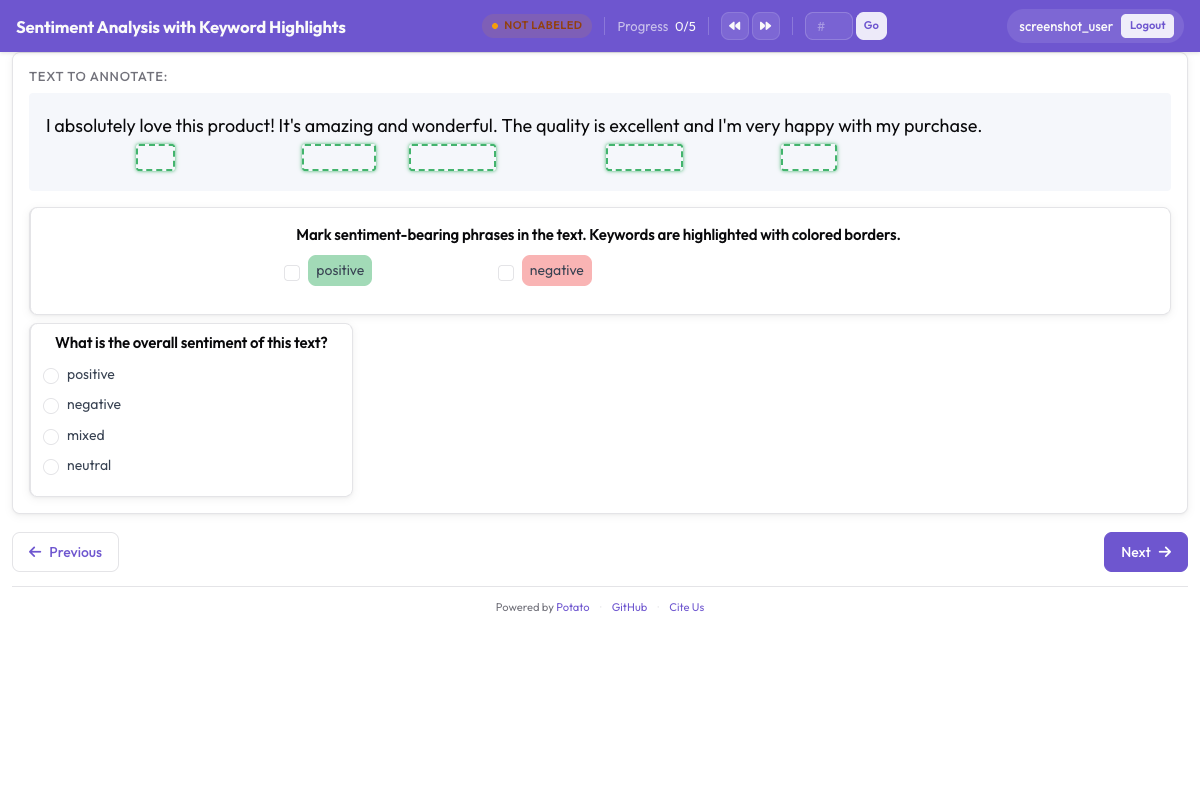 एनोटेटर का ध्यान खींचने के लिए बॉक्स ओवरले से चिह्नित कीवर्ड और इकाइयाँ
आगे पढ़ें
- AI समर्थन हर प्रदाता के लिए endpoint कॉन्फ़िगरेशन बताता है।
- Option हाइलाइटिंग लेबल धुंधले करने वाले रूप को और विस्तार से बताता है।
- Span एनोटेशन उस स्कीम के बारे में है जिसके साथ हाइलाइट दिखते हैं।
- उत्पादकता सुविधाएँ कीवर्ड फ़ाइल का फ़ॉर्मैट और एनोटेटर की गति से जुड़ी बाक़ी सेटिंग्स बताता है।