कोडिंग एजेंट एनोटेशन: Claude Code, Aider और SWE-Agent ट्रेस का मूल्यांकन
Potato कोडिंग एजेंट ट्रेस को diff और टर्मिनल ब्लॉक के रूप में रेंडर करता है, जिसमें प्रोसेस रिवॉर्ड और कोड रिव्यू योजनाएँ और Claude Code, Aider, SWE-Agent के कन्वर्टर शामिल हैं।
Potato अब कोडिंग एजेंट सेशन को सीधे एनोटेट करता है। एक ट्रेस unified diff, गहरे टर्मिनल ब्लॉक, पंक्ति-संख्या वाले फ़ाइल रीड, और एजेंट ने जिन फ़ाइलों को छुआ उन सबके फ़ाइल ट्री के रूप में रेंडर होता है। साथ में कोडिंग एजेंट फ़ॉर्मैट के लिए तीन कन्वर्टर (claude_code, aider और swe_agent_trajectory) हैं, जो उन बारह दूसरे ट्रेस फ़ॉर्मैट के अलावा हैं जिन्हें Potato पहले से पढ़ता है, और इस डेटा के लिए बनी दो एनोटेशन योजनाएँ हैं: चरण-स्तर की शुद्धता के लिए process_reward और diff की GitHub-शैली समीक्षा के लिए code_review।
कोडिंग एजेंट का एक रन फ़ाइल रीड, संपादन, टर्मिनल कमांड और तर्क की एक लंबी ट्रैजेक्टरी होता है। सादा टेक्स्ट एनोटेशन इंटरफ़ेस इस सबको अक्षरों की एक दीवार में चपटा कर देता है, इसीलिए एजेंट का मूल्यांकन करने वाली टीमें अक्सर अपना ख़ुद का रिव्यू UI लिखती रही हैं और आख़िर में ऐसे डेटासेट बनाती हैं जिन्हें कोई और इस्तेमाल नहीं कर सकता। पूरे संदर्भ के लिए कोडिंग एजेंट एनोटेशन दस्तावेज़ और एजेंट मूल्यांकन गाइड देखें।
अध्ययन की योजना बनाने से पहले जाँचने लायक दो बातें
Claude Code ट्रांसक्रिप्ट में मॉडल का thinking टेक्स्ट नहीं होता। फ़ाइलें thinking ब्लॉक और उसका सिग्नेचर रखती हैं और सामग्री हटा देती हैं। 40 लोकल सेशन के 6393 ब्लॉक मापे गए, और किसी में भी टेक्स्ट नहीं था। कन्वर्ट किया गया ट्रेस यह गिनती बताता है, ताकि यह कमी चुपचाप छिपी न रहे बल्कि दिखाई दे। अगर एनोटेटर को चरणों का आकलन करने के लिए तर्क चाहिए, तो उसे डिस्क से बाद में पढ़ने के बजाय claude -p --output-format stream-json या Agent SDK से लाइव कैप्चर करें।
ट्रांसक्रिप्ट में absolute पथ, ब्रांच के नाम, एनवायरनमेंट का ब्योरा, और सेशन ने जो भी सोर्स पढ़ा वह सब भी होता है। डेटासेट साझा करने से पहले इन्हें हटाएँ या छिपाएँ, और जिनके सेशन हैं उनसे सहमति लें।
ट्रेस डिस्प्ले
कोडिंग ट्रेस coding_trace डिस्प्ले प्रकार से रेंडर होते हैं, जिसे instance_display में उन बाकी चीज़ों के साथ घोषित किया जाता है जो एनोटेटर को दिखनी चाहिए। Potato यह अलग रखता है कि क्या दिखाया जाता है और क्या पूछा जाता है, इसलिए वही ट्रेस डिस्प्ले किसी भी एनोटेशन योजना के साथ काम करता है:
instance_display:
  layout:
    direction: vertical
    gap: 16px
  fields:
    - key: task_description
      type: text
      label: "Task"
    - key: structured_turns
      type: coding_trace
      label: "Agent Session"
      display_options:
        show_file_tree: true
        diff_view: unified
        collapse_long_outputs: true
        max_output_lines: 50
        terminal_theme: dark
        show_step_numbers: true
        show_reasoning: true
हर टूल कॉल इस हिसाब से रेंडर होती है कि टूल ने क्या किया, इसलिए एनोटेटर diff को diff की तरह पढ़ता है, escaped टेक्स्ट की तरह नहीं:
| टूल | रेंडरिंग |
|---|---|
Read | पंक्ति संख्याओं वाला कोड ब्लॉक |
Edit, Replace | लाल और हरी पंक्तियों वाला unified diff |
Write, Create | नई फ़ाइल का कोड ब्लॉक, पूरा हरा |
Bash, Terminal, Shell | $ प्रॉम्प्ट वाला गहरा टर्मिनल ब्लॉक |
Grep, Glob, Search, Find | खोज नतीजों का कोड ब्लॉक |
| बाकी कुछ भी | JSON में फ़ॉर्मैट किया इनपुट और आउटपुट |
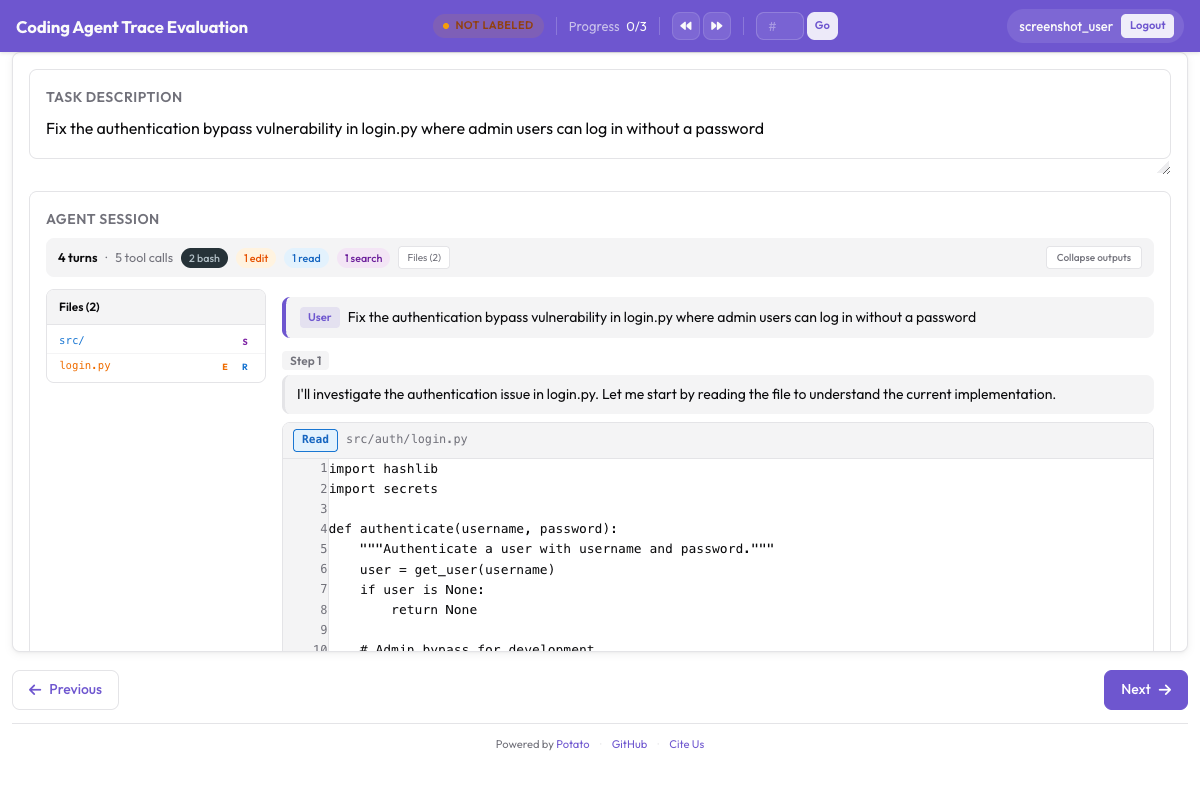 unified diff, टर्मिनल आउटपुट और फ़ाइल ट्री साइडबार वाला एक कोडिंग ट्रेस
max_output_lines: 50 के साथ collapse_long_outputs वह सेटिंग है जो तय करती है कि ट्रेस पढ़ने लायक है या नहीं। एक अकेला pytest रन कई सौ पंक्तियाँ छाप सकता है, और जिस एनोटेटर को हर चरण पर उसके पार स्क्रॉल करना पड़े, वह चरणों को पढ़ना बंद कर देता है।
डेटा फ़ॉर्मैट
structured_turns फ़ॉर्मैट टूल कॉल की वह संरचना बनाए रखता है जिसकी डिस्प्ले को ज़रूरत है। हर टर्न में एक role, टेक्स्ट सामग्री, और टूल कॉल की एक सूची होती है:
{
  "id": "session_001",
  "task_description": "Fix the authentication bypass in login.py",
  "model": "claude-sonnet-4-20250514",
  "structured_turns": [
    {
      "role": "assistant",
      "content": "I'll investigate the auth issue.",
      "tool_calls": [
        {
          "tool": "Read",
          "input": {"file_path": "src/auth/login.py"},
          "output": "def login(user, password):\n    if user.role == 'admin':\n        return True",
          "output_type": "code",
          "language": "python"
        },
        {
          "tool": "Bash",
          "input": {"command": "pytest tests/test_auth.py -v"},
          "output": "4 passed",
          "output_type": "terminal"
        }
      ]
    }
  ]
}
output_type के मान code, diff, terminal या generic हो सकते हैं, और अगर आप इसे छोड़ दें तो Potato इसे टूल और फ़ाइल एक्सटेंशन से अनुमान लगा लेता है। जब किसी टूल का आउटपुट वैसा न हो जैसा उसका नाम बताता है, तब इसे स्पष्ट रूप से सेट करें।
पहले से मौजूद ट्रेस कन्वर्ट करना
कन्वर्टर एक फ़ॉर्मैट पढ़ता है और वह JSONL लिखता है जिसे Potato लोड करता है। इसके तीन फ़ॉर्मैट कोडिंग एजेंट के हैं:
# Claude Code, or any Anthropic Messages API transcript
python -m potato.trace_converter -i traces.json -f claude_code -o data/traces.jsonl

# Aider chat history with SEARCH/REPLACE blocks
python -m potato.trace_converter -i chat.md -f aider -o data/traces.jsonl

# SWE-Agent trajectories
python -m potato.trace_converter -i trajectory.json -f swe_agent_trajectory -o data/traces.jsonl

# Mixed directory, format detected per file
python -m potato.trace_converter -i traces.json --auto-detect -o data/traces.jsonl
claude_code कन्वर्टर Claude Code के अपने सेशन ट्रांसक्रिप्ट भी पढ़ता है और Messages API का कच्चा रूप भी। Claude Code हर सेशन के लिए ~/.claude/projects/<slugified-working-directory>/<session-id>.jsonl में एक JSONL फ़ाइल लिखता है, और कन्वर्टर एक सेशन को हर पंक्ति के लिए एक ट्रेस के बजाय एक ही ट्रेस में बदलता है:
python -m potato.trace_converter \
  -i ~/.claude/projects/-home-me-myrepo/3c853f0f-....jsonl \
  --auto-detect -o data/session.jsonl
यह parentUuid चेन का पीछा करता है और सिर्फ़ बचा हुआ पथ रखता है, इसलिए rewind किए गए प्रयास हटा दिए जाते हैं और गिने जाते हैं, न कि ऐसे एनोटेट होते हैं मानो वे हुए हों। sidechain संदेश मुख्य टर्न से बाहर sidechain_runs में जाते हैं। स्लैश कमांड हटा दिए जाते हैं, क्योंकि वहाँ CLI ख़ुद से बात कर रहा होता है। डिस्क पर का रूप CLI का है, किसी प्रकाशित API का नहीं, इसलिए अपग्रेड के बीच रीडर को best-effort मानें। यह उन रिकॉर्ड प्रकारों को अनदेखा करता है जिन्हें यह नहीं जानता, और जब कोई फ़ाइल पार्स होना बंद हो जाए तो ख़ाली ट्रेस लौटाने के बजाय त्रुटि उठाता है।
प्रोसेस रिवॉर्ड एनोटेशन
प्रोसेस रिवॉर्ड मॉडल सिर्फ़ अंतिम नतीजे को अंक देने के बजाय चरण दर चरण श्रेय बाँटता है, और process_reward वे लेबल इकट्ठा करता है जिन पर यह प्रशिक्षित होता है। दो मोड रफ़्तार और बारीकी के बीच संतुलन बनाते हैं।
first_error मोड में, जो डिफ़ॉल्ट है, एनोटेटर उस पहले चरण पर क्लिक करता है जहाँ एजेंट ग़लत हुआ। उससे पहले का हर चरण सही चिह्नित होता है, और वह चरण और उसके बाद का सब कुछ ग़लत चिह्नित होता है। एक क्लिक पूरी ट्रैजेक्टरी को लेबल कर देता है, इसीलिए जब आपको ज़्यादा मात्रा चाहिए तब यही मोड इस्तेमाल करें।
annotation_schemes:
  - annotation_type: process_reward
    name: step_rewards
    description: "Click the first step where the agent makes a mistake."
    steps_key: structured_turns
    mode: first_error
per_step मोड में हर चरण को अलग से आँका जाता है। इसमें एनोटेटर का ज़्यादा समय लगता है और यह वह सिग्नल देता है जो first_error नहीं दे सकता, क्योंकि कैस्केड मान लेता है कि ग़लती सुधारी नहीं जा सकती, जबकि असली एजेंट सँभल जाते हैं। इसके साथ allow_neutral चालू करें, तो लेबल +1, 0 और -1 की PRM800K परंपरा का पालन करते हैं, जिसमें सचमुच हानिरहित चरण को किसी एक छोर पर धकेलने के बजाय तटस्थ दर्ज किया जाता है:
  - annotation_type: process_reward
    name: step_rewards
    description: "Label each step as correct, neutral, or incorrect."
    steps_key: structured_turns
    step_text_key: content
    mode: per_step
    allow_neutral: true
इनमें से कोई भी योजना ऊपर के कॉन्फ़िग में जोड़ें। allow_neutral चालू होने पर बिना चिह्न वाला चरण null रहता है, इसलिए निर्यात जानबूझकर दिए गए तटस्थ फ़ैसले और उस चरण में फ़र्क़ करता है जहाँ तक एनोटेटर कभी पहुँचा ही नहीं। allow_neutral सिर्फ़ per_step पर लागू होता है, और first_error में ज़बरदस्ती बंद कर दिया जाता है, क्योंकि उसमें तटस्थ फ़ैसले की कोई जगह नहीं है।
कोड रिव्यू एनोटेशन
code_review योजना pull request रिव्यू को एजेंट के आउटपुट तक लाती है। एनोटेटर diff की किसी पंक्ति पर क्लिक करके श्रेणीबद्ध टिप्पणी जोड़ते हैं, हर फ़ाइल को रेट करते हैं, और एक फ़ैसला देते हैं:
  - annotation_type: code_review
    name: review
    description: "Review the agent's code changes."
    comment_categories: [bug, style, suggestion, security]
    verdict_options: [approve, request_changes, comment_only]
    file_rating_dimensions: [correctness, quality]
यह योजना ऊपर के कॉन्फ़िग में जोड़ें। फ़ाइल रेटिंग के हर आयाम को 1 से 5 तक अंक मिलते हैं। सामान्य रिव्यू काम के लिए डिफ़ॉल्ट ठीक हैं, इसलिए उन्हें तब बदलें जब आपकी वर्गीकरण-सूची ही अध्ययन का मुद्दा हो, जैसे किसी सुरक्षा रिव्यू में, जहाँ bug और security को निर्देशों में अलग परिभाषाओं के साथ अलग श्रेणियाँ होना चाहिए।
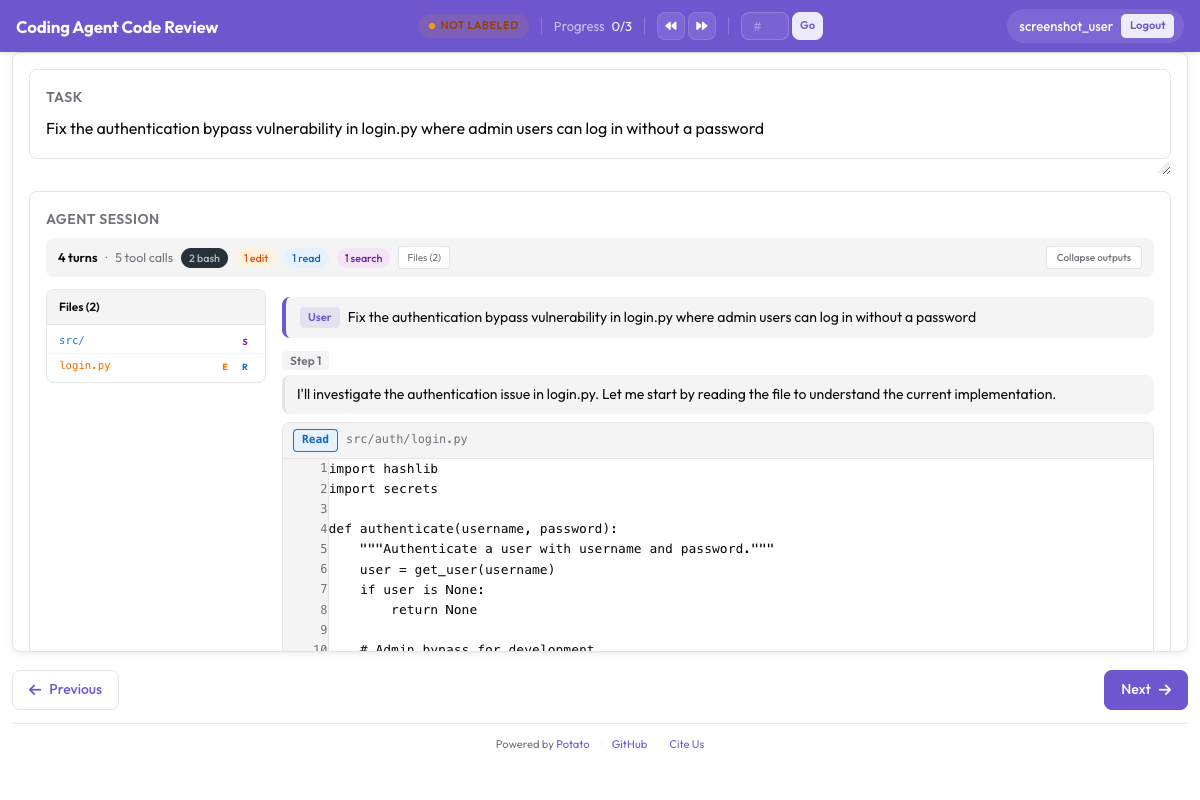 इनलाइन diff टिप्पणियाँ, प्रति-फ़ाइल रेटिंग और कुल फ़ैसला
कोड रिव्यू ट्यूटोरियल एक पूरे रिव्यू अध्ययन से गुज़रता है, जिसमें यह भी शामिल है कि टिप्पणी श्रेणियाँ एनोटेटर के ध्यान को कैसे आकार देती हैं। उस अध्ययन को बड़े पैमाने पर ले जाने से पहले कुछ ट्रेस पर चलाएँ, क्योंकि जो श्रेणी सूची कॉन्फ़िग में पूरी दिखती थी, उसमें पहले बीस रिव्यू के बाद आम तौर पर एक और प्रविष्टि जुड़ जाती है।
एक पूरा कॉन्फ़िगरेशन
यह कॉन्फ़िग ट्रेस रेंडर करता है और कार्य-स्तर का फ़ैसला, first-error प्रोसेस रिवॉर्ड, और एक कोड रिव्यू इकट्ठा करता है, हर ट्रेस पर तीन एनोटेटर के साथ ताकि सहमति मापी जा सके:
annotation_task_name: "Coding Agent Trace Evaluation"
task_description: "Judge whether the agent completed the task and review its changes."

data_files:
  - data/traces.jsonl

item_properties:
  id_key: id
  text_key: task_description

port: 8000
output_annotation_dir: annotation_output/coding-agent-eval/
export_annotation_format: jsonl

instance_display:
  layout:
    direction: vertical
    gap: 16px
  fields:
    - key: task_description
      type: text
      label: "Task"
    - key: structured_turns
      type: coding_trace
      label: "Agent Session"
      display_options:
        show_file_tree: true
        diff_view: unified
        collapse_long_outputs: true
        max_output_lines: 50
        terminal_theme: dark
        show_step_numbers: true

annotation_schemes:
  - annotation_type: radio
    name: task_success
    description: "Did the agent complete the task?"
    labels:
      - name: success
        tooltip: "Completed correctly with no issues"
      - name: partial
        tooltip: "Completed with minor issues"
      - name: failure
        tooltip: "Not completed, or completed incorrectly"
    sequential_key_binding: true

  - annotation_type: process_reward
    name: step_rewards
    description: "Click the first step where the agent makes a mistake."
    steps_key: structured_turns
    mode: first_error

  - annotation_type: code_review
    name: review
    description: "Review the agent's code changes."
    comment_categories: [bug, style, suggestion, security]
    verdict_options: [approve, request_changes, comment_only]
    file_rating_dimensions: [correctness, quality]

  - annotation_type: text
    name: notes
    description: "Anything else worth recording about this trace"
    placeholder: "Optional"

num_annotators_per_item: 3

user_config:
  allow_all_users: false
  users:
    - annotator1
    - annotator2
Potato इंस्टॉल करें, अपने ट्रेस कन्वर्ट करें, और सर्वर शुरू करें:
pip install potato-annotation
python -m potato.trace_converter -i ./my_traces.json --auto-detect -o data/traces.jsonl
potato start config.yaml -p 8000
रिपॉज़िटरी में इस प्रोजेक्ट का एक चालू संस्करण examples/agent-traces/coding-agent-evaluation/ पर मौजूद है, और अपना कुछ भी कन्वर्ट करने से पहले डिस्प्ले देखने का यह तेज़ तरीका है। वह कॉन्फ़िग शुरू करें, एक ट्रेस वैसे पढ़ें जैसे एनोटेटर पढ़ेगा, और कुछ ही मिनटों में आप जान जाएँगे कि जिस चरण-स्तर पर आप लेबल करने की योजना बना रहे हैं, डिस्प्ले वही स्तर दिखाता है या नहीं।
प्रशिक्षण के लिए निर्यात
एनोटेशन कोडिंग मूल्यांकन एक्सपोर्टर से बाहर जाते हैं, जो हर आउटपुट प्रकार के लिए एक फ़ाइल लिखता है:
python -m potato.export -c config.yaml -f coding_eval -o exports/ \
--option types=prm,preference,swebench,code_review| प्रकार | फ़ाइल | किसके काम आता है |
|---|---|---|
prm | prm_training_data.jsonl | प्रोसेस रिवॉर्ड मॉडल प्रशिक्षण |
preference | preference_pairs.jsonl | DPO या RLHF, pairwise एनोटेशन से |
swebench | swebench_results.jsonl | SWE-bench के अनुकूल मूल्यांकन |
code_review | code_reviews.jsonl | संरचित रिव्यू डेटा |
preference प्रकार को बनने के लिए pairwise एनोटेशन चाहिए, इसलिए जो अध्ययन सिर्फ़ प्रोसेस रिवॉर्ड इकट्ठा करता है वह बाकी तीन बनाता है। योजनाएँ डिज़ाइन करने से पहले तय करें कि चारों में से कौन-से चाहिए, क्योंकि बाद में pairwise तुलना जोड़ने का मतलब है हर ट्रेस को किसी जोड़ीदार के मुक़ाबले दोबारा एनोटेट करना।
एजेंट को काम करते देखना
रिकॉर्ड किए गए ट्रेस तस्वीर का आधा हिस्सा हैं। live_coding_agent एनोटेशन पेज के भीतर एक एजेंट चलाता है, जहाँ एनोटेटर उसे काम करते देखते हैं, दख़ल देते हैं, पीछे लौटाते हैं, और अलग निर्देशों के साथ दोबारा चलाते हैं, एक sandboxed वर्किंग डायरेक्टरी में Ollama, Anthropic या Claude SDK बैकएंड के साथ। लाइव कोडिंग एजेंट दस्तावेज़ बैकएंड और sandbox मोड बताते हैं।
अगर आपकी टीम कोडिंग एजेंट का मूल्यांकन कर रही है और उसे कुछ ऐसा मिलता है जो यह सेटअप नहीं संभालता, तो GitHub रिपॉज़िटरी पर एक issue खोलें। नया कन्वर्टर मोटे तौर पर potato/trace_converter/converters/ में एक फ़ाइल होता है, इसलिए जो फ़ॉर्मैट Potato अभी नहीं पढ़ता, वह रुकावट नहीं बल्कि योगदान का मौक़ा है।