Classifier les émotions dans la parole
Créez une tâche de classification des émotions audio dans Potato avec forme d'onde interactive, contrôles de vitesse de lecture, échelles de Likert et jeux d'étiquettes d'émotion configurables.
La reconnaissance des émotions dans la parole (SER) se retrouve dans les assistants virtuels, les outils de santé mentale et l'analyse des centres d'appels, et tous ont besoin d'audio étiqueté pour l'entraînement. Ce tutoriel présente des interfaces d'annotation pour les émotions catégorielles, les évaluations dimensionnelles et les clips où plusieurs émotions sont présentes. Pour les options audio sous-jacentes, consultez la documentation de l'annotation audio.
Approches d'annotation des émotions
Il existe quelques façons courantes d'étiqueter l'émotion dans la parole. Vous pouvez utiliser des catégories discrètes comme joyeux, triste ou en colère. Vous pouvez évaluer des dimensions continues comme la valence, l'éveil et la dominance. Vous pouvez laisser les annotateurs marquer plusieurs émotions à la fois avec des évaluations d'intensité. Ou, pour les clips plus longs, vous pouvez étiqueter des émotions différentes à des horodatages différents.
Classification catégorielle des émotions
Configuration de base
annotation_task_name: "Speech Emotion Recognition"

data_files:
  - data/utterances.json

item_properties:
  id_key: id
  text_key: transcript  # Optional transcript

instance_display:
  fields:
    - key: audio_path
      type: audio
      label: "Utterance"
      display_options:
        controls: true
        show_waveform: true
        preload: metadata

annotation_schemes:
  - annotation_type: radio
    name: emotion
    description: "What emotion is expressed in this speech?"
    labels:
      - name: Happy
        description: "Joy, excitement, amusement"
        key_value: "h"
      - name: Sad
        description: "Sorrow, disappointment, grief"
        key_value: "s"
      - name: Angry
        description: "Frustration, irritation, rage"
        key_value: "a"
      - name: Fearful
        description: "Anxiety, worry, terror"
        key_value: "f"
      - name: Surprised
        description: "Astonishment, shock"
        key_value: "u"
      - name: Disgusted
        description: "Revulsion, distaste"
        key_value: "d"
      - name: Neutral
        description: "No clear emotion"
        key_value: "n"
    label_requirement:
      required: true
Potato affiche une forme d'onde interactive avec des contrôles de lecture à côté des étiquettes d'annotation :
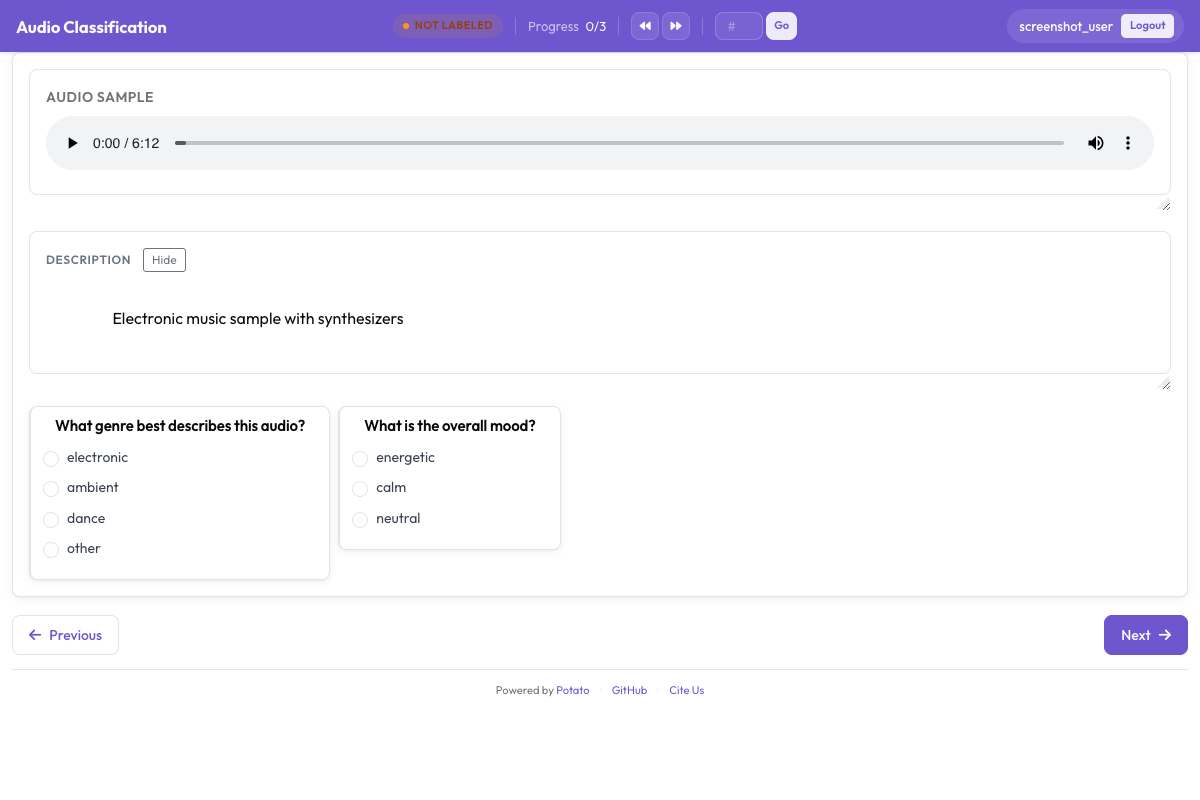 L'interface d'annotation audio avec une forme d'onde interactive, des contrôles de lecture et des étiquettes d'émotion catégorielles
Ajouter l'intensité
annotation_schemes:
  - annotation_type: radio
    name: emotion
    description: "What emotion does the speaker express?"
    labels: [Happy, Sad, Angry, Fearful, Surprised, Disgusted, Neutral]
    label_requirement:
      required: true

  - annotation_type: likert
    name: intensity
    description: "How intense is this emotion?"
    size: 5
    min_label: "Very weak"
    max_label: "Very strong"
Annotation dimensionnelle des émotions
Le modèle VAD (valence, éveil, dominance) évalue chaque clip sur trois échelles continues au lieu de l'enfermer dans une seule catégorie :
annotation_task_name: "Dimensional Emotion Rating"

annotation_schemes:
  # Valence: negative to positive
  - annotation_type: likert
    name: valence
    description: "Valence: How positive or negative?"
    size: 7
    min_label: "Very negative"
    max_label: "Very positive"

  # Arousal: calm to excited
  - annotation_type: likert
    name: arousal
    description: "Arousal: How calm or excited?"
    size: 7
    min_label: "Very calm"
    max_label: "Very excited"

  # Dominance: submissive to dominant
  - annotation_type: likert
    name: dominance
    description: "Dominance: How submissive or dominant?"
    size: 7
    min_label: "Very submissive"
    max_label: "Very dominant"
Échelles visuelles (SAM)
Dans le style du Self-Assessment Manikin :
annotation_schemes:
  - annotation_type: likert
    min_label: "Very negative"
    max_label: "Very positive"
    name: valence
    description: "Select the figure that matches the emotional valence"
    size: 9
Détection d'émotions mixtes
Pour la parole contenant plusieurs émotions :
annotation_schemes:
  - annotation_type: multiselect
    name: emotions_present
    description: "Select ALL emotions you detect (can be multiple)"
    labels:
      - Happy
      - Sad
      - Angry
      - Fearful
      - Surprised
      - Disgusted
      - Contempt

  - annotation_type: radio
    name: primary_emotion
    description: "Which emotion is MOST prominent?"
    labels:
      - Happy
      - Sad
      - Angry
      - Fearful
      - Surprised
      - Disgusted
      - Contempt
      - Mixed (no dominant)
Annotation complète des émotions
annotation_task_name: "Comprehensive Speech Emotion Annotation"

data_files:
  - data/speech_samples.json

item_properties:
  id_key: id
  text_key: transcript

instance_display:
  fields:
    - key: audio_url
      type: audio
      label: "Speech sample"
      display_options:
        controls: true
        show_waveform: true
        preload: metadata
        autoplay: false

    # Show the transcript alongside the audio
    - key: transcript
      type: text
      label: "Transcript (for reference)"

annotation_schemes:
  # Primary categorical emotion
  - annotation_type: radio
    name: primary_emotion
    description: "Primary emotion expressed"
    labels:
      - name: Happiness
        color: "#FCD34D"
        key_value: "1"
      - name: Sadness
        color: "#60A5FA"
        key_value: "2"
      - name: Anger
        color: "#F87171"
        key_value: "3"
      - name: Fear
        color: "#A78BFA"
        key_value: "4"
      - name: Surprise
        color: "#34D399"
        key_value: "5"
      - name: Disgust
        color: "#FB923C"
        key_value: "6"
      - name: Neutral
        color: "#9CA3AF"
        key_value: "7"
    label_requirement:
      required: true

  # Emotional intensity
  - annotation_type: likert
    name: intensity
    description: "Emotional intensity"
    size: 5
    min_label: "Very mild"
    max_label: "Very intense"
    label_requirement:
      required: true

  # Dimensional ratings
  - annotation_type: likert
    name: valence
    description: "Valence (negative to positive)"
    size: 7
    min_label: "Negative"
    max_label: "Positive"

  - annotation_type: likert
    name: arousal
    description: "Arousal (calm to excited)"
    size: 7
    min_label: "Calm"
    max_label: "Excited"

  # Voice quality
  - annotation_type: multiselect
    name: voice_qualities
    description: "Voice characteristics (select all that apply)"
    labels:
      - Trembling voice
      - Raised pitch
      - Lowered pitch
      - Loud/shouting
      - Soft/whisper
      - Fast speech rate
      - Slow speech rate
      - Breathy
      - Tense/strained
      - Crying
      - Laughing

  # Genuineness
  - annotation_type: radio
    name: authenticity
    description: "Does the emotion seem genuine?"
    labels:
      - Clearly genuine
      - Likely genuine
      - Uncertain
      - Likely acted/fake
      - Clearly acted/fake

  # Confidence
  - annotation_type: likert
    name: confidence
    description: "How confident are you in your annotation?"
    size: 5
    min_label: "Guessing"
    max_label: "Certain"

annotation_instructions: |
  ## Emotion Annotation Guidelines

  ### Listening Instructions
  1. Listen to the entire clip before annotating
  2. You may replay as many times as needed
  3. Focus on the VOICE, not just the words

  ### Emotion Categories
  - **Happiness**: Joy, amusement, contentment
  - **Sadness**: Sorrow, disappointment, melancholy
  - **Anger**: Frustration, irritation, rage
  - **Fear**: Anxiety, nervousness, terror
  - **Surprise**: Astonishment, startle
  - **Disgust**: Revulsion, contempt
  - **Neutral**: Calm, matter-of-fact

  ### Tips
  - Consider tone, pitch, speaking rate
  - The transcript may not match the emotion
  - When unsure between two emotions, choose the stronger one
  - Use the intensity scale for unclear cases

output_annotation_dir: annotations/
export_annotation_format: jsonl
Format de sortie
{
  "instance_id": "utt_001",
  "user_id": "rater_01",
  "labels": {
    "primary_emotion": {"Surprise": "true"},
    "voice_qualities": {"Raised pitch": "true", "Fast speech rate": "true"},
    "authenticity": {"Clearly genuine": "true"},
    "confidence": {"4": "true"}
  },
  "spans": {},
  "links": {}
}
Émotion au niveau du segment
Pour un audio plus long dont les émotions changent :
annotation_schemes:
  - annotation_type: audio_annotation
    name: emotion_segments
    description: "Mark time segments with different emotions"
    labels:
      - name: Happy
        color: "#FCD34D"
      - name: Sad
        color: "#60A5FA"
      - name: Angry
        color: "#F87171"
      - name: Neutral
        color: "#9CA3AF"
Contrôle qualité
Des clips sans ambiguïté dont les étiquettes sont connues repèrent les annotateurs qui répondent sans écouter. Les deux blocs se placent au niveau supérieur de la configuration, et tous deux prennent leurs éléments dans un fichier plutôt qu'en ligne :
attention_checks:
  enabled: true
  frequency: 20
  items_file: data/attention_checks.json
  min_response_time: 3.0

gold_standards:
  enabled: true
  items_file: data/gold_standards.json
  mode: mixed
  frequency: 20
  accuracy:
    min_threshold: 0.7
    evaluation_count: 10
Un élément gold ressemble à l'un de vos éléments de données auquel on a ajouté un gold_label, et il s'affiche donc comme tout le reste :
[
  {
    "id": "gold_001",
    "audio_path": "/audio/gold/clearly_happy.wav",
    "gold_label": { "primary_emotion": "Happiness" },
    "explanation": "Laughter and rising pitch throughout, with no ambiguity.",
    "difficulty": "easy"
  }
]
Les éléments de vérification d'attention utilisent expected_answer à la place de gold_label. min_response_time est le contrôle utile pour l'audio : un plancher de trois secondes repère quiconque étiquette un clip qu'il n'a pas pu finir d'écouter.
Imbriquer ces blocs sous un bloc quality_control: est une erreur courante, et l'échec est silencieux. Potato lit attention_checks et gold_standards au niveau supérieur, et la seule clé qu'il lit dans quality_control est geometry_iou_tolerance. Un bloc imbriqué passe donc la validation sans erreur et ne s'exécute jamais.
Conseils pour l'annotation des émotions
Écoutez le clip en entier avant de décider, et prêtez attention à la manière dont les choses sont dites plutôt qu'aux mots eux-mêmes. Gardez à l'esprit que les normes d'expression varient selon les cultures, si bien que ce qui passe pour de la colère dans l'une peut passer pour de l'insistance dans une autre. L'annotation des émotions est fatigante : encouragez les pauses, et faites discuter régulièrement l'équipe de ses désaccords pour rester calibrés.
Prochaines étapes
- Ajoutez la diarisation des locuteurs pour suivre les émotions avec plusieurs locuteurs
- Mettez en place le crowdsourcing pour la collecte à grande échelle
- Calculez l'accord inter-annotateurs pour les tâches d'émotion
Documentation sur Annotation audio.