Active Learning in Potato: Prioritizing the Items Worth Labeling
How Potato reorders the annotation queue by classifier uncertainty, with config for the sampling settings, the cold start, and keeping enough random items in the mix.
Active learning decides which items to annotate next instead of leaving that to chance, so the labeling budget goes to the items the model learns most from. Here is how to set it up in Potato.
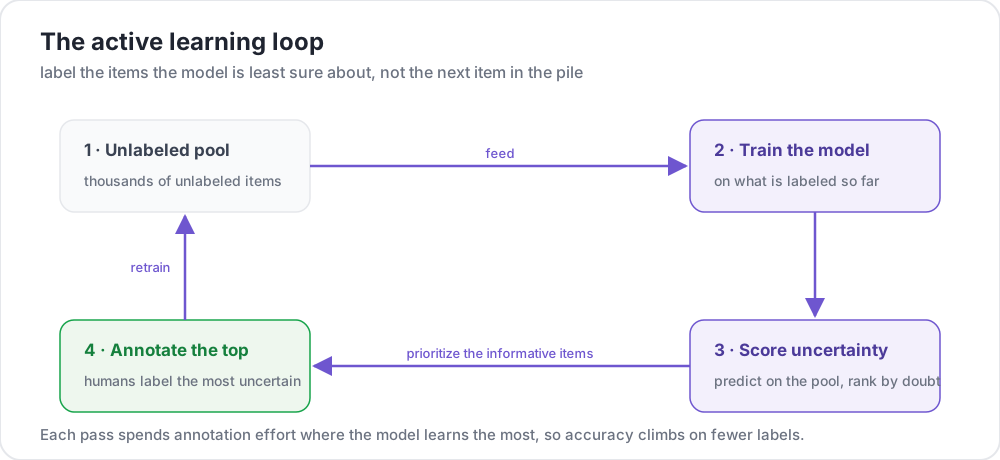 The active learning loop
What is Active Learning?
Instead of randomly sampling data to annotate, active learning:
- Trains a model on current annotations
- Identifies items where the model is uncertain
- Prioritizes those items for human annotation
- Repeats, continuously improving efficiency
Why Use Active Learning?
The payoff is mostly about where your annotators spend their time. You label fewer items to reach the same model quality, so you get a usable model sooner. The hard, ambiguous cases get human attention, and edge cases that random sampling would skip over tend to surface earlier.
Basic Active Learning Setup
annotation_task_name: "Active Learning Classification"

data_files:
  - "data/unlabeled_pool.json"

item_properties:
  id_key: id
  text_key: text

# Active learning configuration
active_learning:
  enabled: true
  classifier:
    name: "sklearn.linear_model.LogisticRegression"

  # Sampling settings
  max_instances_to_reorder: 1000  # Number of instances to reorder by uncertainty
  random_sample_percent: 0.1  # 10% random sampling to maintain diversity

annotation_schemes:
  - annotation_type: radio
    name: category
    description: "Classify the sentiment"
    labels: [Positive, Negative, Neutral]
How Uncertainty Sampling Works
Potato's active learning uses uncertainty sampling to prioritize items where the classifier is least confident. The classifier predicts labels for unlabeled instances, and those with the lowest confidence scores are presented first for annotation. For the available strategies and implementation details, see the active learning guide and the strategies reference.
The classifier block names any scikit-learn compatible classifier, either by its full module path or by a short name such as logistic:
active_learning:
  enabled: true
  classifier:
    name: "sklearn.linear_model.LogisticRegression"
Other classifier options include:
sklearn.ensemble.RandomForestClassifiersklearn.svm.SVC(withprobability=True)sklearn.naive_bayes.MultinomialNB
Complete Configuration
annotation_task_name: "Active Learning for Sentiment"

data_files:
  - "data/reviews.json"

item_properties:
  id_key: id
  text_key: text

active_learning:
  enabled: true
  classifier:
    name: "sklearn.linear_model.LogisticRegression"

  # Sampling settings
  max_instances_to_reorder: 2000  # Reorder top N by uncertainty
  random_sample_percent: 0.1  # 10% random to maintain diversity

annotation_schemes:
  - annotation_type: radio
    name: sentiment
    description: "Classify the sentiment"
    labels:
      - name: Positive
        key_value: "1"
      - name: Negative
        key_value: "2"
      - name: Neutral
        key_value: "3"
    label_requirement:
      required: true

annotation_instructions: |
  ## Sentiment Classification

  Items are prioritized by model uncertainty.
  You may see more difficult or ambiguous cases.

  Focus on accuracy over speed.
Monitoring Progress
Potato's built-in logging records which instances were selected and their uncertainty scores, so you can watch how the sampling behaves as labels accumulate.
Best Practices
Cold Start
Start with diverse random sampling by setting a higher random_sample_percent:
active_learning:
  enabled: true
  classifier:
    name: "sklearn.linear_model.LogisticRegression"
  random_sample_percent: 0.2  # 20% random for initial diversity
Controlling Reordering Scope
Use max_instances_to_reorder to control how many instances are ranked by uncertainty. A larger value gives the sampler more to choose from but costs more compute on each pass:
active_learning:
  max_instances_to_reorder: 5000  # Rank top 5000 by uncertainty
Maintaining Diversity
The random_sample_percent parameter keeps some randomly sampled instances in the queue, so the model does not only ever see uncertain edge cases:
active_learning:
  random_sample_percent: 0.1  # 10% random sampling
Tips for Success
A few things that help in practice. Begin with a random sample so the first model sees a spread of examples, then keep a slice of random sampling in the mix so you do not over-fit to the uncertain edge cases. Track accuracy as you go. And remember that a steady diet of the hardest items wears annotators down, so watch for fatigue and save model checkpoints in case you need to roll back.
Next Steps
- Add AI suggestions to speed up uncertain items
- Set up quality control for difficult cases
- Learn about crowdsourcing with active learning
Full active learning documentation at Active Learning.