تمييز الكلمات المفتاحية التلقائي
تكوين تمييز الكلمات المفتاحية في Potato بملف كلمات مفتاحية ثابت أو بمساعد كلمات مفتاحية قائم على نموذج لغة كبير، مع ألوان لكل تسمية وكلمات تشتيت عشوائية وتخزين مؤقت للاستجابات.
يميّز Potato الكلمات المفتاحية بطريقتين. يضع keyword_highlights_file علامة على قائمة ثابتة من المصطلحات في كل عنصر دون أي نموذج، ويضيف ai_support زر Keyword يضغطه المُوسِّم ليطلب من نموذج لغة كبير تمييز الكلمات المتعلقة بكل تسمية.
تخفق الآليتان بطرق مختلفة، ولذلك يهم الاختيار بينهما أكثر مما يهم الإعداد. القائمة الثابتة حتمية، ولا تكلف شيئاً لكل عنصر، ويمكن ذكرها في قسم المنهجية، لكنها تميّز السلاسل نفسها أياً كان ما تقوله الجملة المحيطة بها. أما المساعد القائم على نموذج اللغة فيقرأ كل عنصر ويستطيع تمييز عبارة ما كانت أي قائمة كلمات لتلتقطها، مقابل استدعاء API واحد لكل طلب والاعتماد على نموذج قد يتغير دون علمك.
لمعرفة كيفية تنفيذ تمييز الخيارات وتمييز الكلمات المفتاحية، راجع الوثائق المصدرية.
قائمة كلمات مفتاحية ثابتة
استخدم ملف الكلمات المفتاحية عندما تحتاج إلى أن يرى كل المُوسِّمين التمييزات نفسها، وأن تتمكن لاحقاً من تحديد ما كانت عليه بالضبط. وجّه keyword_highlights_file إلى ملف CSV أو TSV، وسيضع Potato حول كل تطابق في نص العنصر مربعاً ذا حدود.
annotation_task_name: "Sentiment with keyword highlights"
task_dir: .
output_annotation_dir: annotation_output
export_annotation_format: jsonl

data_files:
  - data/reviews.json

item_properties:
  id_key: id
  text_key: text

keyword_highlights_file: data/sentiment_keywords.tsv

ui:
  label_colors:
    sentiment:
      positive: "(22, 163, 74)"
      negative: "(239, 68, 68)"

annotation_schemes:
  - annotation_type: span
    name: sentiment
    description: "Mark the phrases that carry sentiment. Highlighted keywords are suggestions, not answers."
    labels:
      - name: positive
        tooltip: "Phrases expressing a positive opinion"
      - name: negative
        tooltip: "Phrases expressing a negative opinion"

user_config:
  allow_all_users: true
تُضبط الألوان لكل مخطط ولكل تسمية وليس على مستوى عام، لأن التمييز الذي يطابق لون تسمية امتداد يوشك المُوسِّم على رسمها أسوأ من عدم وجود تمييز أصلاً.
يحتاج ملف الكلمات المفتاحية إلى عمود رأس باسم keyword. يحدد عمود label الفئة التي ينتمي إليها المصطلح، ويحدد عمود schema مخطط التوسيم الذي يتعلق به، ويتجاوز عمود color الاختياري لوحة الألوان لتلك التسمية.
keyword,label,schema,color
excellent,positive,sentiment,(34, 197, 94)
terrible,negative,sentiment,#ef4444
excel*,positive,sentiment,
تطابق * أي تتابع من أحرف الكلمة، فيغطي excel* الكلمات excellent وexcels وexcelled في صف واحد. يقرأ Potato أيضاً ملفاً بسيطاً فيه كلمة مفتاحية واحدة في كل سطر، وملفات JSON أو JSONL أو YAML تحتوي على قائمة كلمات مفتاحية أو خريطة {keyword: label}.
تمييزات عشوائية لأغراض الدراسة
إذا كنت تقيس ما إذا كان التمييز يغيّر ما يفعله المُوسِّمون، فإن عرض كل الكلمات المفتاحية على الجميع لا يترك لك شيئاً تقارن به. يقلل keyword_highlight_settings عدد الكلمات المفتاحية المعروضة ويخلط معها كلمات تمويه.
keyword_highlights_file: data/keywords.csv

keyword_highlight_settings:
  keyword_probability: 0.5        # show half the matched keywords
  random_word_probability: 0.05   # highlight about 5% of other words
  random_word_label: "distractor"
  random_word_schema: "keyword"
القيمة keyword_probability: 0.5 هي التي تجعل المقارنة ممكنة، إذ يرى كل مُوسِّم عندئذ تمييزاً على نصف المصطلحات ولا يرى تمييزاً على النصف الآخر داخل المدوّنة نفسها. يُخزَّن الاختيار مؤقتاً لكل مستخدم ولكل مثيل، وتُستمد بذرته من تجزئة اسم المستخدم ومعرّف المثيل، فيرى المُوسِّم الذي يعود إلى عنصر ما رآه في المرة الأولى. تُسجَّل الكلمات التي عُرضت في الحقل keyword_highlights_shown ضمن البيانات السلوكية، بحيث يمكن للتحليل أن يأخذها في الحسبان.
مساعد الكلمات المفتاحية القائم على نموذج لغة كبير
تمييز الكلمات المفتاحية بالذكاء الاصطناعي زر وليس عملية تجري في الخلفية. عند تفعيل ai_support يحمل كل نموذج توسيم أزرار Hint وKeyword وRationale، والضغط على Keyword يسأل النموذج عن الكلمات في هذا العنصر المتعلقة بكل تسمية متاحة. تعود الإجابة على شكل مربعات متراكبة على النص.
ai_support:
  enabled: true
  endpoint_type: openai

  ai_config:
    model: gpt-4o-mini
    api_key: ${OPENAI_API_KEY}
    temperature: 0.3
    max_tokens: 800
    include:
      all: true
القيمة max_tokens: 800 هي القيمة الافتراضية وهي قريبة من الحد الأدنى لهذا المساعد. تجيب مطالبتا Keyword وRationale عن كل التسميات في استجابة واحدة، لذا فإن ميزانية أصغر تقطع الرد، فيظهر المساعد فارغاً دون أي رسالة خطأ.
يفعّل include.all: true المساعدات لكل المخططات. لتفعيلها لصفحات ومخططات محددة بدلاً من ذلك، استخدم special_include، الذي يربط فهرس صفحة بمعرّف توسيم، ويربط هذا بقائمة بأسماء المساعدات:
ai_support:
  enabled: true
  endpoint_type: openai
  ai_config:
    model: gpt-4o-mini
    api_key: ${OPENAI_API_KEY}
    include:
      all: false
      special_include:
        "0":
          "0": ["hint", "keyword"]
        "1":
          "1": ["hint"]
يحتاج تمييز الكلمات المفتاحية إلى نص يميّزه، لذلك يستبعد Potato الزر من عناصر الصور حتى عندما تكون نقطة النهاية نموذج رؤية. أما في عنصر نصي فيعرض نموذج الرؤية المساعدات الثلاثة كلها.
Anthropic
ai_support:
  enabled: true
  endpoint_type: anthropic

  ai_config:
    model: claude-sonnet-4-20250514
    api_key: ${ANTHROPIC_API_KEY}
    temperature: 0.3
    max_tokens: 800
    include:
      all: true
Ollama، دون فاتورة API
ai_support:
  enabled: true
  endpoint_type: ollama

  ai_config:
    model: qwen3:0.6b
    base_url: http://localhost:11434
    temperature: 0.3
    max_tokens: 800
    include:
      all: true
تستحق نقطة النهاية المحلية التراجع في الجودة عندما لا يمكن للمدوّنة أن تغادر جهازك، أو عندما تميّز عشرات الآلاف من العناصر وكانت التكلفة لكل عنصر ستستهلك الجزء الأكبر من ميزانية الدراسة.
تمييز التسميات المرجحة بدلاً من ذلك
عندما تكون المشكلة قائمة خيارات طويلة وليس نصاً طويلاً، فإن option_highlighting هو الأداة الأنسب. يطلب من النموذج الخيارات الأكثر ترجيحاً ويعرضها بعتامة كاملة مع نجمة، ويخفت الباقي. يبقى كل خيار قابلاً للنقر.
ai_support:
  enabled: true
  endpoint_type: openai
  ai_config:
    model: gpt-4o-mini
    api_key: ${OPENAI_API_KEY}
    temperature: 0.3
    max_tokens: 800

  option_highlighting:
    enabled: true
    top_k: 3
    dim_opacity: 0.4
    auto_apply: true
    schemas: null
    prefetch_count: 10
تناسب القيمة top_k: 3 مخططاً فيه من ثماني إلى اثنتي عشرة تسمية، حيث تختصر ثلاثة خيارات مميّزة القراءة دون إخفاء الإجابة. تعمل مع radio وmultiselect وlikert وselect، وليس لها أثر على الامتدادات أو النص الحر أو أشرطة التمرير.
التخزين المؤقت والجلب المسبق
يضيف استدعاء نموذج اللغة ثواني إلى تحميل الصفحة، والمُوسِّم الذي ينتظر سيتوقف عن الضغط على الزر. يزيل التخزين المؤقت على القرص والجلب المسبق قبل موضع المؤشر معظم هذا الانتظار، كما يمنعك التخزين المؤقت من الدفع مرتين مقابل عنصر يعود إليه المُوسِّم.
ai_support:
  enabled: true
  endpoint_type: openai
  ai_config:
    model: gpt-4o-mini
    api_key: ${OPENAI_API_KEY}
    max_tokens: 800
    include:
      all: true

  cache_config:
    disk_cache:
      enabled: true
      path: annotation_output/ai_cache.json

    prefetch:
      warm_up_page_count: 10
      on_next: 5
      on_prev: 2
تعكس القيمة on_next: 5 مقابل on_prev: 2 طريقة تنقل المُوسِّمين. معظم التنقل يكون إلى الأمام، لذا تذهب الميزانية إلى الأمام، مع ما يكفي خلف المؤشر لتغطية تصحيح.
تكوين كامل
يمكن الجمع بين الآليتين. يمنح ملف الكلمات المفتاحية كل المُوسِّمين التمييزات الأساسية نفسها، وتبقى المساعدات خلف الأزرار للعناصر التي لا تقدم فيها القائمة الثابتة شيئاً.
annotation_task_name: "Entity annotation with keyword support"
task_dir: .
output_annotation_dir: annotation_output
export_annotation_format: jsonl

data_files:
  - data/documents.json

item_properties:
  id_key: id
  text_key: text

keyword_highlights_file: data/entity_keywords.csv

annotation_schemes:
  - annotation_type: span
    name: entities
    description: "Mark people, organizations and locations."
    labels:
      - name: PERSON
        color: "#FECACA"
      - name: ORG
        color: "#BBF7D0"
      - name: LOCATION
        color: "#BFDBFE"

ai_support:
  enabled: true
  endpoint_type: openai

  ai_config:
    model: gpt-4o-mini
    api_key: ${OPENAI_API_KEY}
    temperature: 0.3
    max_tokens: 800
    include:
      all: true

  cache_config:
    disk_cache:
      enabled: true
      path: annotation_output/ai_cache.json
    prefetch:
      warm_up_page_count: 10
      on_next: 5
      on_prev: 2

user_config:
  allow_all_users: true
شغّل الخادم وستظهر التمييزات على العنصر الأول:
potato start config.yaml -p 8000عند تفعيل تمييز الكلمات المفتاحية بالذكاء الاصطناعي، يؤدي الضغط على زر Keyword إلى تمييز المصطلحات ذات الصلة في نص التوسيم:
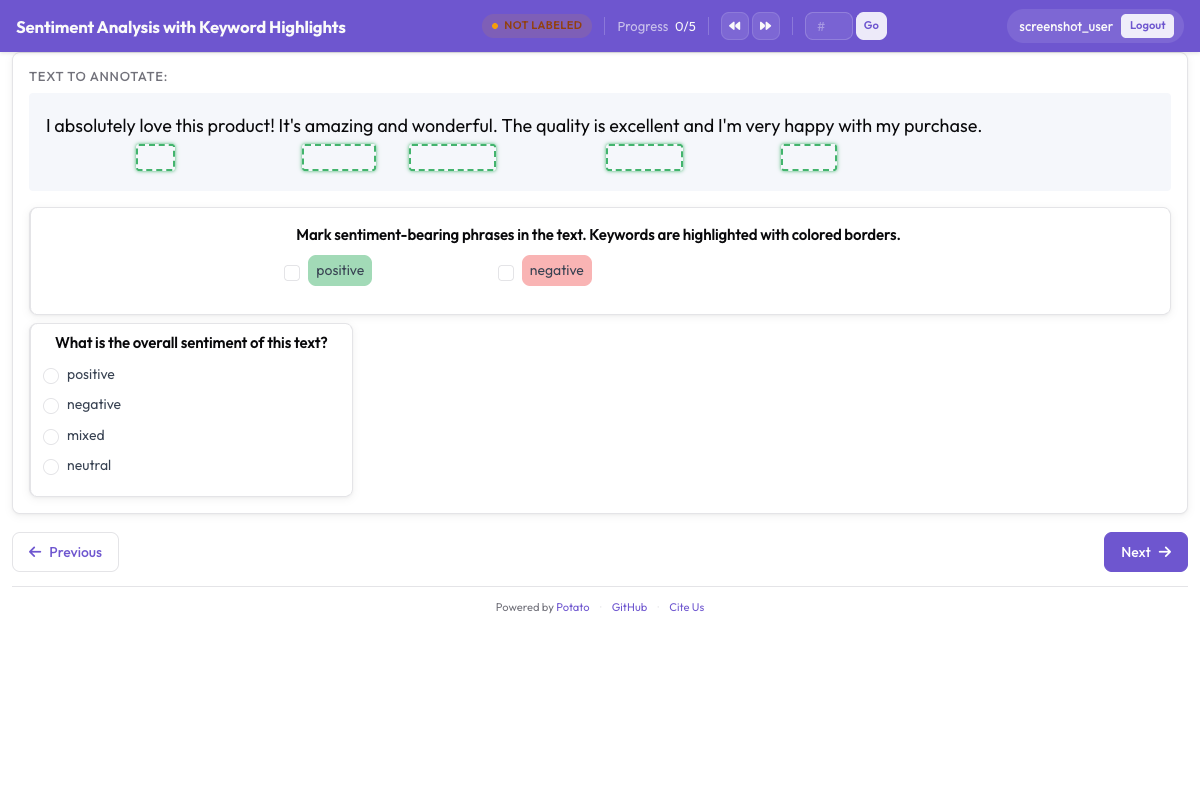 كلمات مفتاحية وكيانات مميّزة بمربعات متراكبة لتوجيه انتباه المُوسِّم
قراءات إضافية
- يغطي دعم الذكاء الاصطناعي تكوين نقاط النهاية لكل مزوّد.
- يغطي تمييز الخيارات النسخة التي تخفت التسميات بمزيد من التفصيل.
- يغطي توسيم الامتدادات المخطط الذي تظهر التمييزات بجانبه.
- تغطي ميزات الإنتاجية صيغة ملف الكلمات المفتاحية وبقية إعدادات سرعة المُوسِّم.