تقييم وكلاء الذكاء الاصطناعي: التوصيف البشري لمسارات الوكلاء
كيف تُعِدّ التقييم البشري لمخرجات وكلاء الذكاء الاصطناعي في Potato، من استيراد المسارات مروراً بتصميم مخططات على مستوى المسار وعلى مستوى كل خطوة وصولاً إلى تحليل النتائج المُصدَّرة.
حوّل مسارات الوكلاء باستخدام python -m potato.trace_converter، واعرضها عبر حقل عرض من نوع agent_trace، واجمع حكماً على مستوى المسار إلى جانب حكم لكل خطوة عبر trajectory_eval. الحكم على كل خطوة هو الجزء الذي يحدد الخطوة التي انحرف عندها التشغيل.
يخبرك معدل النجاح بعدد المرات التي يُنهي فيها الوكيل المهمة، ولا يخبرك بشيء عن سبب الإخفاقات. قد يخفق وكيلان لهما معدل النجاح نفسه، 62%، لأسباب مختلفة تماماً، فأحدهما يختار الأداة الخطأ والآخر يستدل استدلالاً سليماً على نتيجة استرجاع رديئة، والإصلاح مختلف في كل حالة. التقييم البشري على مستوى الخطوة يفرّق بينهما، لأن المُوصِّف يحدد الخطوة التي تعطلت ونوع العطل.
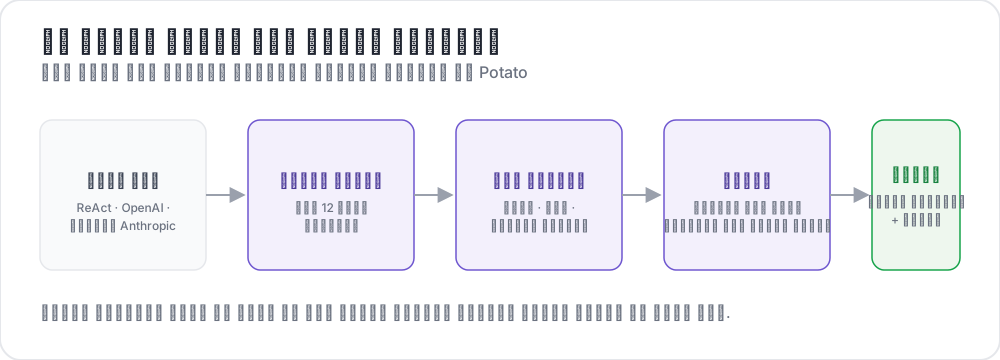 من المسارات الخام إلى أحكام مهيكلة
يبني هذا الدليل خط الأنابيب لوكيل بأسلوب ReAct يجيب عن الأسئلة بالبحث في الويب. الإعدادات مُتحقَّق منها مقابل Potato 2.9.1:
pip install --upgrade potato-annotationالخطوة 1: تحويل المسارات
يسجّل Potato 15 محوّلاً للمسارات، وتعرضها أداة سطر الأوامر مع أوصافها:
python -m potato.trace_converter --list-formatsتشمل القائمة react وopenai وanthropic وlangchain وlangfuse وmulti_agent وmcp وotel وatif وwebarena وweb_agent وswebench وswe_agent_trajectory وclaude_code وaider. تمر صادرات تشغيلات LangSmith عبر langchain، وتمر سجلات CrewAI وAutoGen وLangGraph عبر multi_agent.
يقرأ المحوّل react مساراً تحمل خطواته المفاتيح thought وaction وobservation:
{
  "id": "trace_001",
  "task": "What is the capital of Australia and what is its population?",
  "steps": [
    {"thought": "I need the capital of Australia and then its population.",
     "action": "search('capital of Australia')",
     "observation": "Canberra is the capital city of Australia."},
    {"thought": "Now I need Canberra's population.",
     "action": "search('Canberra population 2025')",
     "observation": "Canberra has a population of approximately 467,000 as of 2025."},
    {"thought": "I have both pieces of information.",
     "action": "finish('Canberra, approximately 467,000')"}
  ],
  "metadata": {"agent": "GPT-4", "tokens": 2340}
}
يحوّل أمر واحد الملف:
python -m potato.trace_converter \
  --input raw_traces.json \
  --input-format react \
  --output data/traces.jsonl
مرّر --auto-detect بدلاً من --input-format إن لم تكن متأكداً من المحوّل المناسب، وسيختار السجل محوّلاً بناءً على بصمات الحقول. سمِّ التنسيق صراحةً بمجرد أن تعرفه، لأن الاكتشاف يأخذ أول محوّل يطابق، وتتداخل عدة تنسيقات في الحقول التي تحملها.
يكتب كل محوّل الشكل القياسي نفسه، وهذا ما يجعل ملف إعدادات واحداً يعمل عبر أطر العمل المختلفة. يحمل كل سطر id وtask_description وconversation، وهذه الأخيرة قائمة من الأدوار لكل منها speaker وtext. والمحوّل الذي تتوفر لديه الحقول agent_name وmetadata_table وscreenshots يكتبها أيضاً:
{
  "id": "trace_001",
  "task_description": "What is the capital of Australia and what is its population?",
  "agent_name": "GPT-4",
  "metadata_table": [{"Property": "Steps", "Value": "3"},
                     {"Property": "tokens", "Value": "2340"}],
  "conversation": [
    {"speaker": "Agent (Thought)", "text": "I need the capital of Australia and then its population."},
    {"speaker": "Agent (Action)", "text": "search('capital of Australia')"},
    {"speaker": "Environment", "text": "Canberra is the capital city of Australia."}
  ]
}
الخطوة 2: عرض المسار
يعرض نوع العرض agent_trace كل دور على شكل بطاقة ملوّنة حسب نوع الخطوة، فيقرأ المُوصِّف التشغيل بدلاً من كتلة JSON:
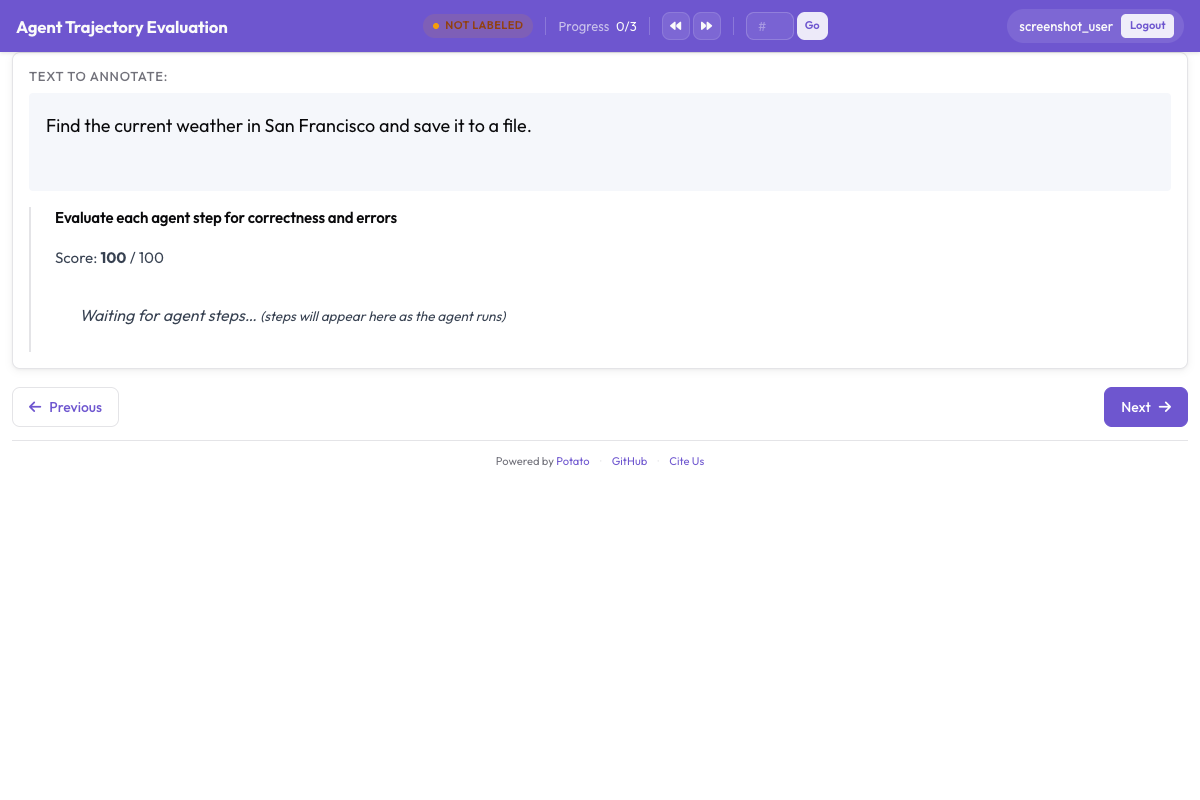
يحدد instance_display ما يظهر في الصفحة وبأي ترتيب. يأتي وصف المهمة في الأعلى لأن المُوصِّف يجب أن يعرف ما طُلب من الوكيل قبل أن يكون لأي خطوة معنى، ويأتي جدول البيانات الوصفية تحته في حقل جدول مضغوط:
instance_display:
  layout:
    direction: vertical
    gap: 16px

  fields:
    - key: task_description
      type: text
      label: "Task"

    - key: metadata_table
      type: spreadsheet
      label: "Trace Info"
      display_options:
        compact: true
        max_height: 120

    - key: conversation
      type: agent_trace
      label: "Agent Trace"
      span_target: true
      display_options:
        show_step_numbers: true
        show_summary: true
        collapse_observations: true
        step_type_colors:
          thought: "#e8f4fd"
          action: "#fff3e0"
          observation: "#e8f5e9"
طيّ الملاحظات يمنع نتائج البحث الطويلة من دفع بقية المسار خارج الشاشة، فالمسار الذي يحمل اثنتي عشرة نتيجة بحث كاملة يصبح في معظمه تمريراً، ويفقد المُوصِّف موضعه في التشغيل. وضبط span_target: true على الحقل نفسه يتيح لمخطط المقاطع تحديد الكلمات الدقيقة لادعاء مُختلَق داخل دور ما، وهذا سجل أدق من وسم الخطوة كلها بأنها خاطئة.
الخطوة 3: الحكم على مستوى المسار
ثلاثة أسئلة تغطي المسار ككل. نجاح المهمة هو الرقم الرئيسي، وصحة الإجابة تفصل بين إجابة صحيحة بُلغت بطريقة سيئة وإجابة خاطئة، والكفاءة هي ما يميّز وكيلين ينجح كلاهما:
annotation_schemes:
  - annotation_type: radio
    name: task_success
    description: "Did the agent complete the task?"
    labels:
      - name: "Success"
        tooltip: "Fully completed correctly"
      - name: "Partial success"
        tooltip: "Completed with errors or omissions"
      - name: "Failure"
        tooltip: "Not completed"
    label_requirement:
      required: true
    sequential_key_binding: true

  - annotation_type: radio
    name: answer_correctness
    description: "Is the agent's final answer factually correct?"
    labels:
      - name: "Correct"
      - name: "Partially correct"
      - name: "Incorrect"
      - name: "Cannot determine"
    label_requirement:
      required: true

  - annotation_type: likert
    name: efficiency
    description: "Did the agent reach the answer without wasted steps?"
    size: 5
    min_label: "Many unnecessary steps"
    max_label: "No wasted steps"

  - annotation_type: text
    name: evaluator_notes
    description: "Anything the ratings above do not capture"
    multiline: true
    rows: 3
لخيار "Cannot determine" ما يبرر وجوده. من دونه، يلجأ المُوصِّف الذي لا يملك وسيلة للتحقق من الإجابة إلى التخمين أو إلى وسمها بأنها غير صحيحة، وكلا الخيارين يُدخل ضوضاء في الرقم الذي يهمك أكثر من غيره.
الخطوة 4: الحكم على كل خطوة
يعرض trajectory_eval كل خطوة على شكل بطاقة لها عناصر تحكم خاصة بها، ويحمل تسمية الصحة وتصنيف الأخطاء ودرجة الخطورة في مخطط واحد بدلاً من ثلاثة. وجّه steps_key إلى الحقل الذي يحمل الخطوات، وهو conversation في المسار المُحوَّل، ووجّه step_text_key إلى المفتاح داخل كل خطوة الذي ينبغي عرضه:
annotation_schemes:
  - annotation_type: trajectory_eval
    name: step_evaluation
    description: "Mark each step and classify anything that went wrong"
    steps_key: conversation
    step_text_key: text
    correctness_options:
      - correct
      - partially_correct
      - incorrect
      - unnecessary
    error_types:
      - name: reasoning
        subtypes:
          - logical_error
          - factual_error
          - planning_error
      - name: execution
        subtypes:
          - wrong_tool
          - wrong_args
          - api_error
      - name: termination
        subtypes:
          - premature_stop
          - redundant_step
    severities:
      - name: minor
        weight: -1
      - name: major
        weight: -5
      - name: critical
        weight: -10
    show_score: true
    max_score: 100
تحوّل أوزان الخطورة قائمة الخطوات الموسومة إلى رقم واحد قابل للمقارنة لكل مسار، والأوزان الافتراضية تستحق التغيير بدلاً من قبولها كما هي. يعبّر الوزن عن مقدار سوء الخطأ الحرج مقارنة بالخطأ الطفيف في مهمتك، وفي تقييم للسلامة تكون هذه النسبة أشد انحداراً بكثير منها في مهمة بحث.
إبقاء unnecessary منفصلاً عن incorrect هو القرار الآخر الذي يستحق أن يُتخذ عن قصد. الخطوة المهدرة تكلّف رموزاً ووقتاً دون أن تُدخل خطأ، ودمج الاثنين يخفي الفرق بين وكيل يتوه ووكيل مخطئ.
الخطوة 5: الإعدادات الكاملة
كل ما سبق في ملف واحد:
annotation_task_name: "ReAct Agent Evaluation"
task_dir: "."
output_annotation_dir: "output/"

data_files:
  - "data/traces.jsonl"

item_properties:
  id_key: id
  text_key: task_description

instance_display:
  layout:
    direction: vertical
    gap: 16px
  fields:
    - key: task_description
      type: text
      label: "Task"
    - key: metadata_table
      type: spreadsheet
      label: "Trace Info"
      display_options:
        compact: true
        max_height: 120
    - key: conversation
      type: agent_trace
      label: "Agent Trace"
      span_target: true
      display_options:
        show_step_numbers: true
        show_summary: true
        collapse_observations: true

annotation_schemes:
  - annotation_type: radio
    name: task_success
    description: "Did the agent complete the task?"
    labels:
      - name: "Success"
      - name: "Partial success"
      - name: "Failure"
    label_requirement:
      required: true
    sequential_key_binding: true

  - annotation_type: radio
    name: answer_correctness
    description: "Is the agent's final answer factually correct?"
    labels:
      - name: "Correct"
      - name: "Partially correct"
      - name: "Incorrect"
      - name: "Cannot determine"
    label_requirement:
      required: true

  - annotation_type: likert
    name: efficiency
    description: "Did the agent reach the answer without wasted steps?"
    size: 5
    min_label: "Many unnecessary steps"
    max_label: "No wasted steps"

  - annotation_type: text
    name: evaluator_notes
    description: "Anything the ratings above do not capture"
    multiline: true
    rows: 3

  - annotation_type: trajectory_eval
    name: step_evaluation
    description: "Mark each step and classify anything that went wrong"
    steps_key: conversation
    step_text_key: text
    correctness_options: [correct, partially_correct, incorrect, unnecessary]
    error_types:
      - name: reasoning
        subtypes: [logical_error, factual_error, planning_error]
      - name: execution
        subtypes: [wrong_tool, wrong_args, api_error]
      - name: termination
        subtypes: [premature_stop, redundant_step]
    severities:
      - name: minor
        weight: -1
      - name: major
        weight: -5
      - name: critical
        weight: -10
    show_score: true
    max_score: 100

export_annotation_format: jsonl
شغّل الخادم وافتح http://localhost:8000:
potato start config.yaml -p 8000كيف تبدو جلسة التوصيف
تعرض الصفحة المهمة وجدول معلومات المسار وبطاقات الخطوات، مع عناصر التحكم الخاصة بكل خطوة ملحقة بكل بطاقة، ومخططات مستوى المسار أسفل المسار. الترتيب الذي يعمل به المُوصِّفون أهم مما يبدو. تقييم الخطوات أولاً ثم المسار يُبقي الحكم الإجمالي مرتكزاً على ما فعله التشغيل فعلاً، أما تقييم النجاح أولاً فيميل إلى التأثير في كل حكم على الخطوات يليه.
ثلاث عادات تستحق أن تُكتب في تعليمات المُوصِّفين. وسّع الملاحظات المطوية بدلاً من الوثوق بسطر الملخص، لأن سوء قراءة نتيجة بحث هو المصدر الأكثر شيوعاً لإجابة خاطئة تبدو مُعلَّلة جيداً. قارن الإجابة النهائية بالحقيقة المرجعية قبل تقييم نجاح المهمة، إن كانت مجموعة البيانات تتضمنها. استخدم الشريط الزمني للخطوات للعودة إلى خطوة ما حين تكشف خطوة لاحقة أن السابقة كانت خاطئة من البداية.
الخطوة 6: التصدير والتحليل
يكتب مُصدِّر JSONL الملف annotations.jsonl، بسجل واحد لكل زوج من العنصر والمُوصِّف:
python -m potato.export --config config.yaml --format jsonl --output ./export/يحمل كل سجل instance_id وuser_id وlabels وspans وlinks، وتقع إجابات المخططات تحت labels مفهرسة باسم المخطط:
import json
import pandas as pd

records = [json.loads(line) for line in open("export/annotations.jsonl")]

df = pd.DataFrame([
    {"trace": r["instance_id"], "annotator": r["user_id"], **r["labels"]}
    for r in records
])

print(df["task_success"].value_counts())
لأي حجم يتجاوز بضع مئات من المسارات، صدّر إلى Parquet بدلاً من ذلك واستعلم عنه في مكانه. يكتب تصدير Parquet الملف annotations.parquet بالأعمدة instance_id وuser_id وعمود لكل مخطط توصيف، فيكون اسم المخطط عموداً لا قيمة:
python -m potato.export --config config.yaml --format parquet --output ./export/import duckdb
print(duckdb.sql("""
SELECT task_success, COUNT(*) AS n
FROM 'export/annotations.parquet'
GROUP BY task_success
ORDER BY n DESC
"""))الأحكام على مستوى الخطوة هي التي تستحق القراءة أولاً. عدّ الأنواع الفرعية للأخطاء عبر المسارات يخبرك هل لدى الوكيل إخفاق منهجي واحد أم ذيل طويل من إخفاقات غير مترابطة، والأول وحده يستحق إصلاحاً موجّهاً.
الخطوة 7: مزيد من المُوصِّفين، ومرحلة تأهيل
تقييم الوكلاء ذاتي بما يكفي لأن يكون التقييم الواحد لكل مسار قياساً بلا هامش خطأ. ثلاثة مُوصِّفين لكل مسار يمنحونك رقماً للاتفاق، والتوزيع العشوائي يمنع التداخل من التركز على المسارات التي تصادف وجودها في مقدمة الملف:
num_annotators_per_item: 3
assignment_strategy: random
تكشف مرحلة التأهيل المُوصِّفين الذين لم يفهموا تصنيف الأخطاء، قبل أن يقضوا يوماً في تطبيقه بشكل غير متسق. تُبقيهم كتلة التدريب على مسارات معروفة الإجابة حتى ينجحوا:
training:
  enabled: true
  data_file: "data/training_traces.jsonl"
  passing_criteria:
    min_correct: 4
  allow_retry: true
  failure_action: "repeat_training"
أطر عمل الوكلاء الأخرى
يبقى العرض والمخططات كما هي عبر أطر العمل، ولا يتغير سوى المحوّل. لمسارات OpenAI Chat Completions ولرسائل Anthropic التي تحتوي كتل tool_use محوّل خاص بكل منهما، وتشترك سجلات الوكلاء المتعددين من CrewAI وAutoGen وLangGraph في محوّل واحد:
python -m potato.trace_converter --input runs.json --input-format openai --output data/traces.jsonl
python -m potato.trace_converter --input runs.json --input-format anthropic --output data/traces.jsonl
python -m potato.trace_converter --input runs.json --input-format multi_agent --output data/traces.jsonl
وكلاء البرمجة يحتاجون عرضاً مختلفاً، لأن مراجعة فرق الشيفرة (diff) مقروءاً كسلسلة JSON أمر غير ممكن. يعرض نوع العرض coding_trace الفروق الموحّدة مع شجرة ملفات، ويطوي مخرجات الطرفية الطويلة:
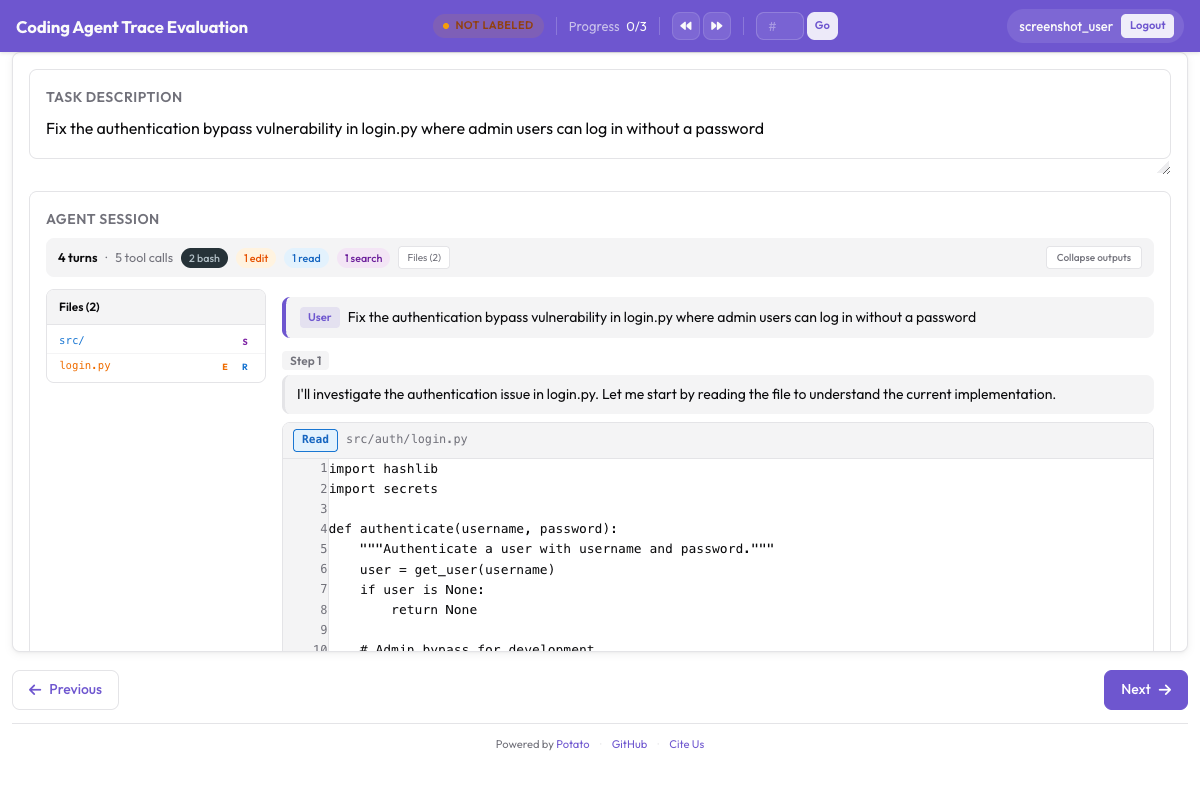
instance_display:
  fields:
    - key: structured_turns
      type: coding_trace
      label: "Agent Session"
      display_options:
        show_file_tree: true
        diff_view: unified
        collapse_long_outputs: true
        max_output_lines: 50
وكلاء تصفح الويب يحتاجون لقطات الشاشة وتراكبات الأفعال وشريط صور للتنقل بينها:
instance_display:
  fields:
    - key: steps
      type: web_agent_trace
      label: "Agent Browsing Trace"
      display_options:
        show_overlays: true
        show_filmstrip: true
        show_thought: true
        screenshot_max_width: 900
يشرح توصيف وكلاء تصفح الويب تنسيق التراكبات ووضع الإنشاء الذي يسجّل مسارات جديدة.
لتفاصيل التنفيذ وراء كل هذا، راجع دليل تقييم الوكلاء وتوثيق مسارات الوكلاء. إن كنت تُعِدّ تقييمك الأول، فحوّل عشرة مسارات، وشغّل الإعدادات أعلاه، ووصّفها بنفسك قبل كتابة الإرشادات، لأن تصنيف الأخطاء الذي تحتاجه لا يكون عادةً هو ما كنت ستكتبه مسبقاً.
قراءة إضافية
- توثيق التوصيف الوكيلي
- توصيف وكلاء تصفح الويب
- Solo Mode، للجمع بين التوصيف الوكيلي والتقييم التعاوني بين البشر ونماذج اللغة الكبيرة
- Best-Worst Scaling، لترتيب مخرجات الوكلاء بالمقارنة
- تصدير Parquet، للتحليل على نطاق واسع