beginneraudio
Keyword Spotting
Classify spoken commands and keywords following the Google Speech Commands dataset format.
Get This Design
This design is available in our showcase. Copy the configuration below to get started.
Quick start:
bash
# Create your project folder
mkdir keyword-spotting
cd keyword-spotting
# Save config.yaml from this page into this folder
potato start config.yaml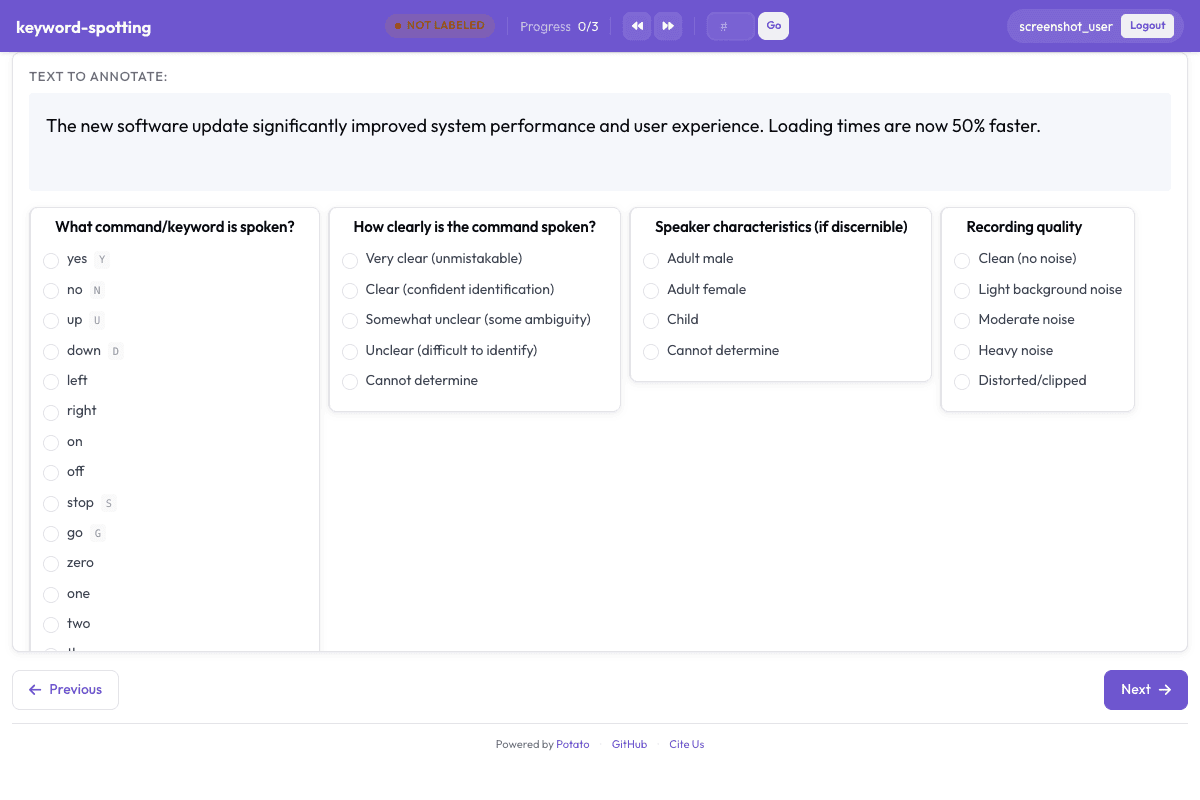
Configuration File
yaml
annotation_task_name: "Keyword Spotting"
task_dir: "."

port: 8000

# Data configuration
data_files:
  - "data/commands.json"

item_properties:
  id_key: "id"
  text_key: "text"
instance_display:
  fields:
    - key: audio_url
      type: audio
      label: "Command"
    - key: text
      type: text
      label: "Notes"

# Annotation schemes
annotation_schemes:
  # Primary command classification
  - annotation_type: radio
    name: command
    description: "What command/keyword is spoken?"
    labels:
      # Core commands
      - name: "yes"
        key_value: "y"
      - name: "no"
        key_value: "n"
      - name: "up"
        key_value: "u"
      - name: "down"
        key_value: "d"
      - "left"
      - "right"
      - "on"
      - "off"
      - name: "stop"
        key_value: "s"
      - name: "go"
        key_value: "g"
      # Numbers
      - "zero"
      - "one"
      - "two"
      - "three"
      - "four"
      - "five"
      - "six"
      - "seven"
      - "eight"
      - "nine"
      # Special categories
      - name: "unknown_word"
        key_value: "w"
      - name: "silence"
        key_value: "i"
      - name: "noise"
        key_value: "x"
    sequential_key_binding: true

  # Clarity rating
  - annotation_type: radio
    name: clarity
    description: "How clearly is the command spoken?"
    labels:
      - Very clear (unmistakable)
      - Clear (confident identification)
      - Somewhat unclear (some ambiguity)
      - Unclear (difficult to identify)
      - Cannot determine

  # Speaker characteristics
  - annotation_type: radio
    name: speaker_type
    description: "Speaker characteristics (if discernible)"
    labels:
      - Adult male
      - Adult female
      - Child
      - Cannot determine

  # Audio quality
  - annotation_type: radio
    name: audio_quality
    description: "Recording quality"
    labels:
      - Clean (no noise)
      - Light background noise
      - Moderate noise
      - Heavy noise
      - Distorted/clipped

  # Accent/pronunciation
  - annotation_type: radio
    name: pronunciation
    description: "Pronunciation characteristics"
    labels:
      - Standard/neutral
      - Regional accent (still clear)
      - Strong accent (affects clarity)
      - Non-native speaker
      - Cannot assess

  # Confidence
  - annotation_type: likert
    name: confidence
    description: "How confident are you in your classification?"
    size: 5
    min_label: "Guessing"
    max_label: "Certain"

# User settings
require_password: false

# Output
output_annotation_dir: "annotation_output/"
export_annotation_format: "jsonl"
Sample Data
json
[
  {
    "id": "keyword_spotting_1",
    "audio_url": "https://upload.wikimedia.org/wikipedia/commons/b/b1/En-us-yes.ogg",
    "text": "Isolated single-word command, US English speaker"
  },
  {
    "id": "keyword_spotting_2",
    "audio_url": "https://upload.wikimedia.org/wikipedia/commons/1/19/En-us-no.ogg",
    "text": "Isolated single-word command, US English speaker"
  }
]

// ... and 3 more items
Get This Design
This design is available in our showcase. Copy the configuration below to get started.
Quick start:
bash
# Create your project folder
mkdir keyword-spotting
cd keyword-spotting
# Save config.yaml from this page into this folder
potato start config.yaml
Details
Annotation Types
radio
Domain
AudioSpeech
Use Cases
keyword spottingvoice commandswake word detection
Tags
audiospeech commandskeyword spottingvoice controlwake word
Related Designs
Audio Transcription Review
Review and correct automatic speech recognition transcriptions with waveform visualization.
likertmultiselect
Audio-Visual Sentiment Analysis
Rate sentiment in speech segments following CMU-MOSI and CMU-MOSEI multimodal annotation protocols.
likertradio
Google Speech Commands: Keyword Spotting Dataset
Google Speech Commands is a corpus of one-second spoken-word audio clips for training keyword spotting models (Warden, 2018). This Potato config reproduces the task: annotators play each clip, label the spoken word, and rate audio quality.
radioaudio_annotation