intermediateaudio
Audio-Visual Sentiment Analysis
Rate sentiment in speech segments following CMU-MOSI and CMU-MOSEI multimodal annotation protocols.
Get This Design
This design is available in our showcase. Copy the configuration below to get started.
Quick start:
bash
# Create your project folder
mkdir audio-sentiment-analysis
cd audio-sentiment-analysis
# Save config.yaml from this page into this folder
potato start config.yaml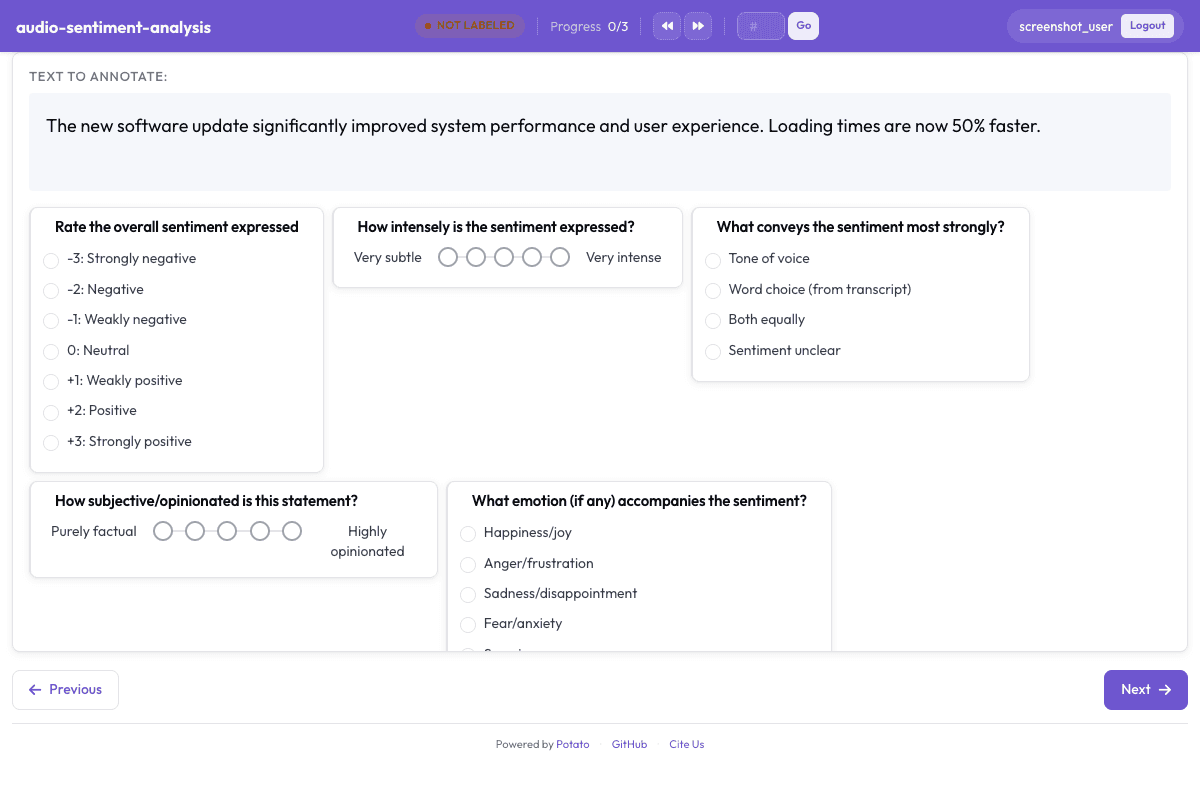
Configuration File
yaml
annotation_task_name: "Audio-Visual Sentiment Analysis"
task_dir: "."

port: 8000

# Data configuration
data_files:
  - "data/speech_segments.json"

item_properties:
  id_key: "id"
  text_key: "transcript"
instance_display:
  fields:
    - key: audio_url
      type: audio
      label: "Speech clip"
    - key: transcript
      type: text
      label: "Transcript"

# Annotation schemes
annotation_schemes:
  # Sentiment polarity (7-point scale, CMU-MOSI standard)
  - annotation_type: likert
    name: sentiment
    description: "Rate the overall sentiment expressed"
    size: 7
    labels:
      - "-3: Strongly negative"
      - "-2: Negative"
      - "-1: Weakly negative"
      - "0: Neutral"
      - "+1: Weakly positive"
      - "+2: Positive"
      - "+3: Strongly positive"

  # Sentiment intensity
  - annotation_type: likert
    name: intensity
    description: "How intensely is the sentiment expressed?"
    size: 5
    min_label: "Very subtle"
    max_label: "Very intense"

  # Primary sentiment source
  - annotation_type: radio
    name: sentiment_source
    description: "What conveys the sentiment most strongly?"
    labels:
      - Tone of voice
      - Word choice (from transcript)
      - Both equally
      - Sentiment unclear

  # Subjectivity
  - annotation_type: likert
    name: subjectivity
    description: "How subjective/opinionated is this statement?"
    size: 5
    min_label: "Purely factual"
    max_label: "Highly opinionated"

  # Emotion detected
  - annotation_type: radio
    name: emotion
    description: "What emotion (if any) accompanies the sentiment?"
    labels:
      - Happiness/joy
      - Anger/frustration
      - Sadness/disappointment
      - Fear/anxiety
      - Surprise
      - Disgust
      - No clear emotion
      - Mixed emotions

  # Speaker certainty
  - annotation_type: likert
    name: speaker_certainty
    description: "How certain does the speaker sound about their opinion?"
    size: 5
    min_label: "Very uncertain"
    max_label: "Very certain"

  # Sarcasm detection
  - annotation_type: radio
    name: sarcasm
    description: "Does the speaker appear sarcastic?"
    labels:
      - No sarcasm detected
      - Possibly sarcastic
      - Clearly sarcastic

  # Annotation confidence
  - annotation_type: likert
    name: confidence
    description: "How confident are you in your sentiment rating?"
    size: 5
    min_label: "Not confident"
    max_label: "Very confident"

# User settings
require_password: false

# Output
output_annotation_dir: "annotation_output/"
export_annotation_format: "jsonl"
Sample Data
json
[
  {
    "id": "audio_sentiment_analysis_1",
    "audio_url": "https://upload.wikimedia.org/wikipedia/commons/5/58/En-us-I%27m_in_love_with_you.oga",
    "transcript": "I'm in love with you."
  },
  {
    "id": "audio_sentiment_analysis_2",
    "audio_url": "https://upload.wikimedia.org/wikipedia/commons/3/3d/En-us-A_business_that_makes_nothing_but_money_is_a_poor_kind_of_business.ogg",
    "transcript": "A business that makes nothing but money is a poor kind of business."
  }
]

// ... and 3 more items
Get This Design
This design is available in our showcase. Copy the configuration below to get started.
Quick start:
bash
# Create your project folder
mkdir audio-sentiment-analysis
cd audio-sentiment-analysis
# Save config.yaml from this page into this folder
potato start config.yaml
Details
Annotation Types
likertradio
Domain
AudioSpeech
Use Cases
sentiment analysismultimodal analysisopinion mining
Tags
audiosentimentmultimodalopinioncmu-mosi
Related Designs
Audio Transcription Review
Review and correct automatic speech recognition transcriptions with waveform visualization.
likertmultiselect
Speech Emotion Recognition
Classify emotional content in speech following IEMOCAP and CREMA-D annotation schemes.
radiolikert
Speech Intelligibility Rating
Rate speech intelligibility for pathological speech following TORGO database annotation protocols.
likertradio