Automatic Keyword Highlighting
Configure keyword highlighting in Potato with a fixed keyword file or an LLM keyword assistant, covering per-label colors, randomized distractors, and response caching.
Potato highlights keywords two ways. A keyword_highlights_file marks a fixed list of terms on every item with no model involved, and ai_support adds a Keyword button the annotator presses to have an LLM mark the words bearing on each label.
The two mechanisms fail differently, so the choice matters more than the setup does. A fixed list is deterministic, costs nothing per item, and can be reported in a methods section, but it marks the same strings whatever the sentence around them says. The LLM assistant reads each item and can mark a phrase that no word list would have caught, at the cost of one API call per request and a dependency on a model that may change under you.
For how option and keyword highlighting are implemented, see the source documentation.
A fixed keyword list
Reach for the keyword file when you need every annotator to see the same highlights and need to be able to say later exactly what those were. Point keyword_highlights_file at a CSV or TSV and Potato marks every match in the item text with a bordered box.
annotation_task_name: "Sentiment with keyword highlights"
task_dir: .
output_annotation_dir: annotation_output
export_annotation_format: jsonl

data_files:
  - data/reviews.json

item_properties:
  id_key: id
  text_key: text

keyword_highlights_file: data/sentiment_keywords.tsv

ui:
  label_colors:
    sentiment:
      positive: "(22, 163, 74)"
      negative: "(239, 68, 68)"

annotation_schemes:
  - annotation_type: span
    name: sentiment
    description: "Mark the phrases that carry sentiment. Highlighted keywords are suggestions, not answers."
    labels:
      - name: positive
        tooltip: "Phrases expressing a positive opinion"
      - name: negative
        tooltip: "Phrases expressing a negative opinion"

user_config:
  allow_all_users: true
The colors are set per schema and per label rather than globally, because a highlight that matches the color of a span label the annotator is about to draw is worse than no highlight at all.
The keyword file needs a keyword header column. A label column says which category the term belongs to, a schema column says which annotation scheme it is relevant to, and an optional color column overrides the palette for that label.
keyword,label,schema,color
excellent,positive,sentiment,(34, 197, 94)
terrible,negative,sentiment,#ef4444
excel*,positive,sentiment,
A * matches any run of word characters, so excel* covers excellent, excels and excelled in one row. Potato also reads a plain one-keyword-per-line file, and JSON, JSONL or YAML holding a keyword list or a {keyword: label} map.
Randomized highlights for a study
If you are measuring whether highlighting changes what annotators do, showing every keyword to everyone gives you nothing to compare against. keyword_highlight_settings thins the keywords out and mixes in decoys.
keyword_highlights_file: data/keywords.csv

keyword_highlight_settings:
  keyword_probability: 0.5        # show half the matched keywords
  random_word_probability: 0.05   # highlight about 5% of other words
  random_word_label: "distractor"
  random_word_schema: "keyword"
keyword_probability: 0.5 is the value that makes the comparison work, since each annotator then sees a highlight on half the terms and no highlight on the other half within the same corpus. The choice is cached per user and per instance and seeded from a hash of the username and instance id, so an annotator who returns to an item sees what they saw the first time. Which words were shown is recorded in the keyword_highlights_shown field of the behavioral data, so the analysis can condition on it.
The LLM keyword assistant
AI keyword highlighting is a button rather than a background process. With ai_support enabled, each annotation form carries Hint, Keyword and Rationale buttons, and pressing Keyword asks the model which words in this item relate to each available label. The answer comes back as box overlays on the text.
ai_support:
  enabled: true
  endpoint_type: openai

  ai_config:
    model: gpt-4o-mini
    api_key: ${OPENAI_API_KEY}
    temperature: 0.3
    max_tokens: 800
    include:
      all: true
max_tokens: 800 is the default and close to the floor for this assistant. The Keyword and Rationale prompts answer for every label in one response, so a smaller budget truncates the reply and the assistant renders empty with no error.
include.all: true turns the assistants on for every scheme. To enable them for particular pages and schemes instead, use special_include, which maps a page index to an annotation id to a list of assistant names:
ai_support:
  enabled: true
  endpoint_type: openai
  ai_config:
    model: gpt-4o-mini
    api_key: ${OPENAI_API_KEY}
    include:
      all: false
      special_include:
        "0":
          "0": ["hint", "keyword"]
        "1":
          "1": ["hint"]
Keyword highlighting needs text to highlight, so Potato filters the button out on image items even when the endpoint is a vision model. On a text item a vision model offers all three assistants.
Anthropic
ai_support:
  enabled: true
  endpoint_type: anthropic

  ai_config:
    model: claude-sonnet-4-20250514
    api_key: ${ANTHROPIC_API_KEY}
    temperature: 0.3
    max_tokens: 800
    include:
      all: true
Ollama, with no API bill
ai_support:
  enabled: true
  endpoint_type: ollama

  ai_config:
    model: qwen3:0.6b
    base_url: http://localhost:11434
    temperature: 0.3
    max_tokens: 800
    include:
      all: true
A local endpoint is worth the quality drop when the corpus cannot leave your machine, or when you are highlighting tens of thousands of items and the per-item cost would otherwise dominate the study budget.
Highlighting the likely labels instead
When the problem is a long option list rather than a long text, option_highlighting is the better tool. It asks the model for the most likely options and renders them at full opacity with a star, dimming the rest. Every option stays clickable.
ai_support:
  enabled: true
  endpoint_type: openai
  ai_config:
    model: gpt-4o-mini
    api_key: ${OPENAI_API_KEY}
    temperature: 0.3
    max_tokens: 800

  option_highlighting:
    enabled: true
    top_k: 3
    dim_opacity: 0.4
    auto_apply: true
    schemas: null
    prefetch_count: 10
top_k: 3 suits a scheme with eight to twelve labels, where three marked options cut the reading without hiding the answer. It works on radio, multiselect, likert and select, and has no effect on spans, free text or sliders.
Caching and prefetching
An LLM call adds seconds to a page load, and an annotator who waits will stop pressing the button. Caching to disk and prefetching ahead of the cursor remove most of that wait, and the cache also stops you paying twice for an item an annotator revisits.
ai_support:
  enabled: true
  endpoint_type: openai
  ai_config:
    model: gpt-4o-mini
    api_key: ${OPENAI_API_KEY}
    max_tokens: 800
    include:
      all: true

  cache_config:
    disk_cache:
      enabled: true
      path: annotation_output/ai_cache.json

    prefetch:
      warm_up_page_count: 10
      on_next: 5
      on_prev: 2
on_next: 5 against on_prev: 2 reflects how annotators move. Most navigation is forward, so the budget goes forward, with enough behind the cursor to cover a correction.
A complete configuration
The two mechanisms combine. The keyword file gives every annotator the same baseline highlights, and the assistants sit behind buttons for the items where the fixed list has nothing to say.
annotation_task_name: "Entity annotation with keyword support"
task_dir: .
output_annotation_dir: annotation_output
export_annotation_format: jsonl

data_files:
  - data/documents.json

item_properties:
  id_key: id
  text_key: text

keyword_highlights_file: data/entity_keywords.csv

annotation_schemes:
  - annotation_type: span
    name: entities
    description: "Mark people, organizations and locations."
    labels:
      - name: PERSON
        color: "#FECACA"
      - name: ORG
        color: "#BBF7D0"
      - name: LOCATION
        color: "#BFDBFE"

ai_support:
  enabled: true
  endpoint_type: openai

  ai_config:
    model: gpt-4o-mini
    api_key: ${OPENAI_API_KEY}
    temperature: 0.3
    max_tokens: 800
    include:
      all: true

  cache_config:
    disk_cache:
      enabled: true
      path: annotation_output/ai_cache.json
    prefetch:
      warm_up_page_count: 10
      on_next: 5
      on_prev: 2

user_config:
  allow_all_users: true
Start the server and the highlights appear on the first item:
potato start config.yaml -p 8000When AI keyword highlighting is enabled, pressing the Keyword button marks the relevant terms in the annotation text:
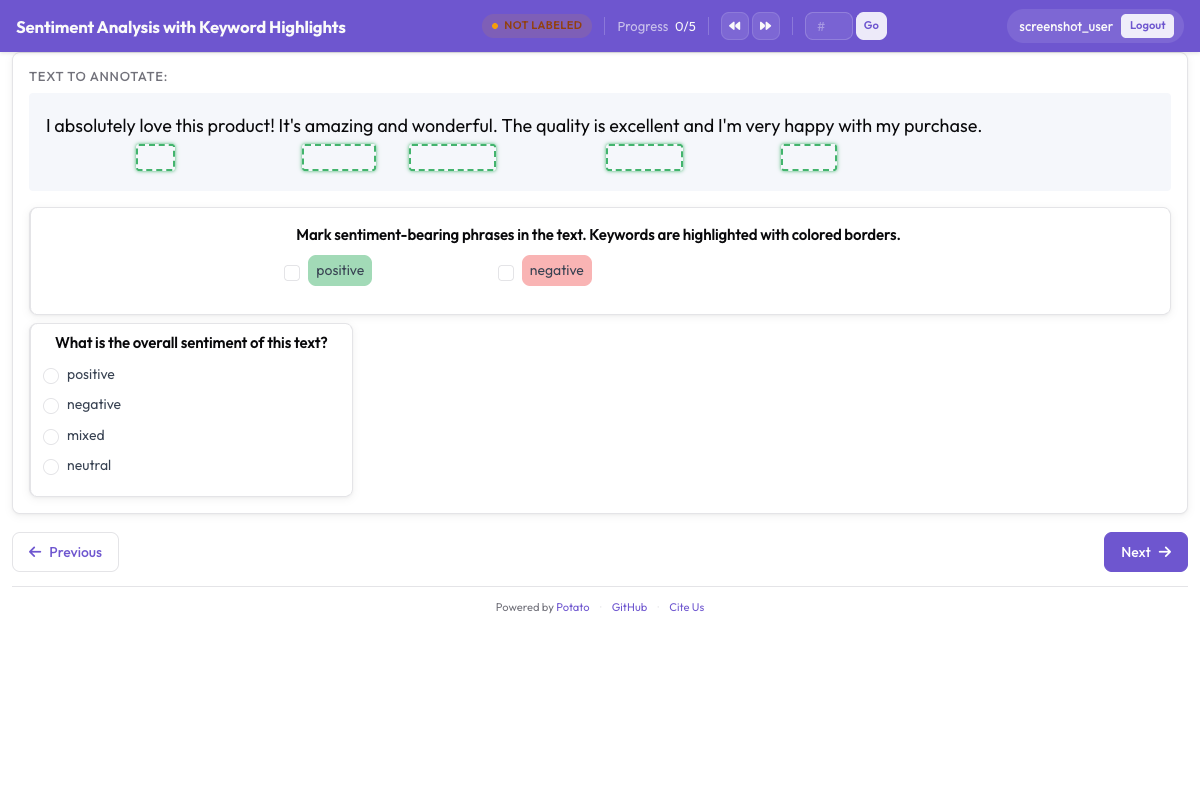 Keywords and entities marked with box overlays to guide annotator attention
Further reading
- AI Support covers endpoint configuration for every provider.
- Option Highlighting covers the label-dimming variant in more detail.
- Span Annotation covers the scheme the highlights sit alongside.
- Productivity features covers the keyword file format and the rest of the annotator-speed settings.