User Feedback Survey
Comprehensive survey template for collecting user feedback with Likert scales and open-ended questions.
Try it live — no install
Boot the real Potato server in your browser (WebAssembly) and annotate with this exact config. Nothing leaves your machine.
Run live in your browserGet This Design
This design is available in our showcase. Copy the configuration below to get started.
Quick start:
# Create your project folder
mkdir survey-feedback
cd survey-feedback
# Save config.yaml from this page into this folder
potato start config.yaml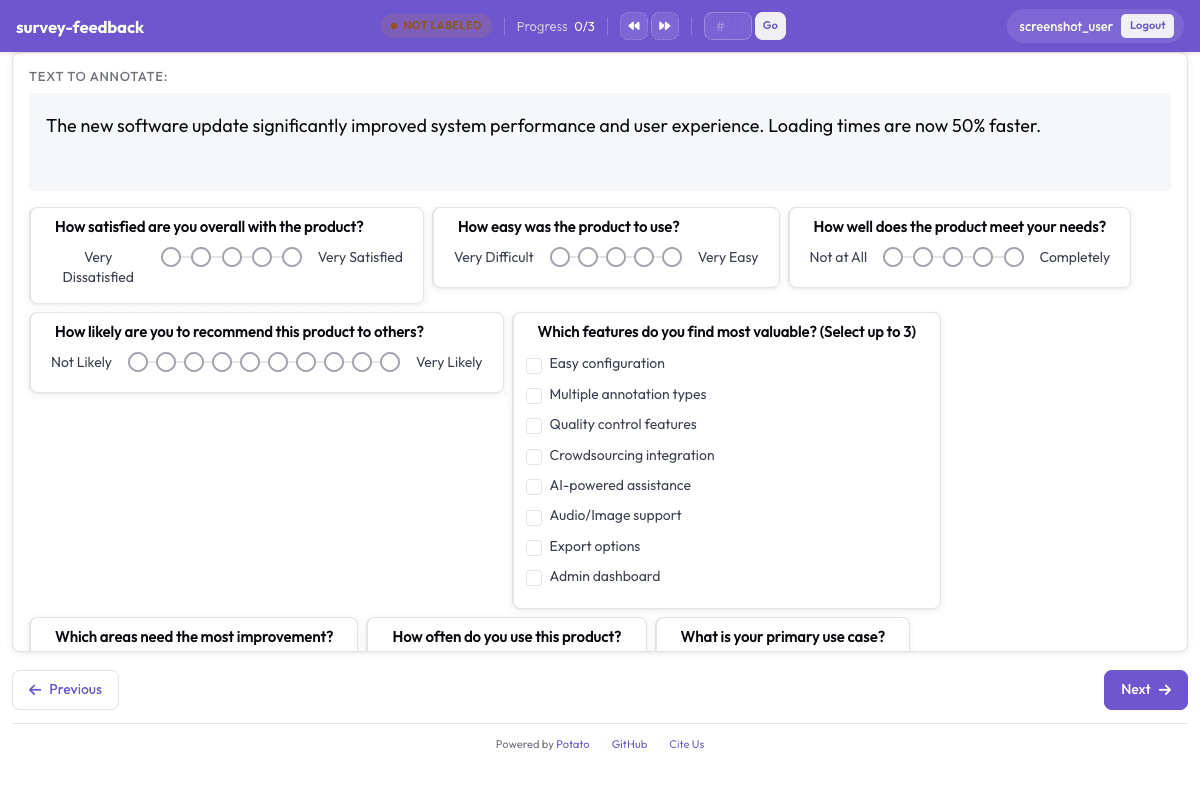
Configuration File
annotation_task_name: "User Feedback Survey"
task_dir: "."

port: 8000

# Data configuration
data_files:
  - "data/survey_context.json"

item_properties:
  id_key: id
  text_key: text
instance_display:
  fields:
    - key: text
      type: text
      label: "About this survey"

# Annotation schemes (survey questions)
annotation_schemes:
  # Overall satisfaction
  - annotation_type: likert
    name: overall_satisfaction
    description: "How satisfied are you overall with the product?"
    size: 5
    min_label: "Very Dissatisfied"
    max_label: "Very Satisfied"
    sequential_key_binding: true

  # Ease of use
  - annotation_type: likert
    name: ease_of_use
    description: "How easy was the product to use?"
    size: 5
    min_label: "Very Difficult"
    max_label: "Very Easy"
    sequential_key_binding: true

  # Feature completeness
  - annotation_type: likert
    name: feature_completeness
    description: "How well does the product meet your needs?"
    size: 5
    min_label: "Not at All"
    max_label: "Completely"
    sequential_key_binding: true

  # Recommendation likelihood (NPS-style)
  - annotation_type: likert
    name: recommend_likelihood
    description: "How likely are you to recommend this product to others?"
    size: 10
    min_label: "Not Likely"
    max_label: "Very Likely"

  # Most valuable features
  - annotation_type: multiselect
    name: valuable_features
    description: "Which features do you find most valuable? (Select up to 3)"
    labels:
      - Easy configuration
      - Multiple annotation types
      - Quality control features
      - Crowdsourcing integration
      - AI-powered assistance
      - Audio/Image support
      - Export options
      - Admin dashboard

  # Improvement areas
  - annotation_type: multiselect
    name: improvement_areas
    description: "Which areas need the most improvement?"
    labels:
      - Documentation
      - User interface
      - Performance
      - Feature set
      - Reliability
      - Support
      - Pricing
      - None - it's great!

  # Usage frequency
  - annotation_type: radio
    name: usage_frequency
    description: "How often do you use this product?"
    labels:
      - Daily
      - Several times a week
      - Weekly
      - Monthly
      - Rarely
      - This is my first time

  # Primary use case
  - annotation_type: radio
    name: primary_use_case
    description: "What is your primary use case?"
    labels:
      - Academic research
      - Industry/Commercial
      - Personal projects
      - Education/Teaching
      - Other

  # What do you like most?
  - annotation_type: text
    name: likes
    description: "What do you like most about the product?"
    multiline: true
    required: false
    placeholder: "Tell us what's working well..."

  # What could be improved?
  - annotation_type: text
    name: improvements
    description: "What could be improved?"
    multiline: true
    required: false
    placeholder: "Share your suggestions..."

  # Any other feedback
  - annotation_type: text
    name: additional_feedback
    description: "Any other feedback or comments?"
    multiline: true
    required: false
    placeholder: "Anything else you'd like to share..."

# User settings
require_password: false

# Output
output_annotation_dir: "annotation_output/"
export_annotation_format: "jsonl"
Sample Data
[
  {
    "id": "survey_feedback_1",
    "text": "End-of-session feedback following a two-hour annotation batch"
  },
  {
    "id": "survey_feedback_2",
    "text": "End-of-session feedback following a short pilot task"
  }
]

// ... and 3 more items
Try it live — no install
Boot the real Potato server in your browser (WebAssembly) and annotate with this exact config. Nothing leaves your machine.
Run live in your browserGet This Design
This design is available in our showcase. Copy the configuration below to get started.
Quick start:
# Create your project folder
mkdir survey-feedback
cd survey-feedback
# Save config.yaml from this page into this folder
potato start config.yaml
Details
Annotation Types
Domain
Use Cases
Tags
Related Designs
AgentBoard Progress Scoring
Assess multi-turn LLM agent progress by identifying achieved milestones, scoring overall progress, categorizing the agent environment, and noting partial progress observations.
OSWorld: Desktop Agent Task Evaluation
Evaluation of multimodal agents performing open-ended tasks in real desktop environments. Annotators assess task success, identify OS-level actions, rate efficiency, and analyze failures across Ubuntu, Windows, and macOS environments.
RefactorBench Multi-File Evaluation
Evaluate multi-file refactoring operations generated by coding agents. Annotators assess whether refactorings preserve behavior, identify the types of refactoring applied, rate code improvement, and provide detailed review comments.