beginneraudio
Environmental Sound Classification
Classify environmental sounds into categories following UrbanSound8K and ESC-50 datasets.
Get This Design
This design is available in our showcase. Copy the configuration below to get started.
Quick start:
bash
# Create your project folder
mkdir environmental-sound-classification
cd environmental-sound-classification
# Save config.yaml from this page into this folder
potato start config.yaml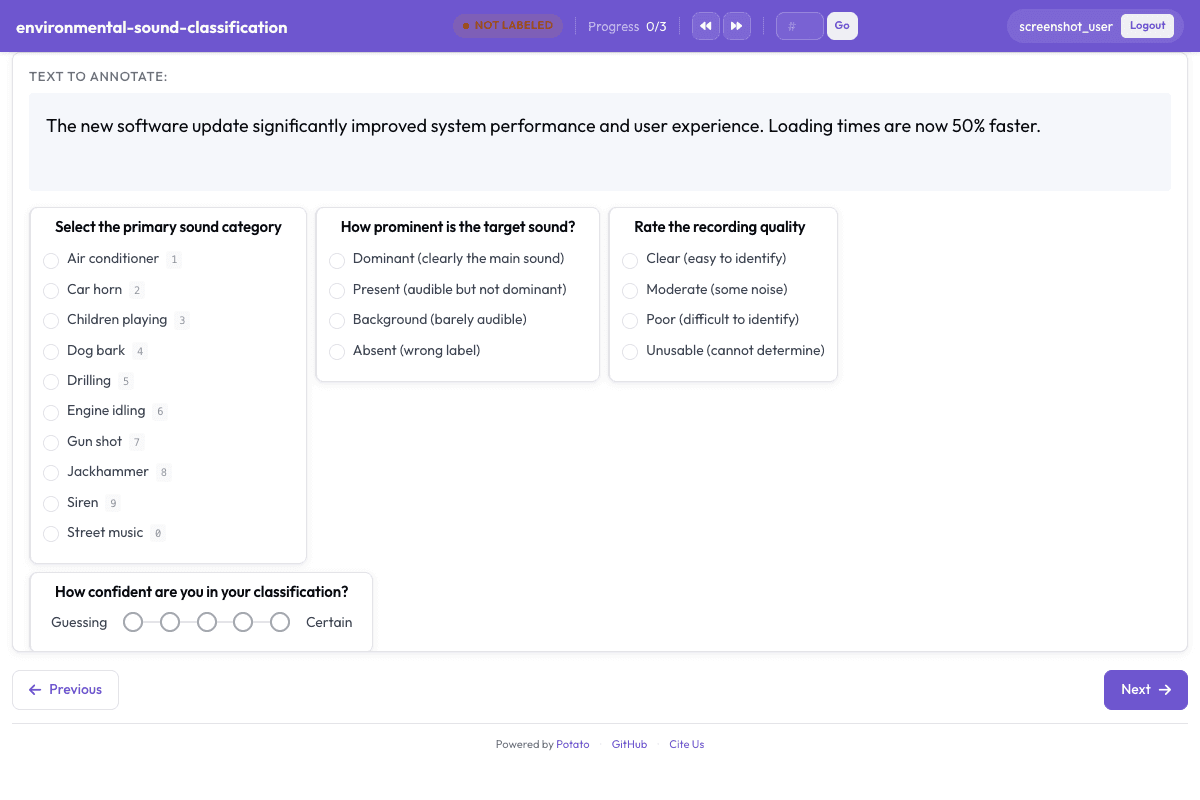
Configuration File
yaml
annotation_task_name: "Environmental Sound Classification"
task_dir: "."

port: 8000

# Data configuration
data_files:
  - "data/environmental_sounds.json"

item_properties:
  id_key: id
  text_key: text
instance_display:
  fields:
    - key: audio_url
      type: audio
      label: "Recording"
    - key: text
      type: text
      label: "Notes"

# Annotation schemes
annotation_schemes:
  # Primary sound category (UrbanSound8K classes)
  - annotation_type: radio
    name: sound_category
    description: "Select the primary sound category"
    labels:
      - name: Air conditioner
        key_value: "1"
      - name: Car horn
        key_value: "2"
      - name: Children playing
        key_value: "3"
      - name: Dog bark
        key_value: "4"
      - name: Drilling
        key_value: "5"
      - name: Engine idling
        key_value: "6"
      - name: Gun shot
        key_value: "7"
      - name: Jackhammer
        key_value: "8"
      - name: Siren
        key_value: "9"
      - name: Street music
        key_value: "0"
    sequential_key_binding: true

  # Sound prominence
  - annotation_type: radio
    name: prominence
    description: "How prominent is the target sound?"
    labels:
      - Dominant (clearly the main sound)
      - Present (audible but not dominant)
      - Background (barely audible)
      - Absent (wrong label)

  # Audio quality
  - annotation_type: radio
    name: audio_quality
    description: "Rate the recording quality"
    labels:
      - Clear (easy to identify)
      - Moderate (some noise)
      - Poor (difficult to identify)
      - Unusable (cannot determine)

  # Confidence
  - annotation_type: likert
    name: confidence
    description: "How confident are you in your classification?"
    size: 5
    min_label: "Guessing"
    max_label: "Certain"

# User settings
require_password: false

# Output
output_annotation_dir: "annotation_output/"
export_annotation_format: "jsonl"
Sample Data
json
[
  {
    "id": "environmental_sound_classification_1",
    "audio_url": "https://upload.wikimedia.org/wikipedia/commons/0/0e/Rain_%281%29.ogg",
    "text": "Steady rainfall recorded outdoors"
  },
  {
    "id": "environmental_sound_classification_2",
    "audio_url": "https://upload.wikimedia.org/wikipedia/commons/4/42/Rain_and_thunder.ogg",
    "text": "Rainfall with thunder in the background"
  }
]

// ... and 3 more items
Get This Design
This design is available in our showcase. Copy the configuration below to get started.
Quick start:
bash
# Create your project folder
mkdir environmental-sound-classification
cd environmental-sound-classification
# Save config.yaml from this page into this folder
potato start config.yaml
Details
Annotation Types
radio
Domain
Audio
Use Cases
sound classificationenvironmental audiourban sound analysis
Tags
audioenvironmentalurbansoundesc-50
Related Designs
Acoustic Scene Classification
Classify audio recordings by acoustic environment following the TUT/DCASE dataset format.
radiolikert
Audio Transcription Review
Review and correct automatic speech recognition transcriptions with waveform visualization.
likertmultiselect
Audio-Visual Sentiment Analysis
Rate sentiment in speech segments following CMU-MOSI and CMU-MOSEI multimodal annotation protocols.
likertradio