Sentiment Analysis
Simple 3-way sentiment classification with radio buttons. Perfect for social media analysis, product reviews, and customer feedback.
Try it live — no install
Boot the real Potato server in your browser (WebAssembly) and annotate with this exact config. Nothing leaves your machine.
Run live in your browserGet This Design
This design is available in our showcase. Copy the configuration below to get started.
Quick start:
# Create your project folder
mkdir sentiment-analysis
cd sentiment-analysis
# Save config.yaml from this page into this folder
potato start config.yaml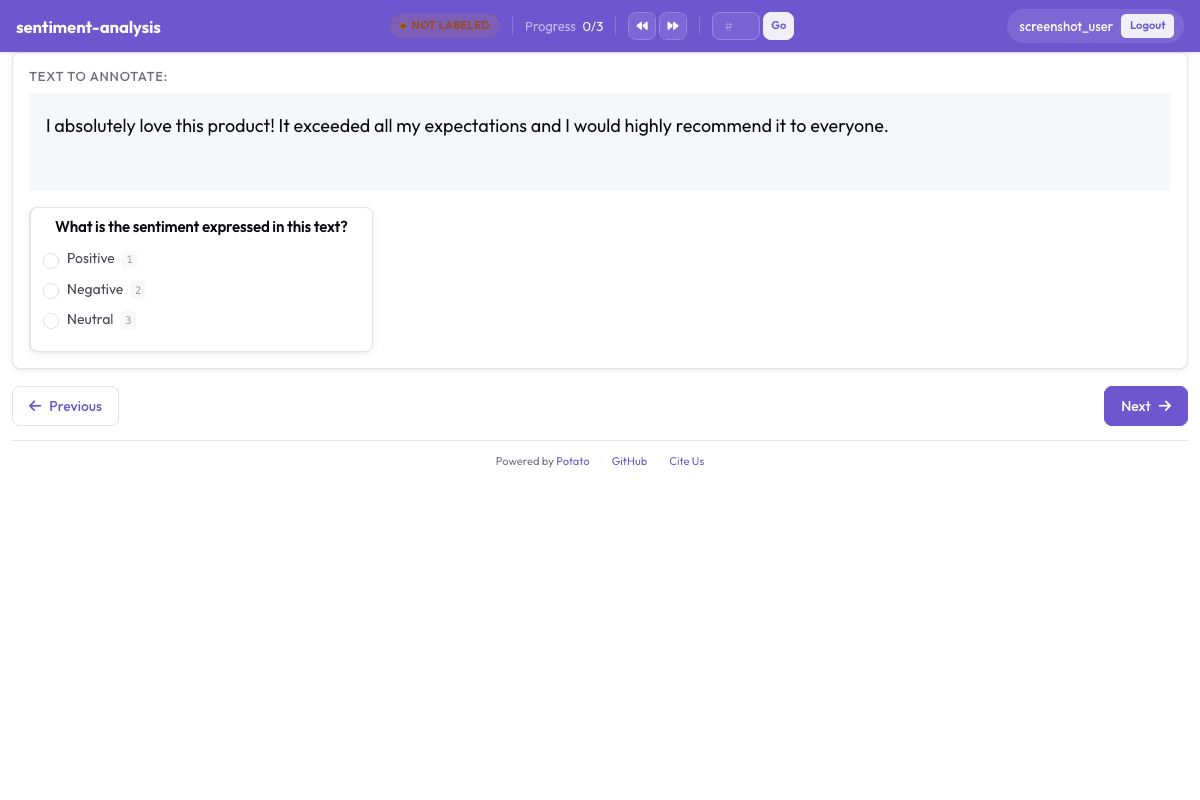
Configuration File
# Sentiment Analysis Configuration
# Generated by Potato Annotation Showcase

port: 8000
annotation_task_name: "Sentiment Analysis"
task_dir: "."

# Data configuration
data_files:
  - "data.json"

item_properties:
  id_key: id
  text_key: text

# Output
output_annotation_dir: "annotation_output/"
export_annotation_format: "jsonl"
instance_display:
  fields:
    - key: text
      type: text
      label: "Text"

# Annotation scheme
annotation_schemes:
  - annotation_type: radio
    name: sentiment
    description: "What is the sentiment expressed in this text?"
    labels:
      - name: Positive
        key_value: "1"
        tooltip: "The text expresses happiness, satisfaction, approval, or other positive emotions"
      - name: Negative
        key_value: "2"
        tooltip: "The text expresses sadness, anger, frustration, disappointment, or other negative emotions"
      - name: Neutral
        key_value: "3"
        tooltip: "The text does not express strong positive or negative sentiment, or is purely factual"
    sequential_key_binding: true

# User configuration
require_password: false

# Task assignment
Sample Data
[
  {
    "id": "sample_1",
    "text": "I absolutely love this product! It exceeded all my expectations and I would highly recommend it to everyone."
  },
  {
    "id": "sample_2",
    "text": "The service was terrible. I waited for hours and nobody helped me. Very disappointed."
  }
]

// ... and 1 more items
Try it live — no install
Boot the real Potato server in your browser (WebAssembly) and annotate with this exact config. Nothing leaves your machine.
Run live in your browserGet This Design
This design is available in our showcase. Copy the configuration below to get started.
Quick start:
# Create your project folder
mkdir sentiment-analysis
cd sentiment-analysis
# Save config.yaml from this page into this folder
potato start config.yaml
Details
Annotation Types
Domain
Use Cases
Tags
Related Designs
AfriHate - Hate and Abusive Language for African Languages
Multilingual content-moderation annotation following the AfriHate scheme (Muhammad et al., NAACL 2025), a collection of hate speech and abusive language datasets for 15 African languages including Amharic, Hausa, Igbo, Yoruba, Swahili, Somali and isiZulu. Native speakers familiar with the regional culture assign each tweet a three-way label - hate, abusive, or neutral - and, when the tweet is hateful, mark the targeted attribute (e.g. ethnicity, religion, politics, gender). Sample items are mild, constructed illustrations that avoid real slurs or targeting of real groups; an English gloss is provided for reference only.
AfriSenti - African Language Sentiment
Sentiment analysis for tweets in African languages, classifying text as positive, negative, or neutral. Covers 14 African languages including Amharic, Hausa, Igbo, Yoruba, and Swahili. Based on SemEval-2023 Task 12 (Muhammad et al.).
Detecting Stance in Tweets
Classification of stance expressed in tweets toward specific targets as favor, against, or neither. Based on SemEval-2016 Task 6 (Stance Detection).